1. Sarrera
This manual provides detailed instructions for setting up, operating, and maintaining your KALINCO Smart Watch, Model IDW25. Please read this manual thoroughly before using the device to ensure proper function and safety.
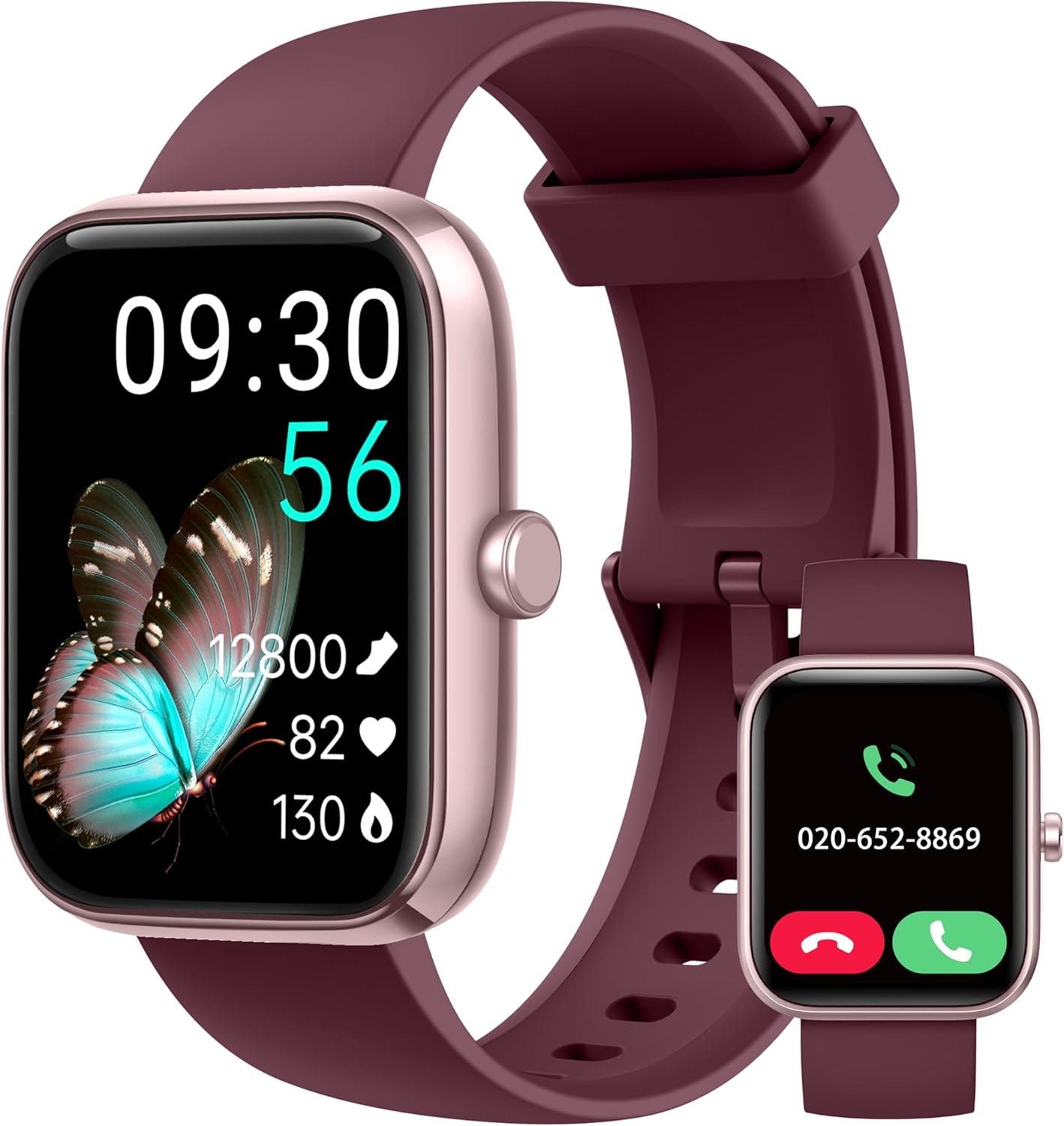
Image: The KALINCO Smart Watch IDW25, featuring a rectangular display and a plum purple silicone strap. The main screen shows time, date, steps, heart rate, and blood oxygen. A smaller inset image shows the watch displaying an incoming call.
2. Paketearen edukia
Ziurtatu elementu guztiak paketean daudela:
- KALINCO Smart Watch (Model IDW25)
- Kargatzeko kablea
- Erabiltzailearen eskuliburua (dokumentu hau)

Image: A visual representation of the KALINCO Smart Watch package contents, including the watch, charging cable, and user manual. Dimensions of the watch and strap are also shown.
3. Konfigurazio gida
3.1 Gailua kargatzea
Before first use, fully charge your KALINCO Smart Watch. The watch has a battery life of approximately 7 days with normal use, 20 days in power-saving mode, and 30 days in standby mode. A full charge takes about 2 hours.
- Konektatu kargatzeko kable magnetikoa erlojuaren atzealdeko kargatzeko kontaktuetara.
- Konektatu kablearen USB muturra USB elikatze-egokitzaile estandar batera (ez dago barne) edo ordenagailuaren USB ataka batera.
- Erlojuaren pantailak kargatze-egoera adieraziko du.

Image: An illustration detailing the battery performance of the KALINCO Smart Watch, showing 2 hours charging time, 7 days normal use, 20 days power-saving mode, and 30 days standby time.
3.2 Aplikazioaren instalazioa eta parekatzea
The KALINCO Smart Watch requires the "VeryFit" app for full functionality. The watch is compatible with Android 6.0+ and iOS 9.0+ smartphones. It is not compatible with tablets or computers.
- Download the "VeryFit" app from the App Store (for iOS) or Google Play Store (for Android).
- Open the VeryFit app and follow the on-screen instructions to create an account or log in.
- Gaitu Bluetootha zure telefonoan.
- In the VeryFit app, navigate to the device pairing section and search for your KALINCO Smart Watch.
- Hautatu zure erlojua aurkitutako gailuen zerrendatik parekatzea hasteko. Berretsi parekatze eskaera bai erlojuan bai telefonoan.
Note: The watch strap buckle contains nickel, which may cause allergic reactions in sensitive individuals.
4. Funtzionamendu-argibideak
4.1 Oinarrizko nabigazioa
- Ukipen-pantaila: Irristatu ezkerrera, eskuinera, gora edo behera menuetan eta funtzioetan nabigatzeko. Sakatu hautatzeko.
- Alboko botoia: Press to wake the screen, return to the home screen, or access the app list. Press and hold to activate Alexa.
- Esnatzera igo: Enable this feature in the VeryFit app to automatically turn on the screen when you raise your wrist.
4.2 Call and Message Functions
Once connected to your smartphone via the VeryFit app, you can manage calls and receive notifications directly on your watch.
- Deiak erantzutea/egitea: You can answer incoming calls or make calls directly from the watch when it is connected to your phone.
- Mezuen jakinarazpenak: Receive alerts for messages from apps like WhatsApp, SNS, etc. A red dot on the watch face indicates unread notifications.
- Ohar garrantzitsua: The watch cannot be used to reply to text messages.
- Ezarpenak: Adjust sound volume, vibration intensity, or enable silent mode via the watch settings or VeryFit app.
- Ez molestatu (DND) modua: Easily set up DND mode for periods when you wish to avoid interruptions.

Image: A display showing the KALINCO Smart Watch's interface for making and answering calls, including a dial pad, call history, and frequent contacts. The VeryFit app interface for call settings is also visible.

Image: Screenshots of the KALINCO Smart Watch displaying various smart reminders, including SNS notifications (WhatsApp, Facebook), washing hand reminders, walking reminders, and drinking water reminders.
4.3 Alexa Ahots Laguntzailea
Your KALINCO Smart Watch features built-in Alexa, allowing you to perform various tasks using voice commands.
- Aktibazioa: Press and hold the power button or tap the Alexa icon on the watch screen to wake Alexa.
- Aginduak: Speak into your watch to ask questions, set alarms, check the weather, control Alexa-compatible smart devices, and more.

Image: A user interacting with the KALINCO Smart Watch's Alexa voice assistant, demonstrating commands like "Alexa, turn off the light," "Alexa, will it rain today?", and "Alexa, set a 10 minute timer."
4.4 Osasunaren Zaintza
Erlojuak osasunaren jarraipen-funtzio integralak eskaintzen ditu.
- Bihotz taupadaren jarraipena: Continuously monitors your heart rate 24/7 and provides instant alerts for irregular readings.
- Odol-oxigenoaren (SpO2) monitorizazioa: Zure odoleko oxigeno mailak neurtzen ditu.
- Estresaren jarraipena: Egun osoan zehar zure estres mailak kontrolatzen ditu.
- Simultaneous Measurement: Utilize the upgraded detection technology to measure heart rate, blood oxygen, and stress simultaneously with a single tap.
- Loaren jarraipena: Monitors your sleep patterns and breathing quality in real-time, providing insights into your sleep health.
- Health Reminders: Set reminders to drink water, wash hands, and move around to promote healthy habits.
- Hilekoaren jarraipena: A dedicated feature for women to track and manage their menstrual cycles.

Image: Visuals of the KALINCO Smart Watch displaying heart rate, blood oxygen, stress levels, and sleep duration, highlighting its daily health care capabilities.

Image: A diagram illustrating the one-step health tracking feature, showing how heart rate, blood oxygen, and stress can be measured simultaneously with a single click on the watch.

Image: A screenshot of the VeryFit app displaying detailed sleep analysis, including awake time, REM sleep, light sleep, and deep sleep durations, along with a sleep score.

Image: A visual showing the menstrual cycle tracking feature within the VeryFit app, allowing users to track menstruation, prediction, and ovulation dates.
4.5 Fitness Tracking and Sports Modes
The watch supports over 100 sports modes, with the ability to select up to 20 to display on the watch.
- Sport Selection: Choose from over 100 sports options in the VeryFit app and sync your preferred 20 to the watch.
- Aitorpen automatikoa: The watch can intelligently recognize common exercises like running and walking.
- Datuen bistaratzea: View real-time data such as time duration, calories burned, distance, average/max pace, and aerobic training effect directly on the watch. More detailed analysis is available in the VeryFit app.
- Konektatutako GPSa: Utilize your phone's GPS through the VeryFit app to track outdoor activity routes.
- Arnasketa entrenamendua: Use guided breathing exercises to aid relaxation and recovery after workouts.

Image: A visual demonstrating the KALINCO Smart Watch's extensive sports modes and advanced analysis, showing various exercise metrics like duration, calories, distance, steps, heart rate, and recovery time.

Irudia: Erabiltzaile bat viewing their exercise data and a map of their route, illustrating the connected GPS feature for outdoor activities.

Image: The KALINCO Smart Watch displaying the breathing training interface, showing a timer and a visual guide for inhalation and exhalation.
4.6 Beste ezaugarri batzuk
- Ikusi aurpegiak: Customize your watch face from various options in the VeryFit app or create your own.
- Aurkitu nire telefonoa: Locate your paired smartphone using the watch.
- Weather Push: Receive weather forecasts directly on your watch.
- Unit Setting & Time Format: Adjust measurement units and time display format.
- Alarm Clock, Stopwatch, Timer: Denbora-neurtzeko funtzio estandarrak.
- Linterna: Use the watch screen as a temporary light source.
- Screen Brightness & Screen-on Time: Doitu pantailaren ezarpenak optimorako viewing and battery life.

Image: A selection of customizable watch faces available for the KALINCO Smart Watch, including options to personalize time displays and colors.

Image: Screenshots showing various watch settings and utilities, including wake gesture, brightness adjustment, vibration adjustment, and flashlight function.

Image: Displays of the KALINCO Smart Watch showing weather forecast, music control, camera remote control, and the 'Find Phone' feature.

Image: Screenshots of the KALINCO Smart Watch demonstrating its alarm, stopwatch, timer, and Do Not Disturb (DND) mode functionalities.
5. Mantentzea
5.1 Erlojua garbitzea
Regularly clean your watch and strap to ensure hygiene and proper function.
- Garbitu erlojuaren pantaila eta gorputza oihal leun batekin,amp oihal.
- For the silicone strap, use mild soap and water, then rinse thoroughly and dry.
- Saihestu produktu kimiko gogorrak edo material urratzaileak erabiltzea.
5.2 Urarekiko erresistentzia
The KALINCO Smart Watch has an IP68 waterproof rating, making it suitable for water sports like swimming. It also features a draining function to expel water from the speaker.
Important: The watch is not suitable for hot showers, saunas, or deep-sea diving, as extreme temperatures or high-pressure water can compromise the seal.

Image: The KALINCO Smart Watch submerged in water, illustrating its IP68 waterproof rating and showing the "Draining water..." function on the screen.
6. Arazoak
- Erlojua ez da pizten: Ziurtatu erlojua guztiz kargatuta dagoela. Konektatu kargagailura gutxienez 10 minutuz.
- Ezin da telefonoarekin parekatu:
- Ziurtatu Bluetootha gaituta dagoela telefonoan.
- Make sure the VeryFit app is installed and open.
- Egiaztatu erlojua zure telefonoaren Bluetooth-aren eremuan dagoen.
- Berrabiarazi telefonoa eta erlojua.
- Ensure your phone's operating system meets the compatibility requirements (Android 6.0+ or iOS 9.0+).
- Osasun-datu okerrak:
- Ziurtatu erlojua eskumuturrean ondo estututa dagoela, baina ez gehiegi estututa.
- Garbitu erlojuaren atzealdeko sentsorea.
- Saihestu mugimendu gehiegi neurketak egiten diren bitartean.
- Ez dira agertzen jakinarazpenak:
- Check notification settings in the VeryFit app and on your phone.
- Ziurtatu erlojua telefonora konektatuta dagoela Bluetooth bidez.
- Disable DND mode on the watch if it is active.
- Alexa not responding:
- Ensure the watch is connected to your phone and has an active internet connection.
- Check Alexa settings in the VeryFit app.
- Speak clearly and directly into the watch.
For further assistance, refer to the FAQ section within the VeryFit app.
7. Zehaztapenak
| Ezaugarri | Xehetasuna |
|---|---|
| Marka | KALINCO |
| Modelo zenbakia | IDW25 |
| Pantailaren tamaina | 1.83 hazbete |
| Pantailaren bereizmena | 240*284 |
| Elementuaren pisua | 2.89 ontza (gutxi gorabehera 82 g) |
| Bateria mota | Litio ioia (1 barne) |
| Kargatzeko Denbora | Gutxi gorabehera. 2 ordu |
| Bateriaren iraupena (erabilera arrunta) | 7 egun arte |
| Bateriaren iraupena (energia aurreztea) | 20 egun arte |
| Bateriaren iraupena (etenean) | 30 egun arte |
| Uraren Erresistentzia | IP68 |
| Konektibitatea | Bluetootha |
| Ezaugarri Berezia | Voice Assistant (Alexa Built-in) |
| Telefono eredu bateragarriak | Android 6.0+ and iOS 9.0+ smartphones |
| Kolorea | Plum Purple |
8. Bermea eta Laguntza
KALINCO offers a three-year warranty for this product. For warranty claims or technical support, please refer to the following resources:
- VeryFit aplikazioa: The app contains an E-manual, FAQ section, and Wellness Management tools.
- Fabrikatzailea Webgunea: Visit the official KALINCO website for additional support and contact information.


