1. Sarrera
The Tzone HTD701 is a digital temperature and humidity data logger designed for precise environmental monitoring. It simultaneously measures and records ambient temperature, dew point, wet bulb temperature, and relative humidity. Featuring a USB interface for automatic report generation and an intuitive display, it is suitable for various applications including laboratories, HVAC systems, greenhouses, and freezers.
2. Paketearen edukia

Egiaztatu elementu guztiak paketean daudela:
- 1 x Tzone HTD701 Temperature and Humidity Data Logger
- 1 x Temperature and Humidity Probe
- 1 x USB C motako kablea
- 1 x Erabiltzailearen eskuliburua
- 1 x Kalibrazio Ziurtagiria
- 1 x Biltegiratze Kutxa eramangarria
This image displays the complete contents of the Tzone HTD701 package, including the main data logger unit, the external temperature and humidity probe, a USB-C cable for data transfer, the user manual, a calibration certificate, and a protective portable box.
3. Produktua amaitu daview

The HTD701 features an intuitive design with clearly labeled components for ease of use:
- LCD pantaila bistaratzea: Shows current readings, settings, and data trends.
- ON/OFF/Backlight Key: Powers the device on/off and controls screen backlight.
- Atzeko tekla: Navigates back through menus.
- Funtzio anitzeko tekla: Used for various menu selections and confirmations.
- Datuak gordetzea: Freezes the current display readings.
- Max/Min/Avg Value: Displays maximum, minimum, and average recorded values.
- Temp Unit Switch: Toggles between °C, °F, and K temperature units.
- Bateria kutxa: Houses the 3 AA batteries.
- Temp & RH Probe: External sensor for temperature and relative humidity measurements.
- USB ataka: For data transfer and power supply.
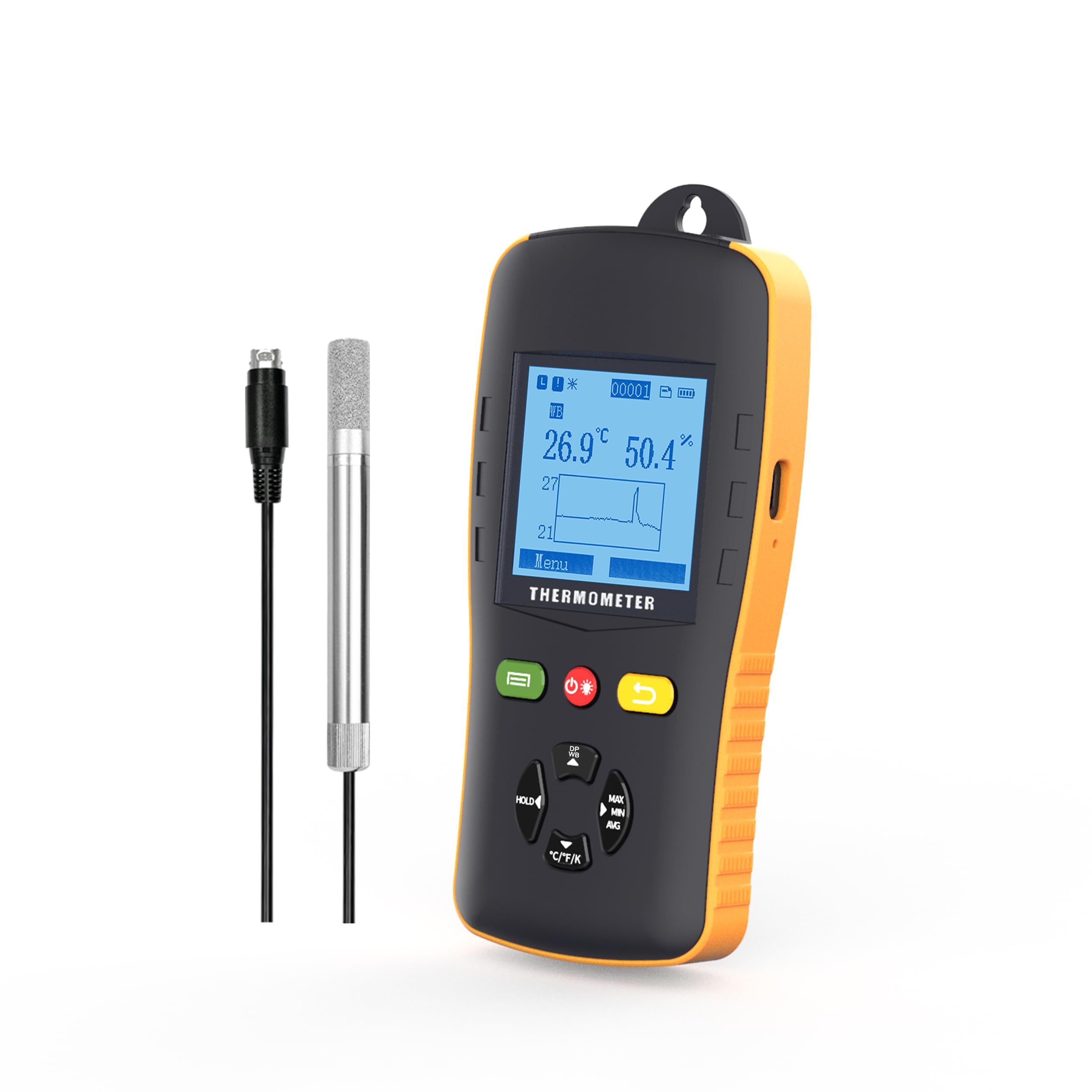
Irudi honek xehetasunak eskaintzen ditu view of the Tzone HTD701 data logger, highlighting its various buttons, the LCD screen, the external temperature and humidity probe, and other key features. Dimensions are also indicated.
4. Ezaugarriak
- Simultaneous Measurement: Records ambient temperature (-40°C to 125°C), dew point (-40°C to 80°C), wet bulb temperature (-40°C to 80°C), and relative humidity (0 to 100% RH).
- Automatic Report Generation: Connect via USB to automatically generate TXT/CSV/XLS/PDF data reports without requiring special software.
- Large Data Capacity: Stores up to 49,920 groups of data.
- Parametro erregulagarriak: Easily set temperature and humidity alarm ranges, auto-off mode, backlight time, and logging intervals.
- Soinu-alarmak: Audible alerts when temperature or humidity exceeds set limits.
- Atzeko argia pantaila: Ensures clear readability in low-light conditions.
- Diseinu humanizatua: Anti-slip and anti-collision casing, foldable stand, and hanging design for versatile placement.
- Tenperatura-unitatea aldatzea: Supports °C, °F, and K units.

This image illustrates the multi-functional aspects of the data logger, including data hold, auto-off, low power consumption, LCD display, and backlight.

This image highlights the user-friendly design elements such as replaceable batteries, USB power option, a flexible stand, and a hanging feature.
5. Konfigurazioa eta instalazioa
- Bateriaren instalazioa: Open the battery compartment on the back of the device and insert 3 AA batteries, ensuring correct polarity.
- Zundaren konexioa: Connect the temperature and humidity probe to the designated port on the top of the data logger. Ensure a secure connection.
- Piztu: Press the ON/OFF button to power on the device. The LCD screen will illuminate.
- Hasierako Kokapena: Place the data logger in the desired monitoring location. Utilize the foldable stand for desktop use or the hanging design for elevated placement.
- Zundaren kokapena: Carefully place the temperature and humidity probe within the area where measurements are to be taken. Ensure the probe is not obstructed and has adequate air circulation.
This video demonstrates the unboxing and initial setup of the Tzone HTD701 data logger, showing how to connect the probe and power on the device.
This video provides a visual guide on connecting the external probe and placing it in a measurement environment, such as a freezer, for data recording.
6. Funtzionamendua
- Viewing Current Data: Upon powering on, the LCD will display current temperature, humidity, and a graph of recent data.
- Bistaratzeko moduak aldatzea: Use the navigation buttons to cycle through different display modes, including dew point and wet bulb temperature readings.
- Datuak gordetzea: Press the 'HOLD' button to freeze the current readings on the screen. Press again to release.
- Max/Min/Avg: Press the 'MAX/MIN/AVG' button to view the maximum, minimum, and average recorded values.
- Tenperatura-unitatearen etengailua: Press the '°C/°F/K' button to change the temperature unit between Celsius, Fahrenheit, and Kelvin.

This image shows the Tzone HTD701 data logger actively monitoring and displaying temperature and humidity data, along with a graphical representation of the trends.
7. Data Logging and Reporting
- Setting Logging Parameters: Navigate to the 'Logging' menu to set the logging interval, start time, and file format (TXT, CSV, XLS, PDF).
- Starting Logging: Select 'Start Logging' from the menu to begin recording data. The device will log data at the set interval.
- Stopping Logging: To stop logging, navigate back to the 'Logging' menu and select 'Stop Logging'. Confirm your choice.
- Datuen transferentzia: Connect the data logger to a computer using the provided USB Type-C cable. The device will automatically generate data reports in the selected format.
- Accessing Reports: The generated reports can be found as removable storage on your computer. No special software is required for report generation.
This image demonstrates the Tzone HTD701 data logger connected to a laptop, showcasing its ability to automatically generate data reports in various formats (TXT, CSV, XLS, PDF) without the need for additional software.
8. Alarms and Settings
- Ezarpenak sartzeko: Navigate to the 'Menu' on the device and select 'Settings' to adjust various parameters.
- Alarma-mugak ezartzea: In the 'Alert' menu, set the upper and lower limits for temperature and humidity. If readings exceed these limits, an audible alarm will sound.
- Auto-Off Mode: Configure the auto-off duration to conserve battery life.
- Atzeko argiaren denbora: Adjust the duration for which the screen backlight remains active.
- Kalibrazioa: The device comes with a calibration certificate. Refer to the 'Calibration' menu for any advanced calibration needs, if applicable.
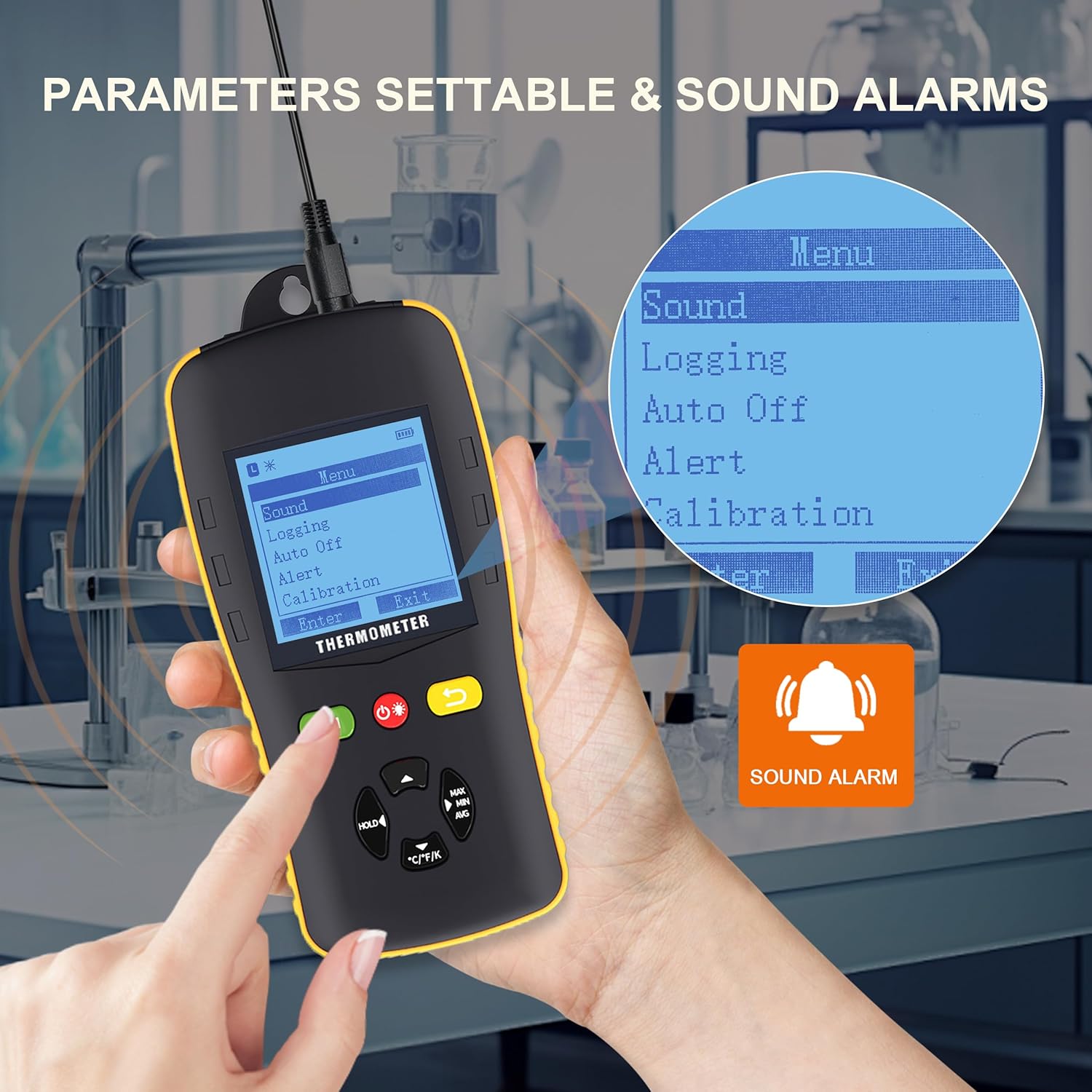
This image shows the Tzone HTD701 data logger's menu interface, illustrating how users can access and adjust various parameters such as sound settings, logging options, auto-off, alert thresholds, and calibration. A sound alarm icon is also visible.
9. Zehaztapenak
| Parametroa | Balioa |
|---|---|
| Temperature Measurement Range (Environmental) | -40°C eta 125°C artean |
| Temperature Measurement Range (Dew Point) | -40°C eta 80°C artean |
| Temperature Measurement Range (Wet Bulb) | -40°C eta 80°C artean |
| Relative Humidity Measurement Range | 0 eta 100% RH |
| Tenperatura Unitateak | °C / °F / K |
| Datuak biltegiratzeko ahalmena | 49,920 talde |
| Ebazpena | 0.1 |
| Neurketa-tasa | 1 aldiz/segundo |
| Energia iturria | 3 x 1.5V AA Batteries (included) |
| Konektibitatea | USB C motakoa |
| Elementuaren pisua | 2.35 kilo |
| Paketearen neurriak | 10.83 x 8.82 x 3.11 hazbete |

This image visually summarizes the key technical specifications of the Tzone HTD701 data logger.
10. Mantentzea
- Garbiketa: Wipe the device and probe with a soft, dry cloth. Do not use abrasive cleaners or solvents.
- Bateria ordezkatzea: Replace batteries when the low battery indicator appears on the screen to ensure continuous operation and data integrity.
- Biltegiratzea: When not in use for extended periods, remove the batteries and store the device in its portable box in a cool, dry place away from direct sunlight and extreme temperatures.
- Zunda zaintzea: Handle the external probe with care. Avoid bending or damaging the cable and sensor tip.
11. Arazoak
- Gailua ez da pizten:
- Egiaztatu bateriak behar bezala instalatuta dauden eta nahikoa karga duten. Beharrezkoa bada, ordezkatu itzazu.
- Irakurketa okerrak:
- Ensure the probe is clean and free from dust or debris.
- Verify the probe is securely connected to the main unit.
- Allow the device to stabilize in the measurement environment for a few minutes.
- Data Not Logging:
- Check logging settings to ensure a logging interval is set and logging has been initiated.
- Verify that the device has sufficient memory capacity.
- USB konexioaren arazoak:
- Ziurtatu USB kablea behar bezala konektatuta dagoela bai gailura bai ordenagailura.
- Probatu beste USB ataka bat zure ordenagailuan.
- Alarma ez da jotzen:
- Check the 'Alert' settings to ensure alarm limits are correctly configured and the alarm mode is enabled.
- Verify the device's volume settings.
12. Bermea eta Laguntza
Tzone products are covered by a standard manufacturer's warranty. For specific warranty details, technical support, or service inquiries, please refer to the contact information provided in the product packaging or visit the official Tzone webgunea. Gorde erosketa-agiria erosketaren frogagiri gisa berme-erreklamazioetarako.


