Womier MT75 75% Wireless Mechanical Gaming Keyboard User Manual
Model: MT75 | Brand: Womier
Sarrera
Thank you for choosing the Womier MT75 75% Wireless Mechanical Gaming Keyboard. This keyboard is designed to provide a versatile and customizable typing and gaming experience with its tri-mode connectivity, hot-swappable switches, dynamic RGB lighting, and unique dot-matrix display. This manual will guide you through the setup, operation, and customization of your new keyboard.
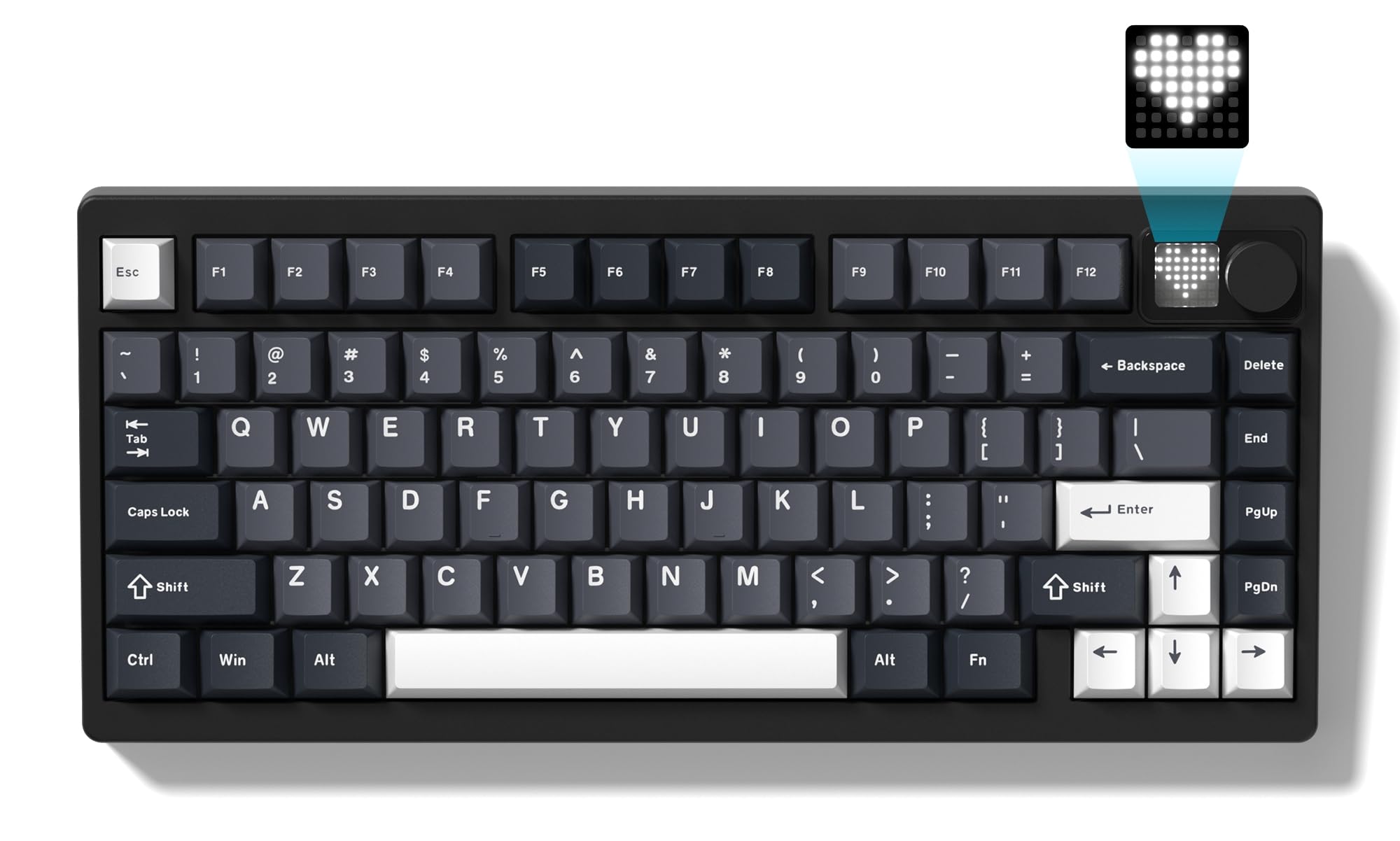
Image: The Womier MT75 keyboard in grey, showcasing its compact 75% layout, RGB backlighting, and integrated knob and dot-matrix display.
Paketearen edukia
Mesedez, egiaztatu paketea elementu hauek dituen:
- Womier MT75 Keyboard
- USB-C kablea
- 2-in-1 teklak eta etengailuaren tiratzailea
- Etengailu gehigarriak (3 pieza)
- Erabiltzailearen eskuliburua

Image: A visual representation of the Womier MT75 keyboard and its included accessories, such as the USB cable, keycap/switch puller, and extra switches.
Produktuaren Ezaugarriak
- % 75ko diseinu trinkoa: Efficient design with 79 keys, including function row and navigation keys, saving desk space.
- Hiru moduko konexioa: Supports Bluetooth 5.0, 2.4GHz wireless (via dongle), and wired USB-C connection. Connects up to 5 devices simultaneously.
- Custom Dot-Matrix Display: Features a 49 RGB lamp bead display with 6 preset modes, customizable images, colors, and dynamic effects via software.
- 8000mAh-ko gaitasun handiko bateria: Ensures extended usage for productivity and gaming without frequent charging.
- RGB atzeko argi dinamikoa: 16.8 million colors with various dynamic effects, monochrome, full-color modes, and musical rhythm mode. Fully programmable via software.
- Junta-euskarri bero-aldagarria: Allows easy replacement of 3-pin or 5-pin mechanical switches to customize typing feel and acoustics.
- High-Quality POM Linear Switches: Pre-installed POM switches offer a smooth and creamy typing experience.
- Programmable Software: Supports professional keyboard editing software for key remapping, macro creation, and fine-tuning settings.
- Bateragarritasun zabala: Windows eta Mac sistema eragileekin bateragarria.
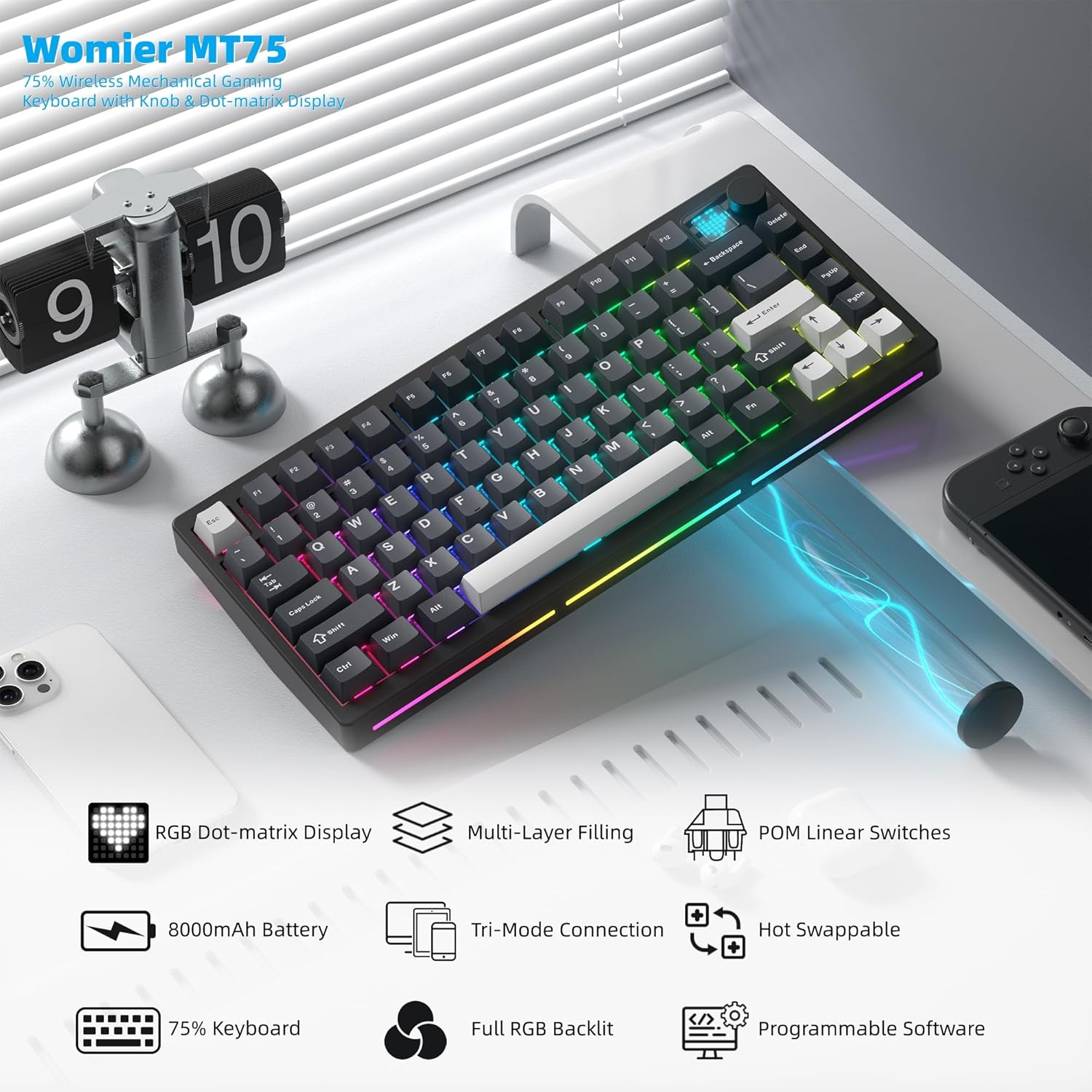
Irudia: Gehiagoview of the Womier MT75 keyboard highlighting its main features including RGB dot-matrix display, multi-layer filling, POM linear switches, 8000mAh battery, tri-mode connection, hot-swappable design, 75% layout, full RGB backlit, and programmable software.
Konfigurazioa eta konexioa
The Womier MT75 keyboard offers three connection modes: wired, 2.4GHz wireless, and Bluetooth 5.0.
1. Kable bidezko konexioa
- Konektatu emandako USB-C kablea teklatuaren USB-C atakara.
- Konektatu USB-C kablearen beste muturra zure ordenagailuko USB ataka erabilgarri batean.
- Teklatua automatikoki ezagutuko da eta erabiltzeko prest egongo da.
2. 2.4 GHz-ko haririk gabeko konexioa
- Locate the 2.4GHz wireless dongle stored under the detachable badge on the top right of the keyboard.
- Plug the 2.4GHz dongle into an available USB port on your computer.
- Turn the power switch on the keyboard to the 'ON' position.
- Luze sakatu FN + R for 3 seconds. The keyboard's backlight will flash, indicating it's in 2.4GHz pairing mode.
- Once connected, the backlight will stop flashing.
3. Bluetooth 5.0 konexioa
Teklatuak gehienez hiru Bluetooth gailu konekta ditzake.
- Turn the power switch on the keyboard to the 'ON' position.
- Luze sakatu FN + Q, FN + W, edo FN + E for 3 seconds to enter Bluetooth pairing mode for the corresponding channel (BT1, BT2, BT3). The backlight will flash rapidly.
- On your device (PC, laptop, tablet, phone), enable Bluetooth and search for 'Womier MT75' or 'SK71 PRO'.
- Select the keyboard to pair. Once connected, the backlight will stop flashing.
- Bluetooth gailu parekatutakoen artean aldatzeko, sakatu besterik ez duzu egin behar FN + Q, FN + W, edo FN + E.

Image: The Womier MT75 keyboard connected to various devices (PC, laptop, tablet, phone, game consoles) via USB-C, 2.4GHz, and Bluetooth, illustrating its versatile tri-mode connectivity.
Video: This video demonstrates the Womier MT75 keyboard's features, including its tri-mode connectivity, RGB lighting, and overall design, highlighting its suitability for PC gaming and computer use.
Key Functions & Customization
FN konbinazio gakoak
The Womier MT75 utilizes FN key combinations for various functions:
| Konbinazioa | Funtzioa |
|---|---|
| FN + ↑/↓ | Atzeko argiaren distira +/- |
| FN + ←/→ | Atzeko argiaren abiadura +/- |
| FN + Backspace | Turn off all backlights (including screen) |
| FN + ← | Atzeko argiaren efektuak aldatu |
| FN + Sartu | Aldatu atzeko planoaren koloreak |
| FN + 0 | Turn side light on/off |
| FN + - | Switch side light effects |
| FN + Delete (hold 3s) | Berrezarri fabrikako ezarpenak |
| FN + 1/2/3 | Switch Bluetooth channel (1/2/3) |
| FN + 4 | 2.4G modua |
| FN + L_WIN | Lock/unlock Windows key (only works on Windows systems) |
| FN + espazioa | Bateriaren maila egiaztatzea |
| FN + P | Inprimatu pantaila |
| FN + = | Aldatu alboko argien koloreak |
| FN + [ / ] | Side light brightness +/- |
| FN + A (hold 3s) | Switch between Windows and Mac systems (Windows key flashes once for Windows, three times for Mac) |

Image: A table detailing the various FN key combinations for controlling backlight, connection modes, and system functions on the Womier MT75 keyboard.
RGB atzeko argia
The MT75 features vibrant RGB backlighting with 16.8 million colors and numerous dynamic effects. Use the FN key combinations above to cycle through effects, adjust brightness, and change colors.
Dot-Matrix Display Customization
The unique dot-matrix display can be customized:
- Aurrez ezarritako moduak: Cycle through 6 built-in display modes using FN key combinations.
- Kolorearen doikuntza: Change the monochrome and color settings of the display.
- Custom Images: Use the keyboard editing software to design and upload custom static or dynamic icons to the display.

Image: A close-up of the Womier MT75's dot-matrix display, showing various customizable patterns and colors, along with the metal knob for volume control.
Video: This video demonstrates the customizable dot-matrix display on the Womier MT75 keyboard, showing how to change lighting effects, colors, and create custom patterns using the software.
Software programagarria
The Womier MT75 supports dedicated software for advanced customization. This software allows you to:
- Edozein tekla funtzio desberdin batera birmapeatu.
- Create and assign complex macros.
- Doitu RGB argiztapen moduak, koloreak eta efektuak.
- Customize the dot-matrix display with static or dynamic images.
Download the latest software from the official Womier webgunea funtzionalitate osoa lortzeko.

Image: A screenshot of the Womier MT75's programmable software interface, showing options for lighting, key remapping, macros, and display customization.
Beroan alda daitezkeen etengailuak
The MT75 features a hot-swappable PCB, allowing you to easily change mechanical switches without soldering. This supports both 3-pin and 5-pin switches.
Changing Switches:
- Use the provided keycap puller to carefully remove the keycap from the desired switch.
- Use the switch puller to gently grip the top and bottom clips of the switch.
- Tira etengailua gora PCBtik kentzeko.
- Lerrokatu etengailu berriaren pinak PCBko zuloekin. Ziurtatu pinak zuzen daudela tolestu ez daitezen.
- Sakatu etengailu berria astiro-astiro bere lekuan klik egin arte.
- Ordeztu giltza-tapoia.

Image: A demonstration of the hot-swappable feature of the Womier MT75 keyboard, showing a switch being removed and replaced using the included 2-in-1 puller tool. Details about the pre-installed POM linear switches are also visible.
Video: This video highlights the high-quality POM linear switches and the hot-swappable design of the Womier MT75 keyboard, demonstrating the ease of switch replacement and the smooth typing experience.
Bateriaren informazioa
The Womier MT75 is equipped with a large 8000mAh Lithium Polymer battery, providing extended usage time. To check the battery level, press FN + espazioa. The dot-matrix display will show the current battery status.
To charge the keyboard, connect it via the USB-C cable to a power source. The keyboard can be used while charging.

Image: An illustration emphasizing the Womier MT75's massive 8000mAh battery, highlighting its long-lasting power for uninterrupted work or gaming sessions.
Zehaztapenak
| Ezaugarri | Xehetasuna |
|---|---|
| Eredua | MT75 (JM-AZ-129) |
| Diseinua | % 75 (79 tekla) |
| Konektibitatea | Bluetooth 5.0, 2.4 GHz haririk gabekoa, USB-C kable bidezkoa |
| Etengailuak | Womier POM Linear (Hot-swappable 3/5-pin) |
| Giltzak | PBT (polibutileno tereftalatoa) |
| Atzeko argiztapena | RGB osoa (16.8 milioi kolore) |
| Bistaratzea | Custom Dot-Matrix Display (49 RGB lamp aleak) |
| Bateria | 8000mAh litio-polimeroa |
| Bateragarritasuna | PC (Windows), Mac |
| Produktuaren neurriak | 13.39 x 6.69 x 1.38 hazbete |
| Elementuaren pisua | 3.53 kilo |
Arazoak konpontzea
- Teklatuak ez du erantzuten: Ensure the keyboard is charged and the power switch is ON. Check the connection mode (wired, 2.4GHz, Bluetooth) and ensure it matches your device.
- 2.4GHz-ko konexio arazoak: Ensure the dongle is securely plugged in and the keyboard is in 2.4GHz mode (FN + R). Try plugging the dongle into a different USB port.
- Bluetooth parekatze-hutsegitea: Ensure the keyboard is in Bluetooth pairing mode (FN + Q/W/E) and your device's Bluetooth is enabled. Remove any previous pairings on your device and try again.
- Atzeko argia ez dabil: Check backlight brightness (FN + ↑/↓). Ensure backlights are not turned off (FN + Backspace).
- Giltzak ez dira behar bezala erregistratzen: If you recently changed switches, ensure they are fully seated and their pins are not bent. Try resetting the keyboard to factory settings (FN + Delete for 3 seconds).
- Softwareak ez du teklatua detektatzen: Ensure the keyboard is connected via wired USB-C mode when using the software for customization.
Bermea eta laguntza
Womier products come with a standard manufacturer's warranty. For detailed warranty information, technical support, or service inquiries, please refer to the official Womier webwebgunera edo jarri harremanetan bezeroarentzako arreta-zerbitzuarekin zuzenean. Gorde erosketa-agiria berme-erreklamazioetarako.


