1. Sarrera
This manual provides essential instructions for the installation, operation, and maintenance of your Lockly Smart Lock Secure Pro with Knob. Please read this manual thoroughly before installation and retain it for future reference. This smart lock offers multiple access methods including fingerprint, PIN Genie keypad, smartphone app, and traditional physical keys, along with built-in Wi-Fi connectivity.
2. Segurtasun informazioa
- Do not attempt to disassemble or repair the lock yourself. This may void the warranty and cause damage.
- Use only the specified battery type (AA alkaline batteries). Do not mix old and new batteries or different types of batteries.
- Ziurtatu osagai guztiak ondo lotuta daudela instalazioan zehar, matxurak saihesteko.
- Keep physical keys in a secure location away from the lock.
- Protect the keypad from direct sunlight and extreme weather conditions to prolong its lifespan.
3. Produktua amaitu daview
The Lockly Smart Lock Secure Pro with Knob integrates advanced security features into a convenient door locking solution. It features a biometric fingerprint sensor, a patented PIN Genie keypad, and Wi-Fi for remote access.

Image: Lockly Smart Lock Secure Pro with Knob illustrating its various unlocking methods: fingerprint, PIN Genie keypad, physical key, and smartphone app control.
4. Door Preparation & Compatibility
Before installation, verify your door's dimensions meet the requirements for the Lockly Smart Lock Secure Pro with Knob. Proper door preparation is crucial for correct functionality.

Image: Diagram showing required door measurements for Lockly Smart Lock installation, including door thickness (1 3/8" - 2") and backset (2 3/8" or 2 3/4").

Irudia: Aurrealdea view diagram detailing standard door bore hole (2 inch / 50mm) and backset (2.8 inch / 71mm) dimensions for knob installation.
Ensure your door thickness is between 1 3/8 inches and 2 inches. The backset should be either 2 3/8 inches or 2 3/4 inches. The bore hole diameter for the knob should be 2 inches (50mm).
5. Instalazio gida
Atal honek gai orokorra eskaintzen duview of the installation process. For detailed step-by-step instructions, refer to the dedicated installation guide included with your product packaging.
5.1 Instalazio mekanikoa
- Atea prestatu: Ensure the door is properly drilled according to the compatibility requirements.
- Instalatu Latch-a: Insert the latch into the door edge and secure it with screws.
- Kanpoko Muntaketa Instalatu: Place the exterior lock assembly onto the door, ensuring the spindle passes through the latch.
- Barneko muntaketa-plaka instalatu: Lotu barneko muntaketa-plaka kanpoko muntaketari emandako torlojuak erabiliz.
5.2 Electronic Installation
- Konektatu kableak: Kontu handiz konektatu kablea kanpoko muntaketatik barneko muntaketara.
- Instalatu barruko muntaia: Barneko muntaketa muntatzeko plakaren gainean muntatu eta finkatu.
- Sartu bateriak: Open the battery cover on the interior assembly and insert four (4) AA alkaline batteries.
- Perform Handing Process: Follow the on-screen or app instructions to calibrate the lock for your door's handing (left or right).
6. Initial Setup & App Pairing
After physical installation, download the Lockly App from your device's app store to complete the setup and connect your smart lock to Wi-Fi.
- Download Lockly App: Bilatu "Lockly" in the App Store or Google Play Store.
- Sortu kontua: Open the app and follow the prompts to create a new user account.
- Gehitu gailu berria: Select "Add New Device" and choose your Lockly Smart Lock model.
- Pair Lock: Follow the in-app instructions to pair your lock via Bluetooth and connect it to your home Wi-Fi network. This enables remote control and monitoring.
7. Operating Your Lockly Smart Lock
7.1 Hatz-markarekin desblokeatzea
The Lockly Smart Lock features AI Biometric Fingerprint Technology for quick access.

Image: A finger placed on the Lockly Smart Lock's biometric sensor, demonstrating its 0.2-second recognition speed and capacity for up to 99 unique fingerprints.
- Erregistratu hatz-markak: Use the Lockly App to register up to 99 unique fingerprints.
- Place Finger: Jarri erregistratutako hatza astiro-astiro hatz-marken sentsorean.
- Desblokeatu: The lock will unlock in approximately 0.2 seconds if the fingerprint is recognized.
7.2 Unlocking with PIN Genie Keypad
The patented PIN Genie keypad prevents code guessing by dynamically shuffling numbers.

Irudia: Gertuko planoa view of the Lockly Smart Lock's PIN Genie keypad, illustrating how the digit locations dynamically shuffle after each use to prevent password guessing.
- Activate Keypad: Ukitu pantaila teklatua aktibatzeko.
- Sartu PINa: Enter your 6-8 digit PIN code. The numbers will shuffle after each digit entry.
- Berretsi: Press the Lockly button (bottom center) to confirm.
7.3 Unlocking with Lockly App
Control your lock remotely using the Lockly App via built-in Wi-Fi.
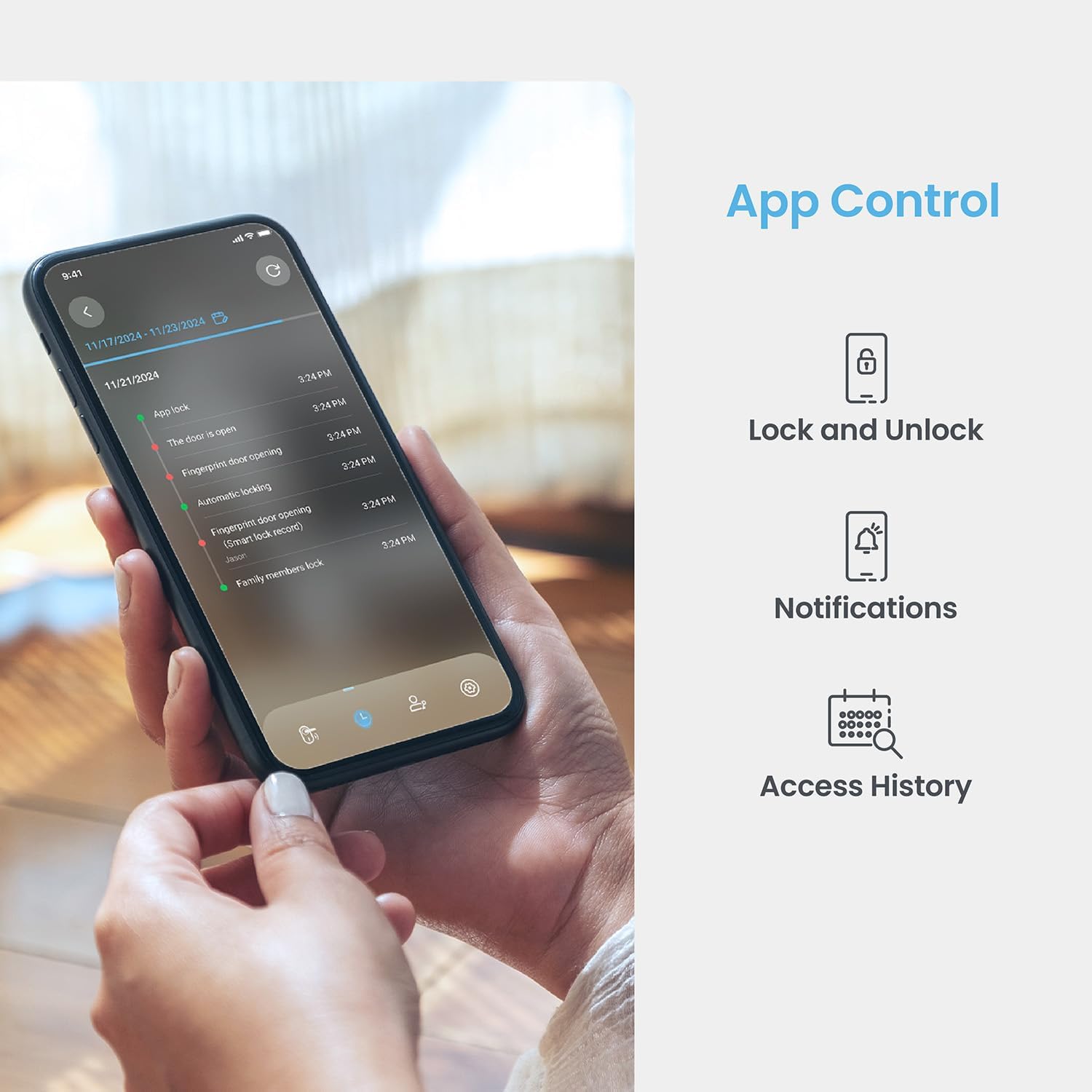
Image: A smartphone displaying the Lockly App, showing options for remote lock/unlock, notifications, and access history logs.
- Ireki aplikazioa: Launch the Lockly App on your smartphone.
- Select Lock: Choose the desired lock from your device list.
- Blokeatu/Desblokeatu: Tap the lock/unlock icon to control the deadbolt.
7.4 Gako fisikoarekin desblokeatzea
Two physical backup keys are provided for manual unlocking.
- Txertatu gakoa: Insert the physical key into the keyhole located on the exterior assembly.
- Turn Key: Turn the key to unlock the deadbolt.
7.5 Blokeo automatikoaren funtzioa
The programmable auto-lock feature ensures your door is always secured.
- Gaitu/Desgaitu: Configure auto-lock settings via the Lockly App.
- Set Delay: Customize the delay time before the lock automatically engages after being closed.
7.6 Ahots-kontrolaren integrazioa
Integrate your Lockly Smart Lock with smart home assistants.
- Connect to Alexa/Google Assistant: Follow the instructions in the Lockly App to link your lock with Amazon Alexa or Google Assistant.
- Ahots-aginduak: Use voice commands to lock or unlock your door (e.g., "Alexa, lock the front door").
8. Erabiltzaileen kudeaketa
Manage access for multiple users through the Lockly App.
- Add/Remove Users: Create or delete user profiles, assigning unique fingerprints or PIN codes.
- eKeys/eBadges: Grant temporary or permanent access to guests via eKeys or eBadges, which can be sent directly from your smartphone.
- Offline Access Codes: Generate time-sensitive or single-use access codes that do not require internet connectivity for the recipient.
- Jarduera erregistroak: Review a detailed history of lock activity, including who accessed the door and when.
9. Mantentzea
9.1 Bateria ordezkatzea
The lock operates on 4 AA alkaline batteries, providing approximately 8 months of battery life. Replace batteries when the low battery indicator appears on the lock or in the app.
- Bateriaren konpartimenturako sarbidea: Kendu bateriaren estalkia barneko muntaketan.
- Ordeztu bateriak: Remove old batteries and insert four new AA alkaline batteries, ensuring correct polarity.
- Itxi azala: Jarri bateriaren estalkia.
9.2 Garbiketa
Garbitu giltzarrapoaren kanpoaldea oihal leun eta lehor batekinamp oihal. Saihestu akabera edo osagai elektronikoak kaltetu ditzaketen garbitzaile edo disolbatzaile urratzaileak.
10. Arazoak
- Blokeoak ez du erantzuten: Check battery levels. Replace batteries if low. Ensure cables are securely connected.
- Keypad Not Activating: Ensure the screen is clean and free of debris. Try touching different areas of the screen.
- Hatz-marka ez da ezagutzen: Ziurtatu hatza garbi eta lehor dagoela. Erregistratu berriro hatz-marka arazoak jarraitzen badute.
- Aplikazioen konexio-arazoak: Verify your home Wi-Fi network is active and the lock is within range. Restart the lock and your router if necessary.
- Blokeo automatikoaren matxura: Check auto-lock settings in the Lockly App. Ensure the door sensor is not obstructed.
11. Zehaztapenak
| Ezaugarri | Xehetasuna |
|---|---|
| Eredua | Secure Pro with Knob |
| ASIN | B0DZXB86LZ |
| Desblokeatzeko metodoak | Fingerprint, PIN Genie Keypad, Lockly App, Physical Key |
| Hatz-markak hautematea | 0.2 seconds, up to 99 fingerprints |
| Keypad Technology | Patented PIN Genie (dynamic number shuffling) |
| Konektibitatea | Wi-Fi integratua, Bluetooth |
| Energia iturria | 4 x AA pila alkalinoak |
| Bateriaren iraupena | 8 hilabete inguru |
| Atearen lodieraren bateragarritasuna | 1 3/8" - 2" |
| Atzeko multzoen bateragarritasuna | 2 3/8" or 2 3/4" |
| Ahots kontrola | Alexa, Google Assistant compatible |
| Estandarra | Built-to ANSI Standard |
12. Bermea eta Laguntza
For warranty information, technical support, or to register your product, please visit the official Lockly website or contact Lockly customer service. Keep your purchase receipt as proof of purchase.
Lineako laguntza: www.lockly.com/support


