1. Sarrera
1.1 Produktua gainditzeaview
The Truman TM-I VISION PRO is a Full HD digital satellite receiver designed to provide a comprehensive entertainment experience. It features a powerful Sunplus 1506HV processor, ensuring smooth performance and high-quality video output. With multiple connectivity options including USB, HDMI, and Ethernet, it offers versatility for various home entertainment setups. The device supports Full HD resolution, multi-language interfaces, and includes parental control features for a family-friendly viewing environment. It also comes with a one-year activated IPTV service.

1.1. irudia: Aurrealdea view of the Truman TM-I VISION PRO Satellite Receiver, showing its compact design and front-facing USB ports.
1.2 Paketearen edukia
Mesedez, egiaztatu behean zerrendatutako elementu guztiak zure paketean sartuta daudela:
- Truman TM-I VISION PRO satelite hargailua
- Elikatze-moldagailua
- Urruneko Kontrol estandarra
- Digital LED Lens
- HDMI kablea
- Argibide eskuliburua

Figure 1.2: Marketing image highlighting key features such as Wi-Fi, Ultra HD support, ISO 9001 certification, and 5G compatibility.
2. Segurtasun informazioa
Erabilera segurua bermatzeko eta kalteak saihesteko, irakurri eta bete segurtasun-jarraibide hauek:
- Ez jarri gailua uretara edo hezetasunera.
- Avoid placing the receiver in direct sunlight or near heat sources.
- Ziurtatu gailuaren inguruan aireztapen egokia gehiegi berotzea saihesteko.
- Erabili emandako korronte-egokigailua soilik.
- Ez saiatu gailua zeuk irekitzen edo konpontzen. Jarri harremanetan zerbitzu-langile kualifikatuekin.
- Mantendu gailua eta osagarriak haurren eskura.
- Deskonektatu entxufea tximista-ekaitzetan edo denbora luzez erabili gabe dagoenean.
3. Konfigurazioa
3.1 Hartzailea konektatzea
- Konektatu satelite antena: Connect your satellite dish cable to the "LNB IN" port on the back of the receiver.
- Telebistara konektatu (HDMI): Use the provided HDMI cable to connect the receiver's HDMI OUT port to an available HDMI IN port on your television.

Figure 3.1: The included HDMI cable for connecting the receiver to your television.
- Konektatu energia: Connect the power adapter to the DC IN port on the receiver, then plug the adapter into a wall outlet.
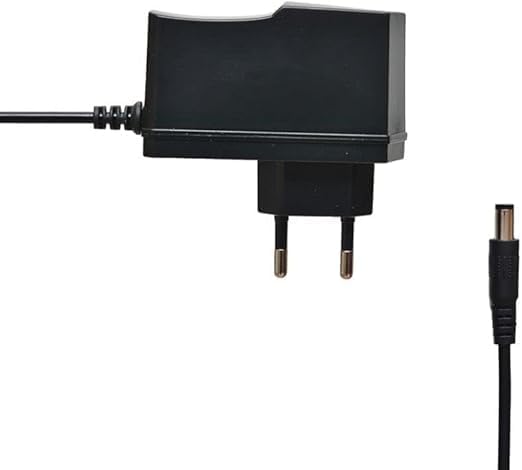
Figure 3.2: The power adapter supplied with the receiver.
- Connect Digital LED Lens: Plug the digital LED lens into its dedicated port on the receiver. This lens displays channel numbers and receives remote control signals.
- Optional: Connect Ethernet/USB: If you plan to use wired internet or external storage, connect an Ethernet cable to the LAN port or a USB drive to one of the USB ports.

3.3. Irudia: Atzealdea view of the receiver showing the LNB IN, HDMI OUT, USB, Ethernet, and DC IN ports.
3.2 Hasierako konfigurazio-morroia
Upon first power-on, the receiver will guide you through an initial setup wizard:
- Hizkuntza hautaketa: Choose your preferred language for the on-screen display.
- Ordu-eremuaren ezarpena: Set the correct time zone for your region.
- Antenaren konfigurazioa: Select your satellite (e.g., Nilesat, Hotbird) and configure LNB settings if necessary.
- Kanalen miaketa: Perform an automatic or manual channel scan to find available TV and radio channels.
- Network Setup (Optional): Configure Wi-Fi or Ethernet connection for internet-based features like IPTV.
4. Funtzionamendu-argibideak
4.1 Oinarrizko funtzioak
- Piztu/Itzali: Sakatu BOTEREA urrutiko aginteko botoia.
- Kanalen nabigazioa: Erabili CH + / CH- botoiak kanalak sekuentzialki aldatzeko, edo sartu kanalaren zenbakia zuzenean zenbakizko teklatua erabiliz.
- Bolumen kontrola: Erabili VOL + / VOL- bolumena doitzeko botoiak.
- Ezkutatu: Sakatu MUTU botoia audioa isilarazteko.
- Menurako sarbidea: Sakatu MENUA botoia ezarpenen eta funtzioen menu nagusira sartzeko.
- Ados botoia: Confirms selections in menus or displays channel information during viewing.
- Irteera: Sakatu EXIT button to return to the previous screen or live TV.
4.2 Ezaugarri aurreratuak
- Gurasoen kontrola: Access the Parental Control menu to set age restrictions for channels or lock specific programs. A default PIN (usually 0000 or 1234) may be required.
- Hizkuntza anitzeko euskarria: Change audio languages (if available) or subtitle languages via the audio/subtitle options in the menu.
- IPTV: The receiver includes a pre-activated IPTV service for one year. Access this feature through the main menu. Ensure your receiver is connected to the internet for IPTV functionality.
- USB multimedia erreprodukzioa: Insert a USB drive into one of the USB ports to play media files (videos, music, photos) or record TV programs.
- Software eguneratzea: Regularly check for software updates via USB or network to ensure optimal performance and access to new features. (Refer to Section 5.2 for details).
5. Mantentzea
5.1 Garbiketa
To clean the receiver, disconnect it from the power supply. Use a soft, dry cloth to wipe the exterior. Do not use liquid cleaners or abrasive materials.
5.2 Software eguneraketak
Keeping your receiver's software updated is crucial for performance and security. Updates can be performed via USB or over the network (if connected to the internet).
- USB eguneratzea: Download the latest firmware (.bin file) from the official Truman website to a USB flash drive. Insert the USB drive into the receiver and navigate to the "System Update" or "Software Upgrade" option in the menu. Follow the on-screen instructions.
- Sarearen eguneratzea: If your receiver is connected to the internet, navigate to the "Network Upgrade" or "Online Update" option in the system settings. The receiver will check for available updates and prompt you to install them.
Kontuz: Do not power off the receiver during a software update, as this may cause permanent damage.
6. Arazoak
If you encounter issues with your Truman TM-I VISION PRO, refer to the following common problems and solutions:
| Arazoa | Kausa posiblea | Irtenbidea |
|---|---|---|
| Botererik ez | Korronte-egokitzailea ez dago konektatuta; Korronte-hartune akastuna. | Ensure power adapter is securely connected to the receiver and a working power outlet. |
| No Signal / Black Screen | Antenna cable loose; Incorrect satellite selected; TV input not set to HDMI. | Check antenna cable connection. Verify satellite settings in menu. Ensure TV input is set to the correct HDMI port. |
| Urruneko kontrola ez dabil | Batteries low/dead; Obstruction between remote and receiver's LED lens. | Replace remote control batteries. Ensure clear line of sight to the digital LED lens. |
| Frozen Picture / Lagging | Weak signal; Overheating; Software issue. | Check signal strength in menu. Ensure proper ventilation. Try a software update or factory reset (last resort). |
| IPTV Not Working | No internet connection; IPTV service expired. | Verify internet connection (Ethernet or Wi-Fi). Contact support if service is within the one-year period and still not working. |
7. Zehaztapenak
| Ezaugarri | Xehetasuna |
|---|---|
| Eredua | TM-I VISION PRO |
| Prozesadorea | Sunplus 1506HV |
| Kutxa mota | Full HD Digital |
| Flash Memoria | 4 MB (SPI SOP8/SOIC8) |
| Bideo Irteera | HDMI (Full HD Resolution Support) |
| Audio irteera modua | Stereo (Dolby Digital, DTS, PCM supported) |
| Konektibitatea | USB, HDMI, Ethernet |
| Gailu bateragarriak | Telebista, Ordenagailu pertsonala |
| Ezaugarri bereziak | User-friendly display, Remote Control, Multi-language support, Parental Control, 1-year IPTV activation. |
| Elementuaren pisua | 10 gramo |
| Fabrikatzailea | Truman |
8. Bermea eta Laguntza
For warranty information, please refer to the warranty card included with your product or contact your point of purchase. The receiver includes a 1-year activated IPTV service.
For technical support or further assistance, please contact Truman customer service or visit their official website. Contact details are typically provided in the product packaging or on the manufacturer's webgunea.


