1. Sarrera
Welcome to the DOOGEE Tab A9 Pro user manual. This guide provides essential information to help you set up, operate, and maintain your new Android tablet. Please read this manual thoroughly before using the device to ensure proper functionality and safety.
2. Zer dago kutxan
The DOOGEE Tab A9 Pro package includes the following items:
- 1 x DOOGEE Tab A9 Pro Tablet
- 1 x USB C motako kablea
- 1 x Kargagailua
- 1 x SIM Ejector Pin
- 1 x Enbalatzeko Kutxa
- 1 x Erabiltzailearen eskuliburua
- 1 x Berme Txartela
- 1 x Pantaila babeslea (aurrez aplikatuta)
3. Produktua amaitu daview
The DOOGEE Tab A9 Pro features a sleek design and powerful components for an optimal user experience.
Ezaugarri nagusiak:
- Pantaila: 10.1-inch IPS HD Ultra-Clear Display (1280x800 pixels, 16.7 million colors, 16:10 aspect ratio, 1200:1 contrast, 2.5D cover glass).
- Prozesadorea: Unisoc T310 Quad-core, 2 GHz.
- Memoria eta biltegiratzea: 20GB RAM (4GB base + 16GB virtual), 128GB ROM, expandable up to 2TB with microSD.
- Bateria: 6580 mAh Lithium battery for extended use.
- Kamerak: 8MP Rear Camera, 5MP Front Camera.
- Sistema eragilea: Android 15.
- Konektibitatea: Wi-Fi (2.4G/5G), Bluetooth 5.0.
- Audioa: Dual 1217 BOX Speakers, 3.5mm Audio Jack.
- Segurtasuna: Aurpegi desblokeatzea.
- Neurriak: 24.53 x 16.33 x 0.99 cm; 478 grams.
Osagai fisikoak:
Familiarize yourself with the tablet's physical layout.
3.1. irudia: Aurrealdea eta atzealdea view of the DOOGEE Tab A9 Pro Tablet.

3.2. irudia: Aldea view showing power button, volume controls, and ports.

Figure 3.3: Available color options for the DOOGEE Tab A9 Pro Tablet.
4. Konfigurazioa
4.1 Hasierako piztea
- Sakatu eta eutsi tabletaren alboan dagoen pizteko botoiari DOOGEE logotipoa agertu arte.
- Jarraitu pantailan agertzen diren argibideei zure hizkuntza hautatzeko, Wi-Fi sare batera konektatzeko eta zure Google kontua konfiguratzeko.
4.2 Bateria kargatzea
Before first use, fully charge the tablet's battery.
- Konektatu USB C motako kablea tabletaren kargatzeko atakara.
- Connect the other end of the cable to the provided charger, then plug the charger into a power outlet.
- Kargatzeko adierazlea pantailan agertuko da.

Figure 4.1: Illustration of the 6580 mAh high-capacity battery.
4.3 MicroSD txartel bat sartzea
To expand storage, insert a microSD card (sold separately).
- Bilatu SIM/microSD txartelaren erretilua tabletaren alboan.
- Sartu SIM txartelaren kanporatzeko pina erretiluaren ondoko zulo txikian irekitzeko.
- Jarri microSD txartela erretiluko zirrikitu izendatuan.
- Sartu erretilua tabletaren barrura astiro-astiro, klik egin arte.

Figure 4.2: Storage capacity details, including expandable memory.
5. Funtzionamendu-argibideak
5.1 Navigating Android 15
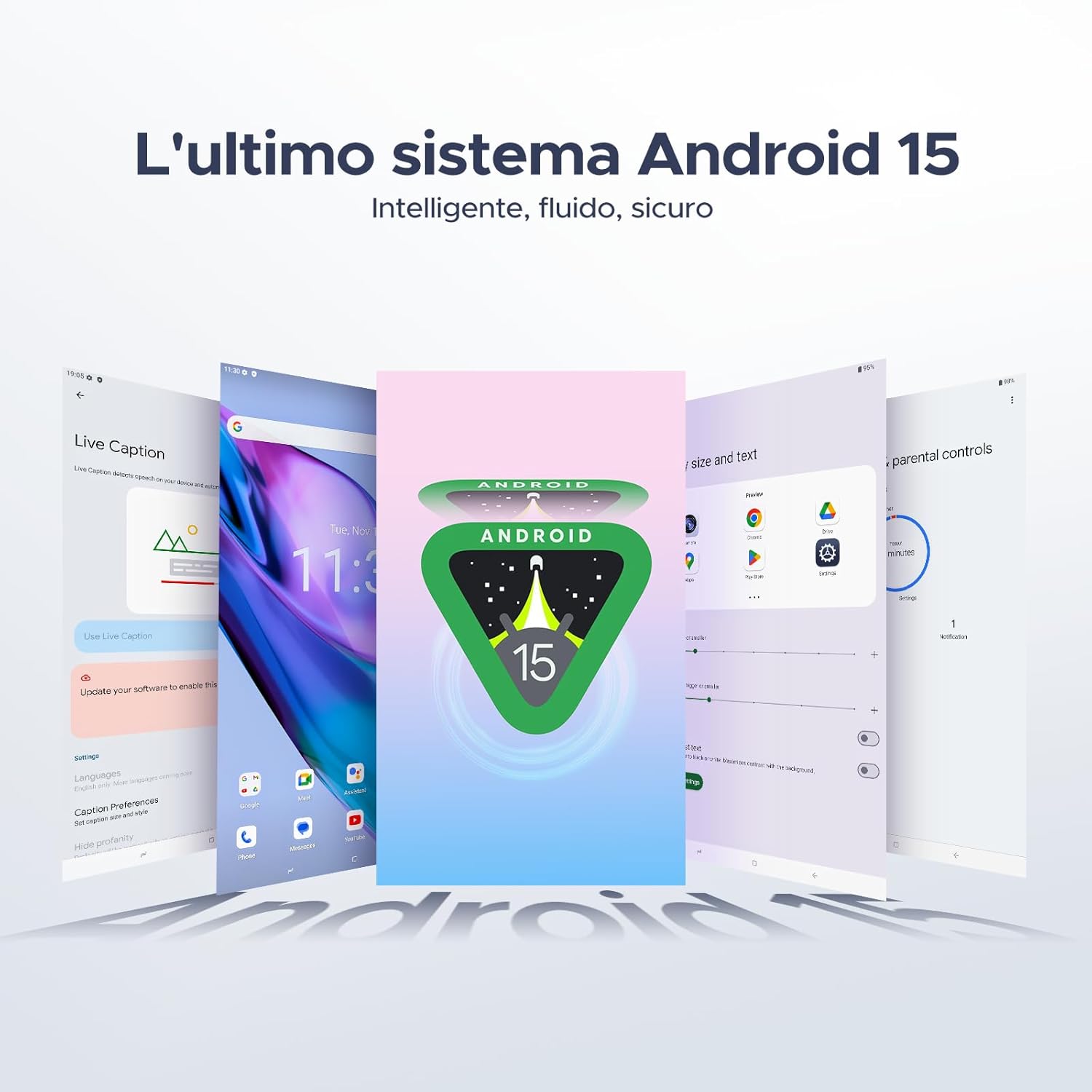
Your tablet runs on the latest Android 15 system, offering an intelligent, fluid, and secure experience.

Figure 5.1: The Android 15 operating system interface.
5.2 Bistaratzeko Ezaugarriak
The 10.1-inch IPS HD display provides a wide visual field. Utilize features like Eye-Caring Mode and Dark Mode for enhanced viewerosotasuna.

Figure 5.2: Details of the 10.1-inch IPS HD Ultra-Clear Display.

Figure 5.3: Eye-Caring Mode and Dark Mode for visual comfort.
5.3 Kameraren erabilera
Capture moments with the 8MP main camera and take clear selfies or video calls with the 5MP front camera. The tablet also supports Beauty Mode and Google Smart Camera features.

Figure 5.4: The 8MP main camera for clear photos.

Figure 5.5: The 5MP front camera for selfies and video calls.

Figure 5.6: Beauty Mode for enhancing photos.

Figure 5.7: Google Smart Camera features for enhanced photography.
5.4 Audioa eta konektibitatea
Enjoy clear audio through the dual 1217 BOX speakers or connect headphones via the 3.5mm audio jack. The tablet supports Wi-Fi 5 (2.4G/5G) for stable and fast internet access.

Figure 5.8: Dual 1217 BOX speakers for crystal clear audio.

Figure 5.9: Standard 3.5mm audio jack for stable, distortion-free transmission.

Figure 5.10: Wi-Fi 5 for seamless connectivity.
5.5 Segurtasuna eta pribatutasuna
Unlock your tablet effortlessly using Face Unlock. Android 15 also provides enhanced privacy features, including precise permission control, robust data encryption, and proactive app screening.

Figure 5.11: Face recognition unlock for easy access.

Figure 5.12: Enhanced privacy shield features of Android 15.
5.6 Produktibitate Ezaugarriak
The tablet supports efficient split-screen multitasking and comes with WPS Office integrated for productivity on the go.

Figure 5.13: Efficient split-screen multitasking.

Figure 5.14: WPS Office integrated for PC-level productivity.
5.7 Ezaugarri gehigarriak
The tablet offers Sleep Mode, Multi-user System, and Parental Control features for a versatile user experience.

Figure 5.15: Discover more with Android 15 features.
5.8 Produktuen bideoak
Watch these official videos for a visual guide to the DOOGEE Tab A9 Pro's features.
Video 5.1: DOOGEE Tab A9 Pro product overview (Aurrekoaview).
Video 5.2: DOOGEE Tab A9 Pro features highlight (Preview).
Video 5.3: DOOGEE Tab A9 Pro design and performance (Preview).
6. Mantentzea
6.1 Tableta garbitzea
- Erabili zapi leun eta lihorik gabeko bat tabletaren pantaila eta gorputza garbitzeko.
- Saihestu produktu kimiko gogorrak edo material urratzaileak erabiltzea, gainazala kaltetu dezaketelako.
6.2 Bateria zaintzea
- Saihestu tableta tenperatura altuetan jartzea.
- Bateriaren iraupen optimoa lortzeko, saihestu bateria maiz erabat deskargatzea.
6.3 Software eguneraketak
Regularly check for and install software updates to ensure your tablet has the latest features and security enhancements. Go to Ezarpenak > Sistema > Sistemaren eguneraketa eguneraketak ikusteko.
7. Arazoak
If you encounter issues with your DOOGEE Tab A9 Pro, refer to the following common solutions:
| Arazoa | Irtenbidea |
|---|---|
| Tableta ez da pizten | Ensure the battery is charged. Connect the charger and wait a few minutes before attempting to power on again. If it still doesn't turn on, press and hold the power button for 10-15 seconds to force a restart. |
| Pantailak ez du erantzuten | Berrabiarazi tableta. Arazoak jarraitzen badu, berrezarri fabrika-ezarpenak (oharra: honek datu guztiak ezabatuko ditu). |
| Wi-Fi konexio arazoak | Berrabiarazi zure Wi-Fi bideratzailea eta tableta. Ahaztu sarea tabletaren ezarpenetan eta konektatu berriro. Ziurtatu Wi-Fi seinalearen eremuan zaudela. |
| Aplikazioak huts egiten edo blokeatzen | Clear the cache and data for the problematic app (Settings > Apps > [App Name] > Storage > Clear Cache/Clear Data). If the issue continues, uninstall and reinstall the app. Ensure your tablet's software is up to date. |
| Bateria azkar agortzen da | Reduce screen brightness, close unused apps running in the background, disable Wi-Fi/Bluetooth when not in use, and check for power-intensive apps in battery usage settings. |
Irtenbide hauek arazoa konpontzen ez badute, jarri harremanetan bezeroarentzako arreta-zerbitzuarekin.
8. Zehaztapenak
Detailed technical specifications for the DOOGEE Tab A9 Pro:
| Ezaugarri | Zehaztapena |
|---|---|
| Marka | DOOGEE |
| Modelo zenbakia | A9 PRO fitxa |
| Sistema eragilea | Android 15 |
| Prozesadorea | Unisoc T310 Quad-core, 2 GHz |
| RAM | 20 GB (4 GB oinarrizkoa + 16 GB birtuala) |
| Barne biltegiratzea (ROM) | 128 GB |
| Biltegiratze zabalgarria | Up to 2 TB via microSD card (sold separately) |
| Pantailaren tamaina | 10.1 hazbete |
| Pantailaren bereizmena | 1280 x 800 pixel |
| Atzeko kamera | 8 MP |
| Aurrealdeko kamera | 5 MP |
| Konektibitatea | Wi-Fi (802.11ac, 2.4G/5G), Bluetooth 5.0 |
| Bateria Edukiera | 6580 milioiamporduko (mAh) |
| Produktuaren neurriak | 24.53 x 16.33 x 0.99 cm |
| Elementuaren pisua | 478 gramo |
| Kolorea | BLACK (also available in Glacier Blue, Meteorite Gray) |
9. Bermea eta Laguntza
Your DOOGEE Tab A9 Pro comes with a manufacturer's warranty. Please refer to the included Warranty Card for details on coverage and terms. For technical support, troubleshooting assistance beyond this manual, or warranty claims, please contact DOOGEE customer service through their official webproduktua erosi zen gunea edo dendaria.
Informazio gehiagorako, bisitatu DOOGEE denda Amazonen.


