Sarrera
Welcome and thank you for choosing the HTC Wireless Earbuds TWS6 5.3. This manual provides detailed instructions to help you set up, operate, and maintain your earbuds for optimal performance. Please read this manual thoroughly before using your device.
Paketearen edukia
Mesedez, egiaztatu elementu guztiak zure paketean daudela:
- 2 x HTC Earbuds
- 1 x USB-C kargatzeko kablea
- 1 x Kargatzeko kasua
- 2 Pairs x Rubber Eartips (S/L)
- 1 x Quick Start Guide (physical document)

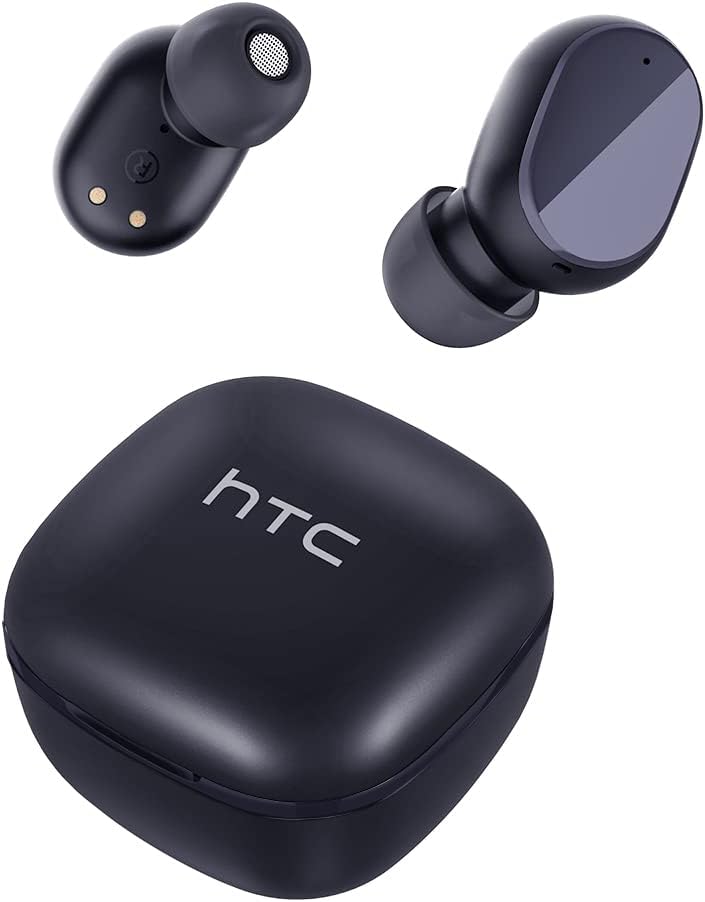
Produktua amaituview
Familiarize yourself with the components of your HTC TWS6 earbuds.

Konfigurazioa
Entzungailuak eta kasua kargatzen
Lehenengo aldiz erabili aurretik, kargatu guztiz entzungailuak eta kargatzeko zorroa.
- Jarri entzungailuak kargatzeko zorroan.
- Konektatu USB-C kablea zorroko kargatzeko atakara eta energia-iturri batera.
- Kaxako adierazle-argiak kargatze-egoera erakutsiko du.
- A full charge provides approximately 5 hours of playback for earbuds and up to 22 hours with the charging case.

Bluetooth parekatzea
Jarraitu urrats hauek entzungailuak zure gailuarekin parekatzeko:
- Ireki kargatzeko zorroa. Aurikularrak automatikoki sartuko dira parekatze moduan.
- Zure gailuan (smartphone-an, tabletan, etab.), gaitu Bluetooth-a.
- Bilatu "HTC TWS6" in the list of available Bluetooth devices.
- Select "HTC TWS6" to connect. A voice prompt will confirm successful pairing.

Entzungailuak jantzita
For optimal sound quality and comfort, choose the correct eartip size and wear the earbuds properly.
- Aukeratu zure belarrietara hobekien egokitzen diren belarri-puntak (S, M, L).
- Sartu aurikular bakoitza astiro-astiro belarri-hodian.
- Rotate slightly to ensure a secure and comfortable fit.
Funtzionamendu-argibideak
Smart Touch Kontrolak
The HTC TWS6 earbuds feature intuitive touch controls:
- Erreproduzitu/Pausatu musika: Sakatu bakar batean entzungailu batean.
- Hurrengo ibilbidea: Sakatu birritan eskuineko entzungailuan.
- Aurreko pista: Sakatu bi aldiz ezkerreko entzungailuan.
- Bolumena igo: Sakatu hiru aldiz eskuineko entzungailuan.
- Bolumena jaitsi: Sakatu hiru aldiz ezkerreko entzungailuan.
- Deia erantzun/amaitu: Sakatu bakar batean entzungailu batean.
- Deia baztertu: Eduki sakatuta aurikularretako bat 2 segundoz.
- Aktibatu Ahots Laguntzailea: Eduki sakatuta aurikularretako bat 3 segundoz.

Piztu/Itzali
The earbuds automatically power on when removed from the charging case and power off when placed back into the case and the lid is closed.
To manually power on, press and hold the touch area for 3 seconds. To manually power off, press and hold the touch area for 5 seconds.
Mantentzea eta zaintzea
Garbiketa
Garbitu aldizka entzungailuak eta kargatzeko zorroa errendimendu eta higiene optimoa bermatzeko.
- Erabili zapi leun, lehor eta lihorik gabeko bat entzungailuak eta kargatzeko zorroa garbitzeko.
- Kendu belarri-puntak eta garbitu xaboi leun eta urarekin, eta gero lehortu ondo berriro jarri aurretik.
- Ez erabili garbitzaile edo disolbatzaile urratzailerik.
Urarekiko erresistentzia (IPX5)
The HTC TWS6 earbuds are IPX5 sweatproof, meaning they are resistant to splashes and sweat.
Oharra: They are not designed for submersion in water. Avoid exposing them to heavy rain, showering, or swimming. Ensure the charging port is dry before charging.

Biltegiratzea
Erabiltzen ez dituzunean, gorde entzungailuak kargatzeko zorroan babesteko eta kargatuta mantentzeko.
Gorde leku fresko eta lehor batean, muturreko tenperaturetatik urrun.
Arazoak konpontzea
| Arazoa | Irtenbidea |
|---|---|
| Entzungailuak ez dira parekatzen | Ensure earbuds are charged. Turn off and on Bluetooth on your device. Forget "HTC TWS6" from your device's Bluetooth list and re-pair. |
| Aurikular bakarra funtzionatzen du | Jarri bi entzungailuak berriro kargatzeko zorroan, itxi tapa eta ireki berriro. Ziurtatu bi entzungailuak kargatuta daudela. |
| Bolumen baxua edo soinu-kalitate eskasa | Adjust volume on your device. Clean eartips and earbud mesh. Try different eartip sizes for a better seal. |
| Kargatzeko arazoa | Check USB-C cable and power adapter. Ensure charging contacts on earbuds and case are clean and dry. |
| Aurikularrak maiz deskonektatzen dira | Ensure your device is within the Bluetooth range (approx. 10 meters/33 feet) and there are no significant obstructions. |
If issues persist, please contact customer support.
Zehaztapenak
| Ezaugarri | Xehetasuna |
|---|---|
| Ereduaren izena | TWS6 |
| Bluetooth bertsioa | 5.3 |
| Konektibitate Teknologia | Haririk gabekoa |
| Haririk gabeko Komunikazio Teknologia | Bluetootha |
| Bateriaren iraupena (entzungailuak) | 5 ordu |
| Jolas-denbora osoa (zorroarekin) | 22 ordu |
| Kargatzeko denbora (kasua) | Gutxi gorabehera 5 ordu |
| Uraren Erresistentzia Maila | IPX5 (Izerdiarekiko erresistentea) |
| Kontrol-metodoa | Ukitu |
| Mikrofonoa | Yes (with ENC) |
| Gailu bateragarriak | Android and iOS Smartphones, Gaming Devices |
| Materiala | Plastikoa |
| Elementuaren pisua | 3.17 ontza |
| UPC | 734257974554 |
| Zarata Kontrola | Zarata Egokitzea |
| Audio kontrolatzaile mota | Gidari dinamikoa |
| Inpedantzia | 199.99 Ohm |
Bermea eta Laguntza
HTC provides a 360-day warranty extension for this product, as detailed in the product information.
For technical assistance, warranty claims, or any inquiries, please contact HTC customer support.
Bezeroarentzako laguntza: Refer to the contact information provided in your product packaging or visit the official HTC webgunea laguntza-aukera eguneratuenak ikusteko.


