1. Sarrera
Thank you for choosing the ASD 12 Inch Smart RGBW Flush Mount Ceiling Light. This fixture combines a stylish minimalist design with efficient, versatile lighting solutions. Featuring multicolor RGBW capabilities, smart app control, and remote operation, it offers a wide range of lighting effects for your space. This manual provides essential information for safe installation, effective operation, and proper maintenance of your new lighting fixture.

Figure 1.1: ASD 12 Inch Smart RGBW Flush Mount Ceiling Light with accessories.
3. Paketearen edukia
Instalazioa hasi aurretik, egiaztatu osagai guztiak daudela:
- ASD 12 Inch Smart RGBW Flush Mount Ceiling Light Fixture (4 units)
- Urruneko Kontrola
- Muntatzeko hardwarea (torlojuak, kable-azkoinak)
- Argibide eskuliburua
4. Zehaztapenak
| Ezaugarri | Xehetasuna |
|---|
| Marka | ASD |
| Ereduaren izena | LOFTA |
| Zati zenbakia | A-LFM12D20SRGBW-N-4p |
| Kolorea | 12" | Nickel | RGBW |
| Materiala | Alloy Steel, Acrylic |
| Estiloa | Modernoa |
| Produktuaren neurriak | 11.3"L x 11.3"Z x 3.4"A |
| Erabilera espezifikoak | Barruko erabilera soilik |
| Energia iturria | Kableatua |
| Argi iturri mota | LED |
| Akabera mota | Margotua |
| Itzala Materiala | Plastikoa |
| liburukiatage | 120 Volt |
| Wattage | 20 watt |
| Muntatze Mota | Urruneko muntaia |
| Batez besteko Bizitza | 50,000 ordu |
| Ezaugarri bereziak | 1064/1220LM, Remote Control, RGBW, Smart App, CCT Adjustable 2700-6500K |

4.1. irudia: Produktuaren neurriak eta ezaugarri nagusiak.
5. Instalazioa
Follow these steps to install your ASD Smart RGBW Flush Mount Ceiling Light:
- Instalaziorako prestatu: Turn off power at the circuit breaker before starting. Ensure the mounting surface is clean and stable.
- Remove the Lens: Gently remove the lens from the fixture by rotating it clockwise. This will expose the mounting holes and wiring connections.
- Muntatu aparatua: Attach the fixture's base to the electrical outlet box using the provided screws. Ensure it is securely fastened.
- Hari-konexioak: Connect the wires: Black to Black (Live), White to White (Neutral), and Ground to Ground. Secure all connections with wire nuts. Carefully tuck all wires back into the outlet box.
- Lentea lotu: Once wiring is complete and secure, attach the lens by aligning it with the fixture and rotating it counter-clockwise until it locks into place.
- Berrezarri boterea: Piztu berriro etengailuan.
- Download ASD SMART App: For smart control features, download the "ASD SMART" application from your smartphone's app store. Scan the QR codes below or click the links to download.
Google Play Store (Android)
Apple App Store (iOS) - Add Fixture to App: Follow the in-app instructions to add your new ceiling light to the ASD SMART app. This typically involves putting the light into pairing mode and connecting it to your Wi-Fi network.

Figure 5.1: Initial installation steps: removing the lens and wiring.
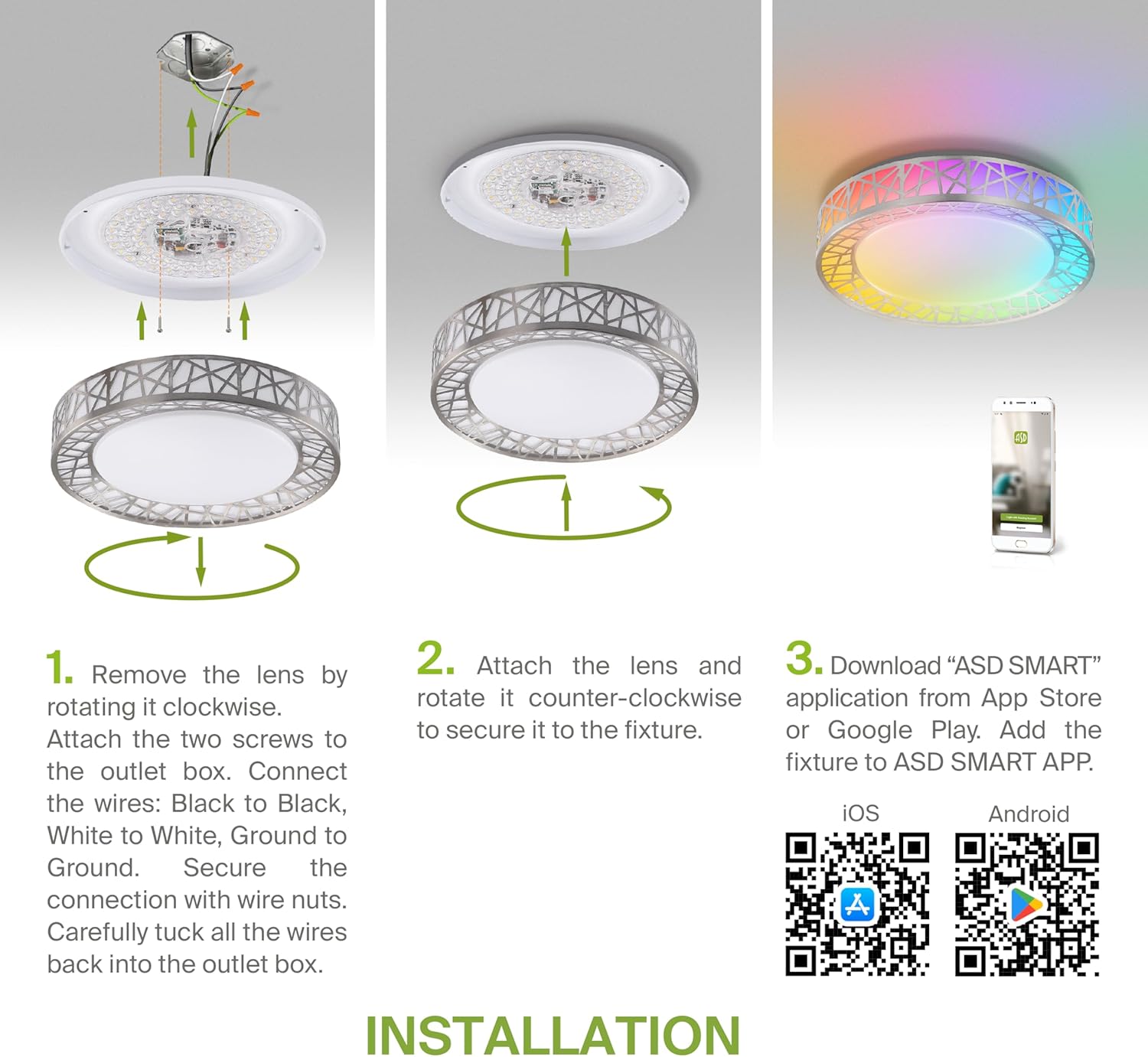
Figure 5.2: Complete installation overview including app download.
6. Funtzionamendu-argibideak
Your ASD Smart RGBW Flush Mount Ceiling Light offers multiple control methods:
6.1 Urruneko kontrola
The included remote control allows for basic functions:
- Aktibatu/Desaktibatuta: Piztu edo itzali argia.
- dimming: Adjust brightness levels smoothly.
- CCT doikuntza: Change color temperature (e.g., from warm white to cool white).
- RGB kolore hautaketa: Cycle through or select specific RGB colors.
6.2 ASD SMART App Control
The ASD SMART app provides full control and advanced features:
- 16.7 milioi kolore: Choose any color from the full RGBW spectrum.
- Smooth Dimming & CCT: Precisely adjust brightness and color temperature (2700K-6500K).
- Lighting Patterns: Select pre-set or custom lighting scenes and effects.
- Taldekatzea: Control multiple fixtures simultaneously.
- Programazioa: Set timers for lights to turn on/off or change settings automatically.

Figure 6.1: RGBW color capabilities.

Figure 6.2: Control via remote and smart app.

Figure 6.3: Seamless dimming functionality.
6.3 Ahots-kontrola (Alexa eta Google Assistant)
The fixture is compatible with Amazon Alexa and Google Assistant for convenient voice commands:
- Ensure your ASD SMART app is linked to your Alexa or Google Home account.
- Use commands such as "Alexa, turn on the living room light" or "Hey Google, set the bedroom light to blue."

Figure 6.4: Compatibility with Alexa and Google Assistant.
7. Mantentzea
To ensure the longevity and optimal performance of your ceiling light:
- Garbiketa: Deskonektatu korrontea garbitu aurretik. Garbitu aparatua zapi leun eta lehor batekin. Ez erabili garbitzaile edo disolbatzaile urratzailerik.
- Bonbillaren ordezkoa: Lanpara honek LED teknologia integratua erabiltzen du eta ez du bonbilla ordezkatu beharrik.
8. Arazoak
Sabaiko argiarekin arazoak badituzu, jo ezazu honako arazo eta irtenbide ohikoenei:
| Arazoa | Kausa posiblea | Irtenbidea |
|---|
| Argia ez da pizten | Argindarrik ez, kableatu solteak, etengailu akastuna | Egiaztatu zirkuitu-hauslea. Ziurtatu kable-konexio guztiak ondo daudela. Probatu hormako etengailua. |
| Urruneko kontrola ez dabil | Dead battery, out of range, interference | Replace remote battery. Ensure you are within range. Remove any obstructions. |
| App cannot connect to light | Incorrect Wi-Fi password, light not in pairing mode, 5GHz Wi-Fi network | Verify Wi-Fi password. Reset light to pairing mode (refer to app instructions). Ensure you are on a 2.4GHz Wi-Fi network. |
| Ahots-kontrolak ez du erantzuten | App not linked to voice assistant, incorrect device name | Check linking in ASD SMART app and voice assistant app. Verify device name in voice assistant app. |
9. Bermea eta Laguntza
ASD provides a 5 urteko berme mugatua for this product, guaranteeing top quality and safety. The fixture is ETL certified, ensuring compliance with North American safety standards.
For technical support, warranty claims, or any questions not covered in this manual, please contact ASD customer service. Refer to the product packaging or the official ASD webharremanetarako informazioa lortzeko gunea.


