Sarrera
Transform your iPad into a versatile workstation with the Epico iPad Keyboard Case. This innovative accessory features a detachable keyboard with seven-colour backlighting, a multi-finger gesture touchpad, and comprehensive iPadOS shortcuts. Designed for both functionality and protection, it enhances your iPad experience for typing, watching, and browsing.

Image: The Epico iPad Keyboard Case with an iPad inserted, shown in a tilted typing position.
Ezaugarriak
- Atzeko argiztatutako teklatua: Seven distinct backlight colours with adjustable brightness levels for comfortable typing in any lighting condition.
- Touchpad Functionality: Multi-finger gesture touchpad provides precise control and enhanced navigation capabilities.
- Shortcut Integration: Comprehensive range of iPadOS shortcuts built into the keyboard for efficient device control and workflow optimisation.
- Diseinu polifazetikoa: Includes detachable keyboard and tilted backside stand for multiple viewing angles and usage modes.
- Power Solution: Equipped with Li-ion battery and USB-C charging capability, operating independently from iPad's power source.
Paketearen edukia
- Epico iPad Keyboard Case
- USB-C-tik USB-C-ra kargatzeko kablea
- Erabiltzailearen eskuliburua (dokumentu hau)
Konfigurazioa
1. Teklatua kargatzea
Before first use, fully charge the keyboard. Connect the provided USB-C to USB-C charging cable to the keyboard's USB-C port and the other end to a compatible USB-C power adapter (not included).
Irudia: Albokoa view of the keyboard case, highlighting the USB-C charging port.
2. Inserting Your iPad
- Gently align your iPad with the case's frame.
- Press firmly but carefully to secure the iPad into the protective shell. Ensure all edges are properly seated.

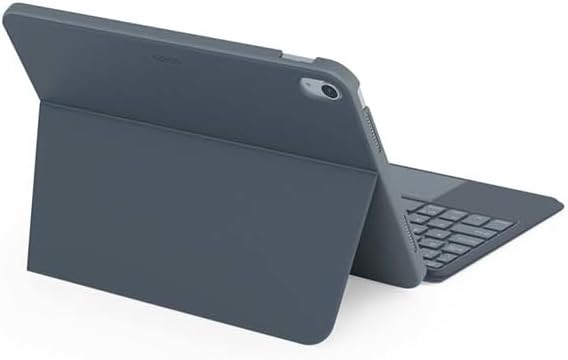
Irudia: Atzealdea view of the Epico iPad Keyboard Case, demonstrating the secure fit of the iPad.
3. Pairing with iPad
- Turn on the keyboard by sliding the power switch (usually located on the side or back of the keyboard).
- Zure iPad-ean, joan honera: Ezarpenak > Bluetootha.
- Enable Bluetooth. The keyboard should appear in the "Other Devices" list as "Epico Keyboard" or similar.
- Tap on the keyboard name to pair. Follow any on-screen prompts.
- Once paired, the keyboard's indicator light will change, and it will be ready for use.
Funtzionamendu-argibideak
Teklatuaren erabilera
The keyboard functions like a standard QWERTY keyboard. Ensure the keyboard is paired with your iPad before typing.

Irudia: Aurrealdea view of the Epico iPad Keyboard Case, displaying the full keyboard layout and touchpad.
Atzeko argiaren kontrola
- Sakatu Bonbilla key (often near the function keys) to cycle through backlight colours.
- Sakatu Fn + Light Bulb key to adjust backlight brightness levels.
Touchpad keinuak
The integrated touchpad supports multi-finger gestures for enhanced navigation:
- Hatz bakarreko ukitu: Egin klik ezkerreko botoiarekin.
- Bi hatzekin ukitzea: Egin klik eskuineko botoiarekin (testuinguru-menua).
- Bi hatzekin korritzea: Gora/behera edo ezkerra/eskuina joan.
- Atximurkatu Zooma egiteko: Edukia handitu/txikitu.
- Refer to iPadOS settings for additional gesture customization.
iPadOS Shortcuts
The keyboard includes dedicated function keys for common iPadOS shortcuts. These may vary slightly by iPadOS version, but typically include:
- Hasiera: Itzuli hasierako pantailara.
- Bilatu: Activate Spotlight search.
- Distira kontrola: Doitu pantailaren distira.
- Komunikabideen kontrola: Play/Pause, Previous/Next track.
- Bolumen kontrola: Doitu sistemaren bolumena.
- Blokeatu pantaila: Lock your iPad.
Mantentzea
Garbiketa
- Use a soft, lint-free cloth to wipe the exterior of the case and keyboard.
- Marka egoskorretarako, apur bat dampeu zapi urarekin edo garbitzaile leun eta ez urratzaile batekin.
- Avoid getting moisture into the keyboard keys or ports.
- Ez erabili produktu kimiko gogorrik, disolbatzailerik edo material urratzailerik.
Biltegiratzea
When not in use for extended periods, store the keyboard case in a cool, dry place. Ensure the keyboard is turned off to preserve battery life.
Arazoak konpontzea
- Teklatua ez da konektatzen:
Ensure the keyboard is charged and turned on. Check iPad's Bluetooth settings to confirm it's enabled and the keyboard is paired. Try unpairing and re-pairing the keyboard.
- Teklak ez dute erantzuten:
Check battery level. Restart both the keyboard and your iPad. Ensure no debris is lodged under the keys.
- Atzeko argia ez dabil:
Ensure the keyboard is on and charged. Cycle through backlight settings using the dedicated key.
- Ukipen-panela ez da erantzuten:
Ensure the touchpad is enabled (some keyboards have a function key to toggle it). Check iPadOS settings for touchpad functionality.
Zehaztapenak
| Marka | Epikoa |
| Ereduaren izena | Epico Keyboard Case |
| Gailu bateragarriak | Apple iPad |
| Konektibitatea | Bluetootha |
| Atzeko argia | 7-Colour, Adjustable Brightness |
| Ukipen-panela | Multi-finger Gesture Support |
| Kargatzeko ataka | USB-C |
| Energia iturria | Li-ioizko bateria integratua |
| Elementuaren pisua | 15.9 ontza (gutxi gorabehera 450 g) |
| Produktuaren neurriak (LxWxH) | 9.94 x 7.24 x 0.48 hazbete (gutxi gorabehera 25.25 x 18.39 x 1.22 cm) |
| Materiala | Plastikoa, Metala |
Bermea eta Laguntza
This Epico product is covered by a manufacturer's warranty. Please refer to the warranty card included with your purchase or visit the official Epico webwebgunean bermearen baldintza zehatzak ikusteko.
For technical support, troubleshooting assistance, or inquiries about your product, please contact Epico customer service through their official webgunea edo erosketa-agirian emandako harremanetarako informazioa.


