Sarrera
The Logitech Flip Folio is a versatile keyboard case designed to enhance your iPad experience. It provides front-and-back protection for your device and features a stowable Bluetooth keyboard, offering flexibility for typing, viewing, and portability. This manual provides instructions for setting up, operating, and maintaining your Flip Folio.

Figure 1: Logitech Flip Folio Keyboard Case with iPad and detachable keyboard.
Bateragarritasuna
The Logitech Flip Folio Keyboard Case is compatible with the following iPad models:
- iPad Pro 11-inch (M4 & M5) (2024 & 2025) – Models: A2836, A2837, A3006, A3357, A3358, A3359
- iPad Air 11-inch (M2 & M3)
- iPad Air (5. belaunaldia)
Kutxan dagoena
Your Logitech Flip Folio package includes:
- Bluetooth teklatua
- iPad Folio Case
- Dokumentazioa
- CR2016 battery x4 (pre-installed in keyboard)

Figure 2: Package contents of the Flip Folio.
Konfigurazioa
Follow these steps to set up your Logitech Flip Folio:
- Konektatu zure iPad-a: Open the folio case. Align your iPad with the case and gently place it. Magnets will securely attach the iPad to the folio.
- Eman euskarria: Fold the front cover along the designated crease. Flip it back to prop up the iPad, transforming the case into a stable stand. You can adjust the viewangelua nahi bezala.
- Connect the Bluetooth Keyboard: The keyboard is magnetically stowed in the back of the folio. Pull out the keyboard. Ensure the keyboard is powered on (it should automatically activate when removed or by sliding the power switch if present).
- Pair with iPad:
- Zure iPad-ean, joan honera: Ezarpenak > Bluetootha.
- Ziurtatu Bluetooth-a piztuta dagoela On.
- Select "Flip Folio" from the list of available devices.
- If prompted, type the on-screen code using the Flip Folio keyboard and press Itzuli.
For a visual guide, please watch the official setup video below:
Video 1: Official Logitech Flip Folio Unboxing and Setup Guide. This video demonstrates how to attach your iPad to the folio, set up the stand, and pair the Bluetooth keyboard.
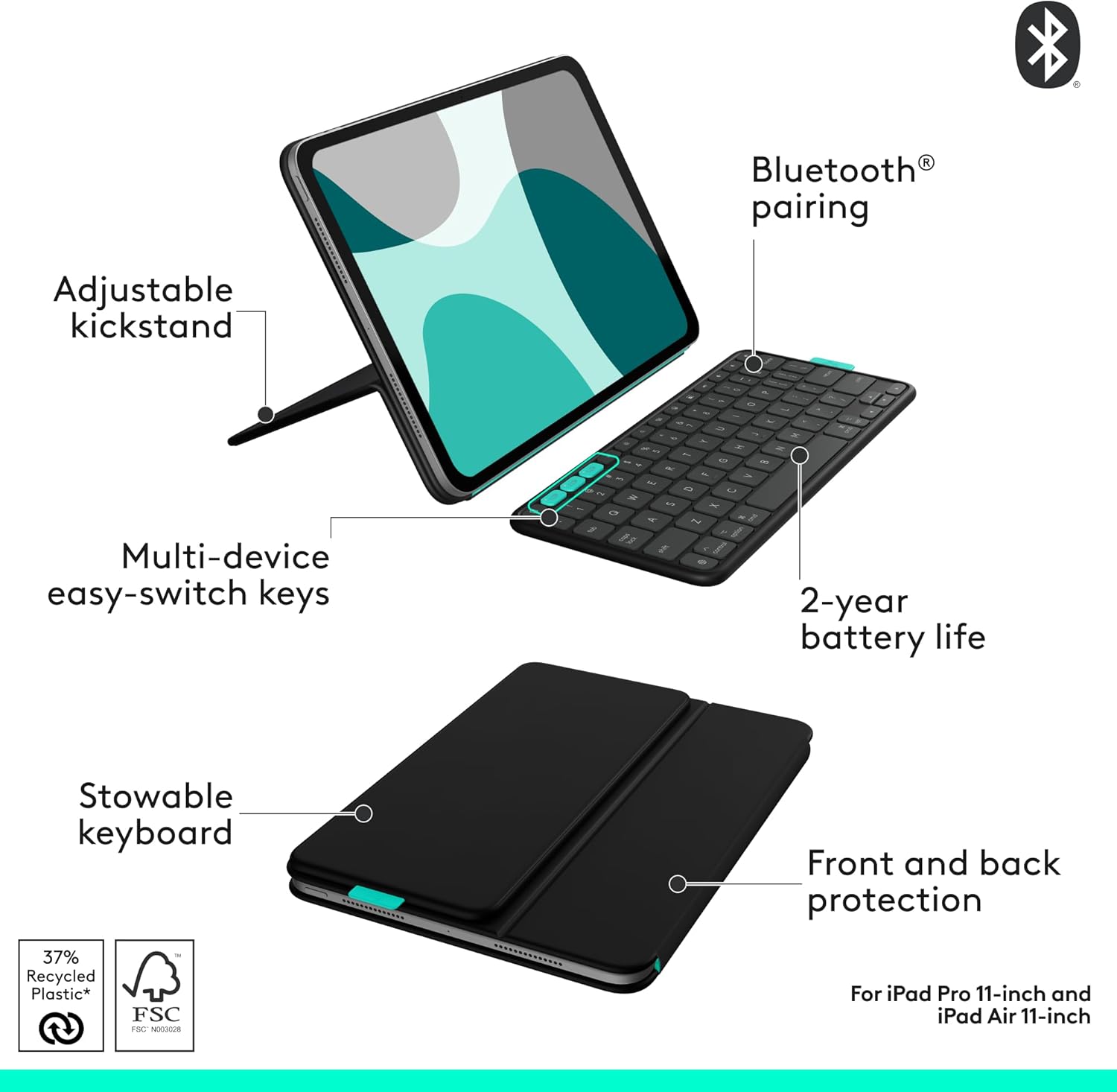
3 Irudia: Gainetikview of Flip Folio features including adjustable kickstand and stowable keyboard.
Erabilera-argibideak eta ezaugarriak
The Logitech Flip Folio is designed for maximum versatility and ease of use:
- Detachable Wireless Keyboard: The full-size keyboard can be used attached to the folio or detached and placed anywhere for comfortable typing. It magnetically reattaches for easy storage.
- Egokigarria ViewInguruak: The integrated kickstand allows you to adjust your iPad to various viewing angles. You can also position your iPad in both portrait and landscape modes for typing, reading, or video calls.
- Multi-Device Pairing (Easy-Switch Keys): The keyboard supports pairing with up to three Bluetooth devices simultaneously. Use the Easy-Switch keys (usually labeled 1, 2, 3) to seamlessly switch between your iPad, iPhone, or other compatible devices with a single press.
- iOS lasterbide-teklak: A full row of dedicated iOS shortcut keys provides quick access to familiar functions such as home, search, media controls, and screen brightness, optimizing your workflow.
- Front and Back Protection: The folio case shields your iPad from everyday bumps, scratches, and spills, ensuring all-around durability.
- Bateriaren iraupen luzea: The keyboard is powered by four replaceable CR2016 coin cell batteries, offering up to 2 years of use, eliminating the need for frequent charging.
- Apple Pencil Compatibility: The folio's design allows your Apple Pencil to magnetically attach directly to your iPad for convenient storage and charging.

Figure 4: iPad in both landscape and portrait modes using the adjustable stand.

Figure 5: Multi-device pairing with the Flip Folio keyboard, showing an iPad and iPhone side-by-side.
Video 2: Official Logitech Flip Folio video highlighting flexibility and function, including multi-device use and adjustable angles.
Mantentzea
To ensure the longevity and optimal performance of your Logitech Flip Folio, follow these maintenance guidelines:
- Garbiketa: Erabili biguna, damp, lint-free cloth to clean the exterior of the folio and keyboard. Avoid abrasive cleaners or solvents.
- Biltegiratzea: When not in use, keep the Flip Folio closed to protect your iPad. Store in a cool, dry place away from direct sunlight and extreme temperatures.
- Bateria ordezkatzea: The keyboard uses four CR2016 coin cell batteries. When the battery indicator light signals low power, replace all four batteries simultaneously to maintain optimal performance.
Arazoak konpontzea
If you encounter issues with your Logitech Flip Folio, refer to the following common troubleshooting steps:
- Teklatuak ez du erantzuten:
- Ziurtatu teklatua piztuta dagoela.
- Check the battery level and replace batteries if necessary.
- Verify Bluetooth connection on your iPad (Settings > Bluetooth). Try unpairing and re-pairing the keyboard.
- Parekatzeko zailtasuna:
- Make sure the keyboard is in pairing mode (refer to setup instructions).
- Ensure no other devices are actively connected to the keyboard via Bluetooth.
- Restart your iPad and the keyboard, then attempt pairing again.
- iPad Not Staying in Stand Mode:
- Ensure the iPad is correctly seated and magnetically attached to the folio.
- Verify the folds of the stand are properly aligned along the creases.
Zehaztapenak
| Marka | Logitech |
| Seriea | Logitech Flip Folio |
| Elementuaren eredu-zenbakia | 920-013370 |
| Elementuaren pisua | 1.41 kilo |
| Produktuaren neurriak | 9.96 x 7.1 x 0.8 hazbete |
| Kolorea | Gauerdi Beltza |
| Energia iturria | Battery Powered (4x CR2016 coin cell batteries) |
| Konektibitate Teknologia | Bluetootha |
| Teklatuaren deskribapena | Mintza |
| Materiala | Plastic (37% post-consumer recycled plastic for Midnight Black) |
| Ezaugarri bereziak | Hot-Swappable, Integrated Stand, Lightweight, Low-Profile Key, Portable |
Bermea eta laguntza
Logitech products are designed for durability and reliability. For specific warranty information and support, please refer to the official Logitech webgunea edo zure produktuarekin batera datorren dokumentazioa.
- Lineako laguntza: Bisitatu Logitech laguntza webgunea maiz egiten diren galderen, arazoak konpontzeko giden eta softwarearen deskargen bilaketarako.
- Produktuen erregistroa: Register your product online to receive updates and access to exclusive support.


