1. Sarrera
This manual provides detailed instructions for the installation, operation, and maintenance of your EDISION CAM-100 Broadband TV Antenna Amplifier. The CAM-100 is designed to enhance Digital Terrestrial Television (DVB-T/T2) signals, featuring adjustable gain and integrated 5G LTE protection to ensure optimal reception quality.
2. Segurtasun-argibideak
Please read these safety instructions carefully before installing or operating the device. Failure to follow these instructions may result in electric shock, fire, or damage to the product.
- Ziurtatu elikadura hornidura boltage gailuan zehaztutako eskakizunekin bat dator.
- Ez jarri gailua euripean, hezetasunean edo muturreko tenperaturetan.
- Saihestu gailua bero-iturrietatik gertu edo eguzki-argia zuzenean jartzen.
- Ez ireki gailua casing. Konponketa guztiak langile kualifikatuen esku utzi.
- Disconnect the power supply before making any connections or disconnections.
3. Paketearen edukia
Egiaztatu elementu guztiak paketean daudela:
- EDISION CAM-100 TV Antenna Ampbiziagoa
- Hasierako gida azkarra
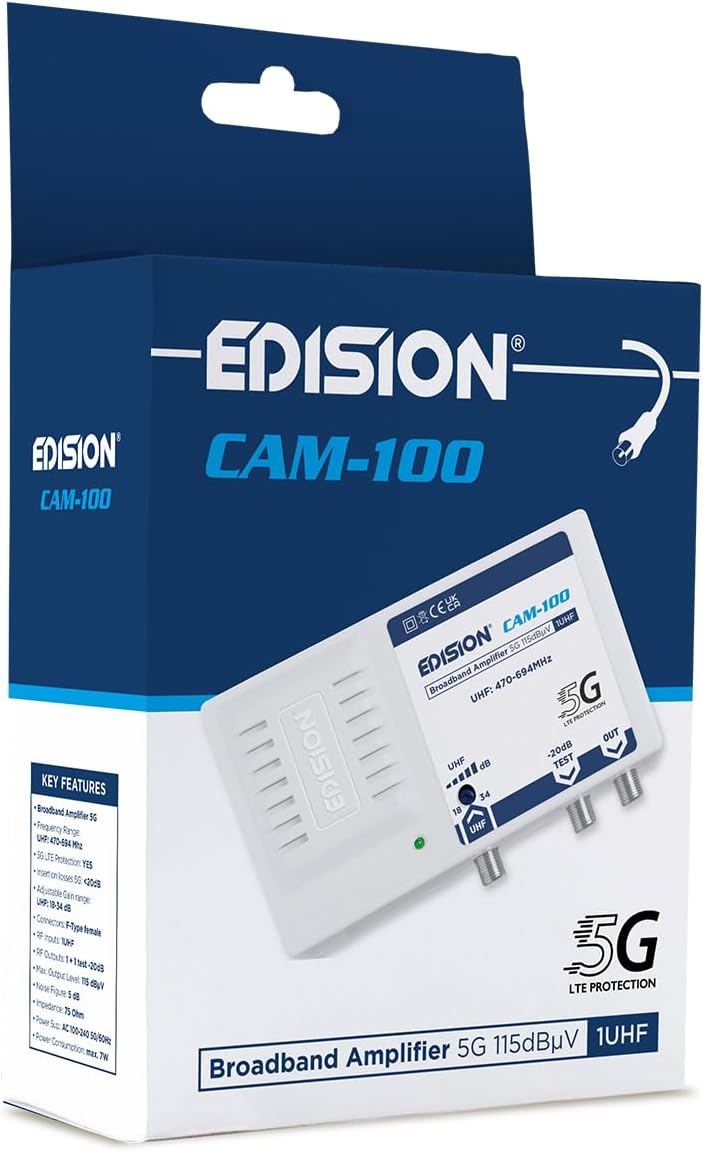
The EDISION CAM-100 amplifier presented in its retail box, showcasing the product branding and key features listed on the packaging.
4. Produktua amaitu daview
The EDISION CAM-100 is a compact broadband amplifier designed for UHF signals. It features adjustable gain and a built-in 5G LTE filter.

The EDISION CAM-100 broadband amplifier, shown with its power plug, features a single UHF input, adjustable gain from 18-34dB, and two output ports (one main, one -20dB test port). It includes 5G LTE protection and operates within the UHF 470-694MHz frequency range.

Aurrealde hurbila view of the EDISION CAM-100, clearly displaying the UHF input, the adjustable gain knob, the -20dB test output, and the main output port. The 5G LTE PROTECTION label is also visible.

The rear side of the EDISION CAM-100 amplifier, featuring keyhole slots for wall mounting, indicating easy installation.
5. Konfigurazioa eta instalazioa
Follow these steps to properly install your EDISION CAM-100 ampbiziagoa:
- Muntaketa: Choose a suitable indoor location for the amplifier, away from direct heat or moisture. Use the keyhole slots on the back of the unit to securely mount it to a wall or flat surface.
- Antena konexioa: Connect your outdoor UHF antenna cable to the UHF IN portuan amplifier. Ensure the connection is secure.
- TV Connections: Connect your television(s) to the KANPO port(s) of the amplifier using coaxial cables. The main output provides the amplified signal. There is also a -20dB TEST port for signal measurement or connecting a single device with reduced signal.
- Potentzia-konexioa: Entxufatu amplifier's power cord into a standard AC 100-240V, 50/60Hz electrical outlet. The power indicator LED on the front of the unit should illuminate.
- Doitu irabazia: Turn the adjustable gain knob (labeled UHF dB) to set the desired amplification level. Start with a lower setting and gradually increase it until optimal signal quality is achieved on your television.

An illustrative diagram demonstrating a typical installation scenario for the EDISION CAM-100. It shows an outdoor UHF antenna connected to the amplifier, which then distributes the signal to multiple televisions indoors, including connections for a test point.
6. Funtzionamendu-argibideak
Once installed, the EDISION CAM-100 operates continuously when powered. The primary operational adjustment is the gain control.
- Potentzia adierazlea: A green LED on the front panel indicates that the amplifier is receiving power and is operational.
- Irabaziaren doikuntza: Use the rotary knob to adjust the UHF signal gain between 18dB and 34dB. Adjust this setting while monitoring your TV's signal quality meter (if available) or picture quality. The goal is to achieve a strong, stable signal without over-amplification, which can cause distortion.
- Test Output: The -20dB TEST output provides a reduced signal level, useful for connecting a single TV or for signal strength measurements without affecting the main output.
7. Mantentzea
The EDISION CAM-100 requires minimal maintenance to ensure long-term performance.
- Garbiketa: Aldian-aldian, garbitu unitatearen kanpoaldea oihal leun eta lehor batekin. Ez erabili garbitzaile likidorik edo material urratzailerik.
- Aireztapena: Ensure that the ventilation slots on the device are not obstructed to prevent overheating.
- Konexioak: Noizean behin, egiaztatu kable-konexio guztiak ondo finkatuta daudela eta korrosiorik gabe daudela ziurtatzeko.
8. Arazoak
If you experience issues with your EDISION CAM-100, refer to the following common problems and solutions:
| Arazoa | Kausa posiblea | Irtenbidea |
|---|---|---|
| Ez dago potentzia adierazle argirik | Unitateari ez dago energiarik | Check power cord connection and wall outlet. Ensure the outlet is live. |
| No signal or weak signal on TV |
|
|
| Distorted picture or sound | Signal over-amplification or interference | Reduce the gain setting. Ensure the 5G LTE filter is effective; if interference persists, check for external sources. |
9. Zehaztapen Teknikoak
| Ezaugarri | Zehaztapena |
|---|---|
| Eredua | CAM-100 (26-01-0403) |
| Maiztasun barrutia | UHF 470-694 MHz |
| Sarrera | 1UHF |
| Irteerak | 1 Main Output, 1 Test Output (-20dB) |
| Irabazi erregulagarria | 18-34 dB (UHF) |
| Max. Irteera Maila | 115 dBµV |
| Iragazkia | 5G LTE babesa |
| Elikatze Hornidura | AC 100-240V, 50/60Hz |
| Neurriak | 11 x 14 x 5 cm |
| Pisua | 270 g |
| Gailu bateragarriak | TV antenna, Televisions |
10. Bermearen informazioa
EDISION products are covered by a standard manufacturer's warranty against defects in materials and workmanship. Please refer to the warranty card included with your product or visit the official Edision webwebgunean bermearen baldintza zehatzak ikusteko. Gorde erosketaren frogagiria bermearen erreklamazioetarako.
11. Laguntza
Laguntza gehiago, euskarri teknikoa edo view additional products, please visit the official Edision store or contact customer service:
- Edision Store: Visit the Edision Store on Amazon
- Bezeroarentzako arreta: Refer to the contact information provided in your Quick Start Guide or on the official Edision webgunea.


