1. Sarrera
Eskerrik asko erosketagatik.asing the SENCOR Soundbar SSB 4450BS. This soundbar is designed to deliver a powerful and immersive audio experience for your home entertainment system. This manual provides essential information for the safe and efficient use of your new soundbar, including setup, operation, maintenance, and troubleshooting.
Mesedez, irakurri arretaz eskuliburu hau produktua erabili aurretik eta gorde ezazu etorkizunean erreferentzia gisa.
2. Segurtasun-argibideak
Funtzionamendu segurua bermatzeko eta kalteak saihesteko, jarraitu segurtasun neurri hauek:
- Energia iturria: Connect the soundbar only to an AC power outlet that matches the voltage specified on the product label. Ensure the power plug is fully inserted.
- Aireztapena: Do not block any ventilation openings. Allow adequate space around the soundbar for proper airflow to prevent overheating.
- Ura eta hezetasuna: Ez jarri soinu-barra euripean, hezetasunean, tantaka edo zipriztinetan. Ez jarri likidoz betetako objekturik, hala nola loreontziak, aparatuaren gainean.
- Bero iturriak: Keep the soundbar away from heat sources such as radiators, heat registers, stoves, or other apparatus (including ampberoa sortzen duten argitzaileak).
- Garbiketa: Unplug the soundbar from the power outlet before cleaning. Use a soft, dry cloth. Do not use liquid cleaners or aerosol cleaners.
- Zerbitzua: Ez saiatu produktu hau zeuk konpontzen. Konponketa guztiak zerbitzu-langile kualifikatuei eskatu. Estalkiak irekitzeak edo kentzeak tentsio-energia arriskutsuen eraginpean jar zaitzake.tage edo beste arrisku batzuk.
- Lekua: Place the soundbar on a stable, flat surface or mount it securely if using a wall mount (mounting hardware not included).
3. Paketearen edukia
Egiaztatu behean zerrendatutako elementu guztiak zure paketean sartuta daudela:
- SENCOR Soundbar SSB 4450BS
- Urruneko Kontrola
- Power Cable (EU plug)
- Erabiltzailearen eskuliburua
4. Produktua amaitu daview
4.1 Soundbar Front View

1. irudia: Aurrealdea view of the SENCOR Soundbar SSB 4450BS. The display shows 'bt' indicating Bluetooth mode.
The front panel features the SENCOR logo and a digital display that indicates the current input mode (e.g., 'bt' for Bluetooth, 'OPT' for Optical, 'AUX' for Auxiliary) and volume level.
4.2 Soundbar Rear View (Portuak)

2. Irudia: Atzealdea view of the SENCOR Soundbar SSB 4450BS, illustrating the connectivity ports.
The rear panel typically includes various input ports for connecting to your television or other audio sources. These may include HDMI ARC, Optical, and AUX inputs, along with the power input.
4.3 Urruneko kontrola
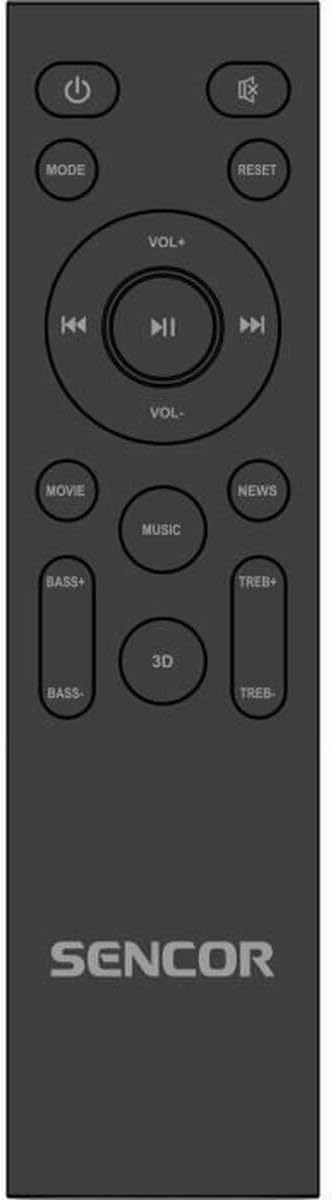
Figure 3: The remote control for the SENCOR Soundbar SSB 4450BS.
The remote control allows you to manage all functions of the soundbar from a distance. Key buttons include:
- Potentzia (⏻): Soinu-barra pizten edo itzaltzen du.
- JARRAIBIDEAK: Cycles through input sources (Bluetooth, Optical, AUX, HDMI ARC).
- VOL +/-: Bolumen nagusiaren maila doitzen du.
- ⏮ / ⏸ / ⏭: Playback controls (Previous, Play/Pause, Next) for Bluetooth mode.
- FILMA / MUSIKA / BERRIAK / 3D: Selects predefined equalizer sound modes.
- BASS +/-: Baxu-maila doitzen du.
- TREB+/-: Agutzen maila doitzen du.
- RESET Soinu ezarpenak lehenetsitako balioetara berrezartzen ditu.
5. Konfigurazioa
5.1 Desontziratzea eta kokatzea
- Carefully remove the soundbar and all accessories from the packaging.
- Place the soundbar on a stable, flat surface in front of your TV, ensuring it does not obstruct the TV's remote sensor.
- Alternatively, the soundbar can be wall-mounted (mounting hardware not supplied). Ensure the wall can support the weight of the soundbar.
5.2 Potentzia konektatzea
- Konektatu elikatze-kablea soinu-barraren atzealdeko AC IN atakara.
- Entxufatu kablearen beste muturra hormako entxufe egoki batera.
5.3 Audio iturri batera konektatzea
Aukeratu konexio metodo hauetako bat:
5.3.1 HDMI ARC Connection (Recommended)
- Connect an HDMI cable (not supplied) from the HDMI ARC port on your TV to the HDMI ARC port on the soundbar.
- Ziurtatu telebistaren HDMI ARC funtzioa gaituta dagoela ezarpenetan.
5.3.2 Konexio optikoa
- Connect an optical cable (not supplied) from the OPTICAL OUT port on your TV to the OPTICAL IN port on the soundbar.
- Ensure your TV's audio output is set to 'Optical' or 'PCM'.
5.3.3 AUX konexioa
- Connect a 3.5mm audio cable (not supplied) from the headphone jack or AUX OUT port on your TV/device to the AUX IN port on the soundbar.
6. Funtzionamendu-argibideak
6.1 Piztu/Itzali
Sakatu Potentzia (⏻) button on the remote control or the soundbar's control panel to turn the unit on or off.
6.2 Sarrera iturria hautatzea
Sakatu MODUA button on the remote control repeatedly to cycle through the available input sources: Bluetooth (bt), Optical (OPT), AUX, HDMI ARC.
6.3 Bolumen kontrola
Erabili VOL+ eta Boluntario buttons on the remote control to adjust the master volume. The current volume level will be displayed on the soundbar's front panel.
6.4 Bluetooth parekatzea
- Switch the soundbar to Bluetooth mode by pressing the MODUA button until 'bt' appears on the display. The 'bt' indicator will flash, signifying pairing mode.
- Gaitu Bluetooth-a zure gailu mugikorrean (smartphone-a, tableta, etab.) eta bilatu eskuragarri dauden gailuak.
- Select 'SENCOR SSB 4450BS' from the list of devices.
- Once paired, the 'bt' indicator will stop flashing and remain solid. You can now play audio from your device through the soundbar.
- Erabili ⏮ (Previous), ⏸ (Play/Pause), and ⏭ (Next) buttons on the remote for media control in Bluetooth mode.
6.5 Sound Modes and Adjustments
Use the dedicated buttons on the remote control to customize your audio experience:
- FILMA: Enhances dialogue and sound effects for films.
- MUSIKA: Musika erreproduzitzeko audioa optimizatzen du.
- BERRIA: Clarifies speech for news broadcasts or podcasts.
- 3D: Creates a wider, more immersive soundstage.
- BASS +/-: Increases or decreases the low-frequency sound output.
- TREB+/-: Increases or decreases the high-frequency sound output.
- RESET Resets all sound settings (Bass, Treble, Sound Mode) to their factory defaults.
7. Mantentzea
7.1 Garbiketa
Soinu-barraren itxura eta errendimendua mantentzeko:
- Deskonektatu beti soinu-barra entxufetik garbitu aurretik.
- Erabili zapi leun, lehor eta lihorik gabeko bat gainazalak garbitzeko.
- Ez erabili garbitzaile, argizari edo disolbatzaile urratzailerik, akabera kaltetu baitezakete.
- Gently clean the speaker grilles with a soft brush or vacuum cleaner with a brush attachment to remove dust.
7.2 Biltegiratzea
If you plan to store the soundbar for an extended period, unplug it from the power source and store it in a cool, dry place, preferably in its original packaging to protect it from dust and damage.
8. Arazoak
If you encounter issues with your SENCOR Soundbar SSB 4450BS, refer to the following table for common problems and solutions:
| Arazoa | Kausa posiblea | Irtenbidea |
|---|---|---|
| Botererik ez | Kable elektrikoa ez dago konektatuta; Entxufea ez dago aktibo | Ziurtatu kablea ondo konektatuta dagoela; Saiatu beste entxufe bat erabiltzen. |
| Soinurik ez | Incorrect input source selected; Volume too low; Mute activated; Cable connection issue | Press MODE to select correct input; Increase volume; Check if mute is active; Reconnect audio cables securely. |
| Bluetootha ez da konektatzen | Soundbar not in pairing mode; Device too far; Already connected to another device | Ensure soundbar is in 'bt' pairing mode (flashing 'bt'); Move device closer; Disconnect from other devices. |
| Urruneko kontrola ez dabil | Batteries depleted; Obstruction between remote and soundbar; Remote sensor blocked | Replace batteries; Remove any obstructions; Ensure remote sensor on soundbar is clear. |
If the problem persists after trying these solutions, please contact SENCOR customer support.
9. Zehaztapenak
| Ezaugarri | Zehaztapena |
|---|---|
| Eredua | SSB 4450BS |
| Marka | SENTOR |
| Bozgorailuaren irteera-potentzia maximoa | 200 Watt |
| Produktuaren neurriak (L x W x H) | 100 cm x 17.5 cm x 11 cm (gutxi gorabehera 39.4 x 6.9 x 4.3 hazbete) |
| Elementuaren pisua | 4.4 kg (9.7 lb inguru) |
| Muntatze Mota | Mahai gaineko muntaia |
| Entxufe mota | EBko entxufea |
| ASIN | B0F2W9C18B |
| EAN / Item Model Number | 8590669354634 |
10. Bermea eta Laguntza
SENCOR products are manufactured to the highest quality standards. In the unlikely event of a defect, your product is covered by a limited warranty from the date of purchase. Please refer to the warranty card included with your product for specific terms and conditions.
For technical support, service inquiries, or to obtain replacement parts, please visit the official SENCOR website or contact your local SENCOR authorized service center. Keep your proof of purchase for warranty claims.
Webgunea: www.sencor.com


