1. Sarrera
This manual provides essential information for the installation, operation, and maintenance of your FSP VITA GM 650W ATX 3.1 PC Power Supply. Please read this manual thoroughly before installation to ensure proper and safe usage of the product. The FSP VITA GM 650W is designed to deliver stable and efficient power to your computer system, adhering to the ATX 3.1 and PCIe Gen 5.1 specifications.
2. Segurtasun informazioa
Always observe the following safety precautions to prevent injury or damage to your equipment:
- Ez ireki elikatze-iturria. Bolumen handikotages are present inside, and opening the casing voids the warranty and poses a risk of electric shock.
- Instalatu elikatze-iturria ondo aireztatutako leku batean, bero-iturrietatik, eguzki-argitik eta hezetasunetik urrun.
- Ensure the power supply is correctly installed and secured in your PC case.
- Use only the modular cables provided with the power supply. Using incompatible cables can cause damage.
- Connect the power supply to a grounded electrical outlet.
- Disconnect the AC power cord from the wall outlet before installing or removing the power supply or any other components.
- Saihestu objektu astunak elikatze-iturriaren edo haren kableen gainean jartzea.
- If the power supply is damaged or malfunctioning, discontinue use immediately and contact FSP support.
3. Paketearen edukia
Egiaztatu elementu guztiak zure paketean daudela:
- FSP VITA GM 650W ATX 3.1 PC Power Supply
- Modular Cable Set (Motherboard, CPU, PCIe, SATA, Peripheral)
- AC korronte kablea
- Muntatzeko Torlojuak
- Erabiltzailearen eskuliburua (dokumentu hau)
4. Produktua amaitu daview
The FSP VITA GM 650W is a high-efficiency power supply designed for modern PC systems. It features:
- ATX 3.1 Compliance: Designed to meet the latest Intel Power Design Guide ATX 3.1 specifications, ensuring compatibility with future hardware.
- PCIe Gen 5.1 Support: Ready for next-generation graphics cards.
- 80 PLUS Gold Certification: Achieves high efficiency, reducing power dissipation, heat, and noise.
- Synchronous Rectifier LLC Resonance Converter Topology: Reduces switching loss and enhances efficiency.
- +5V & 3.3V DC to DC Circuit Design: Improves efficiency and stabilizes output voltage.
- 105°C Japanese Bulk Capacitor: Ensures reliability and extended lifespan.

4.1. irudia: Aurrealdea view of the FSP VITA GM 650W Power Supply, showcasing its compact design and fan grille.
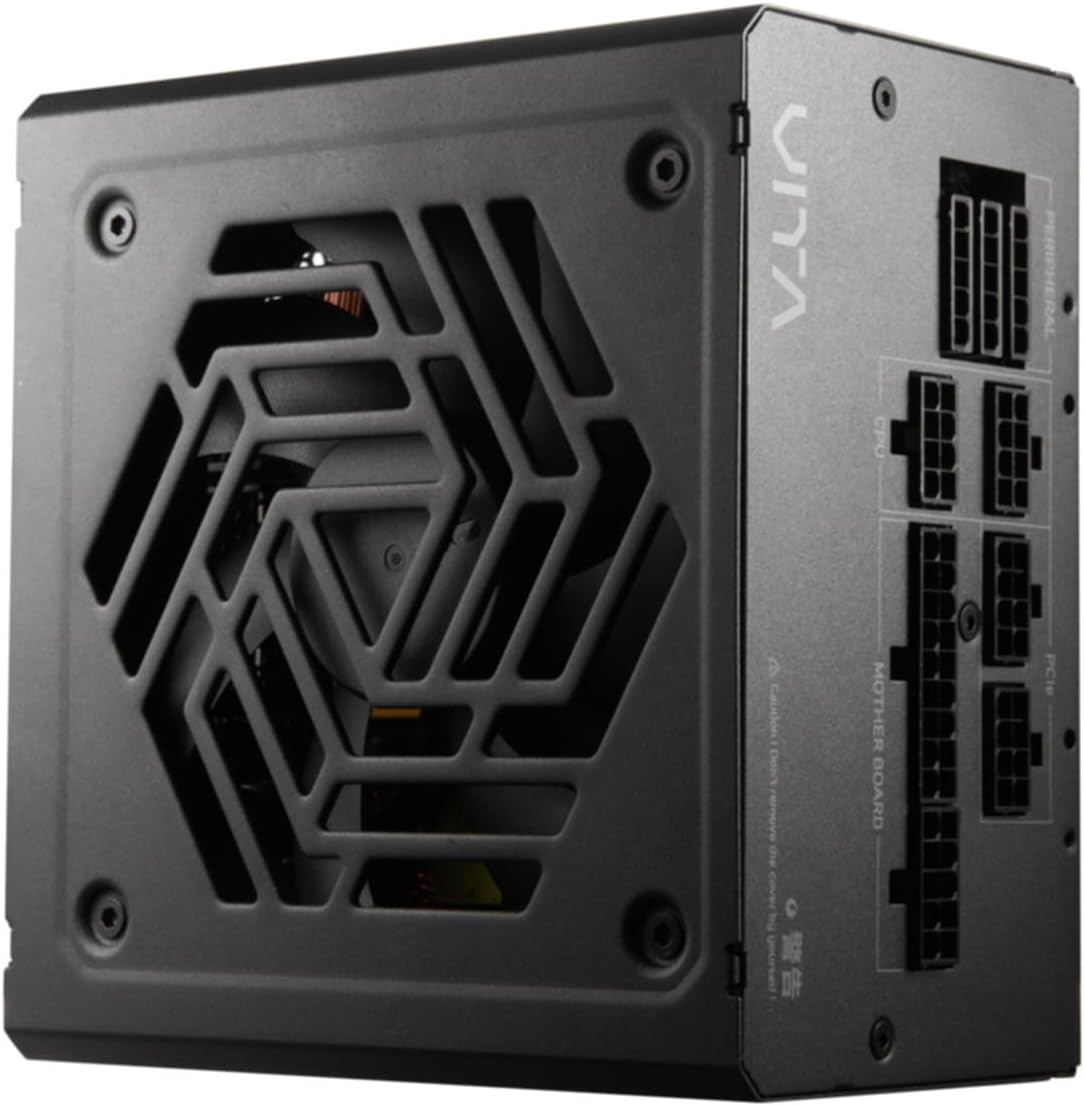
4.2. irudia: Goitik behera view of the FSP VITA GM 650W Power Supply, highlighting the fan and ventilation design.

4.3. irudia: Aldea view of the FSP VITA GM 650W Power Supply, showing the FSP branding and VITA model name.
5. Konfigurazioa eta instalazioa
Follow these steps to install your FSP VITA GM 650W power supply:
- Prestaketa:
- Turn off your computer and disconnect the AC power cord from the wall outlet.
- Ireki zure ordenagailuaren kaxa.
- Elikatze-iturri bat ordezkatzen baduzu, deskonektatu kable guztiak PSU zaharretik eta atera kaxatik.
- Mounting the PSU:
- Carefully place the FSP VITA GM 650W into the power supply bay of your PC case.
- Align the screw holes on the PSU with those on the case.
- Lotu elikadura hornidura hornitutako muntaketa-torlojuen bidez.
- Connecting Modular Cables:
The FSP VITA GM 650W is a modular power supply. Connect only the cables required for your system components.

Figure 5.1: Modular cable connection panel. Ensure cables are firmly seated.
- Plaka basearen potentzia: Konektatu 24 pin ATX kablea plakara.
- CPUaren potentzia: Connect the 4+4-pin or 8-pin EPS/ATX12V cable(s) to the CPU power connector(s) on your motherboard.
- PCIe Power: Connect the 6+2-pin PCIe cables to your graphics card(s).
- SATA potentzia: Connect SATA power cables to SSDs, HDDs, and optical drives.
- Potentzia periferikoa: Connect 4-pin Molex cables to other peripherals as needed.
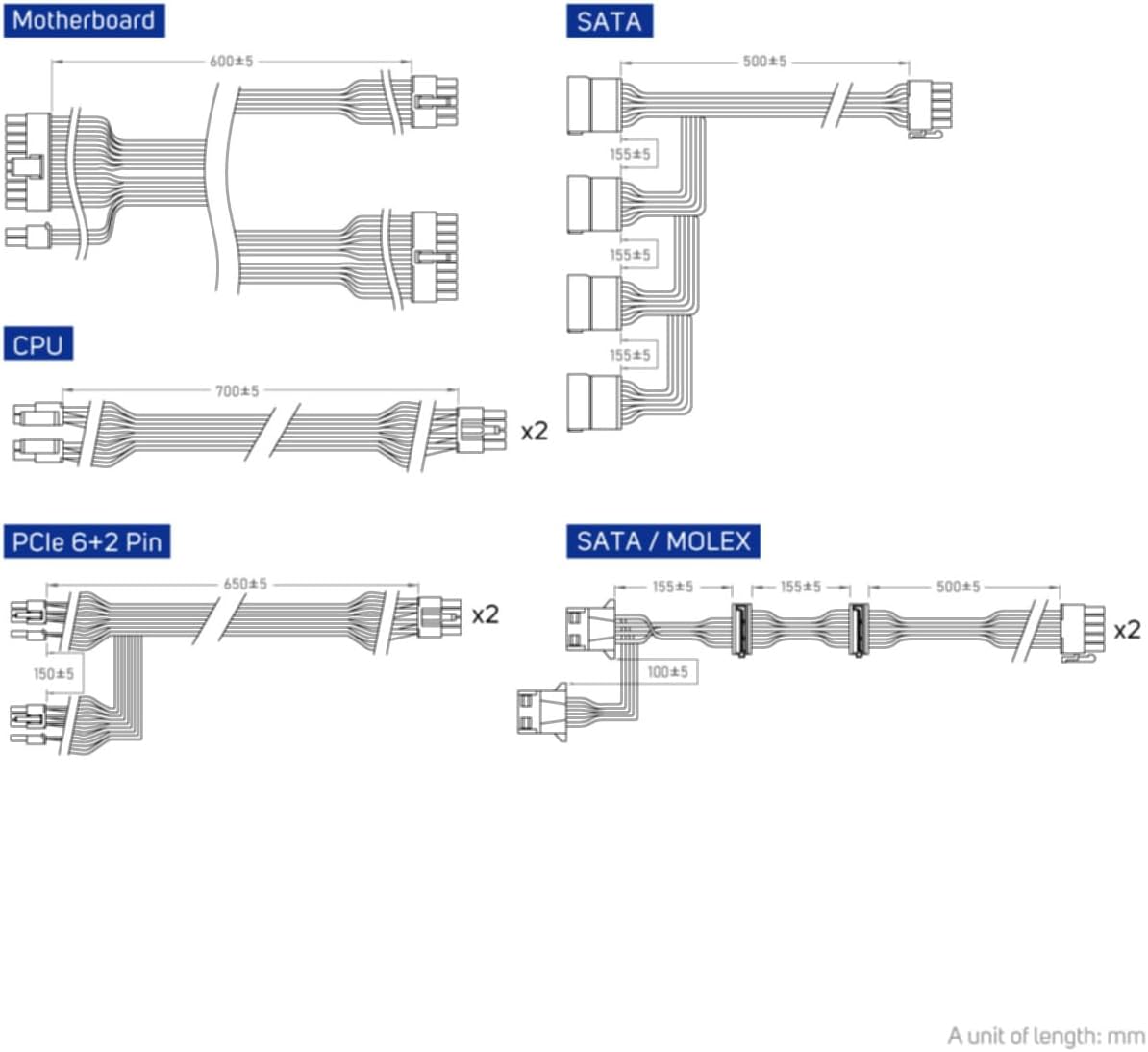
Figure 5.2: Diagram illustrating the various modular cables included and their approximate lengths (in mm).
- Azken egiaztapenak:
- Ensure all cables are securely connected and routed to avoid obstructing airflow.
- Itxi ordenagailuaren zorroa.
- Connect the AC power cord to the power supply and then to a grounded wall outlet.
6. Funtzionamendu-argibideak
After installation, you can power on your system:
- Ensure the power switch on the back of the power supply is in the "ON" (I) position.
- Press the power button on your computer case.
- The power supply will provide stable power to your components.

6.1. Irudia: Atzealdea view of the power supply, showing the AC power input and the main power switch.
Bridge Time Importance: The FSP VITA GM 650W adheres to the recommended ATX 3.1 bridge time values. This feature ensures the power supply can maintain a stable output voltage for a critical duration after a power interruption, preventing system instability or damage during sudden power fluctuations or outages.
7. Mantentzea
To ensure optimal performance and longevity of your power supply:
- Hautsa garbitzea: Periodically clean dust from the power supply's fan grille and vents using compressed air. Ensure the system is powered off and unplugged before cleaning.
- Kableen kudeaketa: Maintain good cable management inside your PC case to ensure proper airflow and prevent overheating.
- Ingurumen-baldintzak: Operate the power supply within recommended temperature and humidity ranges.
8. Arazoak
If you encounter issues with your FSP VITA GM 650W power supply, refer to the following common problems and solutions:
| Arazoa | Kausa posiblea | Irtenbidea |
|---|---|---|
| Sistema ez da pizten. |
|
|
| Sistema piztu egiten da baina berehala itzaltzen da. |
|
|
| Zarata ezohikoak PSUtik. |
|
|
If the problem persists after trying these solutions, please contact FSP customer support for further assistance.
9. Zehaztapenak
| Ezaugarri | Xehetasuna |
|---|---|
| Modelo zenbakia | 790980 |
| Marka | FSP |
| Wattage | 650W |
| ATX bertsioa | 3.1 |
| Eraginkortasun Ziurtagiria | 80 GEHI Urrezkoa |
| Elementuaren pisua | 2.72 kilogramo (5.98 libra) |
| Fabrikatzailea | FSP |
| Eskuragarri dagoen lehen data | 15ko abuztuaren 2024a |
10. Bermea eta Laguntza
For warranty information, technical support, or service inquiries, please refer to the official FSP webwebgunera edo jarri harremanetan bezeroarentzako arreta-zerbitzuarekin. Gorde erosketaren frogagiria berme-erreklamazioetarako.
FSP Official Webgunea: www.fsp-group.com
11. Birziklatzea eta botatzea
Please dispose of this product responsibly. Electronic waste should not be disposed of with household waste. Contact your local authorities or recycling center for information on proper disposal methods for electronic components.


