1. Sarrera
This manual provides instructions for the safe and effective operation of the RuoShui 610B+ Digital Clamp Meter. This handheld, automatic range digital multimeter is battery-driven and designed for measuring DCV, ACV, ACA, DCA, Resistance, Continuity, Diode, Frequency, and other electrical parameters. It features a 5999-count display, True RMS, NCV, VFC, and a built-in flashlight.

Aurrealdea view of the RuoShui 610B+ Digital Clamp Neurgailua, cl erakustenamp jaw, rotary selector, display, and function buttons.
2. Segurtasun informazioa
Always observe safety precautions when working with electricity to prevent electric shock or personal injury. Failure to follow safety guidelines may result in severe injury or damage to the meter.
- Do not exceed the maximum input values for any function as specified in the technical specifications.
- Ensure the meter is in the correct function mode before making measurements. Incorrect settings can lead to damage or inaccurate readings.
- Inspect test leads for damage (e.g., cracked insulation, exposed metal) before each use. Do not use damaged leads.
- Do not operate the meter if it appears damaged or if the case is open. Refer servicing to qualified personnel.
- Replace batteries promptly when the low battery indicator appears to ensure accurate measurements and proper operation.
- Saihestu neurgailua hezetasun handiko, tenperatura muturreko edo gas lehergarrietan erabiltzea.
- Funtzioak edo tarteak aldatu aurretik, deskonektatu beti proba-kableak zirkuitutik.
3. Produktua amaitu daview
Familiarize yourself with the components of your RuoShui 610B+ Digital Clamp Meter for efficient and safe operation.

Diagram illustrating the various components of the RuoShui 610B+ Digital Clamp Meter, including the clamp head, trigger, function range knob, LCD display, and input jacks.
- Clamp Burua: Used for non-contact measurement of AC/DC current. Maximum jaw opening is 40mm.
- Clamp Buruko abiarazlea: Ireki eta ixten du clamp burua.
- Function Range Knob: Rotary switch to select desired measurement function (e.g., V, A, Ω, Hz).
- Selection/Low Pass Filtering (SELECT/VFC): Button to switch between functions within a rotary knob position (e.g., AC/DC, Diode/Continuity) or activate VFC mode.
- Relative Value / Flashlight Lighting (REL/): Button to activate relative measurement mode or turn on the built-in flashlight.
- LCD pantaila: Neurketa-irakurketak, unitateak eta funtzio-adierazleak erakusten ditu.
- Public Port (COM): Proba-kableetarako sarrera-hartune komuna.
- liburukiatage, Resistance, and Other Jacks (VΩHz): Bolumenaren sarrera-jackatage, resistance, frequency, diode, and continuity measurements.
- Data Retention / Backlight (HOLD/B.L.): Button to hold the current display reading or activate the display backlight.
- Reset Key / Inrush Current (ZERO/INR): Button to zero the DC current reading or activate Inrush current measurement.

Image showing the 40mm jaw opening of the RuoShui 610B+ clamp meter, suitable for various wire measurements.
4. Konfigurazioa
4.1 Bateriaren instalazioa
The RuoShui 610B+ Digital Clamp Meter requires two 1.5V AAA batteries for operation.
- Ziurtatu neurgailua itzalita dagoela.
- Bilatu bateriaren konpartimentuaren estalkia neurgailuaren atzealdean.
- Erabili bihurkin bat bateriaren estalkia lotzen duten torlojua(k) askatzeko.
- Kendu arretaz bateriaren estalkia.
- Insert two 1.5V AAA batteries, ensuring correct polarity (+ and -) as indicated inside the compartment.
- Jarri bateriaren estalkia berriro eta finkatu torloju(ekin).
Note: If the low battery indicator appears on the display, replace the batteries immediately to ensure accurate readings.
5. Funtzionamendu-argibideak
5.1 Funtzionamendu Orokorra
- Piztu/Itzali: Turn the Function Range Knob from the 'OFF' position to any desired measurement function to power on the meter. To power off, turn the knob back to 'OFF'.
- Itzaltze automatikoa (APO): The meter will automatically power off after approximately 15 minutes of inactivity to conserve battery life. Press any button or turn the rotary knob to reactivate.
- Atzeko argia: Press and hold the 'HOLD/B.L.' button to turn the display backlight on or off.
- Linterna: Press and hold the 'REL/' button to turn the built-in flashlight on or off.
5.2 Neurketa funtzioak
Always ensure test leads are correctly connected and the function knob is set to the appropriate range before making measurements.
- DC bolumenatage (DCV) Measurement:
- Set the Function Range Knob to the 'V' position. The meter will default to ACV.
- Press the 'SELECT' button to switch to DCV mode.
- Sartu proba-kable gorria 'VΩHz' konektorean eta proba-kable beltza 'COM' konektorean.
- Konektatu proba-kableak zirkuitu edo probatu beharreko osagaiarekin paraleloan.
- Irakurri liburukiatage balioa LCD pantailan.
- AC Boltage (ACV) Measurement:
- Set the Function Range Knob to the 'V' position. The meter will default to ACV.
- Sartu proba-kable gorria 'VΩHz' konektorean eta proba-kable beltza 'COM' konektorean.
- Konektatu proba-kableak zirkuitu edo probatu beharreko osagaiarekin paraleloan.
- Irakurri liburukiatage balioa LCD pantailan.
- AC Current (ACA) Measurement (using Clamp):
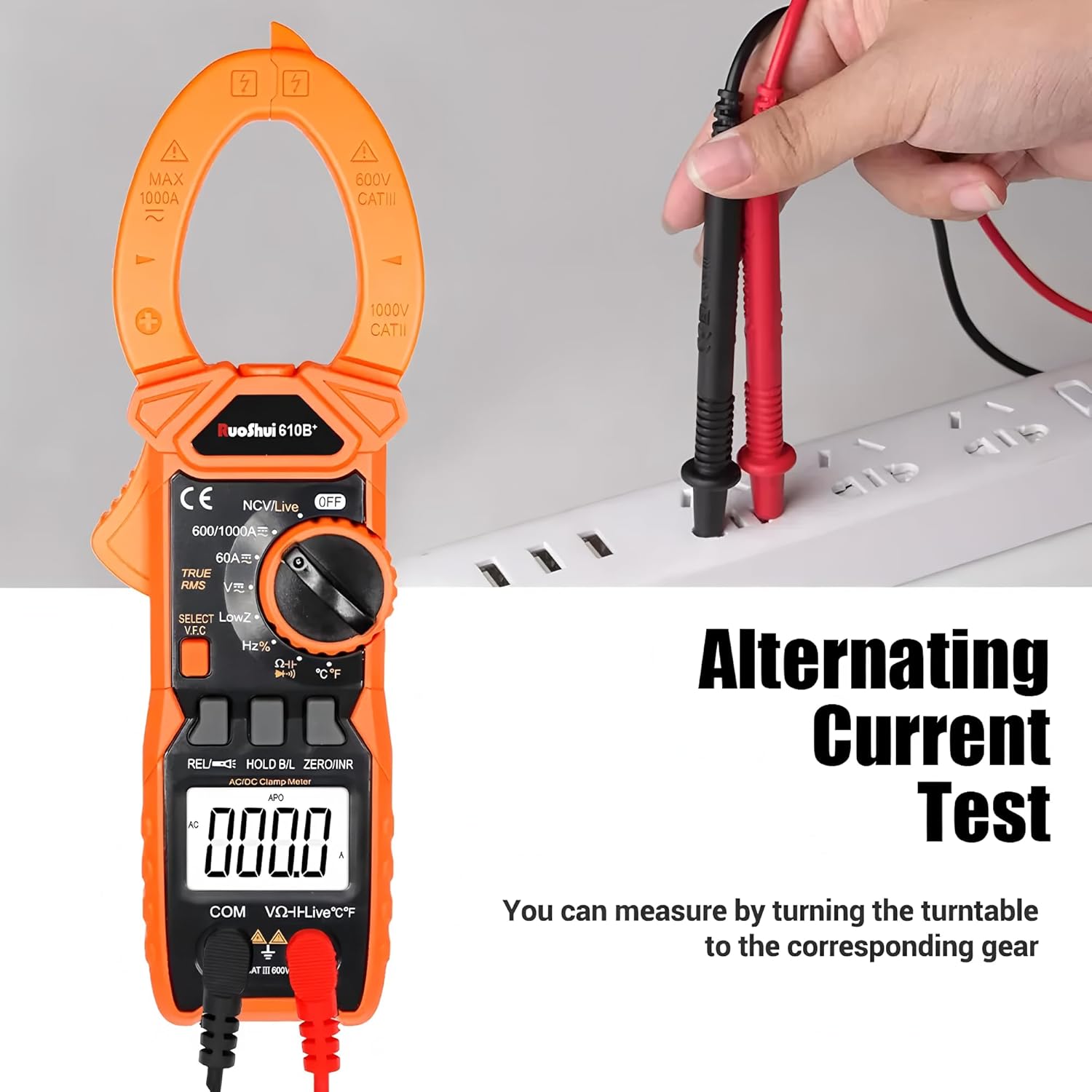
Illustration of how to perform an Alternating Current (AC) test using the clamp meter by clamping around a live wire.
- Set the Function Range Knob to the 'A' position (AC current).
- Sakatu clamp head trigger to open the clamp masailezurra.
- Zirkuituko eroale bakarra sartu cl-aren barruanamp masailezurra. Ziurtatu masailezurra guztiz itxita dagoela.
- Irakurri uneko balioa LCD pantailan.
- DC Current (DCA) Measurement (using Clamp):
- Set the Function Range Knob to the 'A' position.
- Press the 'SELECT' button to switch to DC current mode.
- Press the 'ZERO/INR' button to zero the display before measurement.
- Ireki clamp jaw and enclose only one conductor of the circuit.
- Irakurri uneko balioa LCD pantailan.
- Resistance (Ω) Measurement:
- Set the Function Range Knob to the 'Ω' position.
- Sartu proba-kable gorria 'VΩHz' konektorean eta proba-kable beltza 'COM' konektorean.
- Ziurtatu probatzen ari den zirkuitua edo osagaia desenergizatuta dagoela.
- Konektatu proba-kableak osagaiaren artean erresistentzia neurtzeko.
- Irakurri erresistentziaren balioa LCD pantailan.
- Jarraitasun proba:
- Set the Function Range Knob to the 'Ω' position.
- Press the 'SELECT' button until the continuity symbol (buzzer icon) appears.
- Sartu proba-kable gorria 'VΩHz' konektorean eta proba-kable beltza 'COM' konektorean.
- Konektatu proba-kableak zirkuituan edo osagaian zehar.
- If resistance is below approximately 50Ω, the buzzer will sound, indicating continuity.
- Diodo proba:
- Set the Function Range Knob to the 'Ω' position.
- Press the 'SELECT' button until the diode symbol appears.
- Sartu proba-kable gorria 'VΩHz' konektorean eta proba-kable beltza 'COM' konektorean.
- Konektatu proba-kable gorria diodoaren anodora eta proba-kable beltza katodora.
- Irakurri aurrerako liburukiatage drop on the display. Reverse the leads to check for open circuit (OL).
- Frequency (Hz) / Duty Cycle (%) Measurement:
- Set the Function Range Knob to the 'Hz%' position.
- Press the 'SELECT' button to toggle between Frequency and Duty Cycle.
- Sartu proba-kable gorria 'VΩHz' konektorean eta proba-kable beltza 'COM' konektorean.
- Connect the test leads in parallel to the signal source.
- Irakurri maiztasuna edo betebehar-zikloaren balioa LCD pantailan.
- Kontaktu gabeko boltage (NCV) Detekzioa:
- Set the Function Range Knob to the 'NCV/Live' position.
- Ekarri cl-aren goialdeaamp neurgailua eroale bizi baten ondoan.
- The meter will emit an audible beep and the NCV indicator light will flash if AC voltage detektatzen da.
- Kable biziaren detekzioa:
- Set the Function Range Knob to the 'NCV/Live' position.
- Press the 'SELECT' button to switch to Live mode.
- Insert the red test lead into the 'VΩHz' jack. The black test lead is not used for this function.
- Touch the red test lead to the wire or terminal to be tested.
- If a live wire is detected, the display will show 'LIVE' and an audible alarm will sound.
- VFC (Variable Frequency Control) Measurement:
- Set the Function Range Knob to the 'V' position.
- Press the 'SELECT' button until 'VFC' appears on the display.
- Connect the test leads to the variable frequency signal source.
- The meter will measure the true RMS voltage of the variable frequency signal.
- INRUSH Current Measurement:
- Set the Function Range Knob to the 'A' position (AC current).
- Press the 'ZERO/INR' button to activate Inrush mode. 'INRUSH' will appear on the display.
- Ireki clamp jaw and enclose the conductor of the motor or load.
- Start the motor or load. The meter will capture the peak inrush current.
- Datuak gordetzea:
- During any measurement, press the 'HOLD/B.L.' button briefly to freeze the current reading on the display. 'HOLD' will appear.
- Press the button again to release the data hold function.

Visual summary of key features including NCV, Backlit display, Flashlight, Data hold, Auto range, Automatic shut-down, 5999 Digital Display, and Fire Wire Detection (Live).
6. Mantentzea
6.1 Garbiketa
To maintain the accuracy and longevity of your meter:
- Garbitu kasua iragarkiarekinamp oihala eta detergente leuna. Ez erabili urratzaileak edo disolbatzaileak.
- Ensure the meter is completely dry before use.
6.2 Bateria ordezkatzea
Refer to Section 4.1 for detailed instructions on battery replacement. Always replace both batteries at the same time with new ones of the same type (1.5V AAA).
6.3 Biltegiratzea
- Remove the batteries if the meter is not used for an extended period (e.g., more than one month) to prevent battery leakage and damage to the meter.
- Gorde neurgailua leku fresko eta lehor batean, eguzki-argitik eta muturreko tenperaturetatik babestuta.
- Use the provided cloth bag for protection during storage and transport.
Contents of the RuoShui 610B+ package, including the clamp meter, packing box, product manual, cloth bag, test leads, and temperature probe.
7. Arazoak
If you encounter issues with your RuoShui 610B+ Digital Clamp Neurgailuari dagokionez, jo ezazu honako arazo eta irtenbide ohikoenei:
- Neurgailua ez da pizten:
- Check if the Function Range Knob is turned to an 'ON' position.
- Verify that the batteries are correctly installed with proper polarity.
- Ordeztu bateriak berriekin agortuta badaude.
- No reading or 'OL' (Overload) displayed:
- Ensure test leads are securely connected to the correct input jacks.
- Confirm the Function Range Knob is set to the appropriate measurement function and range.
- If 'OL' is displayed, the measured value exceeds the selected range. Switch to a higher range if available, or verify the circuit is within the meter's capabilities.
- For current measurements, ensure only one conductor is enclosed within the clamp masailezurra.
- Irakurketa zehaztugabeak:
- Check battery level; low batteries can affect accuracy.
- Ensure test leads are not damaged and have good contact.
- Verify the meter is operating within its specified environmental conditions (temperature, humidity).
- For DC current, ensure the meter is zeroed before measurement.
- Buzzer does not sound during continuity test:
- Ensure the meter is in continuity mode (buzzer symbol displayed).
- Check if the resistance of the circuit is above the continuity threshold (approx. 50Ω).
8. Zehaztapenak
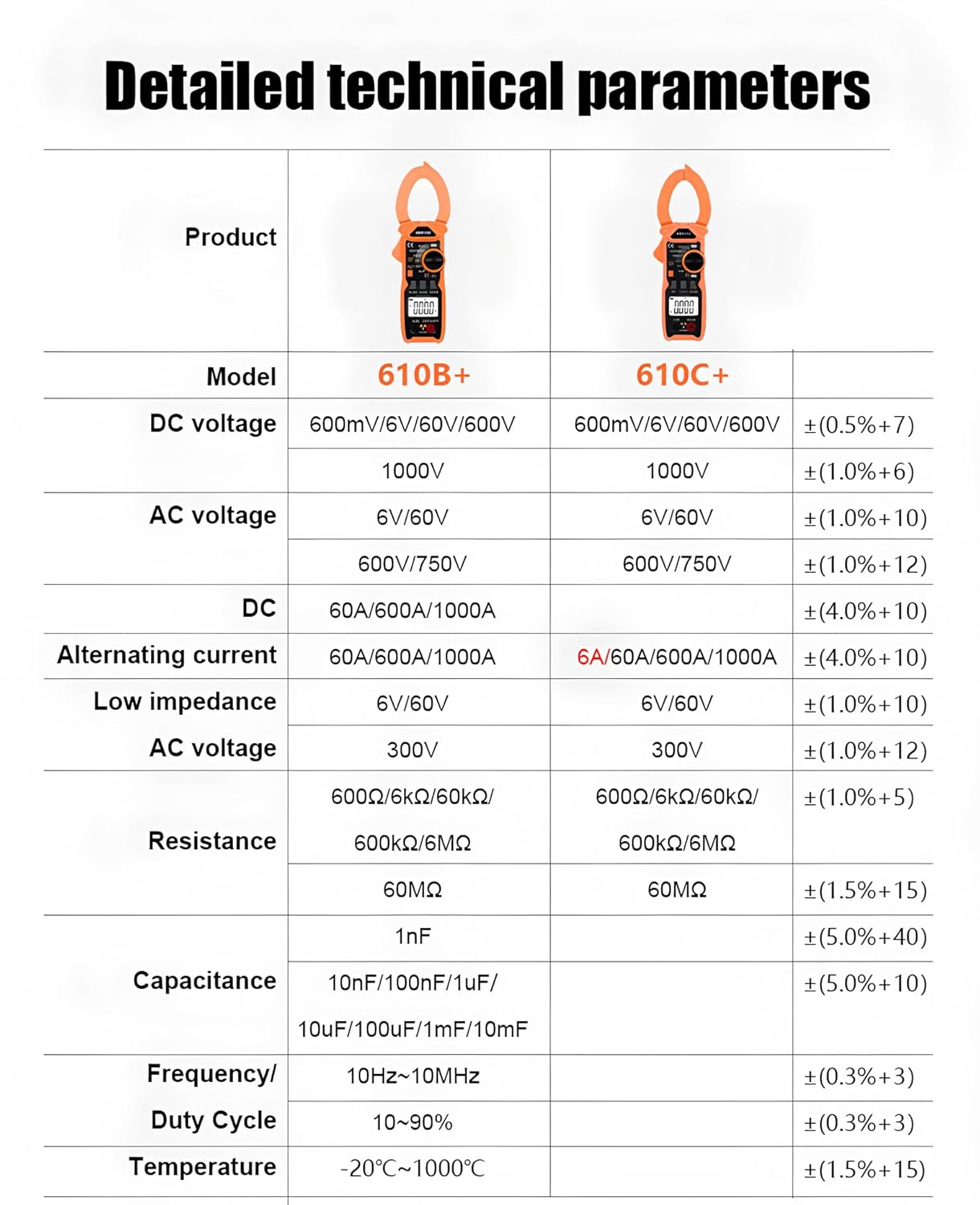
The following table details the technical parameters for the RuoShui 610B+ Digital Clamp Neurgailua.

A comprehensive table outlining the detailed technical specifications for both the RuoShui 610B+ and 610C+ models, covering various measurement ranges and features.
| Parametroa | RuoShui 610B+ | Zehaztasuna |
|---|---|---|
| DC bolumenatage | 600mV/6V/60V/600V/1000V | ±(%0.5+7) |
| AC Boltage | 6V/60V/600V/750V | ±(%1.0+10) |
| Korronte DC | 60A/600A/1000A | ±(%4.0+10) |
| Korronte Alternoa | 60A/600A/1000A | ±(%4.0+10) |
| Low Impedance AC Voltage | 6V/60V/300V | ±(%1.0+10) |
| Erresistentzia | 600Ω/6kΩ/60kΩ/600kΩ/6MΩ/60MΩ | ±(1.0%+5) / ±(1.5%+15) |
| Kapazitatea | 10nF/100nF/1uF/10uF/100uF/1mF/10mF | ±(5.0%+40) / ±(5.0%+10) |
| Maiztasuna | 10Hz ~ 10MHz | ±(%0.3+3) |
| Betebehar Zikloa | % 10 ~ 90 | ±(%0.3+3) |
| Tenperatura | -20 ℃ ~ 1000 ℃ | ±(%1.5+15) |
| Bistaratzeko metodoa | LCD pantaila | |
| Gehienezko pantaila | 5999 zenbaketa | |
| Diodoa | ✓ | |
| Datuen atxikipena | ✓ | |
| NCV | ✓ | |
| Fire Detection (Live) | ✓ | |
| Vol. Baxuatage Abisua | ✓ | |
| Flashlight Lighting | ✓ | |
| True Effective Value (True RMS) | ✓ | |
| SUSTAPENA | 610B+ only | |
| VFC | 610B+ only | |
| Laneko Tenperatura eta Hezetasuna | (0~40)℃ <80% | |
| Biltegiratze-tenperatura eta hezetasuna | (-10~50)℃ <80% | |
| Itzalketa automatikoa | 15 minutu inguru | |
| Gain-eremuaren pantaila | The highest digit shows OL | |
| Unitatearen sinboloa | ✓ | |
| Open Jaws | 40 mm | |
| Sarrerako Erresistentzia | 10 MΩ | |
| Sampling Tarifa | 3 aldiz/seg | |
| Elikatze Hornidura | Bi AAA bateria | |
9. Bermea eta Laguntza
For warranty information, technical support, or service inquiries regarding your RuoShui 610B+ Digital Clamp Meter, please refer to the documentation provided with your purchase or contact the manufacturer directly through their official channels. Keep your purchase receipt as proof of purchase for warranty claims.


