1. Sarrera
This user manual provides comprehensive instructions for the Jedel KL69 60% Mechanical Gaming Keyboard. It covers setup, operation, maintenance, troubleshooting, and detailed specifications to help you maximize your keyboard's performance and lifespan. The Jedel KL69 is a compact, wired mechanical keyboard featuring a 61-key layout, rainbow LED backlighting, and durable blue mechanical switches, designed for an optimal gaming and typing experience.

Figure 1: Jedel KL69 60% Mechanical Gaming Keyboard. This image displays the compact keyboard with its vibrant rainbow LED backlighting and black/red keycap design.
2. Konfigurazioa
The Jedel KL69 keyboard is designed for simple plug-and-play setup. Follow these steps to connect your keyboard:
- Deskonprimitu teklatua eta bere USB kablea paketetik.
- Locate an available USB Type-A port on your computer (desktop or laptop).
- Insert the USB connector of the keyboard cable firmly into the USB port on your computer.
- Your operating system (Windows, Android, Linux, etc.) will automatically detect and install the necessary drivers. This process may take a few moments.
- Once the drivers are installed, the keyboard's LED backlight will illuminate, indicating it is ready for use.

Figure 2: Connecting the Jedel KL69 Keyboard. This image shows the keyboard with its attached USB cable, ready for connection to a computer.
3. Funtzionamendu-argibideak
3.1 Ezaugarri nagusiak
- % 60ko diseinu trinkoa: The KL69 features a space-saving 61-key layout, ideal for gaming setups and smaller desks.
- Arabic/English Layout: Keycaps are designed with both Arabic and English characters for versatile use.
- Etengailu mekaniko urdinak: Provides tactile feedback and an audible click, preferred by many for typing and gaming precision.
- Ortzadarraren LED atzeko argia: Offers vibrant, customizable lighting effects to enhance your experience.
- Tekla bikoitzak: Kondairak inoiz ez desagertzen ziurtatzen du, iraunkortasun luzea eskainiz.
- Ghosting-aren aurkako sistema osoa: All 61 keys support N-key rollover, ensuring every keystroke is registered accurately, even during intense gaming sessions.
- USB konexio kableatua: Provides a stable and reliable connection with minimal latency.

3 Irudia: Gainetikview of the 60% Mechanical Gaming Keyboard. This image emphasizes the compact size and key features like RGB backlight, ABS double injection keycaps, 50 million switch lifespan, and ergonomic design.
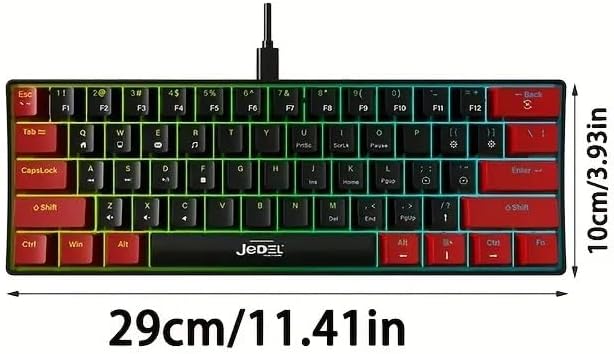
Figure 4: Blue Switches and Double-Shot Keycaps. This close-up view shows the transparent housing of the blue mechanical switches and the durable double-shot keycaps, designed for fast response and longevity.
3.2 Lighting Adjustment Function
The Jedel KL69 keyboard offers 10 distinct rainbow LED lighting modes. Use the following key combinations to adjust the lighting effects:
- Fn + \: Switch between 19 stunning LED lighting effects. (Note: The product description states 10 modes, while the image indicates 19. Please refer to the image for the most accurate number of effects.)
- Fn + [: Murriztu atzeko argiaren distira.
- Fn + ]: Handitu atzeko argiaren distira.
- Fn + ": Argiztapen efektuaren abiadura moteldu.
- Fn + .: Argiztapen efektuaren abiadura bizkortu.

Figure 5: Introduction to Light Adjustment Functions. This diagram illustrates the Fn key combinations for controlling LED lighting effects, brightness, and speed.
3.3 Special Key Functions
The 60% layout utilizes the Function (Fn) key to access secondary functions of certain keys. Refer to the keycap legends for specific Fn combinations. For example, multimedia controls or F-keys (F1-F12) are typically accessed by holding down the Fn key and pressing the corresponding key.
4. Mantentzea
Proper maintenance will ensure the longevity and optimal performance of your Jedel KL69 keyboard. Follow these guidelines for cleaning and care:
- Ohiko garbiketa: Erabili eskuila leun bat edo aire konprimatua teklak estalkien arteko hautsa eta hondakinak kentzeko.
- Tekla-tapoien garbiketa: For deeper cleaning, you can carefully remove keycaps using a keycap puller (if included or purchased separately). Clean the keycaps with a damp cloth and mild soap, then ensure they are completely dry before reattaching.
- Gainazalaren garbiketa: Garbitu teklatuaren gainazala zapi leun eta apur batekinamp oihal. Saihestu produktu kimiko gogorrak edo material urratzaileak erabiltzea.
- Isuri likidoak: In case of a liquid spill, immediately unplug the keyboard from your computer. Invert the keyboard to drain as much liquid as possible. Allow it to air dry completely for at least 24-48 hours before plugging it back in. Do not use a hairdryer as excessive heat can damage components.
- Biltegiratzea: Denbora luzez erabiltzen ez baduzu, gorde teklatua leku lehor eta hautsik gabeko batean.
5. Arazoak
If you encounter issues with your Jedel KL69 keyboard, refer to the following common problems and solutions:
| Arazoa | Kausa posiblea | Irtenbidea |
|---|---|---|
| Teklatuak ez du erantzuten. | USB konexio soltea, USB ataka akastuna, gidariaren arazoa. |
|
| LED backlight is not working or is dim. | Argiztapen modua itzalita, distira baxuegia, software gatazka. |
|
| Giltza batzuk ez dirabiltzen. | Dust/debris under keycap, switch malfunction, software issue. |
|
6. Zehaztapenak
Below are the detailed technical specifications for the Jedel KL69 Mechanical Gaming Keyboard:
| Ezaugarri | Xehetasuna |
|---|---|
| Modelo zenbakia | KL69 |
| Marka Izena | Jedel |
| Teklatuaren deskribapena | Mekanikoa |
| Gako kopurua | 61 |
| Konektibitate Teknologia | USB (kablea) |
| Ezaugarri bereziak | Backlit (Rainbow LED) |
| Kolorea | Beltza / Gorria |
| Gailu bateragarriak | Desktop, Laptop (Windows, Android, etc.) |
| Gomendatutako Erabilerak | Jolasa |
| Materiala | Akrilonitrilo Butadieno Estirenoa (ABS) |
| Dakarten osagaiak | USB kablea |
| Gakoaren bizi-iraupena | 50 Milioi Prentsa |
| Teklatuaren neurriak (L x Z x A) | 290 x 101 x 38 mm (11.41 x 3.93 x 1.49 hazbete) |
| Pisua | Approx. 404 ±5 grams |
| Ghostingaren aurkakoa | N-teklaren iraulketa osoa |

Figure 6: Keyboard Dimensions. This image provides a visual representation of the keyboard's length (29 cm / 11.41 in) and width (10 cm / 3.93 in).
7. Bermea eta Laguntza
For warranty information and technical support, please refer to the documentation provided with your purchase or visit the official Jedel webgunea. Gorde erosketaren egiaztagiria berme-erreklamazioetarako.


