1. Sarrera
The BANNER ENGINEERING K100 Pro Daylight Visible Beacon is a robust industrial indicator designed for clear visual and audible signaling in various environments. It features a single yellow illumination color, high visibility in daylight, and a durable polycarbonate housing with IP66 and IP69K ratings for harsh conditions.
Aurreikusitako erabilera: This beacon is suitable for industrial applications requiring status indication, safety warnings, or process signaling.
2. Segurtasun informazioa
Segurtasun neurriak:
- Deskonektatu energia instalazioa edo mantentze-lanak egin aurretik.
- Ziurtatu bolumen egokiatage (12-48 VDC) is supplied to prevent damage.
- Installation should be performed by qualified personnel in accordance with local electrical codes and safety standards.
- Do not open or modify the device; doing so voids the warranty and may cause hazards.
- Saihestu begiak argi-iturriarekiko esposizio zuzena funtzionatzen ari den bitartean.
3. Paketearen edukia
Zer dago Kutxan:
- 1x K100 Pro Daylight Visible Beacon (Model K100PBLYAQ)
- (Additional mounting hardware or documentation may be included depending on the specific product variant.)
4. Zehaztapenak
| Ezaugarri | Xehetasuna |
|---|---|
| Fabrikatzailea | BANNER ENGINEERING |
| Zati zenbakia | K100PBLYAQ |
| Argiztapen-kolorea | Horia |
| Kolore kopurua | 1 Kolorea |
| Muntatzeko estiloa | Oinarrizko mendia |
| Amaierako estiloa | 5-pin M12 Integral QD |
| Sarrera mota | Bimodala |
| liburukiatage Balorazioa | 12 VDCtik 48 VDCra |
| IP balorazioa | IP66, IP69K |
| Etxebizitza Materiala | Polikarbonatoa (PC) |
| Ezaugarriak | Daylight Visible, Audible |
| Egungo balorazioa | 60 mA |
| Diametroa | 100 mm |
| Altuera | 134.8 mm |
| Etxebizitza Kolorea | Beltza |
| Lamp Mota | LED |
| Modua | Bakarra |
| Segmentu kopurua | 1 Segmentua |
| Elementuaren pisua | 6.99 kilo |
5. Konfigurazioa eta instalazioa
5.1. Muntaketa
The K100 Pro Beacon features a base mount design, allowing for secure attachment to a flat surface or compatible mounting bracket.
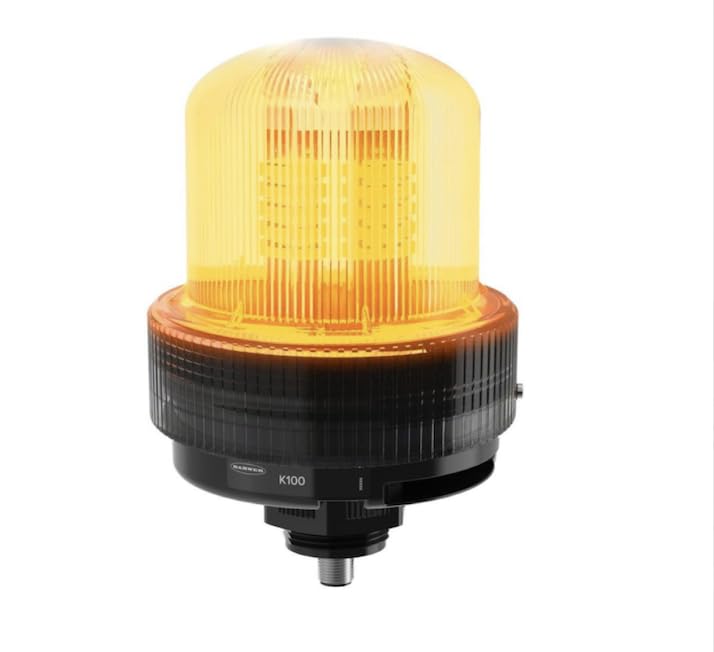
An image showing the BANNER ENGINEERING K100 Pro Daylight Visible Beacon. The beacon features a black base with a clear, ribbed yellow polycarbonate dome. The internal LED array is visible, emitting a bright yellow light. The base has 'BANNER' and 'K100' markings. A threaded metal connector extends from the bottom for mounting.
- Select a suitable mounting location that provides clear visibility and is free from excessive vibration.
- Secure the beacon's base using appropriate fasteners (not included) through the designated mounting holes.
- Ensure the beacon is firmly attached to prevent movement during operation.
5.2. Konexio elektrikoa
The beacon uses a 5-pin M12 integral Quick Disconnect (QD) for electrical connection. Refer to the product's specific wiring diagram for pin assignments.
- Identify the M12 connector pins for power input (12-48 VDC) and any control signals for the audible function.
- Connect the power supply to the appropriate pins, observing correct polarity.
- If utilizing the audible function, connect the control signal as per the wiring diagram.
- Ensure all connections are secure and properly insulated to prevent short circuits or electrical hazards.
6. Funtzionamendu-argibideak
6.1. Piztu/Itzaltzea
Once properly installed and wired, apply the rated voltage (12-48 VDC) to the beacon. The yellow LED illumination will activate immediately.
- To turn the beacon off, remove the power supply.
6.2. Audible Function
The beacon includes an integrated audible alarm. The activation of the audible signal is typically controlled via a separate input pin on the M12 connector or through the main power input, depending on the specific model configuration.
- Refer to the detailed wiring diagram provided with your product for specific instructions on activating and controlling the audible signal.
7. Mantentzea
7.1. Garbiketa
- Regularly clean the polycarbonate housing with a soft, damp oihal.
- Do not use abrasive cleaners, solvents, or harsh chemicals, as these can damage the housing material and affect visibility.
7.2. Ikuskapena
- Periodically inspect the beacon for any signs of physical damage, such as cracks in the housing or loose components.
- Check electrical connections for corrosion or wear, ensuring the M12 connector remains securely fastened.
- Verify that the light output and audible signal (if applicable) are functioning correctly.
8. Arazoak
Ohiko arazoak eta irtenbideak:
| Gaia | Irtenbide posiblea |
|---|---|
| Argiztapenik gabe | Egiaztatu elikadura-iturri boltage (12-48 VDC), verify wiring connections, and ensure correct polarity. |
| No Audible Signal | Verify wiring for the audible function, ensure the control signal is active, and check product documentation for specific activation methods. |
| Etengabeko funtzionamendua | Inspect for loose electrical connections, damaged wiring, or power supply fluctuations. |
| Reduced Light Output | Clean the polycarbonate dome. Ensure the power supply voltage zehaztutako tartean dago. |
If troubleshooting steps do not resolve the issue, contact BANNER ENGINEERING customer support.
9. Bermea eta Laguntza
9.1. Bermearen informazioa
For detailed warranty terms and conditions applicable to the K100 Pro Daylight Visible Beacon, please refer to the official BANNER ENGINEERING webgunea edo erosketarekin batera datorren berme-dokumentazioa.
9.2. Bezeroarentzako arreta
For technical assistance, product inquiries, or to report issues, please contact BANNER ENGINEERING customer support through their official channels. Contact information can typically be found on their webgunea.


