1. Sarrera
Thank you for choosing the HAARAY Solar Security Light Model JY2423. This manual provides essential information for the safe and efficient installation, operation, and maintenance of your new solar-powered security light. Please read these instructions thoroughly before use and retain them for future reference.
2. Segurtasun informazioa
- Ziurtatu eguzki-panela egunean gutxienez 6-8 orduz eguzki-argia zuzenean jasotzen duen leku batean instalatuta dagoela kargatzeko eraginkortasuna maximizatzeko.
- Do not disassemble, modify, or attempt to repair the product yourself. Contact qualified personnel for service.
- Produktua sutik edo tenperatura altuetatik urrun eduki.
- Saihestu begiak argi-iturriarekiko zuzenean kontaktuan jartzea, oso distiratsua baita.
- Tokiko araudien arabera bota bateriak eta osagai elektronikoak.
- Produktu hau IP65 iragazgaitza da, kanpoan erabiltzeko egokia, baina saihestu uretan murgiltzea.
3. Paketearen edukia
Instalatu aurretik, egiaztatu osagai guztiak daudela:
- Solar Security Light (with dual adjustable heads and motion sensor) x 1
- Solar Panel with 16.4ft Cable x 1
- Mounting Hardware (Wall Plugs x 8, Screws x 8, Wall Brackets x 2)
- Argibide eskuliburua x 1

Figure 3.1: Package Contents and Easy Installation Diagram
4. Produktua amaitu daview
4.1 Ezaugarri nagusiak
- Eguzki-energia: Energy-efficient charging via a high-efficiency polycrystalline silicon solar panel.
- Mugimendu-sentsorea: High-sensitivity motion detection with a 120° detection angle and up to 39 feet range.
- Buru bikoitz erregulagarriak: Two rotatable light heads provide wide and customizable illumination coverage.
- Diseinu bereizgarria: LED panels and solar panel are separable with a 16.4ft cable for flexible installation indoors or outdoors.
- 3 argiztapen moduak: Offers two motion-activated modes and one stay-on mode for varied lighting needs.
- Tenporizadore erregulagarria: Lighting duration can be set from 5 seconds to 1 minute.
- Egun/Gau Sentsorea: Adjustable knob to select operation during night only or day and night.
- Eraikuntza iraunkorra: IP65 waterproof rating, frost-resistant, and heat-resistant ABS material for reliable performance in various weather conditions.
4.2 Osagaiak
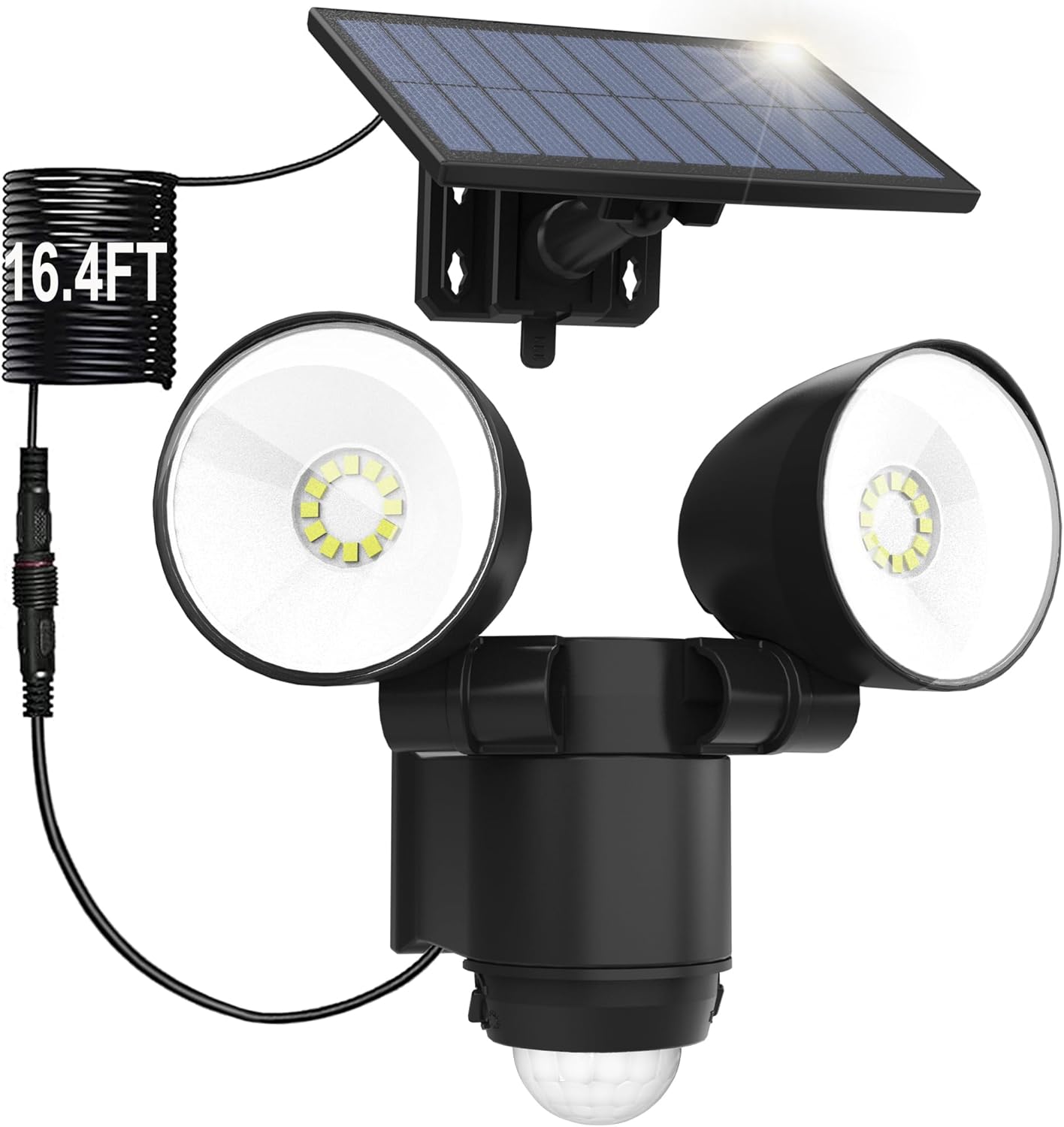
Figure 4.1: Main Product View - Solar Security Light and Solar Panel

Figure 4.2: High-Efficiency Heat Dissipation Design

Figure 4.3: Polycrystalline Silicon Solar Panel Technology
5. Instalazioa
The HAARAY Solar Security Light is designed for easy installation. Follow these steps:
- Aukeratu kokapena: Select a mounting location for the solar panel that receives maximum direct sunlight throughout the day (6-8 hours recommended). The light unit can be installed separately, up to 16.4 feet away from the solar panel, thanks to the extended cable.
- Eguzki-panela muntatu: Use the provided wall brackets, screws, and wall plugs to securely mount the solar panel. Adjust its angle to face the sun directly.
- Argi-unitatea muntatu: Attach the light unit to your desired location (wall, fence, etc.) using the remaining mounting hardware. Ensure the motion sensor is positioned to cover the desired detection area.
- Konektatu kablea: Connect the 16.4ft cable from the solar panel to the light unit. Ensure the connection is secure.
- Argi-buruak doitu: Manually adjust the two light heads to direct illumination where needed. Each head can be rotated 90 degrees vertically and 180 degrees horizontally.

Figure 5.1: Separable Design for Flexible Installation

Figure 5.2: Adjustable Dual Heads and Motion Detection Area
6. Funtzionamendu-argibideak
The light unit features a Day/Night knob and a Timer knob for customization.
6.1 Day/Night Knob Adjustment
This knob controls when the motion sensor activates the light:
- Eguzkiaren ikonoa: The sensor will activate the light during both day and night when movement is detected.
- Ilargiaren ikonoa: The sensor will activate the light only at dusk or night when movement is detected.

Figure 6.1: Day/Night Knob Settings
6.2 Timer Knob Adjustment
The Timer knob adjusts how long the light stays on after motion is detected. It can be set from 5 seconds to 60 seconds.
- Rotate towards '-' for shorter duration (minimum 5 seconds).
- Rotate towards '+' for longer duration (maximum 60 seconds).

Figure 6.2: Timer Knob Adjustment
6.3 Argiztapen moduak
The HAARAY Solar Security Light offers three distinct lighting modes:
- Mode 1 (Motion Activated - Bright): The light remains OFF until motion is detected. Upon detection, it illuminates at 100% brightness and turns OFF approximately 25 seconds after no further motion is detected.
- Mode 2 (Stay On All Night): The light remains at 30% brightness continuously throughout the night, regardless of motion detection.
- Mode 3 (Dim to Bright Motion Activated): The light stays on at 10% brightness. When motion is detected, it switches to 100% brightness and returns to 10% brightness approximately 25 seconds after no further motion is detected.

Figure 6.3: Mode 1 Operation

Figure 6.4: Mode 2 Operation

Figure 6.5: Mode 3 Operation
7. Mantentzea
- Eguzki-panela garbitu: Garbitu eguzki-panela aldizka zapi leun eta lehor batekinamp zapi batekin hautsa, zikinkeria edo hondakinak kentzeko. Panel garbi batek kargatzeko eraginkortasun optimoa bermatzen du.
- Ikuskatu konexioak: Periodically check the cable connection between the solar panel and the light unit to ensure it remains secure and free from damage.
- Garbitu oztopoak: Ensure no trees, buildings, or other objects obstruct direct sunlight from reaching the solar panel.
- Bateria zaintzea: The internal battery is designed for long-term use. If the light's performance significantly degrades over time, it may indicate the battery needs replacement by a qualified technician.

Figure 7.1: Weather Resistance of the Solar Security Light
8. Arazoak
| Arazoa | Kausa posiblea | Irtenbidea |
|---|---|---|
| Argia ez da gauez pizten. |
|
|
| Argia etengabe piztuta dago edo keinuka ari da. |
|
|
| Motion sensor range is poor. |
|
|
9. Zehaztapenak
| Ezaugarri | Xehetasuna |
|---|---|
| Marka | HARAY |
| Modelo zenbakia | JY2423 |
| Materiala | Akrilonitrilo Butadieno Estirenoa (ABS) |
| Argi Kolorea | Zuria (7000K) |
| Energia iturria | Eguzki-energia |
| Mugimendua detektatzeko angelua | 120° |
| Mugimendua detektatzeko tartea | Gehienez 39 oin |
| Cable Length (Solar Panel to Light) | 16.4 oin |
| Adjustable Lighting Time | 5 segundotik 60 segundora |
| Uraren Erresistentzia Balorazioa | IP65 |
| Bateria | D bateria 1 (barne) |
| Produktuaren neurriak | 5 cm-ko luzera x 6 cm-ko zabalera x 7 cm-ko altuera (gutxi gorabehera) |
| Elementuaren pisua | 16 ontza (kilo 1) |
10. Bermea eta Laguntza
HAARAY products come with an extended warranty. For specific warranty details, please refer to the warranty card included in your package or contact HAARAY customer support.
If you encounter any issues or have questions regarding your HAARAY Solar Security Light, please contact our customer support team:
- Lineako laguntza: Visit the official HAARAY store on Amazon: HAARAY Amazon Store
- Posta elektronikoko laguntza: Refer to your product packaging or warranty card for direct email contact information.
Please have your model number (JY2423) and purchase date ready when contacting support.
