1. Sarrera
Thank you for choosing the Ewent EW3295 Backlit Wireless Keyboard. This full-size keyboard offers versatile connectivity options, including Bluetooth 5.0 and 2.4GHz wireless, allowing you to connect up to three devices simultaneously. Its slim design, silent keys, and adjustable backlight provide a comfortable and efficient typing experience. This manual provides detailed instructions for setup, operation, and maintenance to ensure optimal performance of your keyboard.

Figure 1.1: Slim and sturdy design of the EW3295 keyboard.
2. Ezaugarri nagusiak
- Wireless Multi-Device Connection: Connect up to 3 devices simultaneously via Bluetooth 5.0 (x2) or wireless 2.4 GHz. Easily switch between devices with just one button.
- Atzeko argi erregulagarria: The keyboard's backlight is dimmable and can be turned off completely, ideal for various lighting conditions.
- Flat & Quiet Design: Flat, silent keys ensure a comfortable and low-noise typing experience, suitable for quiet environments.
- 12 Multimedia Teklak: Quick access to functions like volume control, email, and other operations.
- Iraupen luzeko bateria kargagarria: Equipped with a 300mAh lithium battery and intelligent energy-saving function for extended use.
- Bateragarritasun zabala: Compatible with Windows (XP, 7, 8.1, 10, 11) and Android, suitable for PCs, laptops, and tablets.
- Diseinu sendoa eta iraunkorra: Made of high-density polycarbonate, lightweight yet durable, with a compact design.
- Italian Layout: Features an Italian QWERTY keyboard layout.
3. Paketearen edukia
Mesedez, egiaztatu paketearen edukia kutxa irekitzean:
- Ewent EW3295 Backlit Wireless Keyboard
- USB-A 2.4GHz Wireless Receiver
- USB-C USB-A kargatzeko kablea
- Erabiltzailearen eskuliburua (dokumentu hau)
4. Konfigurazio gida
4.1 Teklatua kargatzea
The EW3295 keyboard is equipped with a built-in rechargeable 300mAh lithium battery. Before first use, it is recommended to fully charge the keyboard.
- Locate the USB Type-C charging port on the rear panel of the keyboard.
- Connect one end of the provided USB-C charging cable to the keyboard's USB-C port.
- Connect the other end of the USB-A cable to a USB power source (e.g., computer USB port, USB wall adapter).
- The charging indicator light (if present) will illuminate during charging and turn off when fully charged. A full charge takes less than 1 hour and provides over 1 month of use.

Figure 4.1: Rear panel of the keyboard with charging port and receiver compartment.
4.2 Teklatua konektatzea
The EW3295 keyboard supports three connection modes: 2.4GHz wireless and two Bluetooth 5.0 channels (BT1, BT2). You can connect up to three devices and switch between them.
4.2.1 2.4 GHz-ko haririk gabeko konexioa
- Locate the USB-A wireless receiver, typically stored in a compartment on the rear panel of the keyboard.
- Plug the USB-A receiver into an available USB port on your computer or device.
- Sakatu fn+1 keys on the keyboard to switch to 2.4GHz mode. The indicator light for channel 1 will illuminate.
- Teklatua automatikoki konektatu beharko litzateke zure gailura.

Figure 4.2: Ewent EW3295 keyboard and its USB wireless receiver.
4.2.2 Bluetooth konexioa (BT1 / BT2)
- Sakatu fn+2 keys to select Bluetooth channel 1 (BT1) or fn+3 keys to select Bluetooth channel 2 (BT2). The corresponding indicator light will flash, indicating pairing mode.
- Zure gailuan (ordenagailua, ordenagailu eramangarria, tableta), gaitu Bluetooth-a eta bilatu gailu berriak.
- Select "EW3295" or a similar name from the list of available Bluetooth devices.
- Follow any on-screen prompts to complete the pairing process. Once connected, the indicator light will stop flashing and remain solid.
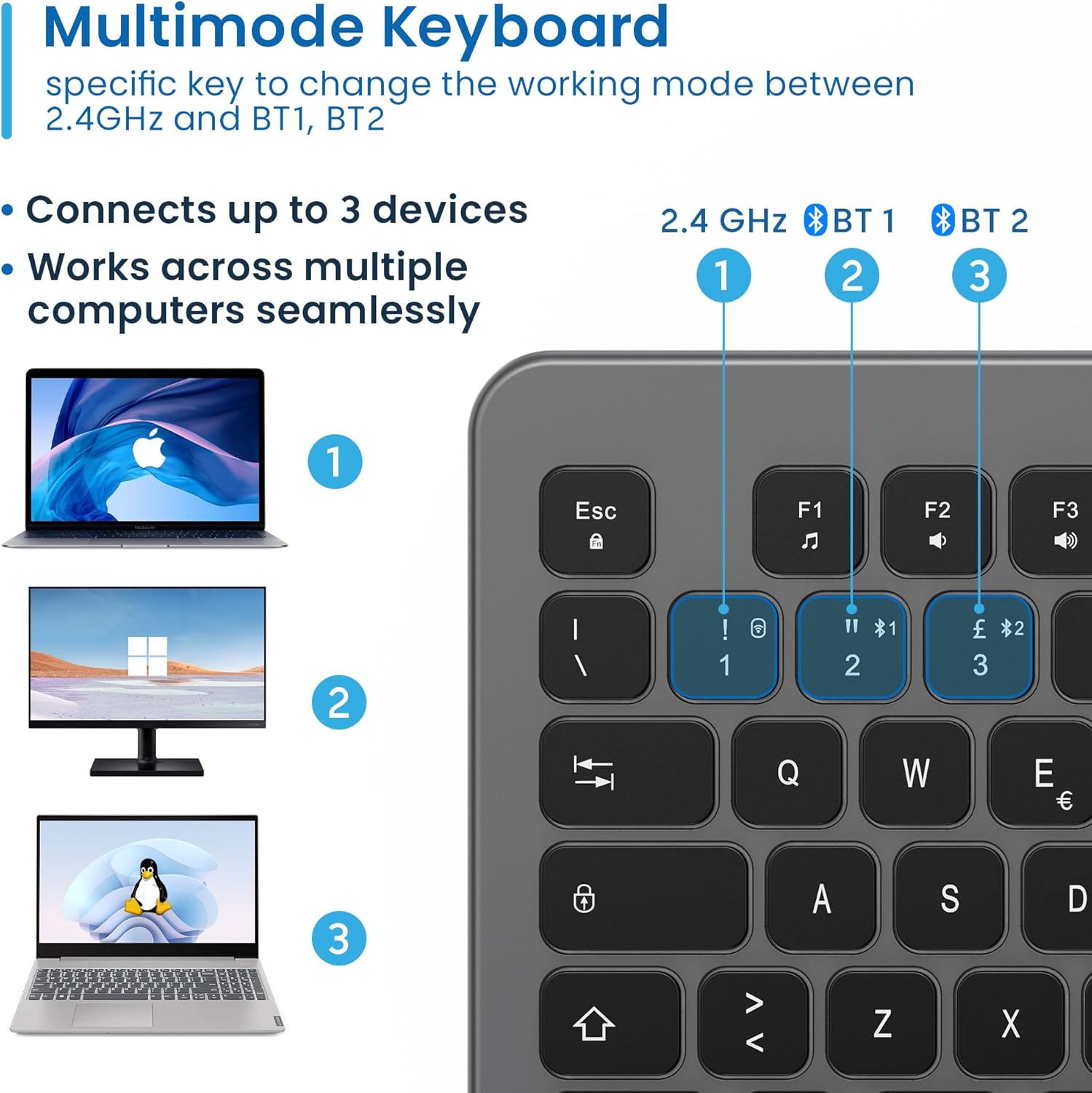
Figure 4.3: Multi-device connectivity options for the EW3295 keyboard.
4.2.3 Konektatutako gailuen artean aldatzea
Once multiple devices are paired, you can easily switch between them:
- Sakatu fn+1 to switch to the 2.4GHz connected device.
- Sakatu fn+2 to switch to the Bluetooth 1 connected device.
- Sakatu fn+3 to switch to the Bluetooth 2 connected device.
5. Funtzionamendu-argibideak
5.1 Oinarrizko idazketa
The EW3295 features a full-size Italian QWERTY layout. Its flat and silent keys provide a comfortable and precise typing experience, reducing noise in quiet environments.

Figure 5.1: Illuminated Italian QWERTY Keyboard Layout.

Figure 5.2: Silent keys for reduced noise.
5.2 Atzeko argiaren kontrola
The keyboard features an adjustable backlight for improved visibility in low-light conditions.
- Atzeko argia ON/OFF: Sakatu Bloke Scorr key (often labeled with a lightbulb icon) to toggle the backlight on or off.
- Backlight Brightness Up: Sakatu Fn + Pag ↑ atzeko argiaren distira handitzeko.
- Backlight Brightness Down: Sakatu Fn + Pag ↓ atzeko argiaren distira murrizteko.
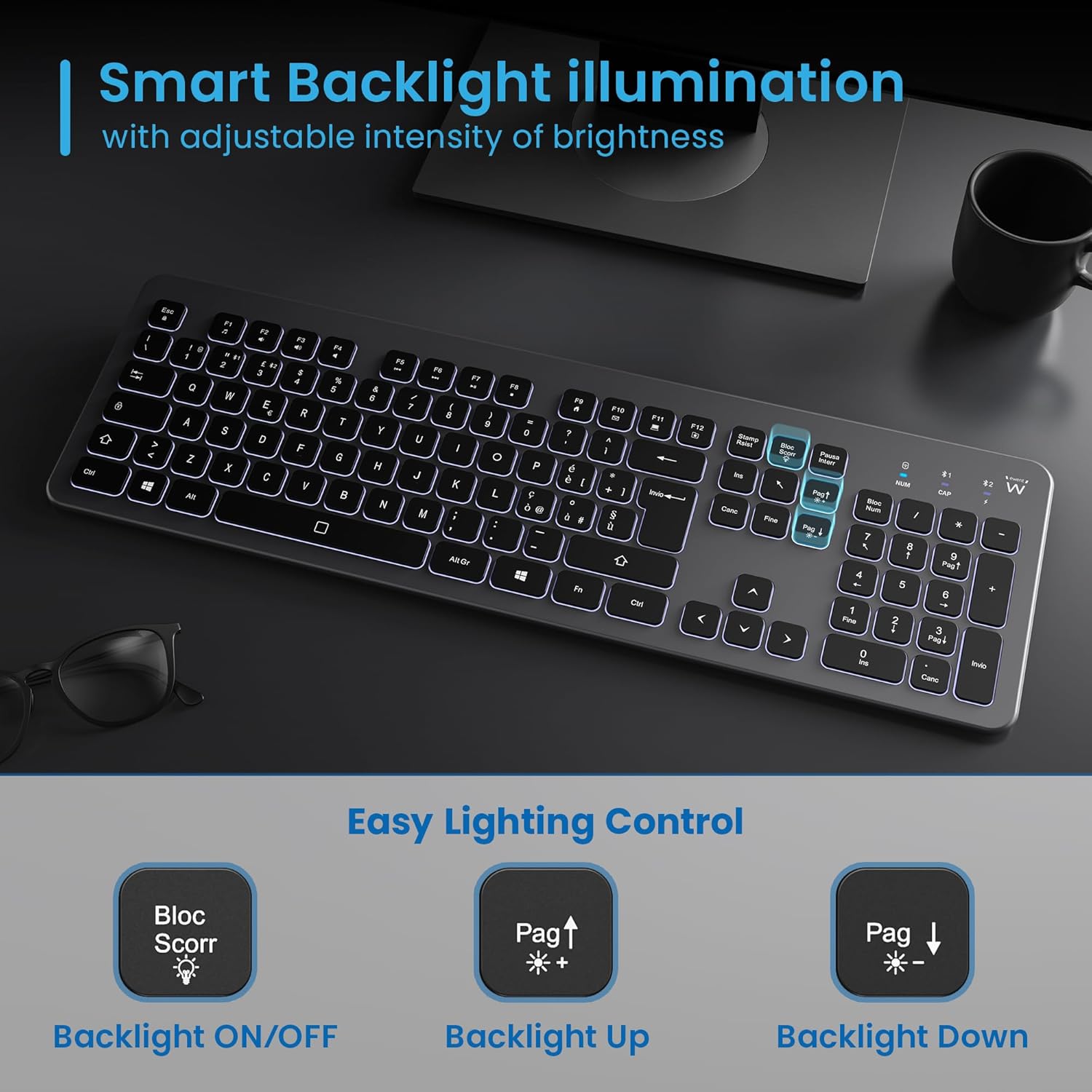
Figure 5.3: Backlight control keys.
5.3 Multimedia teklak
The keyboard includes 12 dedicated multimedia keys (F1-F12) that provide quick access to various functions. To use these functions, press the Fn tekla nahi den F teklarekin batera sakatu.
| Tekla-konbinazioa | Funtzioa |
|---|---|
| Fn + F1 | Multimedia erreproduzitzailea |
| Fn + F2 | Bolumena jaitsi |
| Fn + F3 | Bolumena igo |
| Fn + F4 | Isildu |
| Fn + F5 | Aurreko Pista |
| Fn + F6 | Hurrengo Pista |
| Fn + F7 | Erreproduzitu/Pausatu |
| Fn + F8 | Gelditu |
| Fn + F9 | Hasiera Orria |
| Fn + F10 | Posta elektronikoa |
| Fn + F11 | Nire Ordenagailua |
| Fn + F12 | Kalkulagailua |
6. Mantentzea eta Zainketa
Mantentze egokiak zure teklatuaren iraupena eta errendimendu optimoa bermatzen ditu.
- Garbiketa: Erabili zapi leun, lehor eta lihorik gabeko bat teklatuaren gainazala garbitzeko. Zikinkeria egoskorra bada, garbitu pixka bat.ampGarbitu zapi bat urarekin edo garbitzaile leun eta ez-urratzaile batekin. Saihestu gehiegizko hezetasuna.
- Saihestu likidoak: Do not spill liquids on the keyboard. In case of accidental spills, immediately disconnect the keyboard and allow it to dry completely before re-using.
- Biltegiratzea: Denbora luzez erabiltzen ez duzunean, gorde teklatua leku fresko eta lehor batean, eguzki-argitik eta muturreko tenperaturetatik babestuta.
- Bateria zaintzea: Bateriaren iraupena luzatzeko, saihestu bateria maiz erabat deskargatzea. Kargatu teklatua bateria baxuaren adierazlea agertzen denean.
- Hartzailearen biltegiratzea: When transporting the keyboard, store the USB wireless receiver in its dedicated compartment on the rear panel to prevent loss.
7. Arazoak
If you encounter issues with your EW3295 keyboard, please refer to the following common solutions:
| Arazoa | Kausa posiblea | Irtenbidea |
|---|---|---|
| Keyboard not responding (2.4GHz) | Low battery; Receiver not plugged in; Incorrect channel selected. | Charge the keyboard; Ensure USB receiver is securely plugged in; Press fn+1 to select 2.4GHz mode. |
| Teklatuak ez du erantzuten (Bluetooth) | Low battery; Bluetooth not enabled on device; Not paired; Incorrect channel selected. | Charge the keyboard; Enable Bluetooth on your device; Re-pair the keyboard (see Section 4.2.2); Press fn+2 or fn+3 Bluetooth kanal zuzena hautatzeko. |
| Atzeko argiak ez du funtzionatzen | Atzeko argia itzalita; Bateria gutxi. | Sakatu Bloke Scorr to turn on/off; Increase brightness with Fn + Pag ↑; Charge the keyboard. |
| Teklak itsaskorrak dira edo ez dute erantzuten | Dirt or debris under keys; Physical damage. | Clean the keyboard (see Section 6); If physical damage, contact support. |
| Bateriaren iraupen laburra | Frequent backlight use; Battery degradation over time. | Reduce backlight brightness or turn it off when not needed; Ensure full charge cycles. |
8. Zehaztapenak
| Ezaugarri | Xehetasuna |
|---|---|
| Ereduaren izena | Tastiera Wireless Retroilluminata EW3295 |
| Elementuaren eredu-zenbakia | EW3295 |
| Marka | Ewent |
| Konektibitate Teknologia | Bluetooth 5.0 (x2), 2.4GHz Wireless |
| Teklatuaren deskribapena | Multimedia, Full-size, Italian Layout |
| Gailu bateragarriak | PC (Windows XP, 7, 8.1, 10, 11), Android |
| Bateria mota | 300mAh litiozko bateria kargagarria |
| Atzeko argia | Intentsitate erregulagarria |
| Neurriak (L x W x H) | Gutxi gorabehera. 432 mm x 122 mm x 22 mm |
| Pisua | Gutxi gorabehera. 390 g |
| Materiala | High-density Polycarbonate |

8.1. irudia: Teklatuaren neurriak eta pisua.
9. Bermearen informazioa
Ewent products are designed and manufactured to the highest quality standards. This product is covered by a limited warranty from the date of purchase. Please refer to the warranty card included with your product or visit the official Ewent website for detailed warranty terms and conditions specific to your region. The warranty typically covers defects in materials and workmanship under normal use.
10. Bezeroarentzako arreta
For technical support, troubleshooting assistance, or any questions regarding your Ewent EW3295 keyboard, please contact Ewent customer support. You can typically find contact information (phone, email, support portal) on the official Ewent webgunean edo produktuaren ontzian.
Please have your product model number (EW3295) and purchase details ready when contacting support.


