1. Sarrera
This manual provides detailed instructions for the setup, operation, and maintenance of your Thundeal TD93 Pro Mini Projector. Please read this manual thoroughly before using the product to ensure proper functionality and to extend its lifespan.

Image 1.1: Thundeal TD93 Pro Mini Projector overview.
2. Zer dago kutxan
Egiaztatu behean zerrendatutako elementu guztiak zure paketean sartuta daudela:
- Thundeal TD93 Pro Projector
- Urruneko Kontrola
- Elikatze kablea
- Erabiltzailearen eskuliburua (dokumentu hau)
- AV Kable
- HDMI kablea
- Proiektorearen lentearen estalkia

Image 2.1: Package contents of the TD93 Pro Projector.
3. Product Specifications and Features
3.1. Zehaztapen Teknikoak
| Modelo zenbakia | TD93 Pro (Item Model Number: TD97) |
| Berezko Ebazpena | 1920 x 1080 (HD osoa) |
| Bereizmen maximoaren euskarria | 2K 4K UHD (from HD Signal) |
| Distira | 12000 lumen |
| Kontraste-erlazioa | 15000:1 |
| Aspektu-erlazioa | 4:3 / 16:9 / Auto |
| Sistema eragilea | Android 9.0 OS |
| Haririk gabeko konexioa | 2.4G / 5G WiFi, Bluetooth-compatible |
| Memoria | RAM 1G DDR3 + ROM 8G |
| Keystone zuzenketa | 6D Keystone (4-point corner +/- 60°, Vertical +/- 60°) |
| Zoom funtzioa | 50-100% Proportional Reduction |
| Proiekzioaren Tamaina | 49 to 300 inches (recommended 93-150 inches) |
| Proiekzio Distantzia | 1.6 to 6.5 meters (recommended 3-5 meters) |
| Lamp Bizitza osoan | 50,000 ordu |
| Audioa | Built-in 5W stereo speakers with SRS sound system |
| Ezaugarri bereziak | 3D-Ready (Red-Blue 3D), Auto Horizontal Keystone, Built-In Wi-Fi, Portable, Dust Removal Net |
3.2. Ezaugarri nagusiak
- High Definition Visuals: Native 1080P resolution with support for 2K/4K UHD signals, delivering clear and vibrant images.
- Smart Android OS: Integrated Android 9.0 operating system allows direct app downloads and streaming.
- Banda bikoitzeko WiFi: 2.4G and 5G WiFi connectivity for stable and fast wireless streaming and screen mirroring.
- Bluetooth konexioa: Konektatu kanpoko Bluetooth bozgorailuak edo entzungailuak audioa hobetzeko.
- Advanced Image Correction: 6D Keystone correction (4-point and vertical) for flexible placement and precise image alignment.
- Proiekzio malgua: Adjustable zoom from 50% to 100% and support for screen sizes up to 300 inches.
- Iraupen luzeko Lamp: LED lamp designed for up to 50,000 hours of operation.
- Multi-Media Compatibility: Supports various input sources including HDMI, USB, AV, and direct office file USB bidez erreproduzitzea.

Image 3.1: Visual comparison of projector brightness and resolution.
4. Konfigurazio gida
4.1. Proiektorearen kokapena
The projector can be placed in various positions to suit your viewingurunea:
- Mahai gainean: Jarri proiektorea gainazal egonkor eta lau batean.
- Tripode batean: Utilize the 6mm screw hole on the bottom for tripod mounting.
- Ceiling Hoisting: Mount the projector to the ceiling using a compatible hanger.
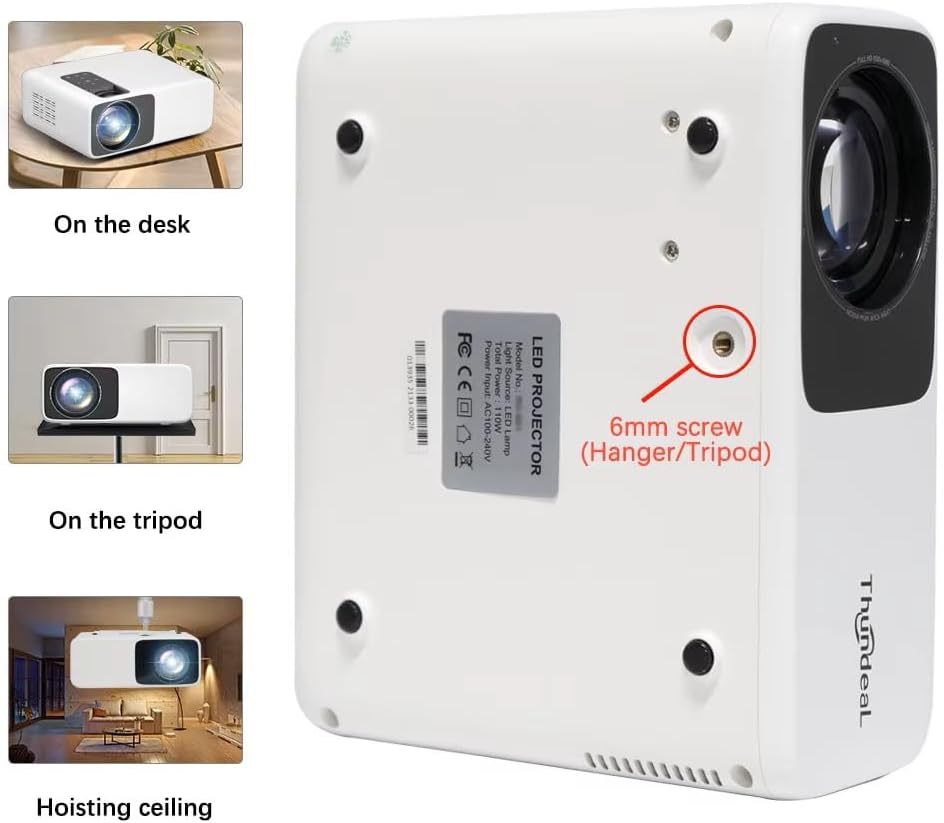
Image 4.1: Projector placement options and mounting point.
Optimorako viewing, ensure the projector is positioned perpendicular to the screen or wall. Adjust the projection distance (1.6 to 6.5 meters) to achieve your desired screen size (49 to 300 inches). A distance of 3-5 meters for a 93-150 inch screen is recommended for eye comfort.
4.2. Energia-konexioa
- Konektatu elikatze-kablea proiektorearen elikatze-sarrera atakara.
- Entxufatu kablearen beste muturra entxufe elektriko estandar batera.
- Sakatu proiektorearen edo urrutiko agintearen pizteko botoia pizteko.
5. Funtzionamendu-argibideak
5.1. Multi-Media Connections
The TD93 Pro projector offers various ports for connecting external devices:
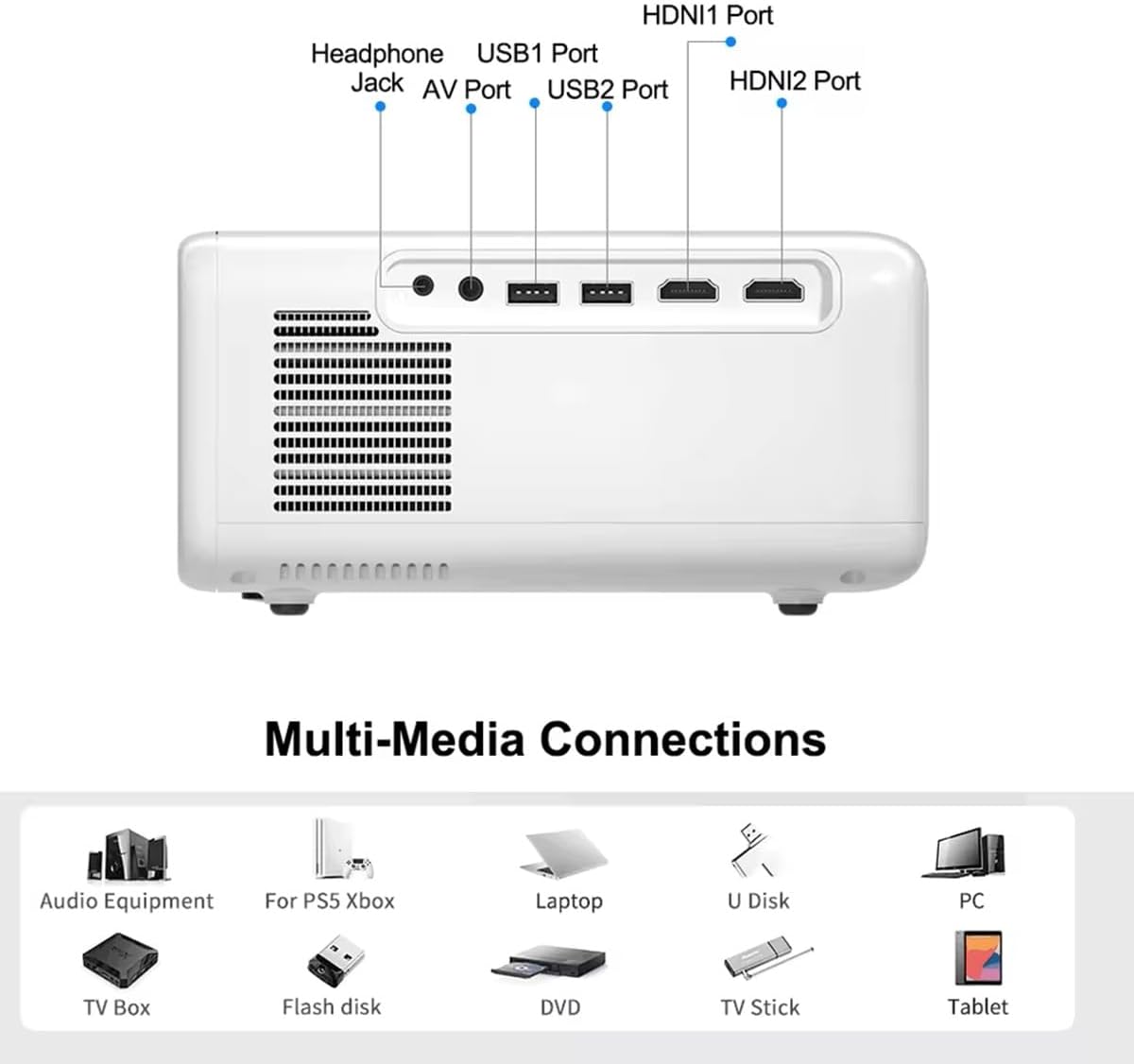
Image 5.1: Available multimedia connection ports.
- HDMI atakak (HDMI1, HDMI2): Connect devices such as TV boxes, gaming consoles (PS5, Xbox), laptops, or Blu-ray players.
- USB atakak (USB1, USB2): Connect USB flash drives for direct media playback (photos, videos, office documents).
- AV ataka: Konektatu gailu zaharragoak emandako AV kablea erabiliz.
- Aurikularretarako Jack (3.5 mm): Konektatu kanpoko entzungailuak edo bozgorailuak.
To switch input sources, use the "Source" button on the remote control or the projector's control panel and select the desired input (HDMI1, HDMI2, AV, USB).
5.2. Haririk gabeko konexioa
5.2.1. WiFi Connection (2.4G/5G)
The projector supports dual-band WiFi for internet access and network features:
- Navigate to the "Settings" menu on the projector's Android interface.
- Select "Network & Internet" and then "Wi-Fi".
- Aktibatu Wi-Fia eta hautatu nahi duzun sarea zerrendatik.
- Eskatzen bazaizu, idatzi pasahitza eta konektatu.
5.2.2. Bluetooth konexioa
Connect Bluetooth-compatible audio devices like speakers or headphones:
- Go to "Settings" > "Connected devices" > "Bluetooth".
- Aktibatu Bluetootha.
- Jarri zure Bluetooth gailua parekatze moduan.
- Hautatu zure gailua parekatzeko eskuragarri dauden gailuen zerrendatik.
5.3. Screen Mirroring (Airplay/WiFi-Display)
Wirelessly display content from your Android or iOS phone:

Image 5.2: Screen mirroring from iOS and Android devices.
- Ensure both your projector and mobile device are connected to the same Wi-Fi network.
- On the projector's main interface, select the "Screen Mirroring" or "Airplay/WiFi-Display" application.
- For iOS devices: Open Control Center, tap "Screen Mirroring" or "AirPlay Mirroring", and select the projector from the list.
- For Android devices: Open the notification panel, find "Cast", "Smart View", "Wireless Display", or similar function, and select the projector.
5.4. Irudiaren Doikuntza
5.4.1. Keystone Correction (6D)
The projector features 6D keystone correction to adjust image shape:
- Giltzarri bertikala: Adjust +/- 60 degrees vertically using the remote control.
- 4-Point Corner Keystone: Adjust each of the four corners independently by +/- 60 degrees for side projection or irregular surfaces. This allows for precise rectangular image alignment.
Access keystone settings via the projector's menu or dedicated buttons on the remote.
5.4.2. Zoom funtzioa
Adjust the display size from 50% to 100% proportionally without moving the projector. This feature is useful for fine-tuning the image size to fit your screen or wall.
Access the zoom function through the projector's menu settings.
5.5. Android OS and App Usage
The integrated Android 9.0 OS allows you to download and install applications directly from the Play Store. Ensure the projector is connected to Wi-Fi to access online services and apps.
- Play Store: Access the Google Play Store to download streaming apps, games, and utilities.
- Multimedia erreprodukzioa: Use pre-installed media players or download alternatives (e.g., VLC player for AC3 audio support).
6. Mantentzea
6.1. Hautsa kentzea
The projector is equipped with a built-in dust net for easy cleaning. Regularly clean the dust net to maintain optimal performance and prevent overheating. Press to pop out the dust net for cleaning.
6.2. Hozte Sistema
The advanced cooling system is designed to dissipate heat efficiently and extend the lamp's lifespan. Ensure proper ventilation around the projector and avoid blocking air vents during operation.
6.3. Lamp Bizitza osoan
LED lamp has an estimated lifespan of 50,000 hours. No lamp replacement is typically required during the product's operational life under normal usage conditions.
7. Arazoak
7.1. No Image Displayed
- Egiaztatu proiektorea piztuta dagoen.
- Egiaztatu sarrera iturria behar bezala hautatuta dagoela (adibidez, HDMI1, USB).
- Ziurtatu kable guztiak ondo konektatuta daudela.
- Doitu fokua eta trapezoiaren zuzenketa.
7.2. Soinurik ez
- Egiaztatu proiektorearen eta konektatutako iturburu-gailuaren bolumen-maila.
- Ensure external speakers or headphones are properly connected and powered on if used.
- If using an external source, verify its audio output settings.
- For AC3 audio, ensure you are using a compatible player like VLC.
7.3. Connectivity Issues (WiFi/Bluetooth)
- Ensure WiFi is enabled and you are connected to the correct network.
- Berrabiarazi proiektorea eta zure bideratzailea/Bluetooth gailua.
- Pantaila islatzeko, baieztatu bi gailuak Wi-Fi sare berean daudela.
7.4. Irudia lausoa edo distortsionatua dago
- Doitu fokatze-eraztuna proiektorearen lentean.
- Use the keystone correction features to correct any trapezoidal distortion.
- Ziurtatu proiekzio-gainazala laua eta leuna dela.
8. Bermea eta Laguntza
For warranty information and technical support, please refer to the documentation provided at the time of purchase or contact your retailer. Keep your purchase receipt as proof of purchase.


