1. Sarrera
Thank you for choosing the GTRACING Gaming Desk. This manual provides essential information for the safe and efficient assembly, operation, and maintenance of your new desk. Please read these instructions carefully before beginning assembly and retain them for future reference.
2. Segurtasun informazio garrantzitsua
Always assemble the desk according to the provided instructions. Be cautious when moving the desk, as it can be heavy and may pose a risk of injury if not handled properly.
- Ziurtatu konexio guztiak seguruak direla erabili aurretik.
- Do not overload the desk or monitor stand beyond the recommended weight capacity (300 lbs).
- Keep liquids away from electrical components (power outlets, USB ports, LED lights).
- Children should not climb on or play with the desk.
- Ontzi-materialak modu arduratsuan bota.
3. Paketearen edukia
Verify that all components are present before assembly. If any parts are missing or damaged, please contact GTRACING customer support.
- Desk components (desktop panels, legs, monitor stand parts)
- Integrated power strip (2 AC outlets, 2 USB ports)
- LED argi-banda
- Extended mouse pad
- Headphone hooks (x2)
- Muntaketa-hardwarea (torlojuak, azkoinak, etab.)
- Muntatzeko tresnak
- Argibide eskuliburua
4. Muntatzeko jarraibideak
Assembly is required. Please follow the detailed step-by-step instructions provided in the separate assembly guide included with your package. All necessary tools are included.
- Deskonprimitu osagai guztiak eta egiaztatu paketearen edukiaren zerrendarekin.
- Identify all hardware and tools.
- Assemble the desk frame and legs.
- Attach the desktop panels.
- Install the monitor stand.
- Mount the integrated power strip.
- Attach the LED light strip.
- Install the headphone hooks.
- Place the extended mouse pad.

Image: All components of the GTRACING Gaming Desk laid out, ready for assembly. This includes the desktop pieces, legs, monitor stand, and various hardware.

Image: A fully assembled GTRACING Gaming Desk, showcasing the monitor stand, LED lighting, and carbon fiber texture.
5. Funtzionamendu-argibideak
5.1. LED argiztapen sistema
The GTRACING Gaming Desk features an integrated LED light strip to enhance your gaming or work environment. The LED lights offer 16 color changes and 6 dynamic modes.
- Connect the LED light strip to the designated power source.
- Use the included remote control to power on/off, change colors, and select dynamic modes.
- Ensure the remote control has a working battery and is pointed towards the LED receiver for optimal functionality.
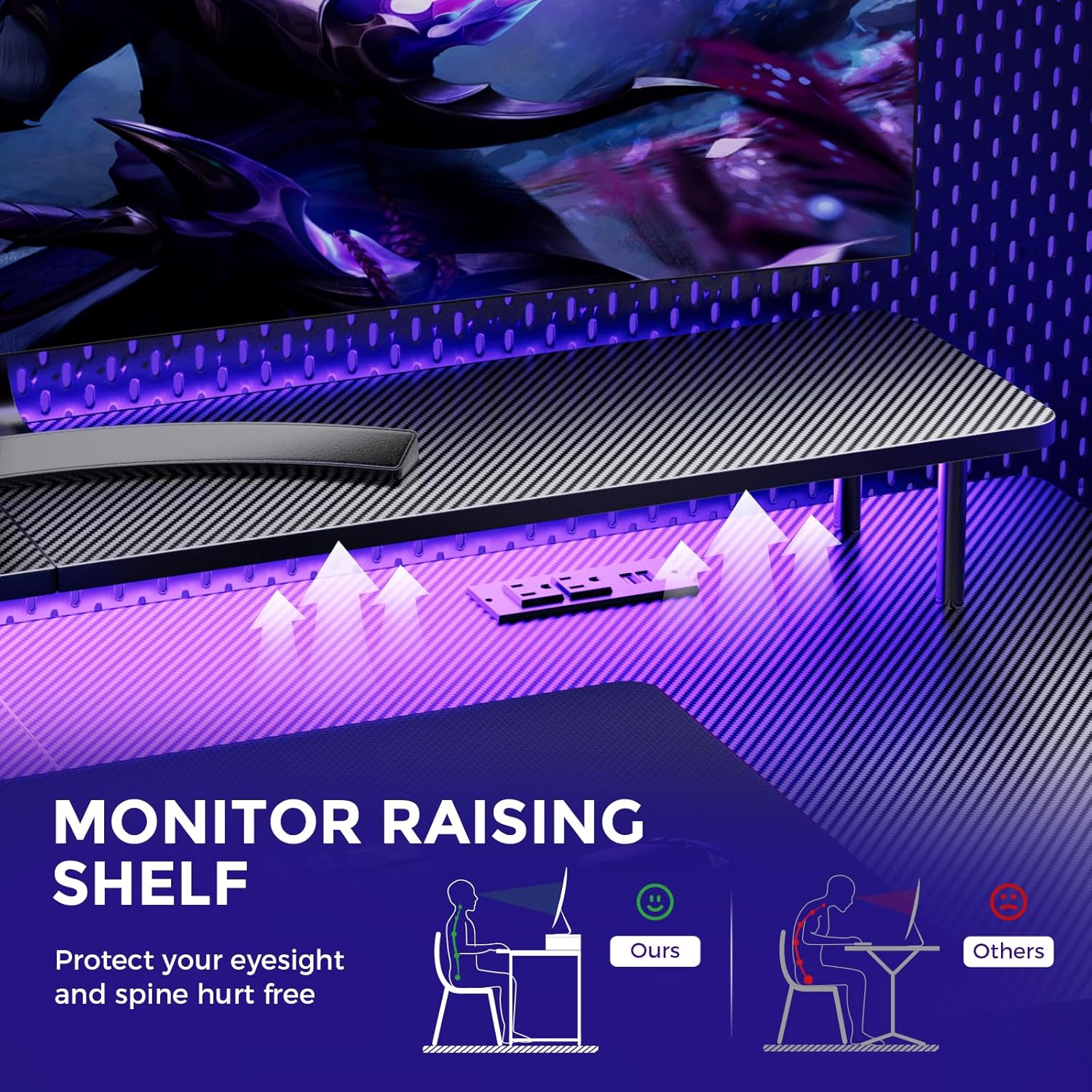
Image: A hand holding a remote control, demonstrating the control over the RGB LED light strip installed beneath the monitor stand of the desk.
Video: An official product video demonstrating the GTRACING 55 Inch Gaming Desk with LED Lights, showcasing its features and aesthetic appeal in a gaming setup.
5.2. Entxufe integratuak eta USB atakak
The desk includes a built-in power strip with 2 AC outlets (120V/12A) and 2 USB charging ports (5V/2A) for convenient device charging and power supply.
- Entxufatu mahaiaren elikatze-kable nagusia hormako entxufe batera.
- Connect your devices to the AC outlets or USB ports as needed.
- Avoid exceeding the maximum power rating of the outlets.

Irudia: Gertutik view of the recessed power strip on the desk, showing two AC outlets and two USB charging ports in use, charging a phone and earbuds.
5.3. Monitorearen euskarri ergonomikoa
The raised monitor stand positions your screen at eye level, promoting better posture and reducing neck strain during extended use. It also provides additional storage space.

Image: A diagram comparing correct ergonomic posture achieved with the monitor stand to incorrect posture without it, highlighting benefits for eyesight and spine.
6. Mantentzea
- Garbiketa: Wipe the carbon fiber surface with a soft, damp oihal. Saihestu akabera kaltetu dezaketen produktu kimiko gogorrak.
- Hardwarea: Aldian-aldian egiaztatu torloju eta azkoin guztiak ondo lotuta daudela ziurtatzeko. Beharrezkoa bada, estutu.
- Osagai elektrikoak: Keep the power outlets and USB ports free from dust and debris. Do not attempt to repair electrical components yourself.
7. Arazoak
7.1. LED Lights Not Working or Remote Not Responding
- Egiaztatu energia-konexioa: Ensure the LED light strip is securely plugged into the power source and the desk's main power cord is connected to a live wall outlet.
- Urruneko bateria: Verify that the remote control has a fresh battery and is inserted correctly.
- Ikusmen lerroa: Ensure there is a clear line of sight between the remote control and the LED receiver. Obstructions can block the signal.
- Eskuzko kontrola: If the remote is unresponsive, check if there's a manual button on the LED controller itself to cycle through modes or power on/off.
7.2. Desk Instability
- Hardwarea estutu: Re-check and tighten all assembly screws and bolts.
- Azalera maila: Ziurtatu mahaia gainazal lau eta berdindu batean jartzen dela.
8. Zehaztapenak
| Ezaugarri | Xehetasuna |
|---|---|
| Marka | GTRACING |
| Modelo zenbakia | 114vc07 |
| Produktuaren neurriak | 24" L x 55" W x 30" H |
| Kolorea | Karbono beltza |
| Goiko material mota | Karbono-zuntza |
| Oinarrizko materiala | Altzairu herdoilgaitza |
| Gehienezko pisuaren gomendioa | 300 kilo |
| Entxufe-zerrenda integratua | 2 korronte alternoko entxufe (120V/12A), 2 USB ataka (5V/2A) |
| Ezaugarri bereziak | Built-In USB Outlet, Ergonomic, Monitor Stand, LED Lights, Headphone Hook |
| Muntaia Beharrezkoa | Bai (Tresnak barne) |

Image: A detailed diagram illustrating the dimensions of the GTRACING Gaming Desk, including the main desktop and the monitor stand.
9. Bermea eta bezeroarentzako laguntza
GTRACING is committed to providing high-quality products and customer satisfaction. For any questions, concerns, or missing parts, please contact our customer service team.
- Free Replacement/Refund: Erosketa egin eta 30 eguneko epean.
- Free Replacement/Repair: Erosketa egin eta urtebeteko epean.
- Harremanetarako informazioa:
- Posta elektronikoa: info@gtracing.com
- Phone: 1-888-660-5669 (9:00-5:30 PST Mon-Fri)
- Webgunea: www.gtracing.com

Image: GTRACING customer service representatives ready to assist with product inquiries and support.


