AULA WIN60 HE PRO 60% Mechanical Gaming Keyboard User Manual
Model: WIN60 HE PRO | Brand: AULA
1. Sarrera
This manual provides detailed instructions for the AULA WIN60 HE PRO 60% Mechanical Gaming Keyboard. Designed for high-performance gaming, this keyboard features Hall Effect magnetic switches, rapid trigger mode, an 8000Hz polling rate, and customizable RGB lighting. Please read this manual thoroughly to ensure proper setup, operation, and maintenance of your keyboard.
Figure 1: AULA WIN60 HE PRO 60% Mechanical Gaming Keyboard with highlighted features.
2. Konfigurazioa
2.1 Deskargatzea
Kontu handiz atera osagai guztiak paketetik. Ziurtatu elementu hauek daudela:
AULA WIN60 HE PRO Keyboard
USB-C kablea
Keycap tiratzailea
Extra Switches (if included)
Video 1: Unboxing the AULA WIN60 HE Gaming Keyboard, showing the contents including the keyboard, USB-C cable, and switch puller.
2.2 Teklatua konektatzea
Bilatu USB-C ataka teklatuaren atzealdean.
Konektatu emandako USB-C kablea teklatura.
Konektatu USB-C kablearen beste muturra zure ordenagailuko USB ataka erabilgarri batean.
The keyboard will automatically be recognized by your operating system (Windows PC/Laptop compatible).
Note: This keyboard is not compatible with PlayStation 5/4 (PS5/PS4) and OBOX.
2.3 Driver Installation (Web-Based)
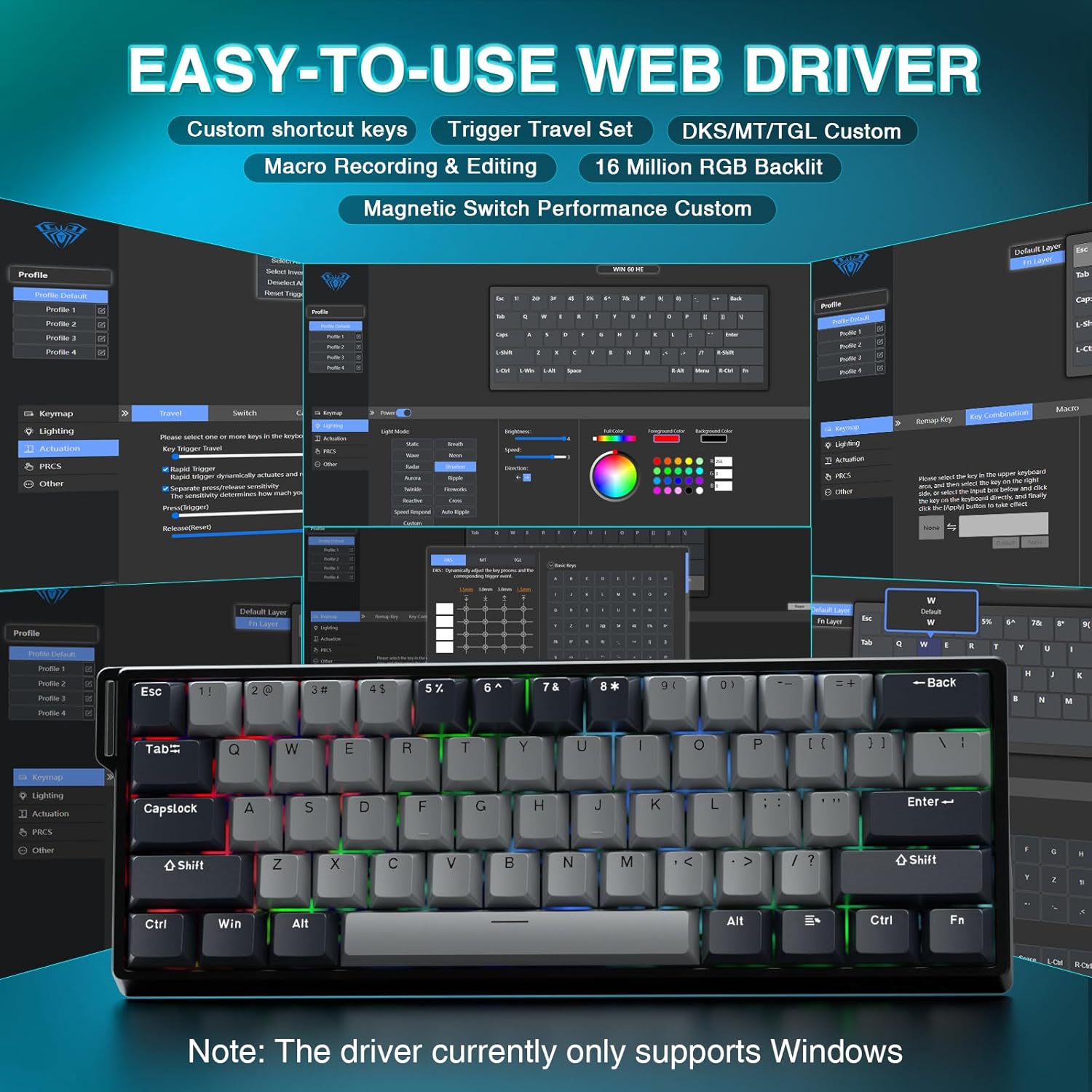
The AULA WIN60 HE PRO utilizes a web-based driver for customization, eliminating the need for software downloads.
Navigate to the official AULA web driver portal (refer to the product packaging or manufacturer's webzehatz-mehatz jakiteko gunea URL).
The web interface will allow you to customize settings directly.
2. irudia: Erabiltzeko erraza web driver interface for customization.
Oharra: The web driver currently only supports Windows operating systems.
3. Funtzionamendua
3.1 Hall Effect Magnetic Switches & Rapid Trigger
The AULA WIN60 HE PRO features advanced Hall Effect magnetic switches, which detect key presses using magnetic fields rather than physical contact. This design provides:
Aktuazio erregulagarria: Customize the actuation point of each key to your preference for faster response or more deliberate presses.
Abiarazle azkarraren modua: Allows keys to activate and deactivate based on movement rather than a fixed actuation point, enabling ultra-fast repeated inputs and precise control, especially beneficial for FPS games. The ultra-low RT step distance is 0.02mm.
Iraunkortasuna: Absence of physical contact reduces wear and tear.
Figure 3: Rapid Trigger technology for enhanced gaming performance.
Video 2: Demonstrating the hot-swappable magnetic switches, including Gray Wood Magnetic Switch and Wing Chun Magnetic Switch variants.
3.2 8000Hz-ko galdeketa-tasa
The keyboard features an 8000Hz polling rate, meaning it reports key presses to your computer 8000 times per second. This results in:
Ultra-Fast Response Times: Minimizes input lag for immediate in-game actions.
Zehaztasun kontrola: Ensures every keystroke is registered accurately and without delay.
Figure 4: 8000Hz Hyper-Polling Technology for minimal latency.
3.3 RGB argiztapen dinamikoa
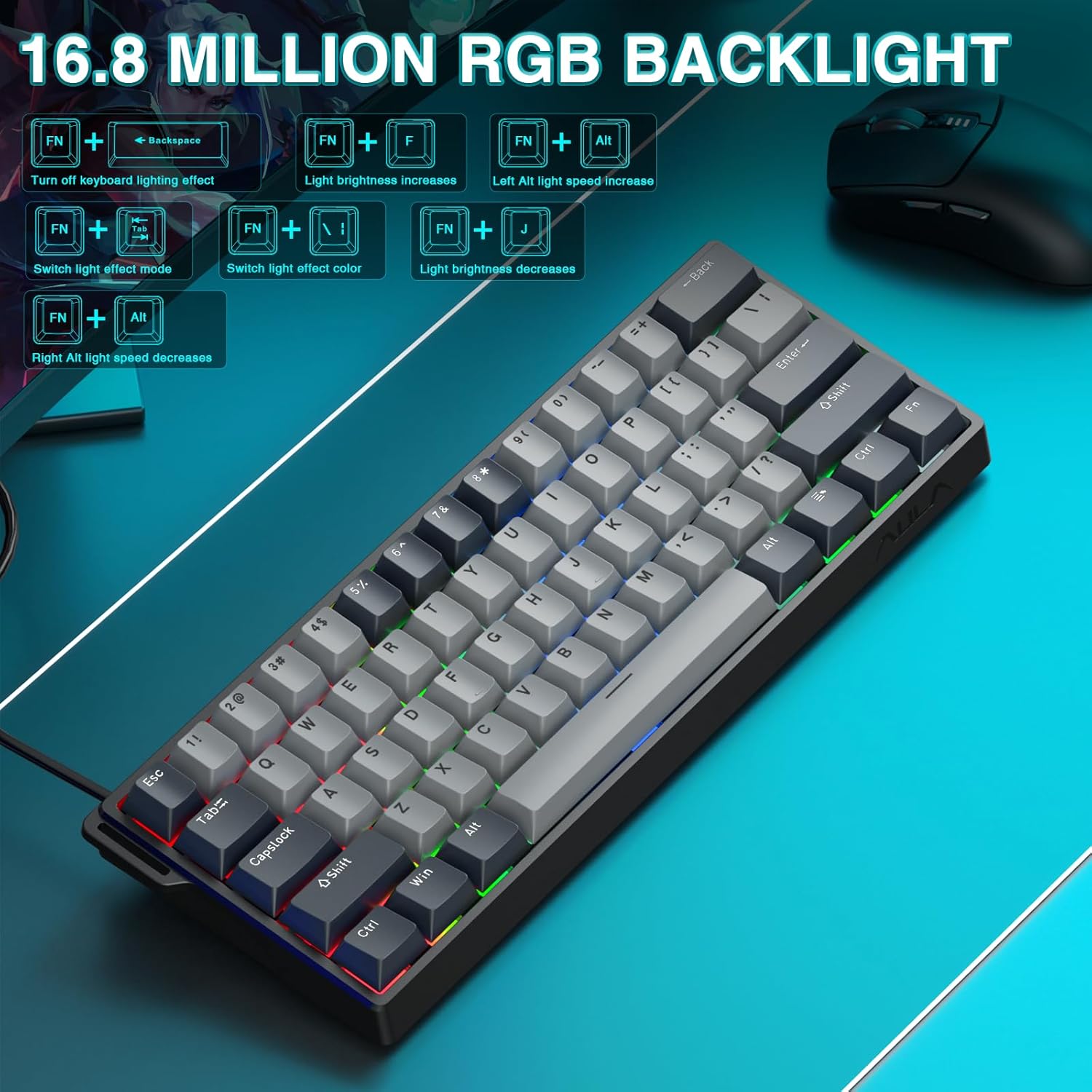
The keyboard offers 16.8 million customizable RGB color options and various lighting effects. Use the following key combinations for quick adjustments:
RGB Lighting Control Hotkeys
Tekla-konbinazioa
Funtzioa
FN + Atzera atzera
Turn off keyboard lighting effect
FN + [
Argiaren distira handitzen da
FN + ]
Argiaren distira gutxitzen da
FN + {
Left Alt light speed increase
FN + }
Right Alt light speed decrease
FN + \
Aldatu argi efektuaren modua
FN + Alt
Aldatu argi efektuaren kolorea
Figure 5: RGB Backlight controls and effects.
3.4 Customization with Web Gidaria
The web-based driver provides extensive customization options:
Gakoen birmapping: Assign any function to any key.
Makroen sorrera: Komando-sekuentzia konplexuak grabatu eta tekla bakar bati esleitu.
RGB argiztapenaren pertsonalizazioa: Fine-tune lighting effects, colors, and patterns beyond the basic hotkeys.
Aktuazio-puntuaren doikuntza: Precisely set the actuation distance for each magnetic switch.
Sartu web driver as described in Section 2.3.
4. Mantentzea
4.1 Teklatua garbitzea
Errendimendu eta itxura optimoak mantentzeko:
Deskonektatu teklatua ordenagailutik garbitu aurretik.
Erabili lipurrik gabeko zapi leun bat dampGarbitu urarekin edo garbiketa-soluzio leun batekin teklak eta xasisa garbitzeko.
Teklen arteko hautsa eta hondakinak kentzeko, erabili aire konprimatua.
Saihestu produktu kimiko gogorrak edo material urratzaileak.
4.2 Beroan alda daitezkeen etengailuak
The AULA WIN60 HE PRO features hot-swappable magnetic switches, allowing for easy replacement or customization without soldering.
Use the provided keycap puller to gently remove the keycap.
Use a switch puller (not explicitly mentioned as included, but implied by "hot-swappable" and video) to carefully remove the switch.
Align the new switch with the socket and press firmly until it clicks into place.
Ordeztu giltza-tapoia.
Caution: Apply gentle force to avoid damaging the switch sockets.
5. Arazoak
5.1 Teklatuak ez du erantzuten
Ziurtatu USB-C kablea ondo konektatuta dagoela teklatura eta ordenagailura.
Saiatu teklatua ordenagailuko beste USB ataka batera konektatzen.
Probatu teklatua beste ordenagailu batean sistemaren arazo espezifikoak baztertzeko.
Berrabiarazi ordenagailua.
5.2 RGB argiztapena ez dabil
Check if the lighting is turned off using the FN + Atzera atzera laster-tekla.
Doitu distira erabiliz FN + [ or FN + ].
Ziurtatu web driver settings haven't disabled lighting.
5.3 Keys Sticking or Not Registering
Clean around the affected keycap to remove any debris.
If a specific switch is faulty, consider replacing it using the hot-swappable feature (refer to Section 4.2).
Check the actuation point settings in the web driver; it might be set too high or too low for your preference.
6. Zehaztapenak
Ezaugarri
Xehetasuna
Eredua
WIN60 HE PRO
Teklatu mota
60% Mechanical Gaming Keyboard
Aldatu mota
Hall Effect Magnetic Switch, Hot-Swappable
Konektibitatea
USB-C kable bidez
Bozketa-tasa
8000Hz
Ezaugarri bereziak
Rapid Trigger Mode, Adjustable Actuation, RGB Backlit, Programmable Keys, Hotkeys and Media Keys, Portable
Gailu bateragarriak
Laptop, PC Windows (Not compatible with PS5/PS4, OBOX)
Produktuaren neurriak
11 x 5 x 1.1 hazbete (27.94 x 12.7 x 2.79 cm)
Elementuaren pisua
2.18 libra (0.99 kg)
Fabrikatzailea
AULA
Figure 6: Detailed comparison of AULA WIN60 HE series magnetic switches.
7. Bermea eta Laguntza
For warranty information, technical support, or service inquiries, please refer to the warranty card included with your product or visit the official AULA/CORBOBO website. You may also contact the seller directly through your purchase platform for assistance.
AULA WIN60 Haridun Teklatu Magnetikoen Produktuaren Eskuliburua Eskuliburu honek AULA WIN60 Haririk gabeko Teklatu Magnetikorako gida osoa eskaintzen du, PRO/Max eta Standard edizioetarako ezaugarriak, funtzioak eta funtzionamendu moduak azaltzen dituena. Ikasi atzeko argiaren doikuntzak, sistemaren aldaketa, lasterbideen teklaren deskribapenak eta etengailu magnetikoaren doikuntza metodoak.
AULA F99 Teklatu Mekanikoaren Erabiltzaile Eskuliburua AULA F99 3-in-1 Hot-Swappable RGB Gasket Teklatu Mekanikoaren erabiltzailearen eskuliburua, non ezaugarriak, zehaztapenak eta kable bidezko, 2.4G eta Bluetooth moduetarako funtzionamendu-argibideak zehaztuta dauden.
AULA F75 Teklatu Mekanikoaren Erabiltzaile Eskuliburua Ezagutu AULA F75 3-in-1 Hot-Swappable RGB Gasket Teklatu Mekanikoaren ezaugarriak eta funtzionamendu-argibideak. Eskuliburu honek konektibitatea, funtzioak, zehaztapenak eta arazoak konpontzea lantzen ditu.
AULA F108 Pro 3-in-1 Mechanical Keyboard: User Manual & Features Comprehensive guide to the AULA F108 Pro 3-in-1 mechanical keyboard. Details connectivity (Wired, 2.4G, Bluetooth), RGB lighting, LCD screen functions, shortcut keys, system compatibility, and specifications.