Sarrera
Welcome to the HONOR 400 Lite 5G Smartphone user manual. This guide provides essential information for setting up, operating, maintaining, and troubleshooting your new device. Please read this manual thoroughly to ensure optimal performance and longevity of your smartphone.
Kutxan dagoena
Upon unboxing your HONOR 400 Lite, you should find the following items:
- HONOR 400 Lite 5G telefonoa
- USB kablea
- SIM kanporatzeko tresna
- Hasierako gida azkarra
- Berme Txartela
Note: The specific contents may vary by region.
Gailua amaitu daview
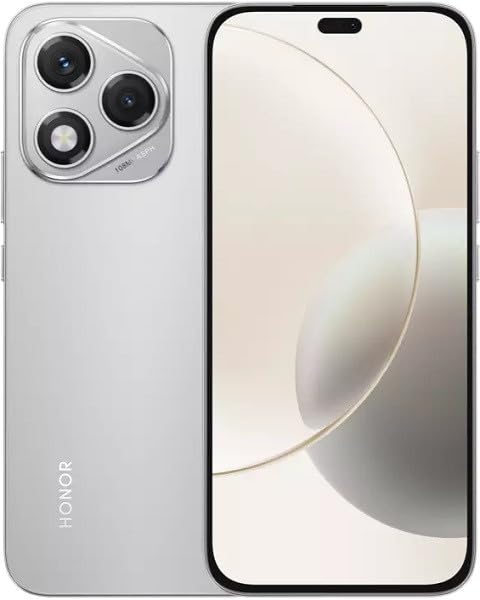
Image: The HONOR 400 Lite 5G Smartphone in Velvet Grey, showcasing its sleek design and camera module on the rear.
The HONOR 400 Lite features a 6.7-inch AMOLED display with a resolution of 1080 x 2412 pixels. The device is equipped with a powerful camera system, including a 108 MP main sensor. Its ergonomic design ensures a comfortable grip and easy access to all physical buttons and ports.
Konfigurazioa
1. SIM txartelaren instalazioa
- Bilatu SIM txartelaren erretilua zure gailuaren alboan.
- Sartu SIM txartela ateratzeko tresna erretiluaren ondoko zulo txikian eta sakatu ondo erretilua atera arte.
- Place your Nano-SIM card(s) and/or eSIM (if applicable) into the tray with the gold contacts facing down, ensuring they are correctly aligned.
- Sartu arretaz erretilua berriro gailuan, klik egin arte.
Garrantzitsua: This smartphone is designed for GSM networks only and is not compatible with CDMA networks (e.g., Verizon, Sprint, US Cellular in the USA). Please verify network compatibility with your service provider before use.
2. Hasierako piztea
- Press and hold the Power button (usually on the right side) until the HONOR logo appears.
- Jarraitu pantailan agertzen diren argibideei hasierako konfigurazioa osatzeko, hizkuntza hautatzea, Wi-Fi konexioa eta Google kontuaren konfigurazioa barne.
Zure gailua funtzionatzea
Bistaratzeko Ezaugarriak
The 6.7-inch AMOLED display offers vibrant colors and deep blacks. Utilize gestures for navigation, access quick settings by swiping down from the top, and customize your home screen layout and widgets to personalize your experience.
Kameraren erabilera
Your HONOR 400 Lite is equipped with a high-resolution 108 MP main camera. Open the Camera app to access various modes such as Photo, Video, Portrait, and more. Tap on the screen to focus and use the on-screen shutter button to capture images or start recording videos. Explore settings for advanced options like HDR and AI enhancements.
Bateria eta Kargatzea
The device is powered by a 5230mAh non-removable battery. Use the provided USB cable to charge your device. Connect the USB-C end to your phone and the USB-A end to a compatible power adapter (not always included, check box contents) or computer USB port. For optimal charging speed, use a compatible fast charger.
Mantentzea
- Software eguneraketak: Regularly check for and install system updates to ensure your device has the latest features, security patches, and performance improvements. Go to Settings > System & updates > Software update.
- Garbiketa: Erabili zapi leun eta pelusik gabeko bat telefonoaren pantaila eta gorputza garbitzeko. Saihestu produktu kimiko gogorrak edo material urratzaileak.
- Biltegiratze kudeaketa: Aldian-aldian garbitu beharrezkoak ez direnak files and apps to free up storage space and maintain optimal performance.
Arazoak konpontzea
If you encounter issues with your HONOR 400 Lite, try the following common troubleshooting steps:
- Gailuak ez du erantzuten: Berrabiarazteko, sakatu eta eutsi pizteko botoia 10 segundo inguru.
- Aplikazioa kraskatzen: Garbitu aplikazioaren cachea eta datuak (Ezarpenak > Aplikazioak > [Aplikazioaren izena] > Biltegiratzea > Garbitu cachea/Garbitu datuak) edo instalatu berriro aplikazioa.
- Bateria hustutzea: Check battery usage in Settings to identify power-hungry apps. Reduce screen brightness and disable unnecessary features like GPS or Wi-Fi when not in use.
- Sareko arazoak: Ensure your SIM card is correctly inserted. Try toggling Airplane Mode on and off. If issues persist, contact your network provider.
Zehaztapenak
| Ereduaren izena | Honor 400 Lite |
| Bistaratzea | 6.7 hazbeteko AMOLED pantaila, 1080 x 2412 pixel |
| Prozesadorea | Mediatek Dimensity 7025 Ultra (6 nm), Octa-core (2x2.5 GHz Cortex-A78 & 6x2.0 GHz Cortex-A55) |
| RAM | 12 GB |
| Barne Biltegiratzea | 256 GB (ezin zabaldu) |
| Atzeko kamera | 108 MP, f/1.8, (wide), 1/1.67", PDAF; 16 MP, f/2.5, (wide) |
| Sistema eragilea | Android 15 |
| Bateria | 5230 mAh, kendu ezin dena |
| Sarearen bateragarritasuna | 2G, 3G, 4G, 5G (GSM Only) |
| Kolorea | Velvet Grey |
| Ezaugarri bereziak | SIM bikoitza |
Bermea eta Laguntza
Your HONOR 400 Lite smartphone comes with a standard manufacturer's warranty. Please refer to the included Warranty Card for detailed terms and conditions, including coverage period and service procedures. For technical support or further assistance, please visit the official HONOR support webwebgunean edo jarri harremanetan bere bezeroarentzako zerbitzuarekin.
Gorde erosketa-froga berme-erreklamazioetarako.


