1. Sarrera
This manual provides essential instructions for setting up, operating, and maintaining your CONSUMER CELLULAR Iris Connect smartphone. The Iris Connect is designed for reliable performance, featuring a 6.5-inch display, 32GB of storage, and running on Android 13. Please read this manual thoroughly to ensure proper use and to maximize your device's capabilities.
2. Zer dago kutxan
Upon unboxing your CONSUMER CELLULAR Iris Connect, verify that all the following items are included:
- CONSUMER CELLULAR Iris Connect Smartphone
- USB kablea
- Hasierako gida azkarra
3. Gailua amaitu daview
Familiarize yourself with the physical components of your Iris Connect smartphone.

3.1. irudia: Aurretik eta atzetik view of the Iris Connect smartphone, highlighting its sleek design and camera placement.

3.2. irudia: Aurrealdea view of the Iris Connect, showcasing the 6.5-inch display and front-facing camera.
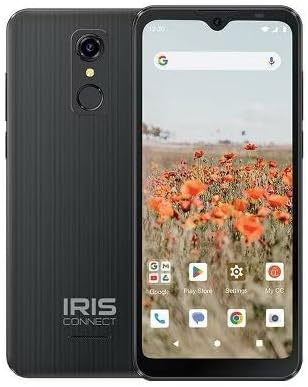
3.3. irudia: Itzuli view of the Iris Connect, showing the main camera, flash, and fingerprint sensor.
Funtsezko osagaiak:
- 6.5 hazbeteko pantaila: High Definition+ screen for clear visuals.
- Aurreko kamera (8MP): Pantailaren goialdean kokatuta dago selfie eta bideo-deietarako.
- Kamera nagusia (13MP): Located on the rear, for high-resolution photos and videos.
- Hatz-marken eskanerra: Integrated on the rear for secure unlocking.
- Pizteko botoia: Typically on the right side, used to turn the device on/off or wake/sleep the screen.
- Bolumen-botoiak: Pizteko botoiaren ondoan, audio mailak doitzeko.
- USB-C ataka: Beheko aldean, kargatzeko eta datuak transferitzeko.
- 3.5 mm-ko audio-konexioa: Entzungailuak konektatzeko.
4. Konfigurazioa
4.1. SIM txartela eta MicroSD txartela sartzea
- Bilatu SIM txartelaren erretilua zure gailuaren alboan.
- Insert the SIM ejector tool (not included, use a thin paperclip) into the small hole next to the tray and press gently until the tray pops out.
- Sartu Nano-SIM txartela(k) dagokion zirrikituan, urre-koloreko kontaktuak behera begira dituela.
- If desired, insert a microSD card (up to 256GB) into its dedicated slot for expanded storage.
- Kontu handiz sartu erretilua berriro gailuan, bere lekuan klik egin arte.
4.2. Hasierako pizte eta konfigurazio morroia
- Eduki sakatuta Pizteko botoia pantaila argitu arte.
- Jarraitu pantailan agertzen diren argibideei hizkuntza hautatzeko, Wi-Fi sare batera konektatzeko eta zure Google kontua konfiguratzeko.
- You may be prompted to transfer data from an old device or set up security features like the fingerprint scanner.
4.3. Gailua kargatzea
Before first use, it is recommended to fully charge your device. The Iris Connect features a 3500 mAh battery with an approximate charging time of 2.5 hours.
- Konektatu USB kablea telefonoaren behealdean dagoen USB-C atakara.
- Connect the other end of the USB cable to a compatible power adapter (not included) and plug it into a wall outlet.
- Kargatzeko adierazlea pantailan agertuko da.
5. Funtzionamendu-argibideak
5.1. Oinarrizko nabigazioa
- Ukitu: Sakatu ikono bat aplikazio bat irekitzeko edo elementu bat hautatzeko.
- Pasatu hatza: Arrastatu hatza pantailan zehar pantailen artean mugitzeko edo nabigatzeko.
- Pixka bat: Erabili bi hatz argazkiak handitu edo txikitzeko eta web orrialdeak.
- Hasierako pantaila: The central hub for your apps and widgets.
- Aplikazioen tiradera: Irristatu hatza gora hasierako pantailatik instalatutako aplikazio guztietara sartzeko.
5.2. Deiak egitea
- Sakatu Telefonoa ikonoa hasierako pantailan edo aplikazioen tiraderan.
- Sartu telefono zenbakia markagailuaren teklatua erabiliz edo hautatu kontaktu bat helbide-liburutik.
- Sakatu Deitu botoia deia hasteko.
5.3. Mezuak bidaltzea
- Ireki Mezuak aplikazioa.
- Sakatu Hasi berriketa or Mezu berria ikonoa.
- Sartu hartzailearen zenbakia edo aukeratu kontaktuetatik, eta idatzi zure mezua.
- Sakatu Bidali botoia.
5.4. Wi-Fira konektatzen
- Joan zaitez Ezarpenak > Sarea eta Internet > Internet.
- Wi-Fia aktibatu/desaktibatu On.
- Hautatu nahi duzun Wi-Fi sarea zerrendatik eta idatzi pasahitza eskatzen bazaizu.
5.5. Bluetooth parekatzea
- Joan zaitez Ezarpenak > Konektatutako gailuak > Konexio-hobespenak > Bluetootha.
- Aktibatu Bluetooth-a On.
- Hautatu Parekatu gailu berria and choose your desired device from the list. Follow any on-screen prompts to complete pairing.
5.6. Kameraren erabilera
The Iris Connect features a 13MP main camera and an 8MP front-facing camera.
- Ireki Kamera aplikazioa.
- Sakatu Pertsiana argazkia ateratzeko botoia.
- Switch between photo and video modes, or front and rear cameras, using the on-screen icons.
5.7. Hatz-marken eskanerra
To set up the fingerprint scanner for secure unlocking:
- Joan zaitez Ezarpenak > Segurtasuna eta pribatutasuna > Gailua desblokeatzea > Hatz-marka.
- Follow the on-screen instructions to register your fingerprint(s).
6. Mantentzea
6.1. Gailua garbitzea
To keep your device clean and functional:
- Erabili zapi leun eta lihorik gabeko bat pantaila eta gorputza garbitzeko.
- Saihestu produktu kimiko gogorrak, garbitzaile urratzaileak edo aerosolak erabiltzea.
- Ziurtatu atakak hautsik eta hondakinik gabe daudela.
6.2. Bateria zaintzea
To optimize your battery life (up to 26 hours of use):
- Saihestu muturreko tenperaturak.
- Do not leave the device charging for extended periods after it's full.
- Adjust screen brightness and close unused apps to conserve power.
6.3. Software eguneraketak
Regularly check for software updates to ensure your device has the latest features and security patches:
- Joan zaitez Ezarpenak > Sistema > Sistema eguneratzea.
- Jarraitu pantailan agertzen diren argibideei eskuragarri dauden eguneratzeak deskargatu eta instalatzeko.
7. Arazoak
This section addresses common issues you might encounter with your Iris Connect smartphone.
- Gailua ez da pizten: Ziurtatu bateria kargatuta dagoela. Konektatu kargagailua eta itxaron minutu batzuk berriro pizten saiatu aurretik.
- Sare seinalerik ez: Check if your SIM card is correctly inserted. Verify that Airplane Mode is off (swipe down from the top of the screen to check quick settings). Contact your service provider if the issue persists.
- Aplikazioak huts egiten edo blokeatzen: Try restarting the app. If the issue continues, restart the phone. You may also clear the app's cache or data via Ezarpenak > Aplikazioak > [Aplikazioaren izena] > Biltegiratzea eta cachea.
- Errendimendu motela: Close unused apps, clear cache, or consider uninstalling rarely used applications to free up storage.
- Unable to connect to Wi-Fi/Bluetooth: Ensure Wi-Fi/Bluetooth is enabled in settings. Try forgetting the network/device and reconnecting. Restart your phone and the router/Bluetooth device.
- Forgot screen lock password/pattern: Google kontu bat lotuta baduzu, berrezarri ahal izango duzu. Bestela, fabrika berrezarpena beharrezkoa izan daiteke (horrek datu guztiak ezabatuko ditu).
For more complex issues, please refer to the official CONSUMER CELLULAR support resources or contact their customer service.
8. Zehaztapenak
Detailed technical specifications for the CONSUMER CELLULAR Iris Connect smartphone (Model: SH4650).
| Ezaugarri | Zehaztapena |
|---|---|
| Ereduaren izena | Iris Connect |
| Modelo zenbakia | SH4650 |
| Sistema eragilea | Android 13.0 |
| Bistaratzeko tamaina | 6.5 hazbete |
| Bistaratzeko ebazpena | 1440 x 810 |
| CPU eredua | Snapdragon 710 |
| CPU Abiadura | 2 GHz |
| RAM memoria instalatuaren tamaina | 3 GB |
| Barne Biltegiratzea | 32 GB |
| Biltegiratze zabalgarria | Gehienez 256 GB microSD bidez |
| Kamera Nagusia | 13 MP |
| Aurrealdeko kamera | 8 MP |
| Bateria Edukiera | 3500 milioiamp Orduak |
| Bateriaren Potentzia Balorazioa | 3600 (likely Wh or similar unit, as mAh is 3500) |
| Kargatzeko Denbora | 2.5 ordu |
| Konektibitatea | 4G LTE, Bluetooth, Wi-Fi |
| Ezaugarri bereziak | Dual Camera, Expandable Storage, Fingerprint Scanner, Long Battery Life |
| Audio Jack | 3.5 milimetro |
| Neurriak | 8 x 6 x 3 hazbete |
| Elementuaren pisua | 6.5 ontza |
9. Bermea eta Laguntza
For information regarding your product's warranty, please refer to the warranty card included with your purchase or visit the official CONSUMER CELLULAR website. For technical assistance, troubleshooting beyond this manual, or customer service inquiries, please contact CONSUMER CELLULAR support directly.
CONSUMER CELLULAR Official Webgunea: www.consumercellular.com


