1. Sarrera
Thank you for choosing the ILEBYGO Mini Projector B0F83Q1HHT. This portable projector is designed to provide a versatile entertainment experience with its Android 13 operating system, WiFi 6, Bluetooth 5.0, 1080P Full HD resolution with 4K support, 320 ANSI lumens brightness, 270-degree rotation, auto keystone correction, and autofocus. This manual provides essential information for setting up, operating, and maintaining your projector.
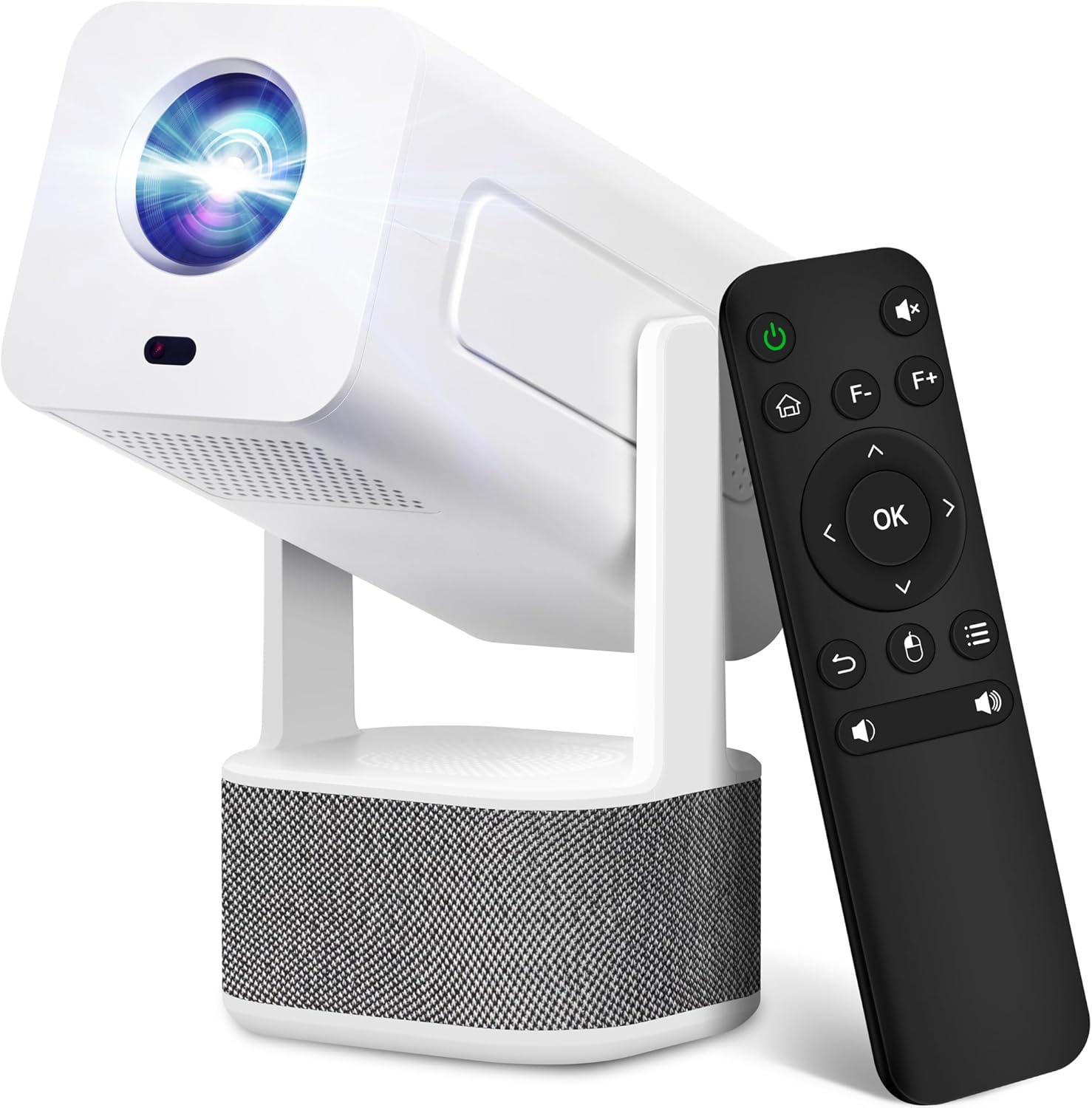
Image 1.1: ILEBYGO Mini Projector and Remote Control
The ILEBYGO Mini Projector B0F83Q1HHT offers a projection size ranging from 30 to 200 inches, making it suitable for various environments from small rooms to outdoor settings. Its dual 5W speakers deliver integrated audio, and multiple connectivity options ensure compatibility with a wide range of devices.
2. Zer dago kutxan
Mesedez, egiaztatu paketearen edukia. Elementuren bat falta bada edo hondatuta badago, jarri harremanetan bezeroarentzako arreta-zerbitzuarekin.
- 1x ILEBYGO Mini Projector
- 1x Erabiltzailearen eskuliburua
- 1x korronte egokitzailea
- 1x Urruneko Kontrola
3. Konfigurazio gida
3.1. Piztea
- Konektatu korronte-egokitzailea proiektorearen DC sarrera-atakara.
- Entxufatu korronte-egokigailua hormako entxufe batera.
- Sakatu proiektagailuko pizteko botoia edo urrutiko agintea gailua pizteko.

Image 3.1: Projector Connectivity Ports (DC, HDMI, USB, Audio)
3.2. Initial Placement and Adjustment
The projector features a 270-degree rotatable design, allowing flexible placement.
- Jarri proiektorea gainazal egonkor batean.
- Adjust the projector's angle to direct the image onto your desired projection surface (wall, screen, ceiling).
- The projector will automatically perform keystone correction and autofocus to optimize the image clarity and shape.
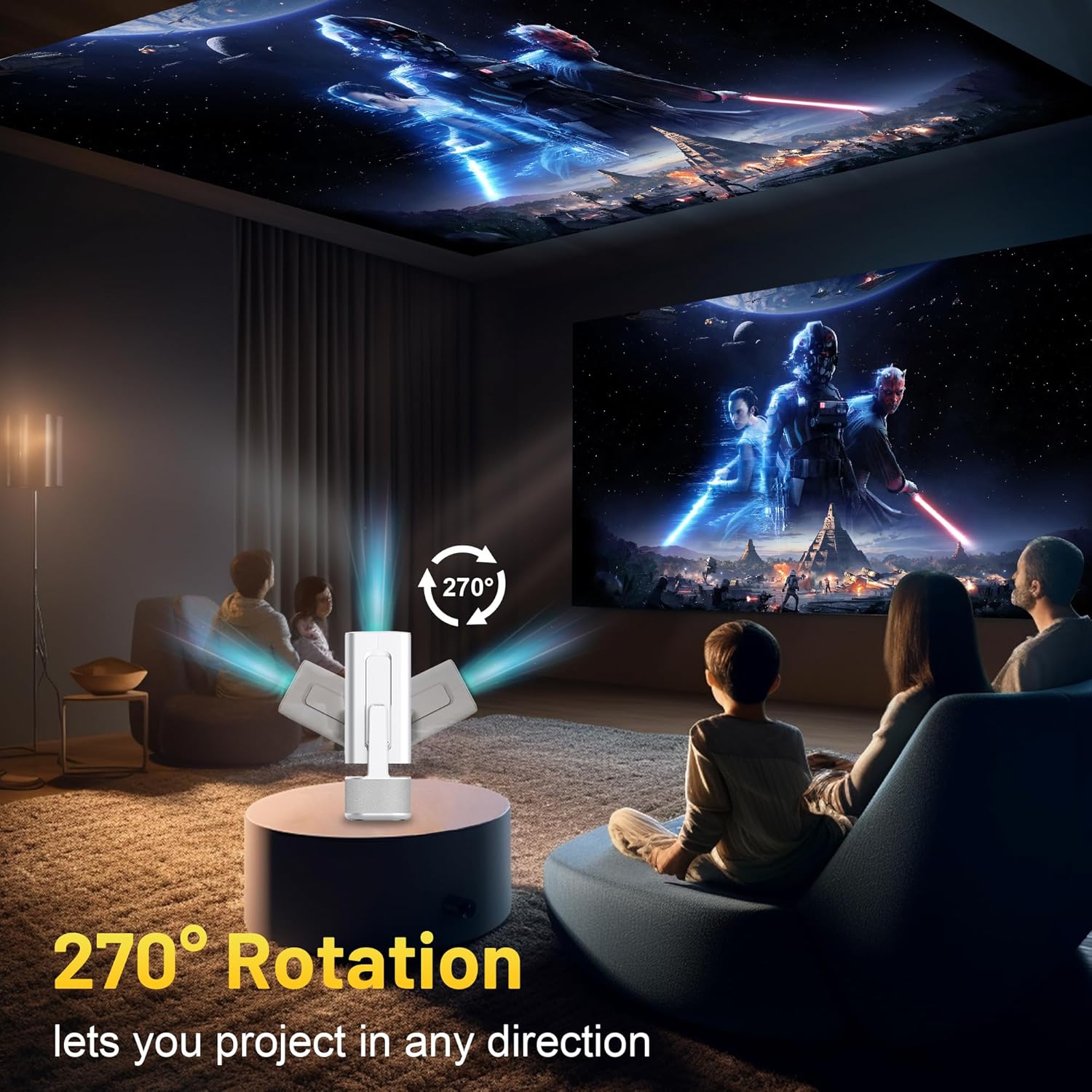
Image 3.2: 270-Degree Rotation Capability
3.3. Sare konexioa (WiFi)
To access online content and streaming services, connect the projector to a Wi-Fi network.
- Hasierako pantailatik, joan 'Ezarpenak' atalera.
- Hautatu 'Sarea eta Internet'.
- Aktibatu Wi-Fia eta hautatu nahi duzun sarea zerrendatik.
- Eskatzen bazaizu, idatzi Wi-Fi pasahitza eta konektatu.

Image 3.3: Dual Band WiFi 6 and Bluetooth 5.0
3.4. Bluetooth parekatzea
Pair Bluetooth devices like external speakers or headphones for enhanced audio.
- Hasierako pantailatik, joan 'Ezarpenak' atalera.
- Select 'Connected Devices' or 'Bluetooth'.
- Aktibatu Bluetootha.
- Jarri zure Bluetooth gailua parekatze moduan.
- Hautatu zure gailua proiektorearen pantailan dauden gailuen zerrendatik parekatzeko.
4. Funtzionamendu-argibideak
4.1. Nabigazioa
Use the included remote control to navigate the projector's interface. The directional buttons, 'OK' button, 'Back' button, and 'Home' button are primary controls.
4.2. App Usage (Android 13)
The projector runs on Android 13 and comes with pre-installed streaming applications.
- From the home screen, select the desired application (e.g., Netflix, YouTube, Prime Video).
- Hasi saioa zure kontuko kredentzialekin behar izanez gero.
- Browse and play content as you would on any Android smart device.
- Additional apps can be downloaded from the Google Play Store.

Image 4.1: Built-in Android 13 System with Apps
4.3. Pantailaren islatzea/igorpena
Mirror content from your smartphone, tablet, or computer wirelessly.
- Ziurtatu proiektorea eta zure gailua Wi-Fi sare berera konektatuta daudela.
- On the projector, select the screen mirroring/casting application (e.g., Miracast, AirPlay).
- On your mobile device, enable screen mirroring or casting and select the projector from the list of available devices.
4.4. External Device Connection (HDMI, USB)
Connect external devices such as laptops, gaming consoles, or USB drives.
- HDMI: Connect an HDMI cable from your device to the HDMI port on the projector. Select the HDMI input source from the projector's input menu.
- USBa: Insert a USB drive into the USB port. The projector's file manager will typically open automatically, allowing you to browse and play media files.

Image 4.2: Multi-Device Compatibility
4.5. Irudiaren Doikuntza
The projector features automatic adjustments for convenience.
- Auto Keystone Zuzenketa: The projector automatically corrects vertical image distortion. If manual adjustment is needed, navigate to 'Settings' > 'Projection Settings' > 'Keystone Correction'.
- Fokatze automatikoa: The image will automatically focus when the projector is moved or powered on. Manual focus adjustment can be found in 'Settings' > 'Projection Settings' > 'Focus'.
- Zooma: Adjust the projection size from 50% to 100% without moving the projector. This setting is typically found in 'Settings' > 'Projection Settings' > 'Zoom'.

Image 4.3: Auto Keystone Correction and Autofocus
5. Mantentzea
5.1. Garbiketa
- Lentea: Erabili lente optikoetarako bereziki diseinatutako oihal leun eta lint-gabea. Saihestu material urratzaileak edo produktu kimiko gogorrak.
- Kanpoaldea: Garbitu proiektorearen kanpoaldea oihal leun eta lehor batekin. Ez erabili garbitzaile likidorik zuzenean gailuan.
- Aireztapena: Ziurtatu aireztapen-irekiduretatik hautsik eta oztoporik gabe daudela gehiegi berotzea saihesteko.
5.2. Biltegiratzea
When not in use, store the projector in a cool, dry place away from direct sunlight and extreme temperatures. Use the original packaging or a protective case to prevent dust accumulation and physical damage.
6. Arazoak
Ikusi beheko taula arazo ohikoenak eta haien irtenbideak ikusteko.
| Gaia | Kausa posiblea | Irtenbidea |
|---|---|---|
| Botererik ez | Power cable not connected; Power outlet malfunction | Ziurtatu kablea ondo konektatuta dagoela. Saiatu beste entxufe batekin. |
| Irudirik ez | Incorrect input source; Device not connected; Projector in standby mode | Select correct input source (HDMI, USB). Ensure external device is powered on and connected. Press power button to wake projector. |
| Irudi lausoa | Out of focus; Keystone not corrected | Allow autofocus to adjust. Manually adjust focus in settings if needed. Check keystone correction settings. |
| Soinurik ez | Volume too low; Muted; External audio device not connected/paired | Increase volume. Unmute projector. Ensure Bluetooth audio device is paired and connected, or external speakers are properly connected via audio jack. |
| Wi-Fi konexio-arazoak | Incorrect password; Network interference; Router issues | Egiaztatu Wi-Fi pasahitza. Hurbildu proiektorea bideratzailera. Berrabiarazi bideratzailea. |
| Bluetooth parekatze-hutsuneak | Device not in pairing mode; Interference; Device too far | Ensure Bluetooth device is in pairing mode. Keep devices close. Turn off other Bluetooth devices to reduce interference. |
7. Zehaztapenak
| Ezaugarri | Xehetasuna |
|---|---|
| Marka | ILEBYGO |
| Eredua | B0F83Q1HHT |
| Bistaratzeko ebazpena | 1920 x 1080 (Full HD), 4K Support |
| Distira | 320 ANSI Lumen |
| Konektibitate Teknologia | Bluetooth 5.0, HDMI, USB, Wi-Fi 6 (2.4G+5G) |
| Sistema eragilea | Android 13 |
| Ezaugarri bereziak | Auto Keystone Correction, Autofocus, 270° Rotation, Built-in Dual 5W Speakers |
| Proiekzioaren Tamaina | 30''-200'' |
| Aspektu-erlazioa | 16:9 / 4:3 |
| Elementuaren pisua | 2.72 kilo |
| Paketearen neurriak | 13.54 x 5.39 x 5.2 hazbete |
8. Bermea eta Laguntza
The ILEBYGO Mini Projector B0F83Q1HHT comes with a standard manufacturer's warranty. Please refer to the warranty card included in your package for specific terms and conditions.
For technical support, troubleshooting assistance, or warranty claims, please contact ILEBYGO customer service through the retailer's platform or the contact information provided in your product documentation.

