1. Sarrera
Thank you for choosing the DAREU A950pro 4K Wireless Gaming Mouse and EK75RT Hall Effect Rapid Trigger Magnetic Switch Mechanical Gaming Keyboard Combo. This manual provides detailed instructions for setting up, operating, and maintaining your new gaming peripherals. Please read this manual carefully before use to ensure optimal performance and longevity of your devices.
2. Produktua amaitu daview
2.1 DAREU A950pro 4K Wireless Gaming Mouse
The A950pro mouse features a 4K polling rate for ultra-responsive input, a high-precision PAW 3395 sensor, and durable Kailh black GM8.0 switches. It supports tri-mode connectivity and is designed for lightweight performance.

Image: DAREU A950pro 4K Wireless Gaming Mouse. This image shows the sleek, ergonomic design of the A950pro mouse.
Ezaugarri nagusiak:
- 4K-ko inkesta-tasa: Equipped with a 4KHz receiver, sending signals to the computer 4 times faster than standard gaming mice (0.25ms response time).
- PAW 3395 sentsore optikoa: Provides excellent accuracy, capturing minute movements and synchronizing to the computer pointer without losing frames. Supports up to 26000 DPI, 650 IPS, and 50G acceleration.
- Kailh Black GM8.0 Mouse Switches: Rated for 80 million clicks, ensuring durability and consistent performance.
- Hiru moduko konexioa: Offers versatile connectivity options including Bluetooth 5.1, 2.4G wireless, and USB-C wired mode.
- Diseinu arina: Weighs approximately 54g for flexible movement and improved handling.
- Karga azkarra: 300mAh battery with 30-minute fast charging, providing up to 37 days in BT5.1 mode or 6 days in 2.4G mode (based on 4 hours of connection per day).
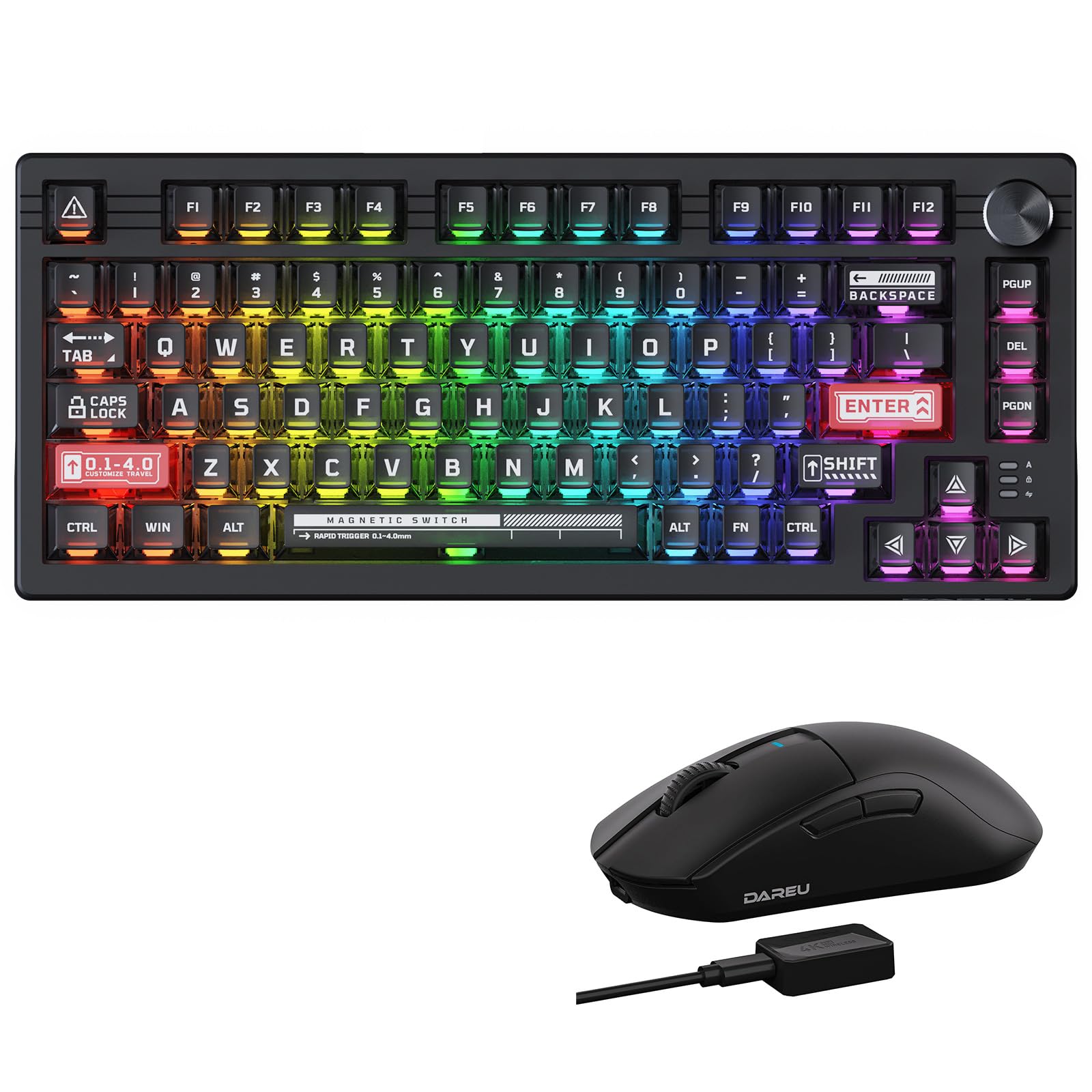
Image: DAREU A950pro 4K Wireless Gaming Mouse with 4000Hz Report Rate. This image highlights the mouse's 4000Hz report rate capability, showing the mouse and its 4K wireless receiver.
Image: DAREU A950pro 4K Wireless Gaming Mouse with PAW3395 Optical Sensor. This image details the mouse's PAW3395 optical sensor, emphasizing its 26000 DPI, 650 IPS, and 50G acceleration specifications.
Image: DAREU A950pro 4K Wireless Gaming Mouse Tri-Mode Connection. This image illustrates the three connection modes: Bluetooth 5.1 for office, 2.4G for gaming, and USB-C for charging while playing.
Image: DAREU A950pro 4K Wireless Gaming Mouse 55G Lightweight Design. This image shows an exploded view of the mouse, highlighting its internal components and lightweight construction.
Image: DAREU A950pro 4K Wireless Gaming Mouse Fast Charging Technology. This image details the mouse's fast charging capabilities, showing battery life estimates for different modes and charging times.
2.2 DAREU EK75RT Hall Effect Rapid Trigger Magnetic Switch Mechanical Gaming Keyboard
The EK75RT keyboard features customizable Hall Effect magnetic switches with rapid trigger technology, offering precise and fast input for competitive gaming.

Image: DAREU EK75RT Hall Effect Mechanical Gaming Keyboard. This image displays the EK75RT keyboard, showcasing its compact layout and transparent keycaps.
Ezaugarri nagusiak:
- Customizable Hall Effect Magnetic Switches: Offers 40 levels of per-key actuation from 0.1mm to 4.0mm, with 0.1mm precision.
- Abiarazle azkarra: Provides up to 20 times faster accuracy and 11 times faster response than traditional mechanical keyboards, allowing for instant key reset and re-actuation.
- 4-in-1 Ekintza Teklak: Allows up to 4 different commands to be assigned to the same key, enhancing combat and complex actions in games.
- All-in-One Driver: Software for customizing RGB lighting effects (50 types), macros, key functions, and key travel settings. Includes preset settings for classic game configurations.
- TKL Form Factor with Full-Size Functionality: Compact Tenkeyless design without sacrificing essential functions.
- Stable Aluminum Positioning Plate: Ensures durability and a solid typing experience.
- Fully Transparent Keycaps: For enhanced aesthetics and RGB lighting display.
- Magnetic Sensing RGB Lighting Effects: Dynamic RGB lighting with side ambient lighting.
Image: DAREU EK75RT Keyboard 45G Linear Magnetic Switch. This image provides a close-up of the magnetic switches, detailing their initial force, pre-travel, trigger force, total travel, bottom force, and switch lifespan.
Image: DAREU EK75RT Keyboard Rapid Trigger Mode. This image visually explains the rapid trigger functionality, comparing the trigger area of mechanical switches to the adjustable reset area of magnetic switches (0.1mm-4.0mm).
Image: DAREU EK75RT Keyboard All-in-One Driver Interface. This image shows the user interface of the DAREU driver software, demonstrating options for key function, key travel, DKS/MT/TGL, RGB, and macro settings, with examples for Valorant and CS:GO.
3. Konfigurazio gida
3.1 DAREU A950pro 4K Wireless Gaming Mouse Setup
- Kargatzen: Before first use, connect the mouse to a USB port on your computer using the provided USB-C cable. The mouse supports fast charging. Ensure to use a computer USB port and the original charging cable. Do not use a power adapter for charging.
- 2.4G Wireless Connection (Recommended for Gaming):
- Plug the 4K wireless receiver into an available USB port on your computer.
- Turn on the mouse. The mouse should automatically connect to the receiver.
- Bluetooth 5.1 Connection (Recommended for Office/General Use):
- Turn on the mouse and switch it to Bluetooth mode.
- Ordenagailuan, joan Bluetooth ezarpenetara eta bilatu gailu berriak.
- Select "DAREU A950pro" from the list of available devices to pair.
- USB-C kable bidezko konexioa:
- Connect the mouse directly to your computer using the USB-C cable. The mouse will function as a wired mouse and charge simultaneously.
3.2 DAREU EK75RT Hall Effect Mechanical Gaming Keyboard Setup
- Konexioa: Connect the keyboard to an available USB port on your computer using the provided USB cable. The keyboard is plug-and-play.
- Gidariaren instalazioa: For full customization (actuation, rapid trigger, RGB, macros), download and install the DAREU All-in-One driver software from the official DAREU webgunea.
4. Funtzionamendu-argibideak
4.1 DAREU A950pro 4K Wireless Gaming Mouse Operation
- DPI doikuntza: Use the dedicated DPI button (usually located behind the scroll wheel) to cycle through preset DPI levels. The DAREU driver allows for custom DPI settings.
- Botoi programagarriak: All buttons can be programmed using the DAREU driver software to assign macros, media controls, or other functions.
- Bozketa-tasa: The 4K polling rate is automatically enabled when using the 2.4G wireless receiver. Ensure the receiver is properly connected for optimal performance.
4.2 DAREU EK75RT Hall Effect Mechanical Gaming Keyboard Operation
- Aktuazio-puntuaren doikuntza: Use the DAREU All-in-One driver to customize the actuation point for each key from 0.1mm to 4.0mm. This allows for personalized responsiveness.
- Abiarazle azkarraren modua: Enable and configure Rapid Trigger settings via the DAREU driver. This feature allows keys to reset and re-actuate instantly upon release, providing a significant advantage erritmo bizkorreko jokoetan.
- 4-in-1 Ekintza Teklak: Program multiple commands to a single key through the driver. For example, a light press could be one action, and a deeper press another.
- RGB argiztapen efektuak: Cycle through various preset RGB lighting effects using keyboard shortcuts (refer to the driver software for specific key combinations) or customize them extensively using the DAREU driver.
- Makro grabaketa: Record and assign complex macros to any key using the DAREU driver software.
5. Mantentzea
- Sagua garbitzea: Erabili zapi leun eta lehor bat saguaren gainazala garbitzeko. Zikinkeria egoskorra bada, garbitu zapi pixka bat.amp cloth can be used, ensuring no liquid enters the internal components. Avoid harsh chemicals.
- Teklatua garbitzea:
- Deskonektatu teklatua ordenagailutik.
- Erabili aire konprimituzko lata bat tekla-tapoien arteko hautsa eta hondakinak kentzeko.
- Gently wipe the keycaps and keyboard frame with a soft, slightly damp oihal.
- For deeper cleaning, keycaps can be carefully removed using a keycap puller (not included) and cleaned separately. Ensure they are completely dry before reattaching.
- Biltegiratzea: When not in use for extended periods, store the keyboard and mouse in a clean, dry environment away from direct sunlight and extreme temperatures.
6. Arazoak
- Saguak ez du erantzuten:
- Egiaztatu bateriaren maila eta kargatu behar izanez gero.
- Ensure the 2.4G receiver is securely plugged into a USB port, or Bluetooth is properly paired.
- Try connecting the mouse via USB-C cable to rule out wireless issues.
- Berrabiarazi ordenagailua.
- Teklatuak ez du erantzuten:
- Ziurtatu USB kablea ondo konektatuta dagoela teklatura eta ordenagailura.
- Probatu beste USB ataka batekin.
- Berrabiarazi ordenagailua.
- Gidarien software arazoak:
- Ensure you have downloaded the latest version of the DAREU All-in-One driver from the official webgunea.
- Temporarily disable any antivirus or firewall software during installation if issues persist.
- Run the driver software as an administrator.
- Inconsistent Mouse Tracking:
- Clean the mouse sensor.
- Use a high-quality mouse pad.
- Doitu DPI ezarpenak.
- RGB argia ez dabil:
- Check lighting settings in the DAREU driver software.
- Ziurtatu teklatua behar bezala konektatuta dagoela.
7. Zehaztapenak
7.1 DAREU A950pro 4K Wireless Gaming Mouse
| Sentsore | PAW 3395 sentsore optikoa |
| Bozketa-tasa | 4KHz (with 4K receiver) |
| DPI | 26000 DPI arte |
| IPS | 650 IPS |
| Azelerazioa | 50G |
| Etengailuak | Kailh Black GM8.0 (80 million clicks) |
| Konektibitatea | Tri-mode (Bluetooth 5.1, 2.4G Wireless, USB-C Wired) |
| Pisua | Gutxi gorabehera. 54 g |
| Bateria | 300mAh (30min fast charging) |
| Bateriaren iraupena | Up to 37 days (BT5.1), 6 days (2.4G) |
7.2 DAREU EK75RT Hall Effect Mechanical Gaming Keyboard
| Aldatu mota | Hall efektuko etengailu magnetikoak |
| Aktuazio-eremua | 0.1mm - 4.0mm (40 levels, 0.1mm precision) |
| Ezaugarriak | Rapid Trigger, 4-in-1 Action Keys |
| Forma-faktorea | TKL (Tenkeyless) |
| Plaka Materiala | Aluminiozko kokapen plaka |
| Giltzak | Fully Transparent |
| Argiztapena | Magnetic Sensing RGB, Side Ambient Lighting |
| Softwarea | DAREU All-in-One Driver |
8. Bermea eta Laguntza
DAREU products are designed for quality and performance. For warranty information, technical support, or any product-related inquiries, please refer to the official DAREU website or contact DAREU customer service directly. Please retain your proof of purchase for warranty claims.


