1. Sarrera
Thank you for choosing the Dreo 110-Pint Smart Dehumidifier. This appliance is designed to efficiently remove excess moisture from large spaces up to 4500 square feet, such as basements, bedrooms, living rooms, bathrooms, and laundry rooms. Featuring smart controls, multiple operating modes, and dual drainage options, it provides a comfortable and healthy environment by maintaining optimal humidity levels. Please read this manual thoroughly before operation to ensure proper use and maintenance.
2. Segurtasun-argibide garrantzitsuak
Sute, deskarga elektriko edo lesio arriskua murrizteko, jarraitu beti oinarrizko segurtasun neurriak tresna hau erabiltzean.
- Read all instructions before using the dehumidifier.
- Etxetresna hau barrualdean erabiltzeko soilik da.
- Ziurtatu elikadura hornidura bolumenarekin bat datorrelatagbalorazio-etiketan zehazten da.
- Ez erabili hezetasun-kentzailea kablea edo entxufea hondatuta badago.
- Always unplug the unit before cleaning, servicing, or moving.
- Ez blokeatu airearen sarrerak edo irteerak.
- Keep the unit upright for at least 24 hours before plugging it in after transport.
- The Dreo Dehumidifier is ETL-certified to meet stringent electrical safety standards, featuring a 90° tilt waterproof design that automatically powers off when tilted, along with comprehensive thermal protection (23°F to 248°F) to prevent overheating and 15A overcurrent protection against power surges.
3. Produktua amaitu daview
3.1. Osagaiak
The Dreo 110-Pint Smart Dehumidifier is designed for efficient and user-friendly operation. Below are the main components:
- Kontrol-panela: Located on the top, with touch buttons and a digital display.
- Aire irteera: Top-mounted for efficient moisture expulsion.
- Aireko sarrera: Rear-mounted for air intake.
- Ur depositua: Front-loading, 2-gallon (8L) capacity with a visible water level indicator.
- Drain Hose Outlet: Located at the rear for continuous drainage.
- Caster Wheels: 360° smooth-rolling wheels for easy mobility.
- Eramateko heldulekuak: Integrated on the sides for convenient lifting.
- Iragazki garbigarria: Easily accessible for cleaning to maintain air quality.
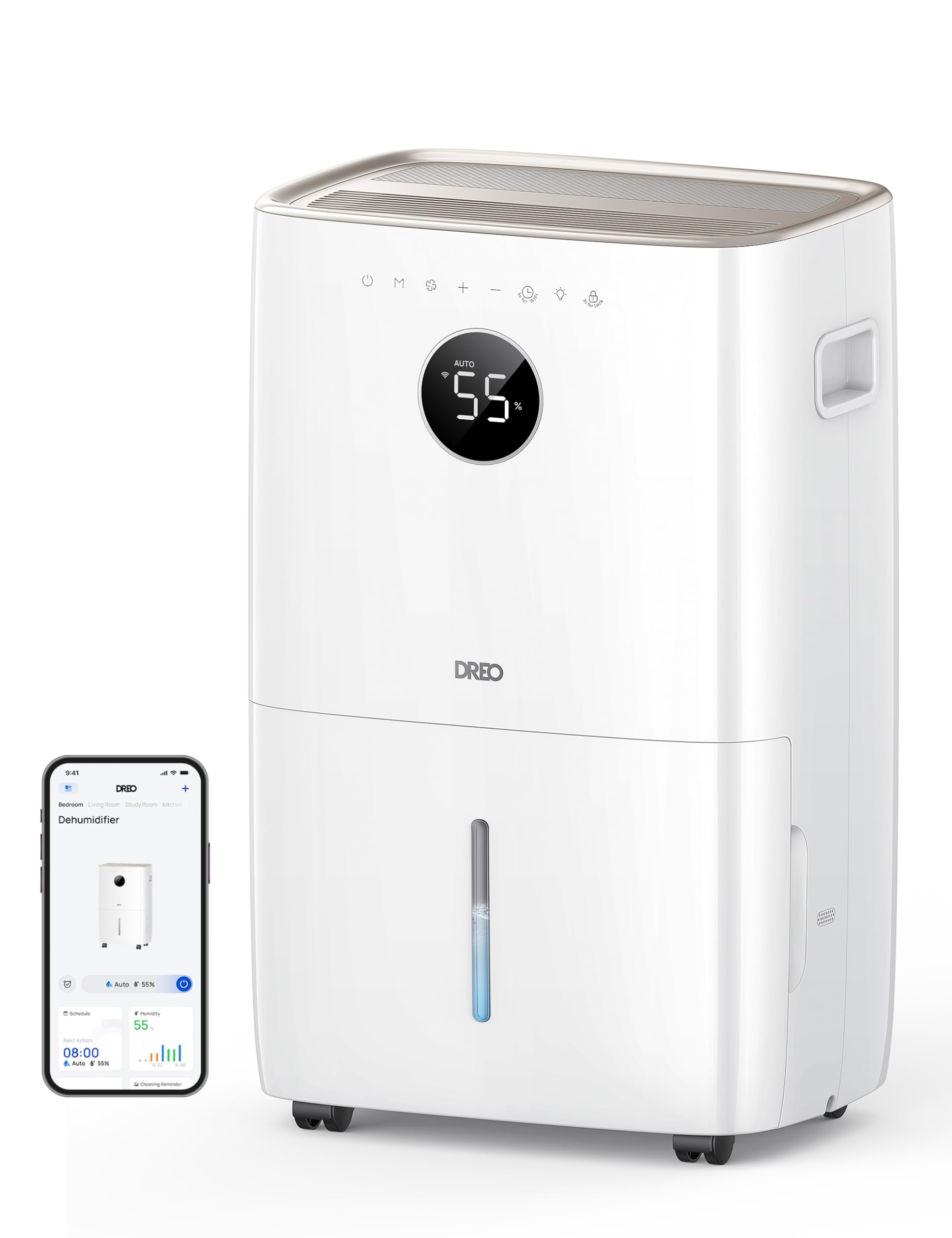
Irudia: Aurrealdea view of the Dreo 110-Pint Smart Dehumidifier, highlighting its compact design and dimensions (11.3"D x 15.4"W x 24.4"H).
3.2. Kontrol-panela
The intuitive control panel allows for easy operation and monitoring of your dehumidifier.
- Pizteko botoia: Unitatea pizten edo itzaltzen du.
- Modu botoia: Cycles through Auto, Comfort, and Continuous modes.
- Fan abiadura botoia: Haizagailuaren abiadura doitzen du (Baxua, Ertaina, Altua).
- Humidity Adjustment Buttons (+/-): Sets desired humidity level in Auto Mode.
- Tenporizadorearen botoia: Sets a 24-hour timer for automatic on/off.
- Wi-Fi adierazlea: Wi-Fi konexioaren egoera erakusten du.
- Haurrentzako blokeo botoia: Kontrol-panela blokeatzen du ustekabeko aldaketak saihesteko.
- Iragazkia berrezartzeko adierazlea: Lights up when the filter needs cleaning.
- Water Full Alert: Illuminates when the water tank is full, and the unit stops operation.
- Desizoztearen adierazlea: Activates automatically at 41°F (5°C) for optimal performance in cold environments.

Image: Close-up of the dehumidifier's control panel, showing the digital display set to 55% humidity in Auto Mode, with various function icons.
4. Konfigurazioa
4.1. Desontziratzea eta kokatzea
- Kontu handiz atera hezetasun-kentzailea bere paketetik.
- Place the unit upright on a flat, stable surface. Ensure there is at least 8 inches (20 cm) of space around the air inlets and outlets for proper airflow.
- Utzi unitatea zutik gutxienez 24 orduz konektatu aurretik, hozgarria finkatu dadin.
4.2. Energia-konexioa
Plug the power cord into a grounded electrical outlet. Ensure the outlet meets the electrical requirements of the dehumidifier.
4.3. Drainage Options
The Dreo dehumidifier offers two drainage methods: manual emptying of the water tank or continuous drainage via a hose.

Image: The dehumidifier illustrating both the manual water tank removal and the continuous drainage hose connection.
4.3.1. Eskuzko drainatzea
- When the water tank is full, the unit will automatically stop and display a "Water Full" alert.
- Carefully pull out the water tank from the front of the unit using the integrated handle.
- Bildutako ura hustubide edo harraska batera.
- Slide the empty water tank back into the unit until it clicks into place. The dehumidifier will resume operation.
4.3.2. Etengabeko drainatzea
- Locate the drain hose outlet at the rear of the dehumidifier.
- Remove the rubber stopper from the outlet.
- Connect the provided drain hose (or a standard garden hose) to the outlet. Ensure the connection is secure to prevent leaks.
- Route the hose to a suitable drain point (e.g., floor drain, sink, or sump pump). Ensure the hose is sloped downwards to allow gravity to drain the water and is free of kinks.
- The dehumidifier will now continuously drain water without needing to empty the tank manually.
5. Funtzionamendu-argibideak
Sakatu Pizteko botoia to turn the dehumidifier on. The unit will start operating in its last used mode and settings.
5.1. Funtzionamendu moduak
Sakatu Modu botoia eskuragarri dauden funtzionamendu moduen artean ziklatzeko:
- Modu automatikoa: The dehumidifier intelligently adjusts fan speed to maintain your target humidity level within a 5% tolerance. Use the +/- botoiak to set your desired humidity (e.g., 45-55% is generally recommended).
- Erosotasun modua: The unit operates to maintain a comfortable humidity level based on ambient temperature.
- Etengabeko modua: The dehumidifier runs continuously at the selected fan speed, regardless of the ambient humidity. This is ideal for very damp conditions or for continuous drainage.
5.2. Fan Abiadura Doitzea
In Auto or Continuous mode, press the Fan Abiadura Botoia to select between Low, Medium, or High fan speeds.
5.3. Tenporizadorearen funtzioa
Sakatu Tenporizadorearen botoia to set a desired operating duration (from 1 to 24 hours). The unit will automatically turn on or off after the set time has elapsed.
5.4. Smart Control (DREO App)
The Dreo 110-Pint Smart Dehumidifier can be controlled remotely via the DREO app on your smartphone or through voice assistants like Alexa and Google Home.

Image: A smartphone displaying the DREO app interface, showing remote control capabilities for the dehumidifier.
5.4.1. Connecting to the DREO App
- Download the DREO app from your smartphone's app store (available on iOS and Android).
- Sortu kontu bat edo hasi saioa.
- Follow the in-app instructions to add your Dreo 110-Pint Smart Dehumidifier (Model DH711S). Ensure your phone is connected to a 2.4GHz Wi-Fi network.
Video: This video demonstrates the process of downloading the DREO app and creating a new user account to manage your smart dehumidifier.
Video: This video provides a step-by-step guide on how to connect your Smart Dehumidifier DH711S to the DREO app for remote control and smart features.
5.4.2. Aplikazioaren Ezaugarriak
Through the DREO app, you can:
- Monitor real-time humidity levels.
- Ezarri ordutegiak eta tenporizadoreak.
- Adjust operating modes and fan speeds.
- Receive notifications (e.g., water tank full, filter cleaning reminder).
- Control the unit using voice commands with Alexa or Google Home.
6. Mantentzea
Mantentze-lan erregularrak zure deshezegailuaren errendimendu optimoa eta iraupena bermatzen ditu.
6.1. Aire-iragazkia garbitzea
The filter reset indicator will light up after approximately 250 hours of operation, signaling that the filter needs cleaning.
- Deskonektatu hezegailuaren entxufea korronte-hartunetik.
- Remove the air filter from the rear of the unit.
- Wash the filter with clean water (no hotter than 104°F / 40°C) and a mild detergent.
- Ondo garbitu eta berriro instalatu aurretik airean guztiz lehortzen utzi.
- Once the filter is reinstalled, plug in the unit and press the Iragazkia berrezartzeko botoia for 3 seconds to clear the indicator.

Image: A hand removing the washable air filter from the back of the dehumidifier for cleaning.
6.2. Ur-depositua garbitzea
Garbitu ur-depositua aldizka lizun eta onddoen hazkuntza saihesteko.
- Remove the water tank as described in the Manual Drainage section.
- Garbitu depositua ur epelarekin eta detergente leun batekin.
- Ondo garbitu eta erabat lehortu unitatean berriro sartu aurretik.
6.3. Garbiketa orokorra
Garbitu dehezegailuaren kanpoaldea leun batekin, damp oihal. Ez erabili produktu kimiko gogorrak edo garbitzaile urratzaileak.
7. Arazoak
Zure deshezegailuarekin arazoak badituzu, jo ezazu honako arazo eta irtenbide ohikoenei:
| Arazoa | Kausa posiblea | Irtenbidea |
|---|---|---|
| Hezetasun-kengailuak ez du pizten. | No power, power cord loose, water tank full. | Check power connection, ensure plug is secure, empty water tank. |
| Unit is not collecting water. | Humidity level too low, room temperature too low, air filter clogged. | Increase target humidity, ensure room temp is above 41°F (5°C), clean air filter. |
| Unitatea zaratatsua da. | Unitatea ez dago gainazal mailakatu batean, aire-iragazkia buxatuta dago. | Place on a flat surface, clean air filter. |
| Unitatetik ura isurtzen da. | Water tank not properly installed, continuous drain hose is loose or kinked. | Reinstall water tank correctly, check drain hose connection and ensure no kinks. |
| Display shows fluctuating numbers. | Normal adjustment to current humidity. | This is normal operation as the sensor adjusts to ambient conditions. |
| Unit isn't defrosting automatically. | Issue with the condenser. | Jarri harremanetan bezeroarentzako laguntza eskatzeko. |
8. Zehaztapenak
| Ezaugarri | Xehetasuna |
|---|---|
| Marka | Dreo |
| Ereduaren izena | DR-HDH001S |
| Edukiera | 110 Pints (at 86°F, RH 90%) / 50 Pints per Day (DOE Standard) |
| Estaldura Eremua | Gehienez 4500 oin karratu |
| Ur deposituaren bolumena | 2 galoi (8L) |
| Eragiketa moduak | Auto, Comfort, Continuous |
| Fan Abiadurak | 3 (Baxua, Ertaina, Altua) |
| Aire Fluxuaren Ahalmena | 210 oin kubiko minutuko (CFM) |
| Hezetasunaren Kontrola | Adjustable, with ±5% precision sensor |
| Ezaugarri bereziak | Smart Control (DREO App, Alexa, Google Home), Auto-Defrost, 90° Tilt Waterproof Design, Thermal Protection, 15A Overcurrent Protection, Washable Filter, 360° Caster Wheels |
| Produktuaren neurriak | 11.3" L x 15.4" W x 24.4" H |
| Elementuaren pisua | 43.7 kilo |
| Materiala | Metala, Plastikoa |
| Ziurtagiriak | ETL ziurtagiria |
9. Bermea eta Laguntza
Dreo products come with a standard warranty. For specific warranty details, please refer to the warranty card included in your product packaging or visit the official Dreo webgunea.
9.1. Bezeroarentzako arreta
If you have any questions, concerns, or require assistance with your Dreo 110-Pint Smart Dehumidifier, please contact Dreo Customer Support:
- Posta elektronikoa: support@dreo.com
- Webgunea: www.dreo.com
Please have your model number (DR-HDH001S) and purchase information ready when contacting support.


