Sarrera
This manual provides essential information for the safe and efficient use of your SUPVAN T50M Pro Label Maker. Please read these instructions carefully before operating the device and retain them for future reference.
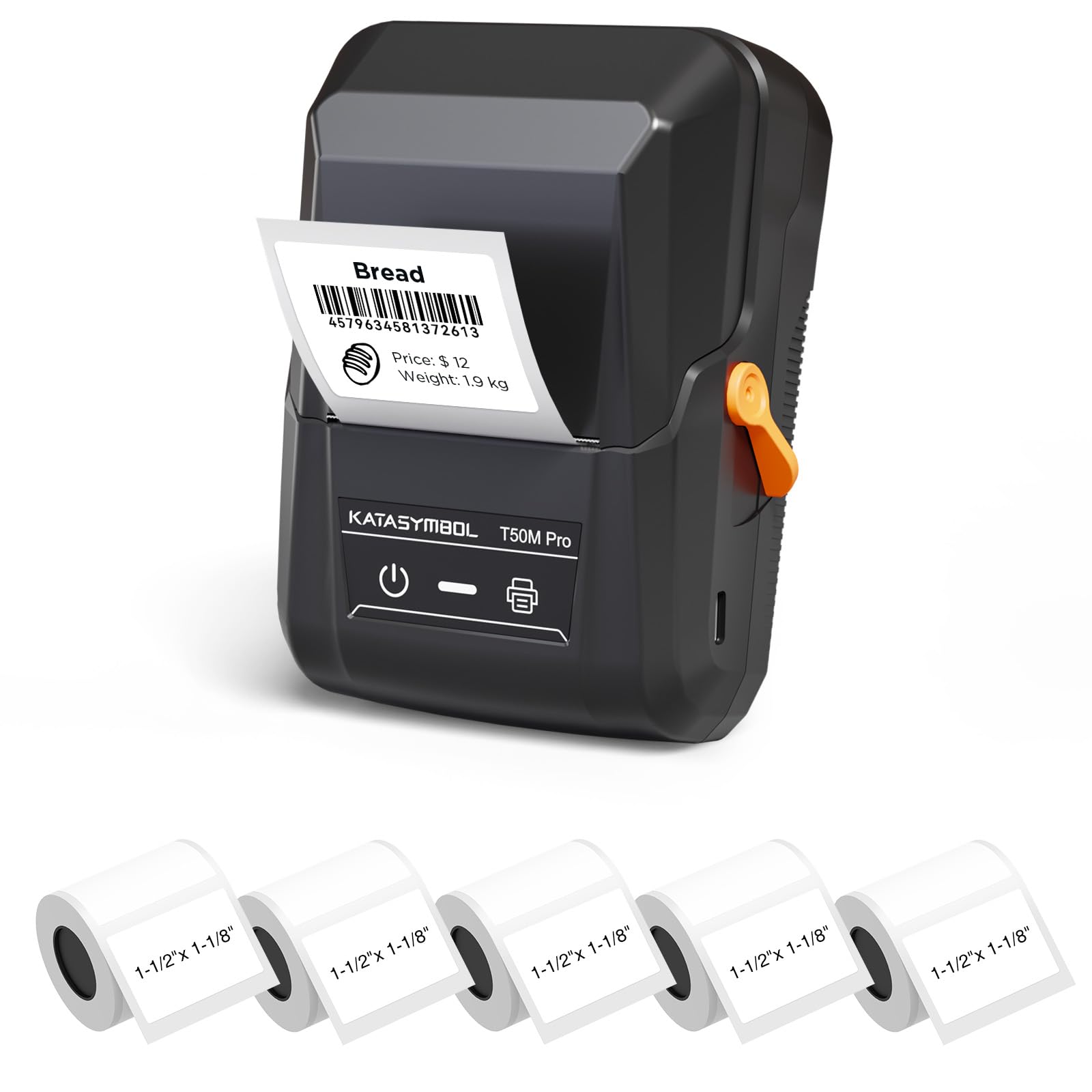
Image: The SUPVAN T50M Pro Label Maker, a compact thermal printer.
Paketearen edukia
Egiaztatu elementu guztiak zure paketean daudela:
- SUPVAN T50M Pro Label Maker
- 5 rolls of 1.57'' × 1.18'' (40mm × 30mm) white labels (250 labels/roll)
- USB Cable (for charging and connectivity)
- Erabiltzailearen eskuliburua (dokumentu hau)
Konfigurazio Gida
1. Gailua kargatzea
Before first use, fully charge the label maker using the provided USB cable. The device features a 1200 mAh built-in rechargeable battery, offering extended use on a single charge.
2. Installing the Label Roll
The T50M Pro uses thermal paper, eliminating the need for ink or toner. Follow these steps to install a label roll:
- Ireki etiketa-konpartimentuaren estalkia.
- Insert the label roll with the printing surface facing upwards.
- Ensure the label edge is aligned with the printer's feed mechanism.
- Close the cover. The device's Smart RFID Auto-Detection will recognize the label size automatically.

Image: Illustration of loading thermal paper into the label maker. The device uses thermal printing technology, requiring no ink or toner.
3. Aplikazioaren instalazioa eta konexioa
Download the official SUPVAN app from your device's app store. The app provides all editing functions and is free to use.
- Piztu etiketa-egilea.
- Open the SUPVAN app on your smartphone or tablet.
- Follow the in-app instructions to connect to your T50M Pro via Bluetooth or USB.
Funtzionamendu-argibideak
1. Creating Labels with the App
The SUPVAN app offers a comprehensive suite of editing tools:
- Testu edizioa: Choose from over 40 fonts.
- Image & Picture Integration: Add custom images and logos.
- Txantiloiak: Access over 140 free, constantly updated templates for various uses.
- Auto Label Size Recognition: The app automatically detects the loaded label size, reducing errors.

Image: The SUPVAN app's editing interface, demonstrating font choices, image integration, and automatic label size detection.

Image: A selection of over 140 free templates available within the SUPVAN app, suitable for diverse labeling needs.
2. Etiketak inprimatzea
After designing your label in the app, select the "Print" option. Ensure the label maker is connected and has sufficient battery. The T50M Pro supports various label styles and sizes, printing 3/4 to 2-inch wide labels.

Irudia: Adibamples of labels created with the T50M Pro, including address labels, price tags, and decorative labels, demonstrating support for various styles.

Image: A visual comparison highlighting the high-quality image output from the SUPVAN T50M Pro's app compared to other label makers.
3. Aplikazio arruntak
The SUPVAN T50M Pro is suitable for a wide range of labeling tasks:
- Enpresa txikia: Shipping addresses, product information, QR codes, brand logos.
- Office & School: Izena tags, folder labels, documentation, asset tagjoan zen.
- Etxeko Antolaketa: Pantry labels, storage bins, personal items.

Image: Demonstrates diverse uses for the label maker, such as labeling containers in a pantry, creating product labels, printing shipping labels, and organizing school supplies.
Mantentzea
1. Inprimatze-burua garbitzea
To ensure optimal print quality, periodically clean the thermal print head. Use a soft, lint-free cloth lightly dampened with isopropyl alcohol. Do not use abrasive cleaners or sharp objects.
2. Bateria zaintzea
Recharge the device when the battery indicator is low. Avoid fully discharging the battery frequently to prolong its lifespan. Store the device in a cool, dry place when not in use for extended periods.
3. Etiketa biltegiratzea
Store label rolls in a cool, dry place away from direct sunlight and heat to prevent degradation of the thermal material.
Arazoak konpontzea
1. Gailua ez da pizten
- Ensure the device is fully charged. Connect it to a power source using the USB cable.
- Eduki sakatuta pizteko botoia segundo batzuetan.
2. Printing Issues (Blank or Faint Prints)
- Check if the label roll is installed correctly with the printing surface facing up.
- Ensure the label roll is not empty.
- Garbitu inprimatze-burua Mantentze-lanak atalean azaltzen den bezala.
- Verify that the label type is compatible with the T50M Pro.
3. App Connectivity Problems
- Ziurtatu Bluetootha gaituta dagoela zure gailu mugikorrean.
- Make sure the label maker is turned on and within range.
- Restart both the label maker and the app.
- Arazoak jarraitzen badute, saiatu aplikazioa berriro instalatzen.
4. Label Misalignment
- Ensure the label roll is properly seated and aligned in the compartment.
- The Smart RFID Auto-Detection should prevent most misalignment issues; if not, try re-seating the roll.
Zehaztapenak
| Ezaugarri | Xehetasuna |
|---|---|
| Ereduaren izena | T50M Pro |
| Marka | SUPVAN |
| Inprimatzeko Teknologia | Termikoak |
| Konektibitate Teknologia | USB, Bluetootha |
| Hardware interfazea | USBa |
| Inprimagailuaren irteera | Monochrome (Black Ink Color) |
| Gehienezko euskarriaren tamaina | 1.57'' × 1.18'' (40mm × 30mm) - 3/4 to 2-inch wide labels supported |
| Ezaugarri Berezia | Portable, Smart RFID Auto-Detection, BPA-free labels |
| Bateria | 1200 mAh-ko bateria kargagarria integratua |
| Neurriak | Gutxi gorabehera 5 cm x 3.7 cm x 2.3 cm |
| Pisua | Gutxi gorabehera. 0.6 kilo |
| Dakarten osagaiak | Label Maker, Labels, USB Cable |

Image: The compact design of the T50M Pro, highlighting its portability, lightweight nature, and 1200 mAh rechargeable battery.
Bermea eta Laguntza
Bermearen informazioa
For detailed warranty information, please refer to the warranty card included with your product or visit the official SUPVAN webgunea. Bermearen baldintzak eta zehaztapenak eskualdearen eta saltzailearen arabera alda daitezke.
Bezeroarentzako Arreta
If you encounter any issues or have questions regarding your SUPVAN T50M Pro Label Maker, please contact SUPVAN customer support through their official webproduktua erosi zen gunea edo dendaria.
Era berean, bisitatu dezakezu SUPVAN Store on Amazon produktuari buruzko informazio gehigarria eta laguntza-baliabideak lortzeko.


