Segurtasun-argibide garrantzitsuak
Produktu hau erabili aurretik, irakurri eta ulertu segurtasun-argibide guztiak. Gorde eskuliburu hau etorkizunean erreferentzia gisa.
- Aireztapena: Ziurtatu aireztapen egokia dagoela. Ez blokeatu aireztapen-irekidurak.
- Ura eta hezetasuna: Ez jarri tresna hau euripean edo hezetasunean. Ez jarri likidoz betetako objekturik, hala nola loreontziak, tresnaren gainean.
- Bero iturriak: Ez instalatu bero-iturri inongo ondoan, esate baterako, erradiadoreak, bero-erregistroak, sukaldeak edo beste aparatu batzuk (barne ampberoa sortzen duten argitzaileak).
- Energia iturriak: Use only power supplies specified by the manufacturer. Ensure the power cord is protected from being walked on or pinched.
- Garbiketa: Garbitu zapi lehor batekin bakarrik.
- Zerbitzua: Ez saiatu produktu hau zuk zeuk ematen. Bidali zerbitzu guztiak zerbitzu kualifikatuko langileengana.
Paketearen edukia
Egiaztatu behean zerrendatutako elementu guztiak zure paketean sartuta daudela:
- Kuephom CD-X2A Boombox
- AC korronte kablea
- Erabiltzailearen eskuliburua (dokumentu hau)
- Urruneko Kontrola
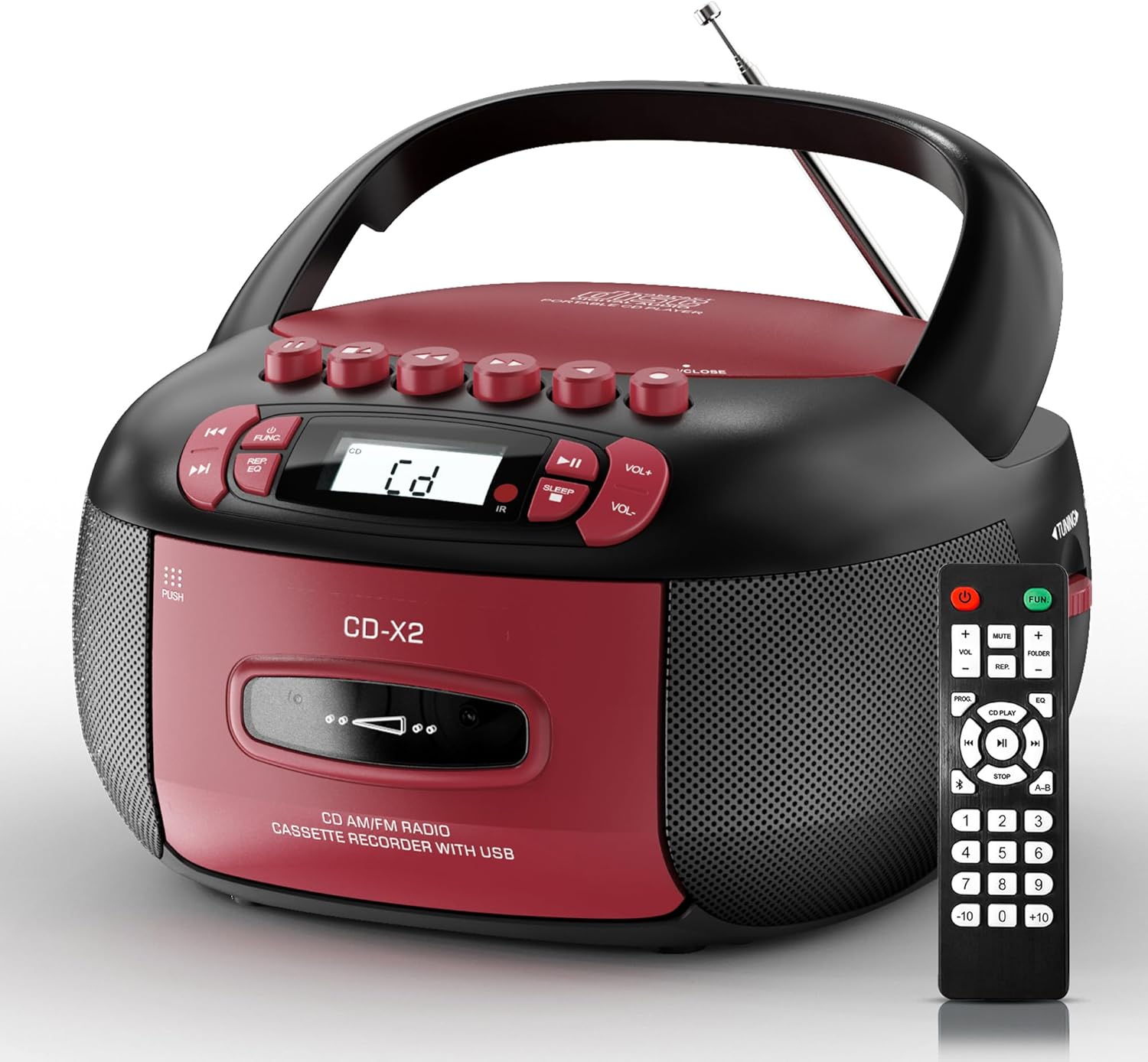
Image: The Kuephom CD-X2A Boombox with its included remote control, showcasinbere diseinu trinkoa eta gorri/beltz kolore eskema ditu.
Produktua amaituview
Familiarize yourself with the various components and controls of your Kuephom CD-X2A Boombox.
Aurrealdeko paneleko kontrolak
- Pizteko/Funtzio botoia: Press and hold to power on/off. Press to cycle through modes (CD, USB, Bluetooth, Radio, AUX, Tape).
- Bolumenaren +/- botoiak: Doitu erreprodukzio-bolumena.
- Erreproduzitu/Pausatu botoia: Start or pause playback for CD, USB, Bluetooth, or Tape.
- Gelditzeko botoia: Erreproduzitzeari utzi.
- Saltatu/Bilatu botoiak: Navigate between tracks on CD/USB or fast forward/rewind on tape.
- EQ botoia: Hautatu ekualizazio aurrezarpenak.
- Lo egiteko tenporizadorearen botoia: Ezarri lo egiteko tenporizadorea.
Alboko panelaren kontrolak
- Afinatzeko botoia: Manually tune AM/FM radio stations.
- Aurikularrak Jack: Konektatu entzungailuak entzuteko modu pribatuan.
- AUX sarrerako ataka: Konektatu kanpoko audio gailuak.
- USB ataka: Insert USB drives for MP3/WMA playback.
Goiko Panelaren Ezaugarriak
- CD konpartimentua: Top-loading compartment for CDs.
- Kasete konpartimentua: Kasete-zintak gordetzeko aurrealdeko konpartimentua.
- Antena teleskopikoa: Extend for improved radio reception.

Image: The boombox highlighting its multiple functions including CD/MP3, Bluetooth, Type I/II tape, USB, FM/AM Radios, Sleep timer, Remote, Phone jack, AUX, and Tape recording.

Irudia: Gertuko planoa views of the boombox's phone jack, top-loading CD player, telescopic antenna, and tape play/record buttons.
Konfigurazioa
Boombox-ari indarra ematea
AC potentzia
- Connect the supplied AC power cord to the AC IN jack on the back of the boombox.
- Plug the other end of the power cord into a standard AC wall outlet (120V~60Hz).
Bateria Potentzia
- Open the battery compartment cover located on the bottom of the boombox.
- Insert 6 x 'C' size batteries (not included), ensuring correct polarity (+/-).
- Itxi bateriaren konpartimenduaren estalkia ondo.
- When operating on battery power, disconnect the AC power cord.

Image: The boombox demonstrating both AC power connection and the use of 6 C-size batteries for portable operation.
Urruneko Kontrola
- Insert 2 x 'AAA' batteries (not included) into the remote control, observing polarity.
- Point the remote control towards the boombox's IR sensor for optimal operation.

Image: An individual comfortably operating the boombox using the remote control from a distance.
Funtzionamendu-argibideak
Funtzionamendu Orokorra
- Piztu/Itzali: Press and hold the Power/Function button to turn the unit on or off.
- Funtzioa hautatzea: Press the Power/Function button repeatedly to switch between CD, USB, Bluetooth, Radio (AM/FM), AUX, and Tape modes.
CD erreprodukzioa
- Ireki CDaren konpartimentuaren estalkia.
- Place a CD (CD, CD-R, MP3, WMA compatible) onto the spindle with the label side facing up.
- Itxi CD konpartimentuaren estalkia.
- Press the Power/Function button to select 'CD' mode.
- Sakatu Erreproduzitu/Pausatu botoia erreprodukzioa hasteko.
- Use the Skip/Search buttons to navigate tracks.
- Press the Repeat button to repeat a single track, folder, or all tracks.
- Press the Program button to program a custom playback sequence.

Image: The boombox's display showing 'CD' mode, with icons indicating compatibility with CD, CD-R, CD-RW, WMA, and MP3 formats, along with single cycle, repeat folder, repeat all, random play, and play in order options.
Kaseteen erreprodukzioa eta grabaketa
- Press the 'OPEN/CLOSE' button on the cassette compartment to open it.
- Sartu kasete-zinta bat.
- Itxi kasetearen konpartimendua.
- Press the Power/Function button to select 'TAPE' mode.
- Sakatu Erreproduzitu botoia erreproduzitzen hasteko.
- Use the Fast Forward/Rewind buttons to navigate the tape.
- Grabaketa: In TAPE mode, select the desired source (CD, Bluetooth, USB, or AM/FM radio). Press the Record button to begin recording onto the cassette. The unit features an auto-stop function when the tape reaches its end.

Image: A hand inserting a cassette tape into the boombox's front-loading compartment, with controls for tape operation visible.
AM/FM irratia
- Press the Power/Function button to select 'RADIO' mode. Press again to switch between AM and FM bands.
- Extend the telescopic antenna for better FM reception. For AM, rotate the unit for best reception.
- Use the Tuning knob on the side to manually tune to your desired station. The frequency will be displayed on the screen.

Image: A man relaxing on a couch with the boombox, which displays various FM/AM radio frequencies, indicating good reception.
Bluetooth konexioa
- Press the Power/Function button to select 'BT' (Bluetooth) mode. The display will show 'BT' and flash, indicating it's in pairing mode.
- On your mobile device, enable Bluetooth and search for 'CD-X2A'.
- Select 'CD-X2A' to pair. Once paired, the 'BT' indicator will stop flashing.
- Orain audioa haririk gabe erreproduzitu dezakezu zure gailutik boombox-era.

Image: A woman in a living room wirelessly streaming audio from her smartphone to the boombox via Bluetooth 5.1, indicating a stable connection.
USB erreprodukzioa
- Insert a USB flash drive into the USB port on the side of the boombox.
- Press the Power/Function button to select 'USB' mode.
- The boombox will automatically detect and play compatible MP3/WMA files.
- Use the Play/Pause, Stop, and Skip/Search buttons to control playback.
AUX sarrera
- Connect an external audio device (e.g., smartphone, MP3 player) to the AUX-in port using a 3.5mm audio cable (not included).
- Press the Power/Function button to select 'AUX' mode.
- Control playback directly from your connected external device.
Lo egiteko tenporizadorea
- While the unit is playing, press the Sleep Timer button.
- Repeatedly press the button to cycle through available sleep timer durations (e.g., 15, 30, 60, 90 minutes).
- The unit will automatically power off after the selected time.

Image: A man sleeping in bed with the boombox on his nightstand, illustrating the sleep timer feature which allows the device to turn off automatically.
Mantentzea
- Garbiketa: Use a soft, dry cloth to clean the exterior of the boombox. Do not use abrasive cleaners or solvents.
- CDaren zainketa: CDak ertzetik heldu. Garbitu CD zikinak zapi leun eta lihorik gabeko batekin, erdialdetik kanporantz garbituz.
- Kaseteen zaintza: Keep cassette tapes away from direct sunlight and heat. Periodically clean the tape heads with a specialized cassette head cleaner.
- Biltegiratzea: When not in use for extended periods, disconnect the power cord and remove batteries. Store the unit in a cool, dry place.
Arazoak konpontzea
Arazoak izanez gero, jo beheko taulara arazo ohikoenak eta irtenbideak ikusteko.
| Arazoa | Kausa posiblea | Irtenbidea |
|---|---|---|
| Botererik ez | Korronte alternoko kablea ez dago konektatuta; Bateriak agortuta edo gaizki sartuta. | Check AC connection; Replace or correctly insert batteries. |
| Soinurik ez | Bolumena baxuegia; Funtzio modu okerra hautatuta; Entzungailuak konektatuta. | Increase volume; Select correct mode; Disconnect headphones. |
| CDak salto egiten du edo ez da erreproduzitzen | CD dirty or scratched; CD inserted incorrectly; Incompatible CD format. | Clean or replace CD; Insert CD correctly; Ensure CD is compatible (CD, CD-R, MP3, WMA). |
| Irrati estatikoa/harrera txarra | Antena ez dago luzatuta/posizionatuta; Seinale ahula. | Extend and adjust telescopic antenna; Try repositioning the unit. |
| Bluetootha ez da parekatzen | Boombox-a ez dago parekatze moduan; Gailuaren Bluetooth-a itzalita; Gailua urrunegi. | Ensure boombox is in 'BT' mode and flashing; Enable Bluetooth on device; Move device closer. |
| Kasetea ez da erreproduzitzen/grabatzen ari | Tape inserted incorrectly; Tape heads dirty; Auto-stop engaged. | Insert tape correctly; Clean tape heads; Check tape end. |
Zehaztapenak
| Ezaugarri | Xehetasuna |
|---|---|
| Modelo zenbakia | CD-X2A |
| Produktuaren neurriak (L x W x H) | 8.39 x 4.8 x 8.54 hazbete |
| Elementuaren pisua | 3.45 kilo |
| Energia iturria | AC 120V~60Hz or 6 x 'C' size batteries |
| Konektibitate Teknologia | Laguntzailea, Bluetooth, USB |
| Hizlari mota | Stereo (2W+2W output) |
| Onartutako disko formatuak | CD, CD-R, MP3, WMA |
| Supported Tape Types | Type I/II Cassette |
| Irrati Taldeak | AM/FM |
| Ezaugarri bereziak | Tape Recording, Sleep Timer, Earphone Jack, Remote Control |
Bermea eta Laguntza
Kuephom products are designed for reliability and performance. This product comes with a standard manufacturer's warranty against defects in materials and workmanship under normal use.
For warranty claims, technical assistance, or any questions regarding your Kuephom CD-X2A Boombox, please contact Kuephom customer support. Refer to the contact information provided with your purchase documentation or visit the official Kuephom webgunea laguntza xehetasunetarako.
We are committed to providing lifetime service support and 7/24 customer assistance for our products.


