1. Sarrera
This manual provides detailed instructions for the assembly, operation, maintenance, and safety of your HOMCOM Double Media Storage Cabinet, Model 836-602V00BK. Please read all instructions carefully before assembly and use to ensure proper function and safety.

Figure 1: Assembled HOMCOM Double Media Storage Cabinet.
2. Produktuaren ezaugarriak
- Adjustable Media Storage: Features 12 adjustable shelves, accommodating up to 720 CDs, 396 DVDs, or 396 Blu-rays.
- Espazio aurrezteko diseinua: Modern design minimizes floor space while providing ample biltegiratze.
- Egonkorra eta segurua: Constructed from quality particleboard and includes an anti-tipping strap for stability.
- Pantaila polifazetikoa: Can also be used to display ornaments, small potted plants, and other decor items.

Figure 2: Storage capacity details.

3. irudia: Apal erregulagarriaren mekanismoa.
3. Muntatzeko jarraibideak
Assembly of the HOMCOM Double Media Storage Cabinet is designed to be straightforward. All parts are numbered, and clear instructions are provided. It is recommended to assemble the unit on a soft, clean surface to prevent scratches.
- Deskonprimitu osagai guztiak eta egiaztatu ontzian emandako piezen zerrendarekin.
- Follow the step-by-step diagram to connect the main structural panels.
- Insert the adjustable shelves into your desired positions. Ensure they are securely seated.
- Attach the anti-tipping strap to the top rear of the cabinet and secure it to a wall stud as per safety guidelines.

Figure 4: Assembly diagram with numbered parts.
4. Erabilera eta funtzionamendua
The media storage cabinet is designed for organizing CDs, DVDs, Blu-rays, and other small media items. The 12 adjustable shelves allow for customization of compartment heights to fit various media sizes or decorative items.
- To adjust a shelf, carefully lift it from its current position and re-insert it into the desired shelf pin holes. Ensure all four pins are fully engaged before placing items on the shelf.
- Banatu pisua apaletan uniformeki egonkortasuna mantentzeko.

5. irudia: Adibample media arrangement.
Video 1: Demonstration of the HOMCOM Double Media Storage Cabinet in use, showcasinbere edukiera eta apal erregulagarriak.
5. Mantentzea
To ensure the longevity and appearance of your media storage cabinet, follow these maintenance guidelines:
- Garbitu gainazalak leun batekin, damp oihal. Saihestu garbitzaile urratzaileak edo produktu kimiko gogorrak.
- Aldian-aldian egiaztatu torloju eta lotura guztiak ondo estutu direla ziurtatzeko. Beharrezkoa bada, berriro estutu.
- Keep the cabinet away from direct sunlight and excessive moisture to prevent material damage.
6. Segurtasun informazioa
For your safety and to prevent damage to the product, adhere to the following:
- Iraulketaren aurkako uhala: Always install the provided anti-tipping strap to secure the cabinet to the wall. This prevents accidental tipping, especially in households with children or pets.
- Do not overload shelves beyond the specified weight capacity.
- Ez utzi haurrei armairuan igotzen edo harekin jolasten.
- Ensure the cabinet is placed on a level surface to prevent instability.
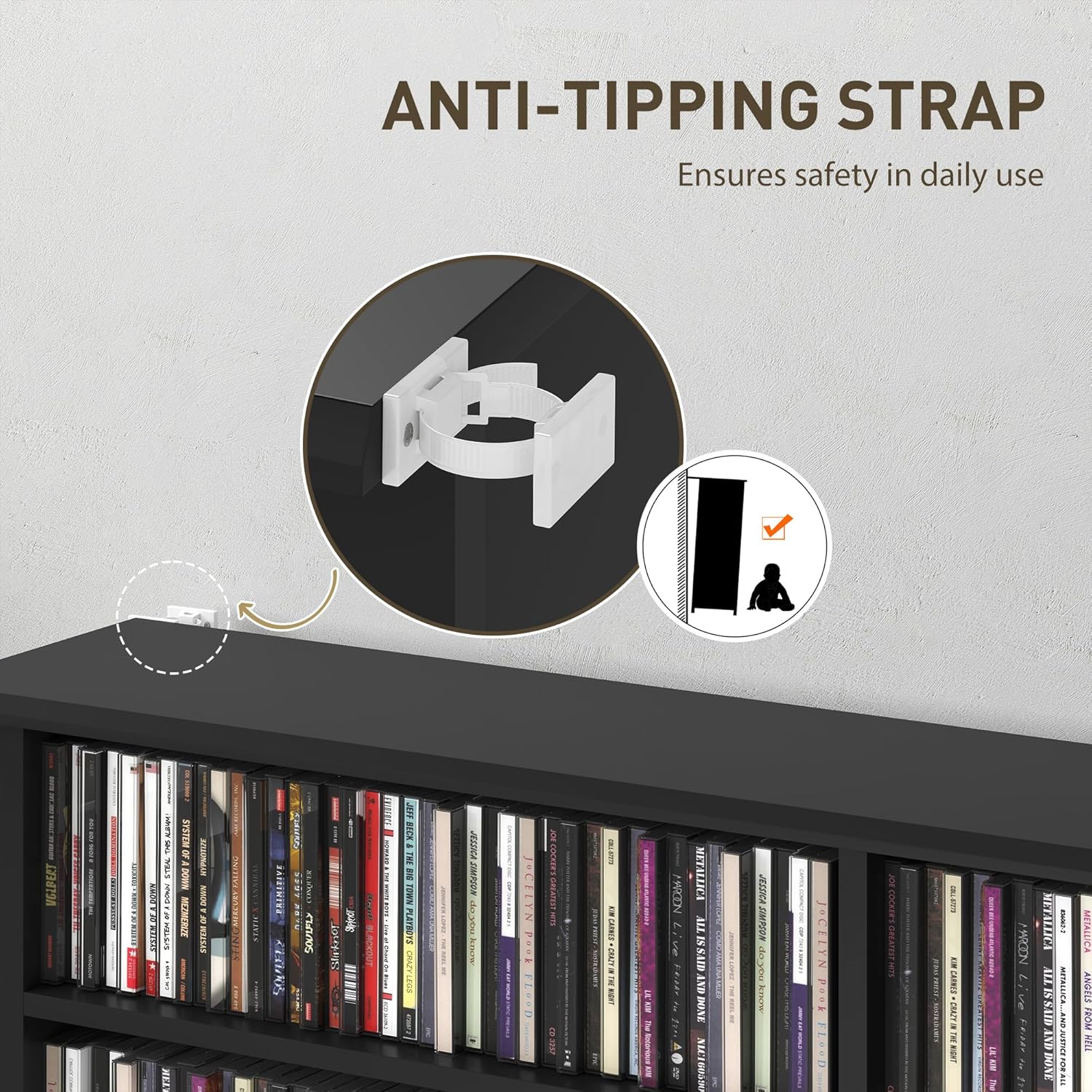
Figure 6: Anti-tipping strap installation.
7. Arazoak
If you encounter any issues with your HOMCOM Double Media Storage Cabinet, consider the following common solutions:
- Ezegonkortasuna: Ensure all fasteners are tightened. Verify the cabinet is on a level surface. Confirm the anti-tipping strap is correctly installed.
- Falta diren piezak: Double-check the packaging. If parts are genuinely missing, contact customer support with your model number and a description of the missing components.
- Muntatzeko zailtasuna: Review the assembly diagram and instructions carefully. Ensure parts are oriented correctly. Do not force components together.
8. Zehaztapenak
| Ezaugarri | Xehetasuna |
|---|---|
| Dimentsio orokorrak | 41.9" Z x 9.4" S x 49.7" A (106.5 x 24 x 126.3 cm) |
| Konpartimentu bakoitzaren tamaina | 18.5" Z x 5.9" S x 5.5" A (47 x 15 x 14 cm) |
| Pisu-ahalmen osoa | 66 kgs. (30 kg) |
| Materiala | Ingeniaritza Egurra |
| Amaitu | Melamina |
| Kolorea | Beltza |
| Apal erregulagarrien kopurua | 12 |
| Total Compartments | 16 |
| Muntaia Beharrezkoa | Bai |
| Muntatze Mota | Floor Mount (with anti-tipping strap) |

7. irudia: Produktuaren neurriak.
9. Bermea eta Laguntza
Your HOMCOM Double Media Storage Cabinet comes with a 90-Day Warranty Against Manufacturer Defects. For warranty claims, missing parts, or technical assistance, please contact Aosom Canada customer support.
Fabrikatzailea: Aosom Kanada
Negozioaren kokapena: Markham, Ontario, Kalifornia
Telefonoa: 1-416-792-6088