1. Sarrera
The NexTool Mini Sailor S11 Pro is a compact and versatile 12-in-1 multitool designed for everyday carry (EDC), outdoor activities, and minor DIY tasks. This manual provides essential information on the product's features, operation, maintenance, and specifications to ensure safe and effective use.

Image 1.1: The NexTool Mini Sailor S11 Pro Multitool, showcasing its various tools in an open configuration and its compact closed form.
2. Produktua amaitu daview
2.1 Ezaugarri nagusiak
- Upgraded Durability: Features a stone wash blackened finish and utilizes 5Cr15Mov and 8Cr14Mov steel for enhanced performance and rust resistance.
- Diseinu arina: Hollowed-out interior reduces weight to approximately 2.86oz (81 grams) for easy portability.
- Reinforced Pliers: Designed to withstand demanding tasks without breaking.
- Tamaina trinkoa: Closed dimensions of 2.83 × 0.99 × 0.63 inches (7.3 × 25.3 × 16.1mm) make it keychain-friendly.
2.2 Components (12-in-1)

Image 2.1: A detailed diagram illustrating the 12 distinct tools integrated into the NexTool Mini Sailor S11 Pro Multitool, along with its overall dimensions.
- Pintxoak
- Pintza erregularra
- Hari-mozgailuak
- Botila irekitzailea
- SIM Card Needle (Extractor)
- Buru lauko bihurkina
- Phillips Torlojua
- Guraizeak
- File
- Knife (8Cr14Mov)
- Zintzilikatzeko zuloa
- Transparent Fluorescent Block
3. Konfigurazioa
The NexTool Mini Sailor S11 Pro comes pre-assembled and ready for use. No complex setup is required. Simply unfold the desired tool from its compact, closed position.
3.1 Attaching to a Keychain
The multitool features a retractable hanging hole for easy attachment to a keychain or backpack. Gently push out the key ring to extend it, attach your keys or clip, then push it back in for secure storage.
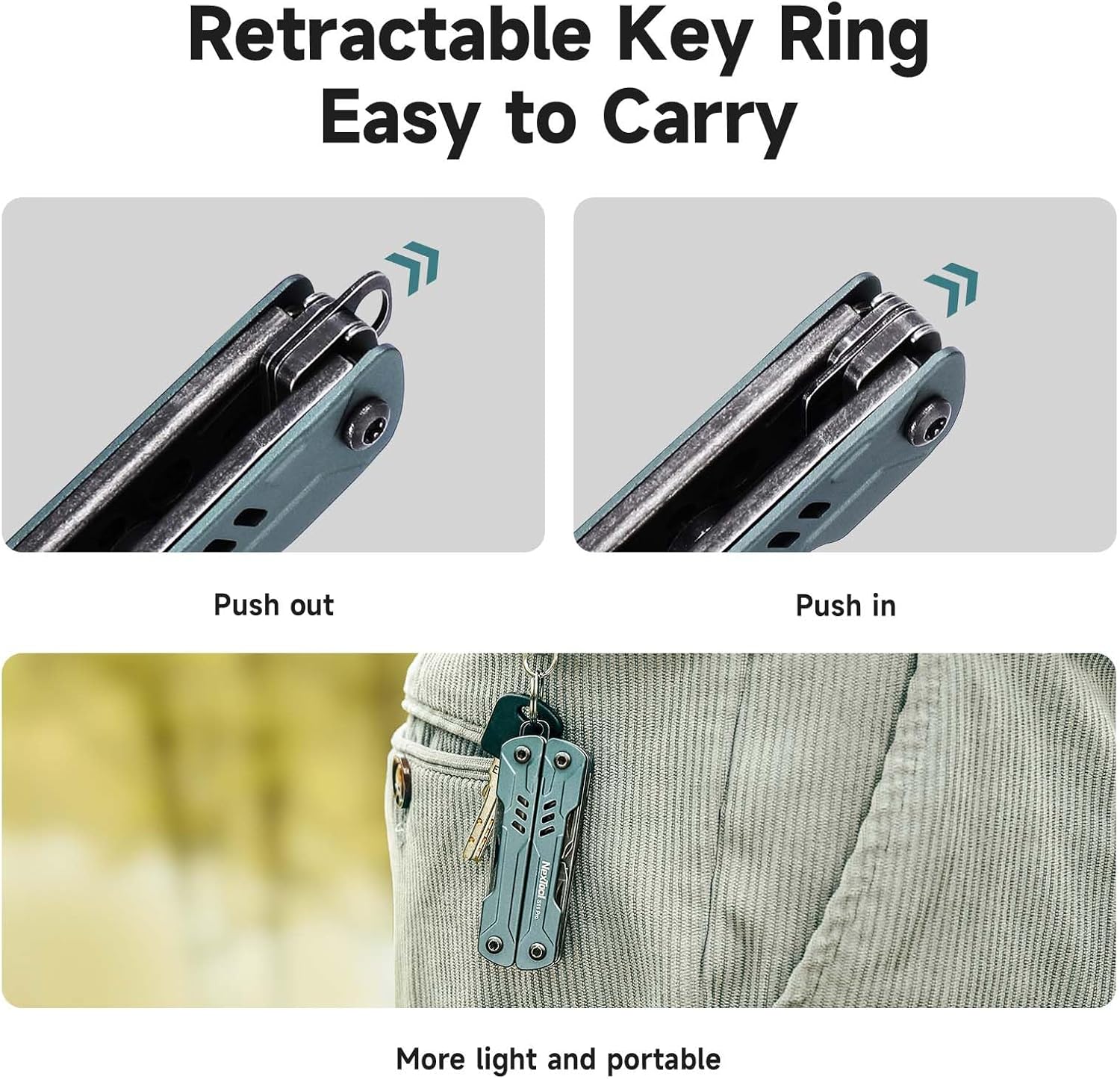
Image 3.1: Demonstration of the retractable key ring mechanism, showing how to extend and retract it, and an example of the multitool attached to a keychain.
4. Funtzionamendu-argibideak
To access any tool, carefully unfold the multitool handles. Select the desired tool and pivot it out until it locks into place (if applicable). Always ensure tools are fully deployed before use and securely folded away after use.
4.1 Pliers (Needlenose, Regular, Wire Cutters)
Unfold the multitool completely to reveal the pliers. The needlenose pliers are suitable for fine manipulation, while the regular pliers offer a stronger grip. The integrated wire cutters are designed for cutting small gauge wires.
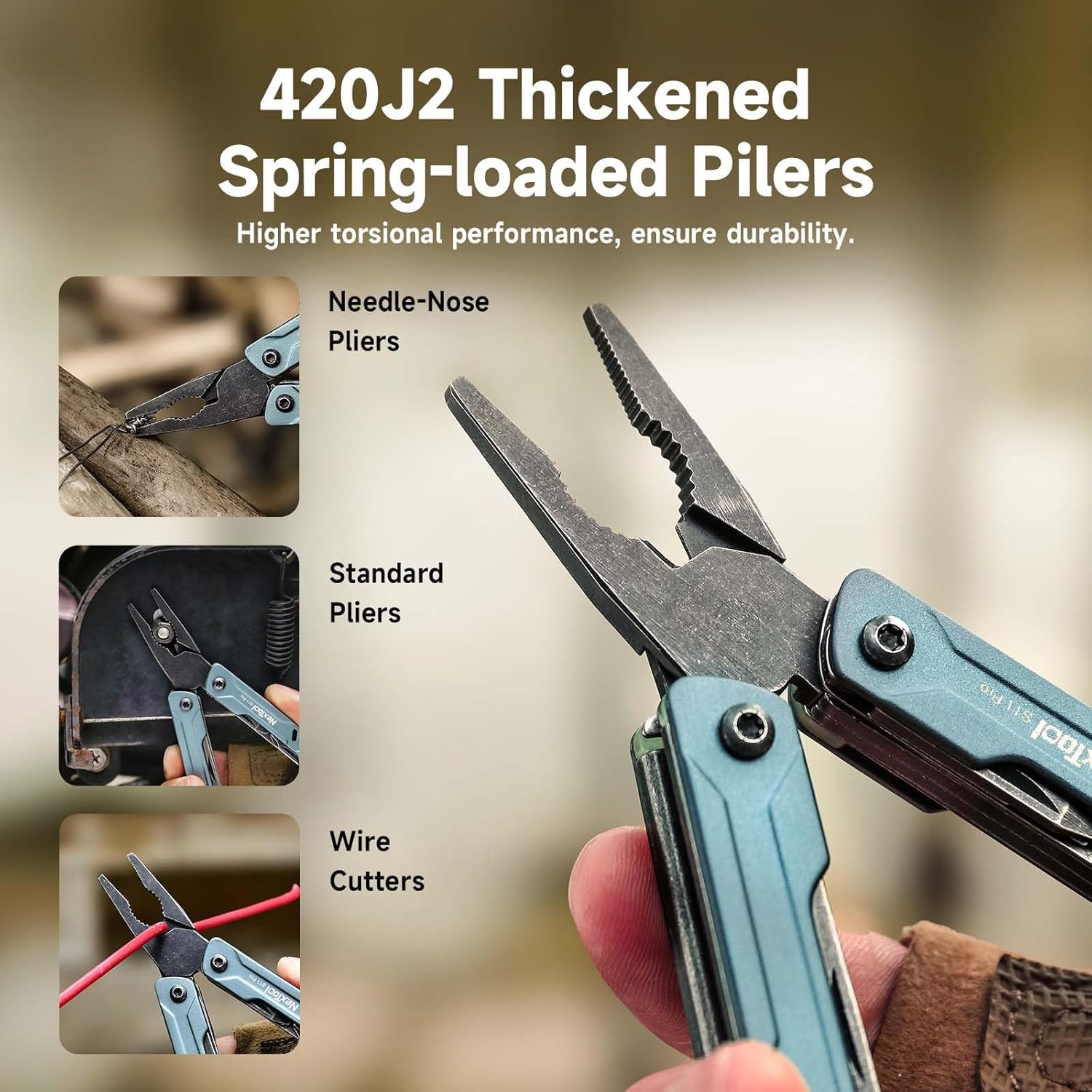
Image 4.1: Visual guide on utilizing the needlenose pliers for precision tasks, standard pliers for general gripping, and wire cutters for electrical work.
4.2 Knife (8Cr14Mov)
Carefully pivot the knife blade out from the handle. The 8Cr14Mov steel blade offers good sharpness for various cutting tasks. Always exercise caution when handling the blade.

Image 4.2: The 8Cr14Mov sharp portable knife in use, highlighting its ease of deployment and safe handling.
4.3 Scissors (5Cr15Mov)
Deploy the scissors by pivoting them out. The 5Cr15Mov scissors are suitable for cutting paper, string, or other light materials.

Image 4.3: The multitool's scissors in action, demonstrating their capability for light cutting tasks.
4.4 Screwdrivers (Phillips, Flat-head)
Locate and pivot out the Phillips or flat-head screwdriver as needed. These are designed for small screws commonly found in electronics or household items.

Image 4.4: The Phillips screwdriver being used to tighten a screw on a red valve.
4.5 File
The file can be used for light filing or shaping tasks on various materials.

4.5 irudia: file tool in use, demonstrating its application on a wooden surface.
4.6 Botila irekigailua
The integrated bottle opener provides convenience for opening capped bottles.

Image 4.6: The bottle opener tool being used to remove a bottle cap.
4.7 SIM Card Needle
The SIM card needle is designed for safely ejecting SIM card trays from mobile devices.

Image 4.7: The SIM card extractor tool in use, demonstrating its function on a smartphone.
4.8 Transparent Fluorescent Block
This block absorbs UV/visible light and glows in the dark, aiding in locating the multitool in low-light conditions.

Image 4.8: The multitool's fluorescent block glowing in a dark environment, illustrating its visibility feature.
5. Mantentzea
Proper maintenance ensures the longevity and optimal performance of your multitool.
- Garbiketa: After each use, especially in dirty or wet conditions, clean the multitool with a damp cloth. For stubborn dirt, use a small brush and mild soap. Ensure all tools are dry before folding and storing.
- Lubrifikazioa: Periodically apply a small amount of light machine oil to the pivot points of the tools to ensure smooth operation. Wipe off any excess oil.
- Zorroztea: The knife blade may require sharpening over time. Use a suitable sharpening stone or tool, maintaining the original blade angle. Exercise extreme caution during sharpening.
- Biltegiratzea: Store the multitool in a dry environment to prevent rust.
6. Arazoak
- Issue: Tools are stiff or difficult to open/close.
- Irtenbidea: Apply a small amount of light machine oil to the pivot points of the stiff tools. Work the tools back and forth several times to distribute the oil. If the issue persists, ensure no debris is obstructing the mechanism. Some users have noted that the pliers can be stiff initially; continued use and lubrication should improve this.
- Issue: Knife blade or scissors are dull.
- Irtenbidea: Sharpen the blade or scissors using appropriate sharpening tools. Refer to section 5 for sharpening guidelines. If the file appears ineffective, it may be due to a very fine grit or manufacturing variation; consider using a separate, dedicated file for heavy-duty tasks if needed.
- Issue: Multitool shows signs of rust.
- Irtenbidea: Clean the rust with a rust remover product suitable for stainless steel, following the product's instructions. After cleaning, dry thoroughly and apply a protective layer of oil. To prevent future rust, ensure the tool is always dry before storage and avoid prolonged exposure to moisture.
7. Zehaztapenak
| Ezaugarri | Xehetasuna |
|---|---|
| Modelo zenbakia | NE20382A |
| Materiala | Aluminum, Stainless Steel (5Cr15Mov, 8Cr14Mov) |
| Itxita dagoenean neurriak (L x Z x A) | 2.83 × 0.99 × 0.63 hazbeteko (7.3 × 25.3 × 16.1mm) |
| Elementuaren pisua | 2.86 ontza (81 gramo) |
| Dakarten osagaiak | Needlenose Pliers, Regular Pliers, Wire Cutter, Knife, Scissor, Phillips Screwdriver, Flathead Screwdriver, File, Bottle Opener, SIM Extractor, Hanging Hole, Fluorescent Block |
| Kolorea | S11 Pro (Stone Wash Blackened Finish) |
8. Bermea eta Laguntza
NexTool stands behind its products. If you are unsatisfied with your purchase, you may be eligible for a replacement or refund. For any questions regarding your NexTool Mini Sailor S11 Pro, please do not hesitate to contact NexTool Customer Service. They are available to provide solutions and support for your product experience.
Please refer to the official NexTool website or your purchase documentation for the most current warranty terms and contact information.


