1. Sarrera
The LD Systems DAVE 15 G4X is a powered compact PA system designed for various live sound applications, including DJs, live bands, and solo entertainers. This system comprises a 15-inch subwoofer and two 8-inch satellites, delivering a total peak power of 2060 Watts. It features an integrated 6-channel mixer, versatile input options, Bluetooth connectivity, and advanced DSP technology for clear and powerful sound reproduction.
This manual provides essential information for the safe and efficient setup, operation, and maintenance of your DAVE 15 G4X PA system. Please read it thoroughly before initial use and keep it for future reference.
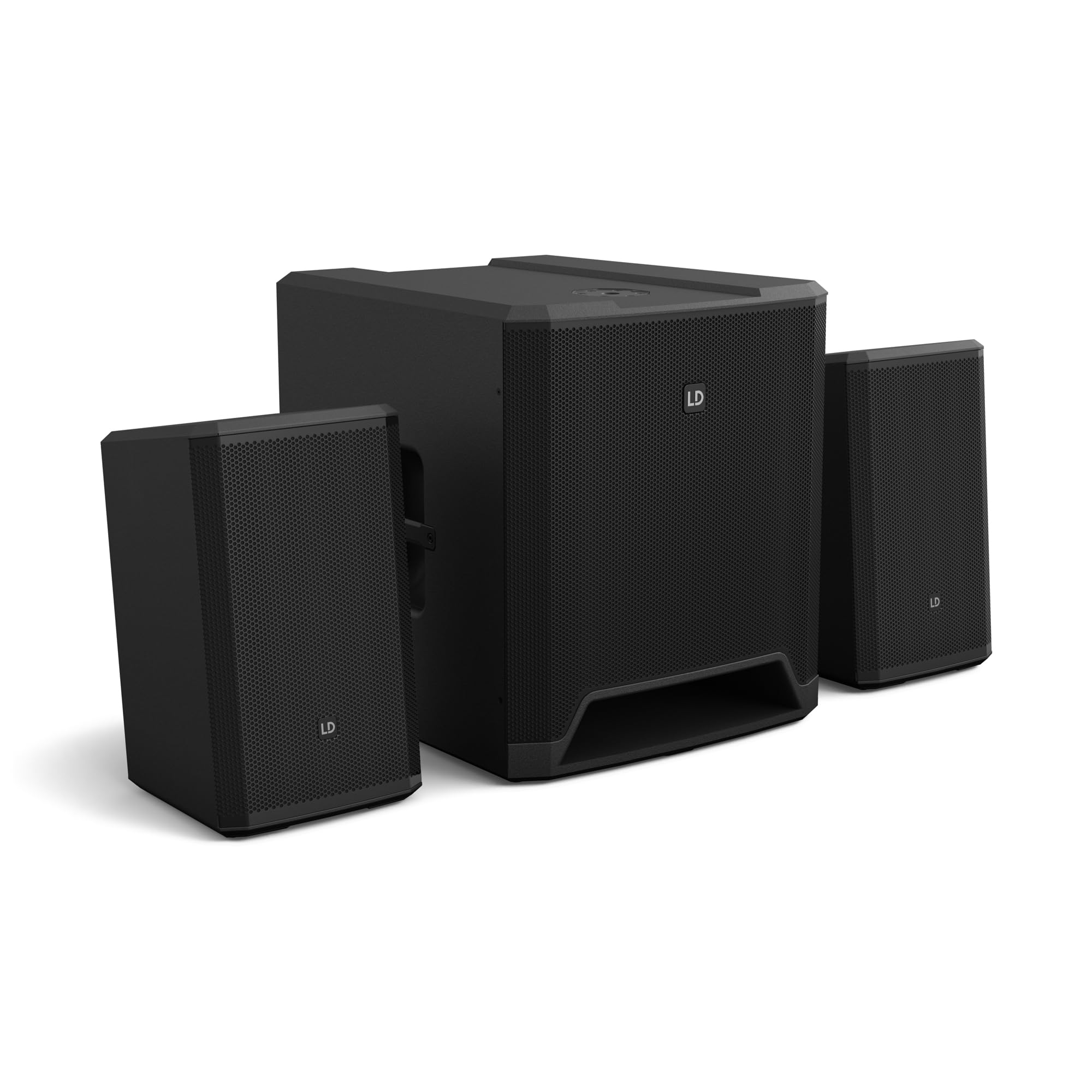
1 Irudia: Gainetikview of the LD Systems DAVE 15 G4X PA System components.
2. Segurtasun-argibideak
Beti jarraitu segurtasun neurri hauek deskarga elektrikoak, suteak edo lesioak saihesteko:
- Ziurtatu elikadura hornidura boltage matches the rating on the unit.
- Ez jarri unitatea euri edo hezetasunera.
- Ez ireki c-a.asing; bidali mantentze-lan guztiak langile kualifikatuen esku.
- Jarri unitatea gainazal egonkor eta berdinean.
- Ziurtatu unitatearen inguruan aireztapen egokia dagoela.
- Saihestu objektuak unitatearen gainean jartzea.
- Disconnect power before cleaning or moving the unit.
3. Konfigurazioa
Proper setup is crucial for optimal performance and safety. Follow these steps to assemble your DAVE 15 G4X system:
3.1 Desontziratzea eta kokatzea
- Carefully unpack all components: one 15-inch subwoofer and two 8-inch satellite speakers.
- Jarri subwooferra gainazal egonkor eta lau batean.
- Position the satellite speakers. They can be placed on speaker stands (not included) or mounted on a T-stand above the subwoofer (accessories sold separately).

2. irudia: Adibample of a stereo setup with one satellite speaker mounted on a pole above the subwoofer. Speaker pole not included.

3. irudia: Adibample of a stereo setup with both satellite speakers on separate poles. Speaker poles not included.

4. irudia: Adibample of a cluster mode setup with both satellite speakers mounted on a T-stand above the subwoofer. Speaker pole not included.
3.2 Bozgorailuak konektatzea
- Connect the two satellite speakers to the "SAT LEFT" and "SAT RIGHT" outputs on the rear panel of the subwoofer using appropriate speaker cables.
- Ziurtatu konexio seguruak.

Figure 5: Rear panel connections of the DAVE 15 G4X subwoofer, including power input, satellite outputs, and various audio inputs.
3.3 Energia-konexioa
- Connect the supplied power cable to the "POWER INPUT" on the subwoofer's rear panel.
- Plug the other end into a suitable AC power outlet.
- Ensure the power switch is in the "OFF" position before connecting to power.
4. Nahastailearen funtzionamendua
The DAVE 15 G4X features an integrated 6-channel mixer for connecting various audio sources. Familiarize yourself with the control panel:

6. irudia: Xehetasuna view of the DAVE 15 G4X mixer control panel, showing input controls, EQ, reverb, and mode selection.
4.1 Input Channels 1 & 2 (Mono)
- Input Type Selection: Use the "SELECT" button to toggle between Microphone (MIC), High-Impedance Instrument (HI-Z), or Line-level (LINE) input.
- Gain Control: Adjust the "HIGH" knob for input sensitivity.
- 2 bandako ekualizadorea: Use the "LOW" and "HIGH" knobs to adjust bass and treble frequencies for each channel.
- Erreberbazioa: Select one of three reverb presets (SMALL, LARGE, PLATE) and adjust the "REVERB" knob for the desired effect level.
4.2 Input Channels 3 & 4 (Stereo Line)
- These inputs are designed for stereo line-level sources such as keyboards, synthesizers, or drum machines.
- Adjust the "INPUT 3/4" knob for the overall volume of these channels.
4.3 Input Channels 5 & 6 (Digital/Bluetooth)
- SPDIF sarrera: Connect a digital audio source via the SPDIF TOSLINK input on the rear panel.
- Bluetooth bidezko lotura Press and hold the "HOLD TO LINK" button to activate Bluetooth pairing mode. Bilatu "LD Systems DAVE 15 G4X" on your device and connect.
- Iturburuaren hautaketa: Use the "SOURCE" button to switch between SPDIF and Bluetooth inputs.
- Adjust the "INPUT 5/6" knob for the overall volume of these channels.
4.4 Kontrol Nagusiak
- MAIN Volume: The large "MAIN" knob controls the overall output volume of the system.
- SUB Volume: Adjust the "SUB" knob to control the volume level of the subwoofer.
- Bolumen HANDIA: Adjust the "HIGH" knob to control the volume level of the satellite speakers.
- Modu aurrezarpenak: Use the "SELECT" button under "MODE" to choose between different setup presets (e.g., Stereo, Cluster Mode) for optimized sound dispersion.
5. Mantentzea
Regular maintenance ensures the longevity and optimal performance of your DAVE 15 G4X PA system.
- Garbiketa: Erabili zapi leun eta lehor bat gainazalak garbitzeko. Zikinkeria egoskorra bada, garbitu zapi pixka bat.amp cloth can be used, followed by a dry cloth. Avoid abrasive cleaners or solvents, as they may damage the polyurea coating.
- Aireztapena: Ensure that all ventilation openings remain clear of dust and debris to prevent overheating.
- Biltegiratzea: When not in use for extended periods, store the system in a dry, dust-free environment. Consider using protective covers or bags (accessories sold separately) to prevent damage.
- Kableen kudeaketa: Aldian-aldian egiaztatu kable guztiak higadura edo kalteen zantzurik duten. Ordeztu berehala kaltetutako kable guztiak.
6. Arazoak
If you encounter issues with your DAVE 15 G4X system, refer to the following common problems and solutions:
6.1 Soinurik ez
- Egiaztatu potentzia: Ensure the system is powered on and the power cable is securely connected. Verify the "POWER" indicator light is illuminated.
- Bolumen mailak: Confirm that the "MAIN," "SUB," and "HIGH" volume knobs are turned up. Check individual channel gain controls.
- Sarrera hautatzea: Ensure the correct input source is selected for the active channel (e.g., MIC, HI-Z, LINE, SPDIF, Bluetooth).
- Kable konexioak: Verify all audio cables (input sources, satellite speakers) are correctly and securely connected.
- Iturburu gailua: Check if your audio source device (microphone, instrument, media player) is functioning correctly and outputting sound.
6.2 Distorted or Unclear Sound
- Sarrerako irabazia: Reduce the input gain for the affected channel if the "SIGNAL" or "LIMIT" indicator lights are constantly red.
- Master bolumena: Lower the "MAIN" volume if the overall sound is distorted.
- EQ ezarpenak: Adjust the EQ (LOW, HIGH) settings on individual channels to improve clarity.
- Kablearen kalitatea: Ensure you are using high-quality, shielded audio cables.
6.3 Bluetooth konexio arazoak
- Parekatze modua: Ensure the DAVE 15 G4X is in Bluetooth pairing mode (press and hold "HOLD TO LINK").
- Gailuaren ikusgarritasuna: Make sure Bluetooth is enabled on your source device and it is discoverable.
- Distantzia: Keep your Bluetooth device within the effective range of the PA system.
- Interferentzia: Aldendu interferentziak sor ditzaketen haririk gabeko beste gailuetatik.
- Ahaztu gailua: If previously paired, try "forgetting" the DAVE 15 G4X on your device and re-pairing.
7. Zehaztapenak
Detailed technical specifications for the LD Systems DAVE 15 G4X PA System:
| Ezaugarri | Zehaztapena |
|---|---|
| Ereduaren izena | LDS-DAVE15G4X |
| Hizlari mota | Powered 2.1 PA System |
| Subwoofer tamaina | 15 hazbetekoa |
| Satelite-bozgorailuen tamaina | 2 x 8 hazbete |
| Irteerako potentzia gailurra | 2060 Watt |
| Nahaste-kanalak | 6-Channel Integrated Mixer |
| Konektibitate Teknologia | Bluetooth, SPDIF TOSLINK, XLR, 1/4" Jack, RCA |
| Muntatze Mota | Floor Standing (Subwoofer), Pole Mount (Satellites) |
| Produktuaren neurriak (Subwooferra) | 20"S x 19"Z x 21"A (gutxi gorabehera) |
| Elementuaren pisua | 119 pounds (total system approximate) |
| Dakarten osagaiak | LDDAVE15G4X (Subwoofer, 2 Satellites, Power Cable) |
| DSP Teknologia | DynX DSP (Gen.2), FIR Filters |
| Armairuaren materiala | Durable Polyurea Coating |
8. Bermearen informazioa
Warranty terms and conditions for the LD Systems DAVE 15 G4X PA System are typically provided with your purchase documentation or can be found on the official LD Systems webgunea. Gorde erosketaren egiaztagiria berme-erreklamazioetarako.
Bermearen informazio zehatza lortzeko, mesedez, bisitatu LD Systems official webgunea or contact your authorized dealer.
9. Bezeroarentzako arreta
Should you require technical assistance, service, or have questions regarding your LD Systems DAVE 15 G4X PA System, please contact LD Systems customer support or your local authorized dealer.
For further support and resources, please visit the LD Systems official webgunea.


