Sarrera
This manual provides essential information for the safe and efficient operation of your Ulefone Armor 34 Pro Plus 5G Rugged Phone. It covers device setup, feature usage, maintenance, and troubleshooting. Please read this manual thoroughly before using your device to ensure optimal performance and longevity.
Video: Ulefone Armor 34 Pro Rugged Phone overview, erakutsiasing its robust design and key features.
Kutxan dagoena
Egiaztatu elementu guztiak zure produktuaren paketean daudela:
- 1 x Telefonoa
- 1 x AC Power Charger, 66W
- 1 x Type-C to Type-C Data Cable (100cm)
- 1 x Protective Film (Pre-installed)
- 1 x beira tenplatua pantaila babeslea
- 1 x SIM orratza
- 1 x Korrila
- 1 x hizkuntza anitzeko erabiltzailearen eskuliburua
- 1 x Charging Instruction Card
- 1 x Safety Prompt Card

Image: Contents of the Ulefone Armor 34 Pro Plus retail package.
Konfigurazioa
1. SIM txartelaren eta biltegiratzearen instalazioa
- Bilatu SIM txartelaren erretilua gailuaren alboan.
- Insert the provided SIM needle into the small hole next to the tray to eject it.
- Place your Nano-SIM cards and/or a microSD card (up to 2TB) into the designated slots on the tray. Ensure correct orientation.
- Kontu handiz sartu erretilua telefonoan berriro, bere lekuan klik egin arte.
2. Hasierako piztea eta konfigurazioa
- Press and hold the Power button until the Ulefone logo appears.
- Jarraitu pantailan agertzen diren argibideei zure hizkuntza hautatzeko, Wi-Fi sarera konektatzeko eta zure Google kontua konfiguratzeko.
- Configure security settings such as fingerprint unlock or face unlock for enhanced device protection.
3. Gailua kargatzea
Connect the provided 66W AC power charger and Type-C cable to the phone's charging port. The device supports fast charging. Ensure the charger is connected to a compatible power outlet. The phone also supports 10W reverse charging, allowing it to act as a power bank for other devices.
Funtzionamendu-argibideak
1. General Phone Operation
The Ulefone Armor 34 Pro Plus runs on Android 15. Navigate the interface using touch gestures. Swipe up from the bottom for the app drawer, swipe down from the top for notifications and quick settings. Customize your home screen by long-pressing on empty space.
2. 5G Network Connectivity
The device supports global 5G networks with dual SIM dual standby functionality. Ensure your SIM cards are properly installed and your mobile data plan supports 5G. Access network settings via Ezarpenak > Sarea eta Internet > Sare mugikorra hobespenak konfiguratzeko.
3. Projector Functionality
The Ulefone Armor 34 Pro Plus features a built-in DLP projector with 150 lumens brightness and 854x480 resolution. It supports smart autofocus and ±40° keystone correction for clear projection. The integrated 98 dB loudspeaker enhances the audio experience.
- Aktibazioa: Use the dedicated projector button or access the projector app to activate.
- Fokatze automatikoa: The projector automatically adjusts focus. Manual adjustment options are available in the projector settings.
- Keystone zuzenketa: Adjust vertical keystone up to ±40° to correct distorted images.
- Proiekzio distantzia: Project a screen size of up to 100 inches from a distance of 3 meters.
Video: Demonstration of the Ulefone Armor 34 Pro Plus projector features, including autofocus and keystone correction.

Image: The Ulefone Armor 34 Pro Plus projecting a movie for outdoor entertainment.

Image: Visual representation of screen sizes achievable with the projector at different distances.
4. Kamera sistema
Gailuak kamera sistema polifazetiko batekin hornituta dago:
- 64MP gaueko ikusmen kamera: Features 4 infrared LEDs and NightEif Ultra 3.0 algorithm for clear images in low-light conditions.
- 50MP-ko Kamera Nagusia: Utilizes a large 1/1.3" sensor for high-resolution photos.
- 50MP Ultra-wide Macro Camera: Offers a 117.3° field of view for expansive shots and detailed close-ups.
- 32MP-ko aurrealdeko kamera: Kalitate handiko selfie eta bideo-deietarako.

Image: Night vision camera capabilities comparison.
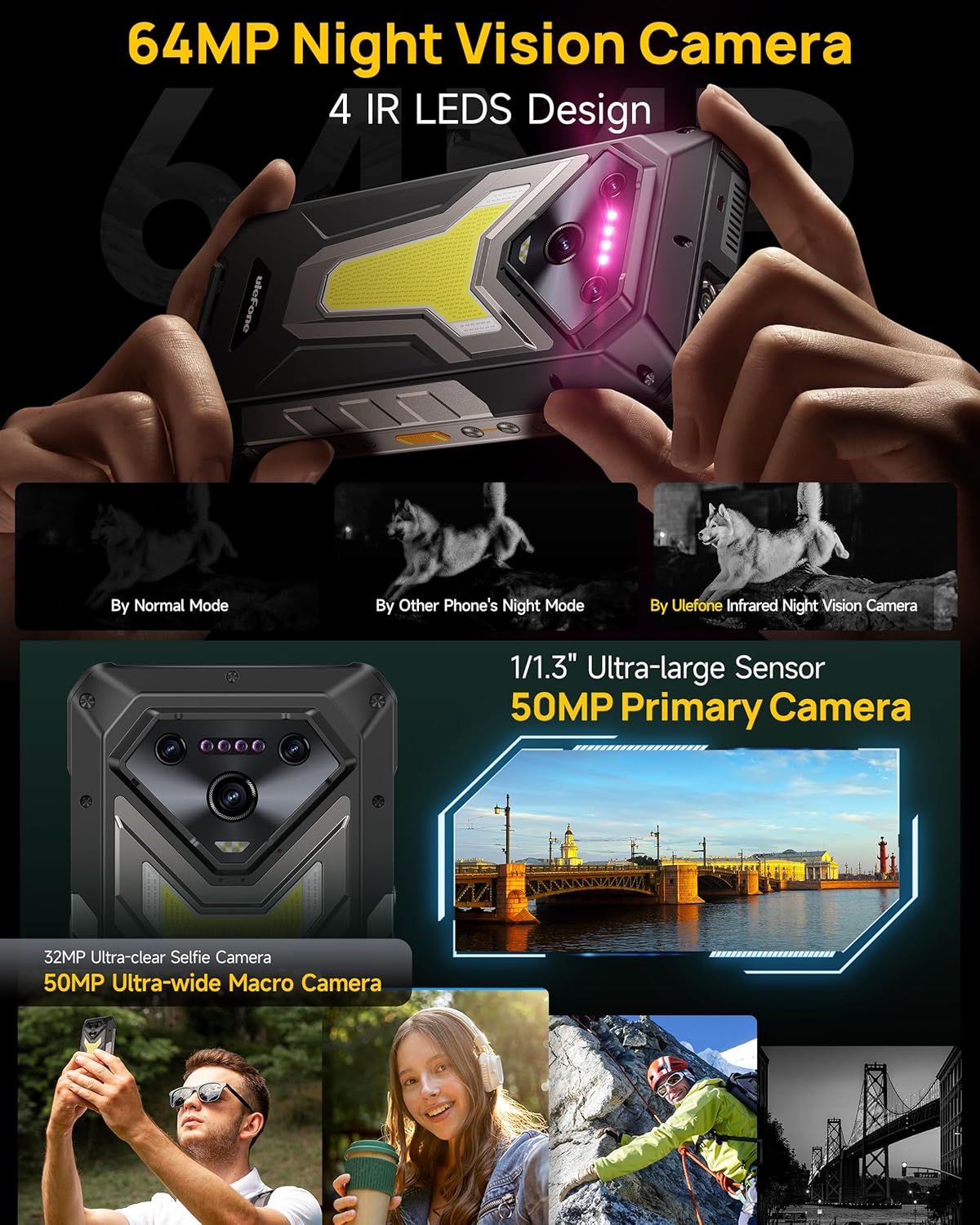
Irudia: Xehetasun handikoa view of the Ulefone Armor 34 Pro Plus camera setup.
5. LED Light and Warning Lights
The device integrates an 1100 Lumens camping light and red/blue warning lights for various situations.
- CampArgia: Provides powerful illumination for outdoor activities. Adjustable brightness and duration settings are available in the dedicated app.
- Abisu-argiak: Red and blue lights can be activated for emergency alerts, signaling for help, or increasing visibility.
Video: Demonstration of the Ulefone Armor 34 Pro Plus LED camping light and warning light functions.

Image: The 1100 Lumens LED light in use during camping.
6. Baterien kudeaketa
The Armor 34 Pro Plus features a 25500mAh battery, providing extended usage. It supports 66W fast charging for quick power replenishment and 10W reverse charging to power other compatible devices.

Image: The 25500mAh battery and 66W fast charging feature.
7. Ezaugarri sendoak
Designed for durability, the phone is MIL-STD-810H certified and boasts IP68/IP69K ratings for water and dust resistance. The 6.95-inch FHD+ display is protected by Corning Gorilla Glass 5.

Image: Demonstrating the IP68/IP69K and MIL-STD-810H ruggedness of the device.
8. uSmart Expansion Connector
The uSmart Expansion Connector allows for integration with various external accessories, such as endoscopes and microscopes, expanding the phone's utility for specialized tasks.
Video: Showcase of various accessories compatible with the Ulefone Armor 34 Pro Plus, including the uSmart ecosystem.

Image: The uSmart Expansion Connector in use with an endoscope accessory.
9. Beste Ezaugarri batzuk
The device includes additional functionalities:
- NFC: Kontakturik gabeko ordainketak eta datuen transferentzia.
- Widevine L1: Enables high-definition streaming from supported platforms.
- IR Blaster: Control compatible infrared devices.
- Fingerprint Unlock & Face Unlock: Biometric security options.
- Gako pertsonalizatua: Programmable button for quick access to functions.
- GPS + GLONASS + Beidou + Galileo: Comprehensive navigation support.

Irudia: Gainetikview of additional functionalities available on the device.
Mantentzea
To ensure the longevity and optimal performance of your Ulefone Armor 34 Pro Plus, follow these maintenance guidelines:
- Garbiketa: Garbitu gailua leun batekin, damp cloth. Avoid harsh chemicals or abrasive materials. Ensure all ports are dry before charging or connecting accessories.
- Software eguneraketak: Regularly check for and install system updates to ensure your device has the latest security patches and features. Go to Ezarpenak > Sistema > Sistemaren eguneraketa.
- Bateria zaintzea: Avoid extreme temperatures. Do not fully discharge the battery frequently. Use only the provided charger for optimal charging.
- Pantailaren babesa: While the screen is durable, using the provided tempered glass screen protector can offer additional protection against scratches.
Arazoak konpontzea
Gailuarekin arazoak badituzu, jarraitu arazoak konpontzeko ohiko urrats hauek:
- Gailuak ez du erantzuten: Berrabiarazteko, sakatu eta eutsi pizteko botoia 10-15 segundoz.
- Kargatzeko arazoak: Ensure the charger and cable are securely connected and undamaged. Try a different power outlet. Clean the charging port if necessary.
- Sarearen konexio arazoak: Check if airplane mode is off. Restart the device. Verify your SIM card is correctly inserted and your mobile data plan is active.
- Projector Not Working: Ensure the projector is enabled in settings. Check for any obstructions in front of the lens. Adjust focus and keystone correction.
- App Crashes/Freezes: Garbitu aplikazioaren cachea eta datuak honen bidez: Ezarpenak > Aplikazioak > [Aplikazioaren izena] > Biltegiratzea eta cacheaArazoak jarraitzen badu, desinstalatu eta berriro instalatu aplikazioa.
- Gehiegizko berotzea: Close background applications and reduce screen brightness. Avoid direct sunlight exposure during heavy use or charging.
For more complex issues, refer to the built-in Service Center 2.0 application on your device or contact customer support.

Image: The Service Center 2.0 application for device diagnostics and support.
Zehaztapenak
| Ezaugarri | Zehaztapena |
|---|---|
| Marka | Ulefone |
| Modelo zenbakia | Armor 34 Pro Plus |
| Sistema eragilea | Android 15 |
| Prozesadorea | MediaTek Dimensity 7400X |
| RAM | 32GB (16GB + 16GB adjustable) |
| Barne Biltegiratzea | 512GB ROM (expandable up to 2TB) |
| Bistaratzea | 6.95 inch FHD+ 120Hz Corning Gorilla Glass 5 |
| Kamera nagusia | 50MP (1/1.3" sensor) |
| Ultra-wide Macro Camera | 50MP (117.3° FOV) |
| Gaueko Ikusmen Kamera | 64MP (4 IR LEDs) |
| Aurrealdeko kamera | 32MP |
| Proiektorea | 150 Lumens DLP (854x480 resolution), Autofocus, ±40° Keystone Correction |
| Bateria Edukiera | 25500mAh |
| Kargatzen | 66W-ko karga azkarra, 10W-ko alderantzizko karga |
| Malkartasuna | IP68/IP69K, MIL-STD-810H ziurtagiria |
| Konektibitatea | 5G, Wi-Fi 6E, Bluetooth 5.4, NFC, IR Blaster |
| Ezaugarri bereziak | 1100 Lumens Camping Light, Red & Blue Warning Lights, uSmart Expansion Connector, Widevine L1, Custom Key, GPS |
| Neurriak | 7.21 x 3.41 x 1.29 hazbete |
| Pisua | 3.14 kilo |
Bermea eta Laguntza
Your Ulefone Armor 34 Pro Plus comes with a 12-month manufacturer warranty service in the US, covering defects in materials and workmanship under normal use. Please retain your proof of purchase for warranty claims.
For technical assistance, warranty inquiries, or product support, please contact Ulefone customer service through the Service Center 2.0 app on your device or visit the official Ulefone website for contact information. Our support team is available to assist you with any questions or concerns regarding your product.


