1. Sarrera
This manual provides comprehensive instructions for the KOSPET Magic R10 GPS Smart Watch. It covers device setup, operational procedures, maintenance guidelines, and troubleshooting tips to ensure optimal performance and user experience. Please read this manual thoroughly before using your device.

Image 1.1: KOSPET Magic R10 Smart Watch displaying time, date, battery, steps, and calories.
2. Zer dago kutxan
Paketea irekitzean, egiaztatu elementu guztiak bertan daudela:
- 1 x KOSPET Magic R10 Stainless Steel Smart Watch
- 1 x Kargagailu kablea
- 1 x Erabiltzailearen eskuliburua (dokumentu hau)
3. Konfigurazioa
3.1 Hasierako karga
Before first use, fully charge your KOSPET Magic R10 Smart Watch. Connect the provided charger cable to the watch's charging port and a USB power source. The watch display will indicate charging status.
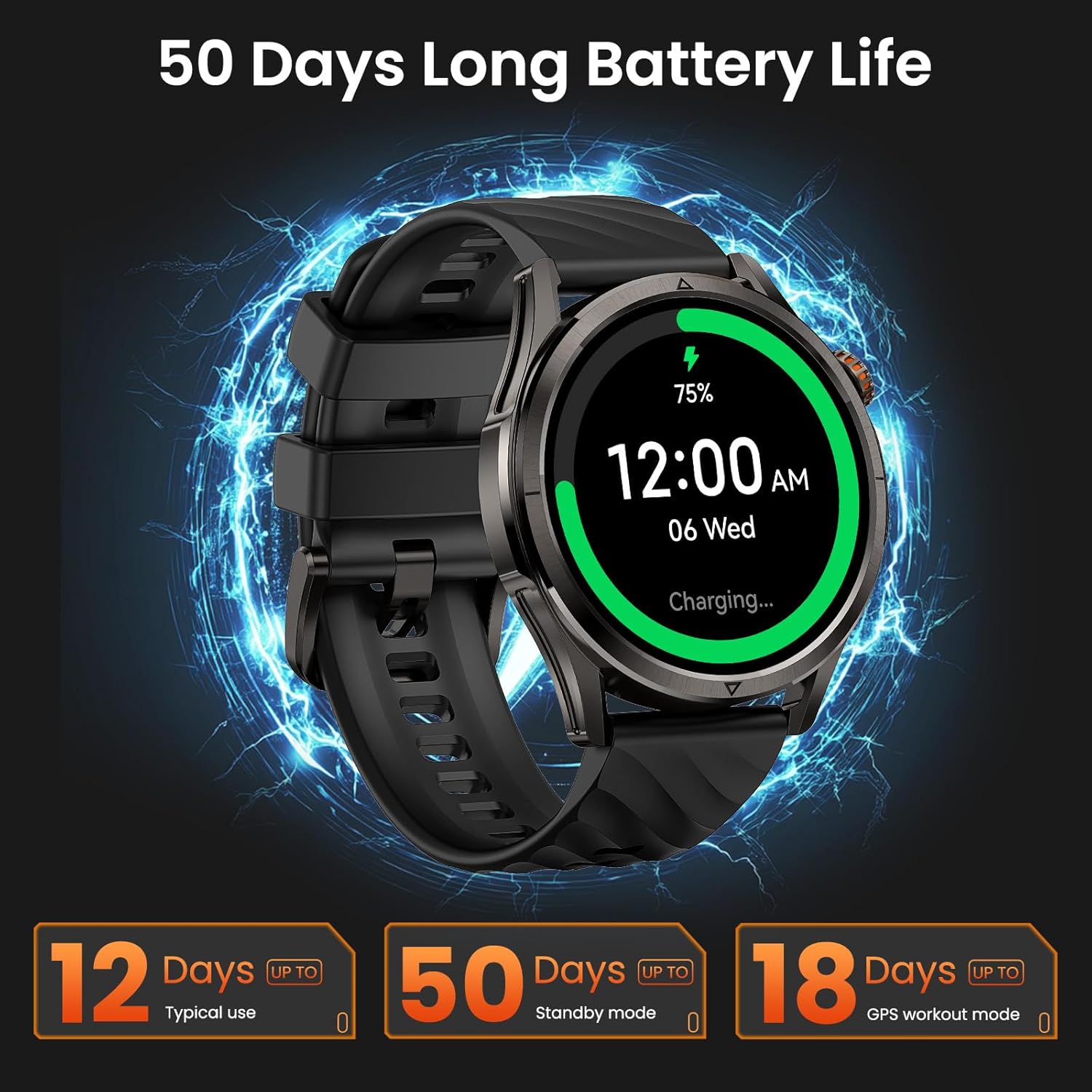
Image 3.1: KOSPET Magic R10 Smart Watch on a charger, indicating 75% battery and displaying battery life estimates.
3.2 App Installation (Apexmove)
The KOSPET Magic R10 Smart Watch requires the Apexmove application for full functionality. The app is compatible with iOS 10.0+ and Android 5.1+ devices.
- Download the 'Apexmove' app from the Apple App Store (for iOS) or Google Play Store (for Android).

Image 3.2: Download the Apexmove app from your device's app store.
3.3 Pairing with Phone
To connect your watch to your smartphone:
- Ziurtatu telefonoaren Bluetooth-a gaituta dagoela.
- Open the Apexmove app. Navigate to 'Device' and select 'Add a new device'.
- The app will search for your watch. Select 'KOSPET Magic R10' from the list.
- Berretsi parekatze eskaera bai telefonoan bai erlojuan.

Image 3.3: Connection steps for iOS devices.
3.4 Notification Setup
To receive messages and app notifications on your watch, follow these steps:
IOS gailuetarako:
- Ensure the Apexmove app remains active in the background.
- In the Apexmove app, go to 'Device' and open 'SMS Reminder' to enable SMS notifications.
- Still in 'Device', click 'App Notification' and enable notifications for desired applications.
- Go to your iPhone's 'Settings' > 'Notifications' > 'Apexmove' and allow notifications.

Image 3.4: iOS message and app notification setup.
Android gailuetarako:
- Keep the Apexmove app active (add to whitelist in settings if necessary).
- Turn off 'Do Not Disturb' and 'Low Power Mode' on your phone.
- In the Apexmove app, go to 'Device' and open 'SMS Reminder' to enable SMS notifications.
- Still in 'Device', click 'App Notification' and enable notifications for desired applications.
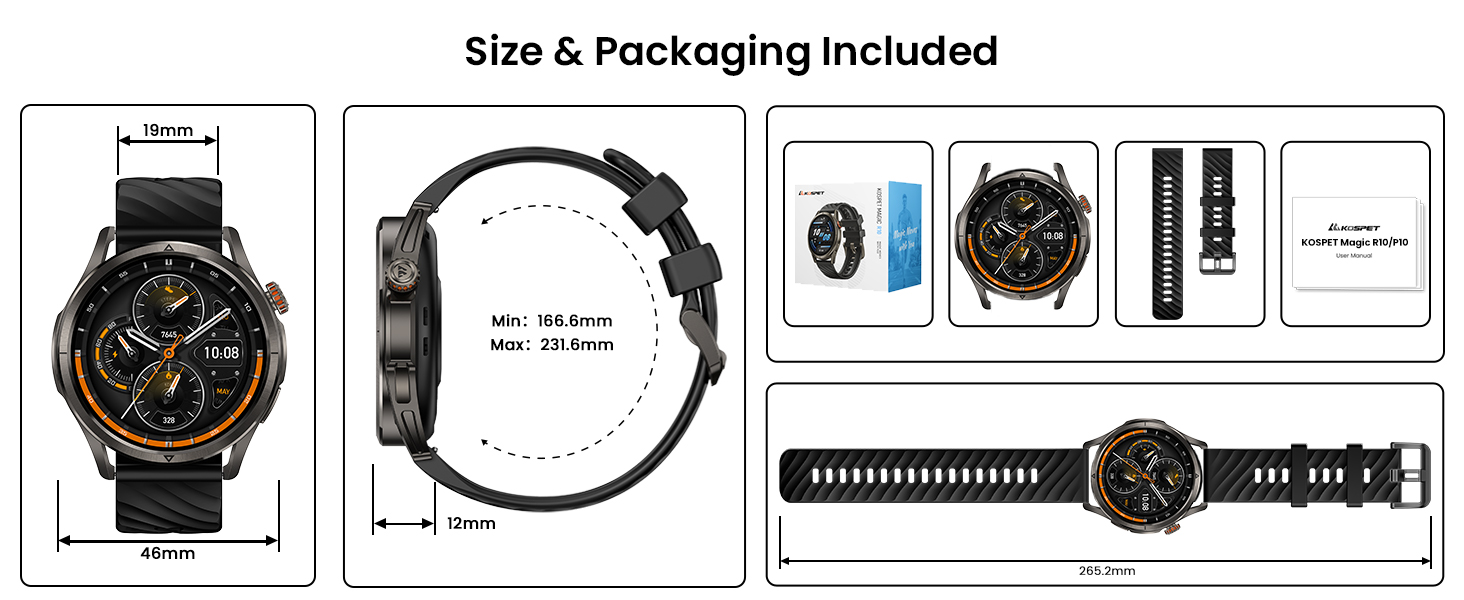
Image 3.5: Android message and app notification setup.
4. Funtzionamendu-argibideak
4.1 Pantaila eta nabigazioa
The Magic R10 features a 1.43" AMOLED display with Corning Gorilla Glass for durability and clear visibility. Navigate the watch interface using touch gestures and the physical buttons.
4.2 GPSaren funtzionaltasuna
The watch includes built-in GPS that connects to 6 satellite systems, providing accurate location tracking. Dual-band GNSS ensures reliable signal strength, even in challenging environments. An integrated Altitude Pressure Compass provides elevation data and directional guidance.

Image 4.1: Multi-GNSS positioning and route tracking.
4.3 Kirol Modu
The Magic R10 supports 180 sport modes. It also features 6 smart recognition sports (walking, cycling, elliptical, etc.) that automatically detect and begin monitoring your activity without manual input.

Image 4.2: Apexmove app interface displaying activity data for various sports.
4.4 Osasunaren Zaintza
The watch is equipped with a 4PD sensor for comprehensive health tracking, including:
- Bihotz-taupadak: Bihotz-maiztasunaren etengabeko monitorizazioa, 24/7.
- SpO2: Blood oxygen saturation tracking.
- Loaren jarraipena: Loaren jarraipena egiten dutagak eta iraupena.
- Stress and Emotions: Monitors stress levels.
- Menstrual Cycles: Provides tracking for women's health.
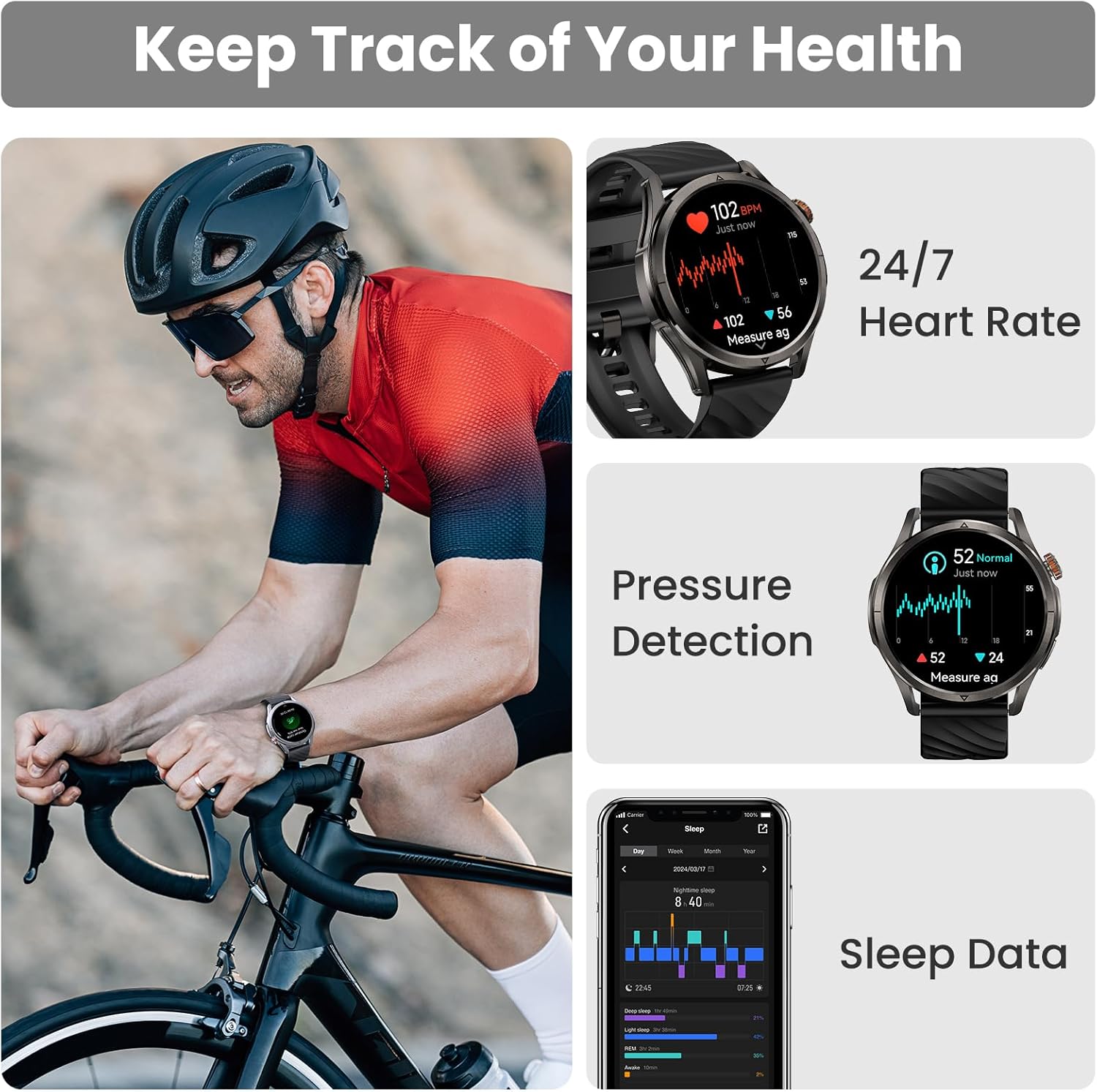
Image 4.3: Health monitoring features including heart rate, pressure, and sleep data.

Image 4.4: Menstrual cycle tracking interface.
Image 4.5: Heart rate monitoring during exercise.

Image 4.6: Sleep monitoring data display.
4.5 Calling and Notifications
The watch allows you to answer and make calls directly from your wrist when connected to your phone. It also displays message reminders and notifications from various applications.

Image 4.7: Call management, voice assistant, and message reminders.
4.6 Ahots laguntzailea
Utilize the built-in voice assistant for hands-free task execution, such as checking weather or initiating calls.
5. Mantentzea
5.1 Urarekiko erresistentzia
The Magic R10 has a 5ATM water resistance rating, making it suitable for swimming and daily exposure to water (rain, sweat). It is not recommended for diving or high-pressure water activities.

Image 5.1: Watch being used for swimming, demonstrating 5ATM water resistance.
5.2 Garbiketa
Garbitu aldizka erlojua eta uhala zapi leun eta lehor batekinamp oihal. Saihestu produktu kimiko gogorrak edo material urratzaileak erabiltzea. Ziurtatu kargatzeko kontaktuak garbi eta lehor daudela kargatu aurretik.
5.3 Bateria zaintzea
Bateriaren iraupena luzatzeko:
- Saihestu muturreko tenperaturak.
- Charge the watch fully before prolonged storage.
- Do not allow the battery to completely drain frequently.
6. Arazoak
6.1 Bluetooth konexio arazoak
If your watch fails to connect or maintain a Bluetooth connection:
- Ziurtatu Bluetooth gaituta dagoela telefonoan eta erlojuan.
- Berrabiarazi telefonoa eta erlojua.
- Ensure the Apexmove app is updated to the latest version.
- Try unpairing the watch from your phone's Bluetooth settings and then re-pairing through the Apexmove app.
- Check if other Bluetooth devices are causing interference. Temporarily disconnect other devices if necessary.
6.2 Bateriaren iraupen laburra
Bateriaren iraupena espero baino laburragoa bada:
- Murriztu pantailaren distira.
- Disable 'Always On Display' if enabled.
- Limit frequent GPS usage or long GPS tracking sessions.
- Desaktibatu beharrezkoak ez diren jakinarazpenak.
- Ensure the watch is fully charged using the provided cable.
6.3 Osasun-datu zehaztugabeak
For accurate health monitoring:
- Ziurtatu erlojua eskumuturrean ondo eramaten duzula, ez gehiegi estutzen ez gehiegi soltetzen.
- Mantendu sentsorearen eremua garbi.
- Saihestu gehiegizko mugimendua neurketetan zehar (adibidez, SpO2).
7. Zehaztapenak
| Ezaugarri | Zehaztapena |
|---|---|
| Modelo zenbakia | Magic R10 |
| Pantailaren tamaina | 1.43 hazbete |
| Bistaratzeko mota | AMOLED |
| Gorputzaren Materiala | Altzairu herdoilgaitza |
| Uraren Erresistentzia | 5ATM |
| GPSa | Built-in GPS (6 satellite systems, Dual-band GNSS) |
| Bateria Edukiera | 450 milioiamp Orduak |
| Bateriaren iraupena (erabilera arrunta) | Gehienez 12 egun |
| Battery Life (GPS Workout Mode) | Gehienez 18 ordu |
| Battery Life (Standby Mode) | Gehienez 50 egun |
| Memoria Biltegiratzeko Ahalmena | 128 MB |
| Sistema eragileen bateragarritasuna | Android 5.1+ eta iOS 10.0+ |
| Konektibitatea | Bluetootha |
| Ezaugarri bereziak | Activity Tracker, Always On Display, GPS, Notifications, Voice Assistant, Phone Call |
| Elementuaren pisua | 9.6 ontza |

Image 7.1: Watch dimensions and package contents.
8. Bermea eta Laguntza
For warranty information and customer support, please refer to the official KOSPET website or contact the retailer from whom you purchased the device. Keep your proof of purchase for warranty claims.