1. Sarrera
Thank you for choosing the AULA SC680 Wireless Gaming Mouse. This manual provides detailed instructions to help you set up, operate, and maintain your device for optimal performance. The SC680 features tri-mode connectivity, a high-performance PAW3395 sensor, and customizable options designed for both gaming and professional use.

Irudia: Goian view of the AULA SC680 Wireless Gaming Mouse in black, showcasinbere diseinu ergonomikoa eta botoi nagusiak.
2. Ezaugarri nagusiak
- Hiru moduko konexioa: Supports USB-C wired, 2.4GHz wireless, and Bluetooth 5.2 connections for versatile use across multiple devices and operating systems (Windows 7/8/10, Vista, XP, Mac, Windows 2000, Linux).
- PAW3395 errendimendu handiko sentsorea: Delivers precise tracking with up to 26000 programmable DPI, 650 IPS speed, 50g acceleration, and an 8000Hz polling rate.
- Durable & Responsive Buttons: Equipped with switches rated for up to 80 million clicks, ensuring longevity and quick response.
- Diseinu ultra-arin: Weighs only 58g for comfortable, extended use, reducing hand fatigue. Includes anti-slip and sweat-proof stickers for enhanced grip.
- Bateriaren iraupen luzea: Built-in 500mAh rechargeable battery provides up to 75 hours of continuous use.
- Software pertsonalizagarria: Allows users to personalize DPI settings, button functions, macro files, and polling rates (Windows systems only for driver functionality).

Image: Diagram illustrating the PAW3395 flagship sensor and its performance specifications including DPI adjustment, IPS, and accelerated speed.
3. Paketearen edukia
Mesedez, egiaztatu paketea elementu hauek dituen:
- AULA SC680 haririk gabeko jokorako sagua
- USB-C kargatzeko/datu kablea
- 2.4 GHz USB hargailua
- Anti-slip Stickers (optional application)
- Spare Foot Pads
- Erabiltzailearen eskuliburua (dokumentu hau)
4. Konfigurazioa eta konexioa
4.1 Sagua kargatzea
Before first use, it is recommended to fully charge the mouse. Connect the provided USB-C cable to the mouse's front port and the other end to a USB power source (e.g., computer USB port, USB wall adapter). The indicator light on the mouse will blink red while charging and turn solid when fully charged. A full charge provides up to 75 hours of battery life.

Image: The AULA SC680 mouse connected via USB-C cable for charging, highlighting its 500mAh battery and up to 75 hours of battery life.
4.2 Connecting the Mouse (Tri-Mode)
The AULA SC680 offers three connection modes: 2.4GHz Wireless, Bluetooth 5.2, and USB-C Wired.
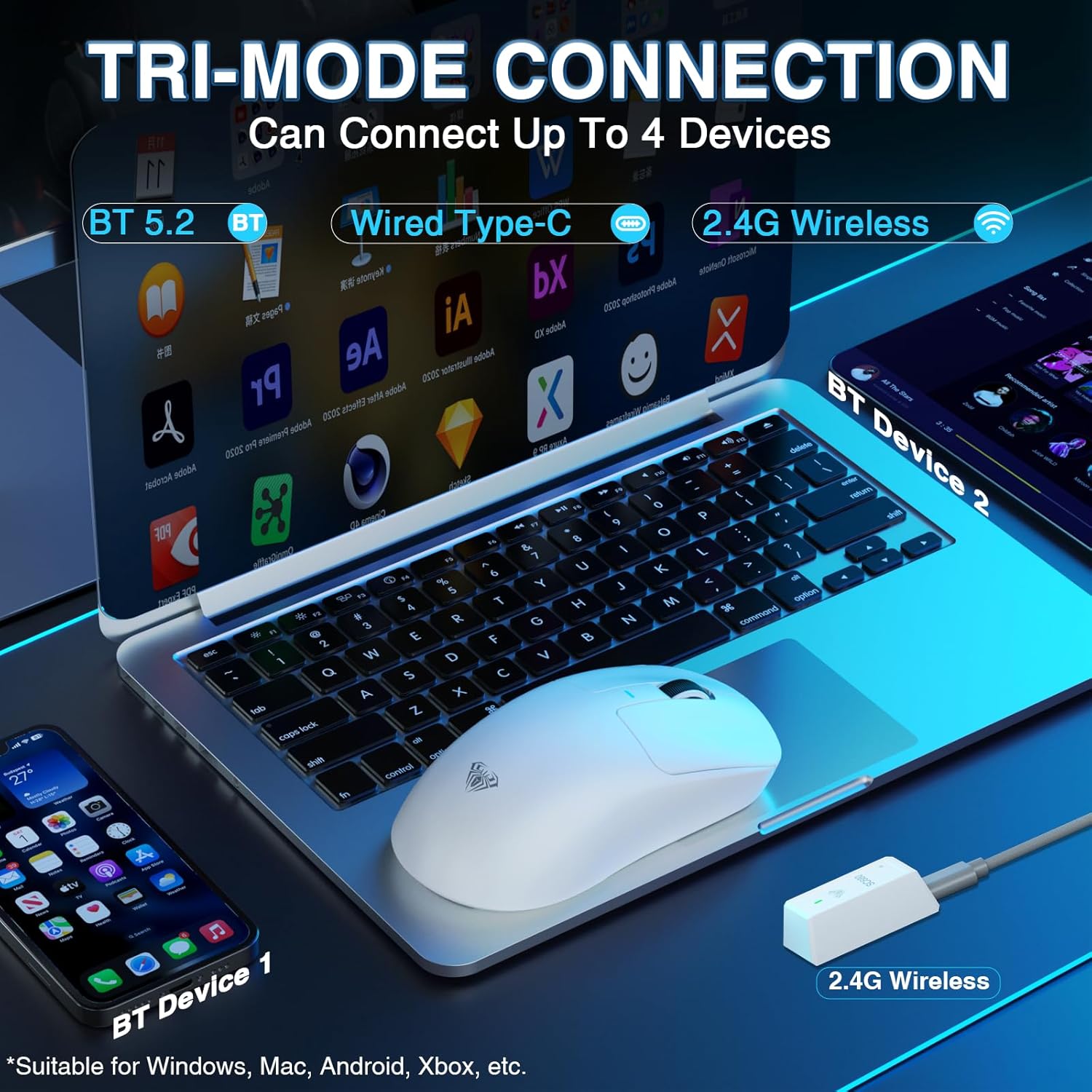
Image: The AULA SC680 mouse demonstrating its tri-mode connection capabilities, including Bluetooth, wired USB-C, and 2.4GHz wireless with a receiver.
- 2.4 GHz Haririk gabeko modua:
- Locate the 2.4GHz USB receiver (often stored in a compartment on the bottom of the mouse).
- Konektatu hargailua ordenagailuko USB ataka erabilgarri batean.
- Slide the switch on the bottom of the mouse to the "2.4G" position. The mouse should connect automatically.
- Bluetooth 5.2 modua:
- Irristatu saguaren beheko aldean dagoen etengailua "BT" posiziora.
- On your device (PC, laptop, Mac, PS5), go to Bluetooth settings and search for new devices.
- Select "AULA-SC680" from the list to pair. The mouse supports two Bluetooth connections (BT1 and BT2).
- For BT1: Hold down the DPI key for 5 seconds; the blue light will flash.
- For BT2: Hold down the middle key + back key for 5 seconds; the green light will flash.
- To switch between BT1 and BT2: Hold down the middle key + forward key for 5 seconds.
- USB-C kable bidezko modua:
- Connect the provided USB-C cable to the mouse and to your computer's USB port.
- Saguak kable bidezko sagu gisa funtzionatuko du eta aldi berean kargatuko da.
Video: An official product video demonstrating the AULA SC680 Tri-Mode Wireless Gaming Mouse, highlighting its features and connectivity options.
5. Funtzionamendu-argibideak
5.1 Botoien funtzioak
The AULA SC680 mouse features several programmable buttons:
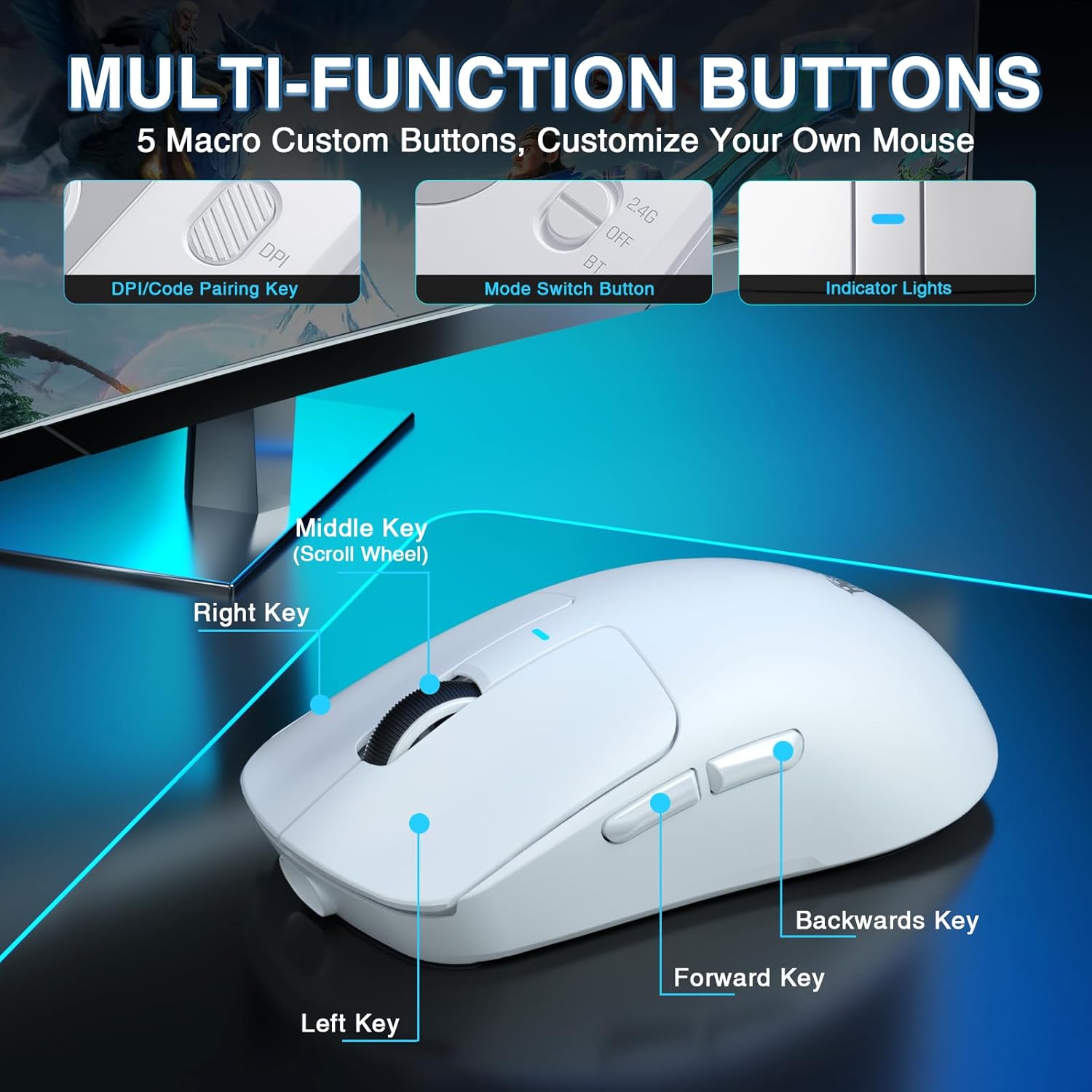
Image: A detailed diagram labeling the multi-function buttons on the AULA SC680 mouse, including Left Key, Right Key, Middle Key (Scroll Wheel), Forward Key, Backwards Key, DPI/Code Pairing Key, Mode Switch Button, and Indicator Lights.
- Ezkerreko klik: Klik nagusi estandarra.
- Egin klik eskuineko botoiarekin: Bigarren mailako klik estandarra.
- Middle Key (Scroll Wheel): Scroll up/down, click for middle button function.
- Aurrera giltza: Aurrera nabigatzen du web nabigatzaileak edo file esploratzaileak.
- Backwards Key: Atzeraka nabigatzen du web nabigatzaileak edo file esploratzaileak.
- DPI/Code Pairing Key (Bottom): Cycles through DPI settings and initiates Bluetooth pairing.
- Mode Switch Button (Bottom): Toggles between 2.4G, OFF, and BT modes.
5.2 DPI doikuntza
The mouse supports up to 26000 programmable DPI. You can cycle through preset DPI levels using the DPI button on the bottom of the mouse. The indicator light on the mouse will change color to indicate the current DPI setting. Default levels are typically 400-800-1600-3200-6400.
5.3 Customizable Software
For advanced customization, including precise DPI settings, macro programming, and button remapping, download the official AULA driver software.
- Gidaria deskargatu: Bisitatu bit.ly/m/AULA
- Bateragarritasun oharra: The gaming driver is compatible only with Windows systems and supports 2.4GHz wireless mode and USB-C wired mode. For Bluetooth connection mode, Windows 10 or higher is required.
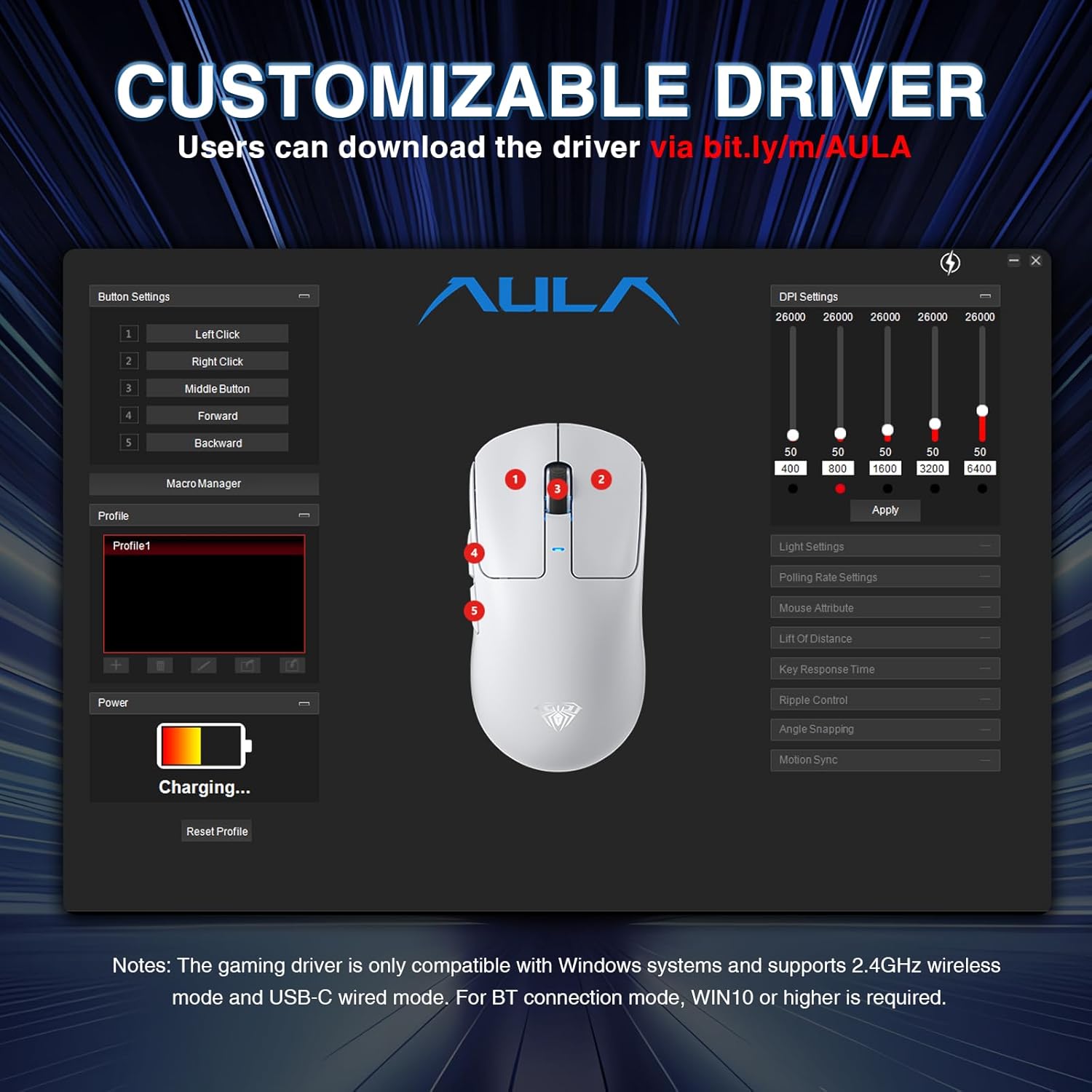
Image: A screenshot of the AULA customizable driver software, showing options for button settings, DPI adjustments, polling rate, and other mouse attributes.
6. Mantentzea
Zure AULA SC680 saguaren iraupena eta errendimendu optimoa bermatzeko, jarraitu mantentze-jarraibide hauek:
- Garbiketa: Erabili zapi leun eta lehor bat saguaren gainazala garbitzeko. Zikinkeria egoskorra bada, garbitu zapi pixka bat.amp oihal bat erabil daiteke, baina ziurtatu hezetasunik ez sartzen barneko osagaietan. Saihestu produktu kimiko gogorrak edo garbitzaile urratzaileak.
- Biltegiratzea: Denbora luzez erabiltzen ez baduzu, gorde sagua leku fresko eta lehor batean.
- Bateria zaintzea: Saihestu bateria maiz erabat deskargatzea. Kargatu sagua bateriaren adierazlea baxua denean.
- Kableen zainketa: Do not sharply bend or pull the USB-C cable to prevent damage.
- Oin-babesak: The mouse comes with spare foot pads. Replace them if the original pads show significant wear to maintain smooth gliding.
- Anti-slip Stickers: Apply the included anti-slip stickers for improved grip and a personalized aesthetic. Ensure the mouse surface is clean and dry before application.

Image: The AULA SC680 mouse with colorful anti-slip stickers applied, demonstrating the customizable grip and aesthetic options.
7. Arazoak
Zure AULA SC680 saguarekin arazoak badituzu, jo ezazu honako ohiko irtenbide hauetara:
- Saguak ez du erantzuten:
- Ensure the mouse is charged. Connect it via USB-C cable to charge and check if it works in wired mode.
- Verify the connection mode switch (2.4G/OFF/BT) on the bottom of the mouse is set correctly for your desired connection type.
- For 2.4GHz: Ensure the USB receiver is securely plugged into a working USB port. Try a different USB port.
- For Bluetooth: Ensure Bluetooth is enabled on your device and the mouse is paired correctly. Re-initiate pairing if necessary (refer to Section 4.2).
- Berrabiarazi ordenagailua edo gailua.
- Atzerapena edo konexio etengabea:
- Move the mouse closer to the 2.4GHz receiver or Bluetooth device to reduce interference.
- Ensure there are no large metal objects or other wireless devices causing interference between the mouse and receiver/device.
- Egiaztatu bateriaren maila; bateria baxuak haririk gabeko errendimenduan eragina izan dezake.
- Update mouse drivers (if applicable, via customizable software).
- DPI Settings Not Changing:
- Ensure you are pressing the correct DPI button on the bottom of the mouse.
- If using customizable software, ensure the settings are applied and the mouse is in a compatible mode (2.4GHz or wired).
- Botoiak ez dute funtzionatzen:
- Check if the buttons are remapped in the customizable software. Reset to default if unsure.
- Ensure the mouse is clean and there's no debris obstructing the buttons.
8. Zehaztapenak
| Ezaugarri | Xehetasuna |
|---|---|
| Marka | AULA |
| Eredua | SC680 |
| Konektibitate Teknologia | 2.4 GHz haririk gabekoa, Bluetooth 5.2, USB-C kable bidezkoa |
| Sentsore | PAW3395 sentsore optikoa |
| DPI (Puntoak hazbeteko) | Up to 26000 (Programmable), Default: 400-800-1600-3200-6400 |
| IPS (Hazbeteak Segundoko) | 650 |
| Azelerazioa | 50 g |
| Bozketa-tasa | 8000Hz |
| Botoia Bizi-iraupena | 80 milioi klik |
| Bateria mota | Litio ioia (barne) |
| Bateria Edukiera | 500mAh |
| Bateriaren iraupena | Gehienez 75 ordu |
| Elementuaren pisua | 58g (Ultra-Lightweight) |
| Ezaugarri bereziak | Ergonomic Design, Lightweight, Programmable Buttons, Rechargeable |
| Bateragarritasuna | Windows 7/8/10, Vista, XP, Mac, Windows 2000, Linux (BT requires WIN10+) |
9. Bermea eta Laguntza
Bermeari buruzko informazioa eta laguntza teknikoa lortzeko, jo ezazu AULA ofizialera. webwebgunearekin edo jarri harremanetan zure saltzailearekin. Gorde erosketa-agiria berme-erreklamazioetarako.
For further assistance or to download the latest drivers and software, please visit the AULA official support page.


