1. Sarrera
Eskerrik asko erosketagatik.asing the SENCOR SPT 3907 Bluetooth Radio Player. This compact and versatile device offers multiple audio playback options, including CD, Bluetooth, USB, and FM radio. This manual provides essential information for safe and efficient use of your new player. Please read it thoroughly before operation and retain it for future reference.
2. Segurtasun-argibideak
- Energia iturria: Ziurtatu elikadura hornidura boltage matches the rating indicated on the unit. Use only the provided power cable.
- Ura eta hezetasuna: Ez jarri unitatea euripean, hezetasunean edo tantaka/zipriztinetan. Ez jarri likidoz betetako objekturik, hala nola loreontziak, unitatearen gainean.
- Aireztapena: Ez blokeatu aireztapen-irekidurarik. Ziurtatu unitatearen inguruan nahikoa leku aire-fluxu egokia izan dadin.
- Beroa: Mantendu unitatea bero-iturrietatik urrun, hala nola erradiadoreetatik, bero-erregistroetatik, sukaldeetatik edo beste aparatu batzuetatik (adibidez, ampberoa sortzen duten argitzaileak).
- Garbiketa: Deskonektatu unitatea hormako entxufetik garbitu aurretik. Erabili zapi leun eta lehor bat. Ez erabili garbitzaile likidorik edo aerosol garbitzailerik.
- Zerbitzua: Ez saiatu produktu hau zuk zeuk ematen. Bidali zerbitzu guztiak zerbitzu kualifikatuko langileengana.
- Pilak: When using batteries, ensure correct polarity. Do not mix old and new batteries, or different types of batteries. Remove batteries if the unit is not used for extended periods.
3. Paketearen edukia
Egiaztatu elementu guztiak paketean daudela:
- SENCOR SPT 3907 Radio Player
- Urruneko Kontrola
- AC energia kablea
- Dokumentazioa (eskuliburu hau)
4. Produktuaren ezaugarriak
The SENCOR SPT 3907 is designed for versatile audio entertainment:
- Irteera potentzia: 4W RMS for clear sound.
- CD erreproduzitzailea: Supports CD-R/RW discs with programmable playback for up to 20 songs.
- Bluetooth konexioa: Bluetooth V2.1 + EDR for wireless audio streaming from compatible devices.
- USB erreprodukzioa: USB connection for MP3 file playback with programmable playback for up to 99 songs.
- FM irratia: Stereo FM radio receiver with digital tuning and 30 station presets.
- AUX-IN: 3.5mm auxiliary input for connecting external audio sources.
- Pantaila: Backlight LCD display for easy navigation.
- Urruneko kontrola: Funtzio osoko urrutiko agintea erabiltzeko erosotasuna lortzeko.
- Potentzia aukerak: Operates on AC 100-240V or D/LR20 batteries for portability.
- Funtzio gehigarriak: Repeat and random playback modes.
5. Kontrolak eta funtzioak
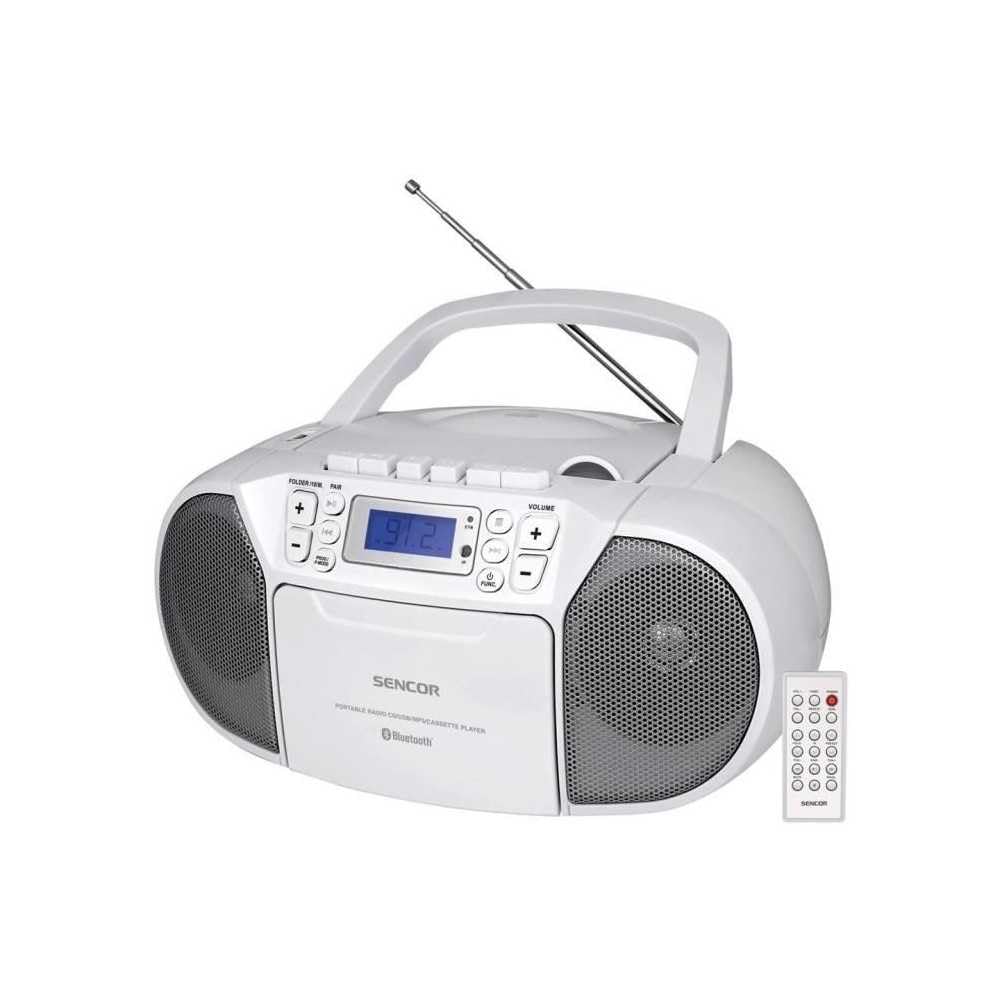
Aurrealdea view of the SENCOR SPT 3907 unit, highlighting the control buttons, LCD screen, CD tray, and speakers. The remote control is also visible.
Aurreko paneleko kontrolak:
- POWER botoia: Unitatea pizten edo itzaltzen du.
- MODE botoia: Switches between CD, Bluetooth, USB, FM Radio, and AUX-IN modes.
- BOLUMENA +/- botoiak: Audio irteera-maila doitzen du.
- PLAY/PAUSE (►/▮▮) Button: Starts or pauses playback in CD, Bluetooth, or USB mode.
- SKIP (◀◀ / ►►) Buttons: Aurreko edo hurrengo pistara/irteerara salto egiten du.
- STOP (■) botoia: Erreprodukzioa geldiarazten du.
- FOLDER / PAIR Button: Navigates folders in USB mode; initiates Bluetooth pairing.
- FUNC botoia: Accesses additional functions (e.g., program, repeat, random).
- LCD pantaila: Uneko modua, pistaren zenbakia, maiztasuna eta bestelako informazioa erakusten ditu.
- CD konpartimentua: Audio CDak txertatzeko.
- USB ataka: USB biltegiratze gailuak konektatzeko.
- AUX-IN Jack: Kanpoko audio gailuak konektatzeko.
- Aurikularretarako irteera: Entzun pribaturako.
Atzeko paneleko kontrolak:
- CA potentzia sarrera: Korronte alternoko kablea konektatzen du.
- FM Antena: Extendable telescopic antenna for FM reception.
Urruneko kontrola:
The remote control duplicates most of the front panel functions for convenient operation from a distance. Refer to the remote control diagram in the included documentation for specific button layouts.
6. Konfigurazioa
6.1 Energia-konexioa
The SENCOR SPT 3907 can be powered by AC mains or batteries.
AC potentzia:
- Ziurtatu unitatea itzalita dagoela.
- Connect the supplied AC power cable to the AC input jack on the rear of the unit.
- Plug the other end of the AC power cable into a standard wall outlet (AC 100-240V, 50/60Hz).
Bateria Potentzia:
- Ireki bateriaren konpartimentuaren estalkia unitatearen behealdean.
- Insert 6 x D/LR20 size batteries (not included), ensuring correct polarity (+/-) as indicated inside the compartment.
- Itxi bateriaren konpartimenduaren estalkia ondo.
Note: When the AC power cable is connected, battery power is automatically disconnected. Remove batteries if the unit will not be used for an extended period to prevent leakage.
6.2 Antenen konfigurazioa
For optimal FM radio reception, fully extend the telescopic FM antenna located on the rear of the unit. Adjust its position for the best signal.
7. Funtzionamendu-argibideak
7.1 Piztea/Itzaltzea eta Moduaren Hautaketa
- Sakatu BOTEREA button to turn the unit on. The LCD display will light up.
- Sakatu MODUA button repeatedly to cycle through available modes: CD, Bluetooth, USB, FM Radio, AUX-IN. The selected mode will be shown on the LCD display.
- Sakatu BOTEREA botoia berriro unitatea itzaltzeko.
7.2 CD erreprodukzioa
- Sakatu MODUA botoia CD modua hautatzeko.
- Ireki CDaren konpartimentuaren estalkia.
- Place a CD (CD-R/RW compatible) with the label side facing up onto the spindle.
- Itxi CDaren konpartimentuaren estalkia. Unitateak diskoa irakurriko du, eta abesti kopuru osoa agertuko da pantailan.
- Sakatu JOLASTU/PAUSTU botoia erreproduzitzen hasteko.
- Erabili SALTATU (◀◀ / ►►) pistak saltatzeko botoiak.
- Sakatu GELDITU (■) erreprodukzioa gelditzeko botoia.
- Programa erreproduzitzea: While in STOP mode, press the FUNC botoia programazio moduan sartzeko. Erabili SALTATU buttons to select tracks and FUNC again to confirm. Up to 20 CD songs can be programmed.
7.3 Bluetooth funtzionamendua
- Sakatu MODUA botoia Bluetooth modua hautatzeko. Pantailak 'BT' erakutsiko du eta keinuka hasiko da, parekatze moduan dagoela adieraziz.
- Bluetooth gaitutako gailuan (adibidez, telefono adimenduna, tableta), gaitu Bluetooth eta bilatu eskuragarri dauden gailuak.
- Select 'SPT 3907' from the list of devices. Once paired, the 'BT' indicator on the display will stop flashing and remain solid.
- Start playing audio on your connected device. The sound will be streamed through the SENCOR SPT 3907.
- Erabili JOLASTU/PAUSTU eta SALTATU erreprodukzioa kudeatzeko unitateko edo urrutiko aginteko botoiak.
7.4 USB erreprodukzioa
- Sartu USB flash unitate bat (MP3 bat duena) files) USB atakan.
- Sakatu MODUA button to select USB mode. The unit will automatically read the files.
- Sakatu JOLASTU/PAUSTU botoia erreproduzitzen hasteko.
- Erabili SALTATU (◀◀ / ►►) pistak saltatzeko botoiak.
- Sakatu KARPETA button to navigate between folders on the USB drive.
- Programa erreproduzitzea: While in STOP mode, press the FUNC botoia programazio moduan sartzeko. Erabili SALTATU buttons to select tracks and FUNC again to confirm. Up to 99 MP3 songs can be programmed.
7.5 FM irratiaren funtzionamendua
- Sakatu MODUA button to select FM Radio mode. The current frequency will appear on the display.
- Luzatu antena teleskopikoa harrera hobea lortzeko.
- Sintonizazio automatikoa: Eduki sakatuta SALTATU (◀◀ / ►►) botoiak segundo batzuetan automatikoki hurrengo irrati-kate eskuragarria bilatzeko.
- Eskuzko sintonizazioa: Sakatu labur SALTATU (◀◀ / ►►) buttons to fine-tune the frequency step-by-step.
- Aurrez ezarritako geltokiak: To save a station, tune to the desired frequency, then press the FUNC botoia. Erabili SALTATU buttons to select a preset number (P01-P30), then press FUNC berriro baieztatzeko.
- Aurrez ezarritako irrati bat berreskuratzeko, sakatu FUNC botoia behin eta berriz gordetako irratiak zeharkatzeko.
7.6 AUX-IN konexioa
- Connect one end of a 3.5mm audio cable (not included) to the AUX-IN jack on the SENCOR SPT 3907.
- Konektatu kablearen beste muturra kanpoko audio gailuaren (adibidez, MP3 erreproduzitzailea, telefonoa) entzungailuen konektorera edo audio irteerara.
- Sakatu MODUA botoia AUX-IN modua hautatzeko.
- Start playback on your external device. The audio will be played through the SENCOR SPT 3907.
- Doitu bolumena BOLUMENA +/- buttons on the unit or remote control, and also on your external device.
8. Mantentzea
8.1 Unitatea garbitzea
Wipe the exterior of the unit with a soft, dry cloth. Do not use abrasive cleaners, waxes, or solvents as they may damage the finish. Ensure the unit is unplugged from the power source before cleaning.
8.2 CD Lenteen Zainketa
If the CD player experiences reading errors, the lens may need cleaning. Use a commercially available CD lens cleaner disc. Do not touch the lens directly.
8.3 Bateria ordezkatzea
When the unit operates on batteries and the sound becomes distorted or the unit stops functioning, replace all batteries with new D/LR20 batteries, ensuring correct polarity.
9. Arazoak
| Arazoa | Kausa posiblea | Irtenbidea |
|---|---|---|
| Botererik ez | Kable elektrikoa ez dago konektatuta; bateriak agortuta edo gaizki sartuta. | Check AC power connection; Replace batteries, ensuring correct polarity. |
| Soinurik ez | Bolumena baxuegia; Modu okerra hautatuta; Entzungailuak konektatuta. | Increase volume; Select correct mode (CD, BT, USB, FM, AUX); Disconnect headphones. |
| CDa ez da erreproduzitzen / Saltatzen ari da | CD zikin edo urratuta; CDa gaizki sartuta; CDaren lentea zikin. | Garbitu edo ordezkatu CDa; Sartu CDa etiketa gora begira duela; Erabili CD lenteen garbitzailea. |
| Bluetootha ez da konektatzen | Unit not in pairing mode; Device too far; Bluetooth not enabled on external device. | Ensure unit is in BT pairing mode; Move device closer; Enable Bluetooth on your device. |
| FM harrera eskasa | Antena ez dago luzatuta edo behar bezala kokatuta; Seinale ahula. | Luzatu eta doitu antena teleskopikoa guztiz; Saiatu unitatea beste leku batera mugitzen. |
10. Zehaztapenak
| Ezaugarri | Zehaztapena |
|---|---|
| Eredua | SPT 3907 |
| Irteera Potentzia | 4W RMS |
| Onartutako komunikabideak | CD-R, CD-RW, Bluetooth, MP3, USB |
| Bluetooth bertsioa | V2.1 + EDR |
| FM Irratiaren aurrezarpenak | 30 geltoki |
| Konektibitatea | Laguntzailea (3.5 mm), USB |
| Energia iturria | AC 100-240V, 50/60Hz; 6 x D/LR20 batteries |
| Elementuaren pisua | 1 kg 960 g |
| Neurriak | (Not specified in provided data) |
11. Bermea eta Laguntza
SENCOR products are manufactured to high-quality standards and are warranted against manufacturing defects. For specific warranty terms and conditions, please refer to the warranty card included with your purchase or visit the official SENCOR website. For technical support, service, or inquiries, please contact your local SENCOR distributor or authorized service center.


