Sarrera
The COLMI R12 Smart Ring is a compact and innovative device designed to seamlessly integrate health and fitness tracking into your daily life. Featuring a touch display, it monitors essential health metrics such as heart rate, blood oxygen, and sleep patterns. It also supports multiple sports modes and offers convenient features like wireless charging and remote camera control. This manual provides comprehensive instructions for setup, operation, maintenance, and troubleshooting to ensure optimal use of your smart ring.

Image: The COLMI R12 Smart Ring, showcasing its sleek design and key features like smart display, intelligent touch, and wireless charging.
Kutxan dagoena
Upon unboxing your COLMI R12 Smart Ring, please ensure all the following items are present:
- 1 x COLMI R12 Smart Ring
- 1 x Portable Charging Stand
- 1 x Charging Cable (USB-A to USB-C)
- 1 x Argibide eskuliburua
Konfigurazioa
1. Choosing the Right Ring Size
For optimal comfort and accurate data collection, selecting the correct ring size is crucial. It is recommended to purchase a COLMI Sizing Kit prior to your smart ring purchase to determine your ideal fit. The ring should fit snugly but comfortably on your finger, allowing for slight movement without being too loose or too tight.
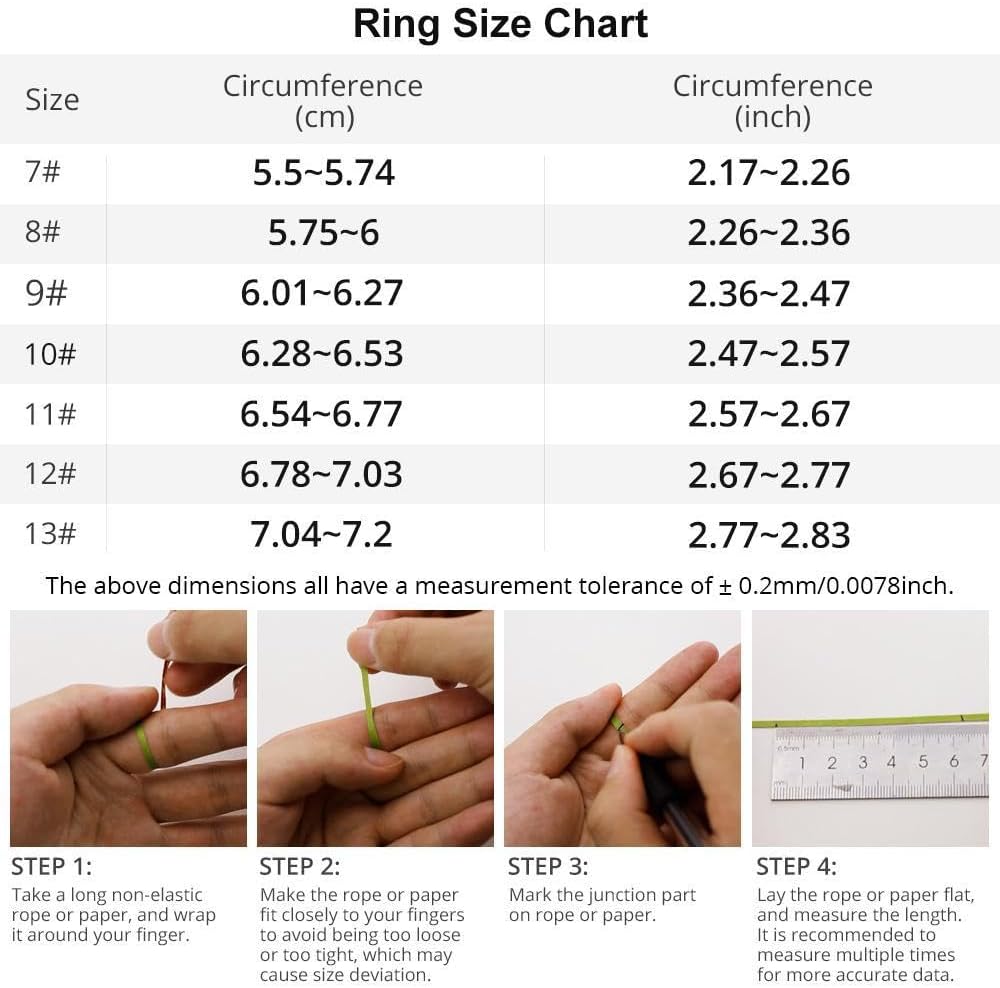
Image: A detailed ring size chart and instructions for measuring your finger to ensure a comfortable and accurate fit for the smart ring.
2. Aplikazioaren deskarga eta parekatzea
To unlock the full potential of your COLMI R12 Smart Ring, you need to download and pair it with the companion application on your smartphone. The app is compatible with both Android and iOS devices.
- Scan the QR code provided in the instruction manual or search for the "Q Ring" app in your device's app store.
- Deskargatu eta instalatu aplikazioa.
- Open the app and follow the on-screen instructions to create an account and set up your personal profile (birthdate, gender, height, weight).
- Ensure your smart ring is charged and within Bluetooth range of your smartphone.
- In the app, select the option to add a new device and choose the COLMI R12 from the list of available devices.
- Confirm the pairing request on both your phone and the smart ring (if prompted).

Image: A four-step visual guide illustrating the process from sizing kit purchase to app download and pairing for the COLMI R12 Smart Ring.
Operating the Smart Ring
1. Touch and Display Functions
The COLMI R12 Smart Ring features a touch-sensitive display that allows you to quickly check essential information without needing your phone or watch. Simply tap the ring to cycle through different displays such as current time, step count, and battery level.
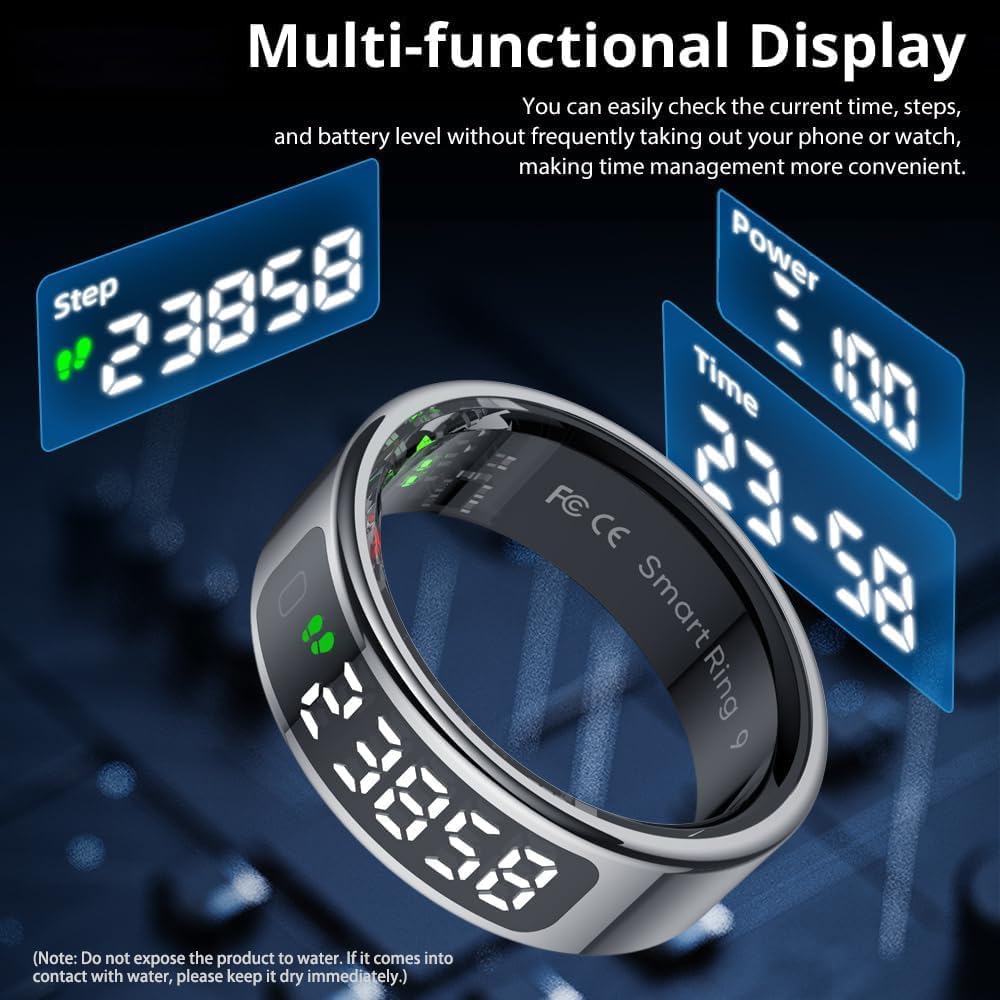
Image: The smart ring's multi-functional display showing time, step count, and battery power, emphasizing its convenience.
2. Osasunaren jarraipena
The smart ring continuously monitors various health metrics, providing valuable insights into your well-being. All data is synchronized with the companion app for detailed reports and historical tracking.
- Bihotz-taupadak: Tracks your heart rate 24/7. You can also manually check your heart rate through the app for instant readings.
- Odol-oxigenoa: Monitors your blood oxygen levels.
- Loaren jarraipena: Analyzes your sleep quality, including deep sleep, light sleep, and REM sleep, to help you develop better sleep habits.

Image: Visual representation of heart rate, sleep stages, and blood oxygen monitoring data as displayed within the companion app.

Image: The app interface demonstrating 24/7 heart rate monitoring capabilities of the smart ring.

Image: The smart ring's sleep monitoring feature, tracking sleep quality and generating reports for improved sleep habits.
3. Kirol Moduak
Connect the smart ring to the companion app to access and track data for multiple sports modes. The app records exercise time, steps, distance, and calories consumed, helping you monitor your fitness progress.

Image: The app's activity statistics interface, showing daily energy consumption, steps, distance, and calories, with data visualization options.
4. Control Photo Taking
When connected to your mobile phone, the smart ring allows you to control your phone's camera remotely. Simply wave your hand to capture photos, making it easier to record beautiful moments.

Image: The smart ring's smart fingertip control feature, enabling remote photo capture with a simple hand gesture.
Kargatzen
The COLMI R12 Smart Ring features convenient wireless charging. To charge your device:
- Place the smart ring onto the dedicated portable charging stand. Ensure the charging contacts align properly.
- Connect the charging cable to the stand and a power source (e.g., USB wall adapter, computer USB port).
- The charging indicator on the stand will illuminate to confirm charging is in progress.
The charging stand is designed for portability and efficiency, offering stronger performance and lower power consumption.

Image: The smart ring on its wireless charging stand, illustrating the ease of charging.

Image: Smart charging in progress, showing the ring on its base with an illuminated indicator.
Zehaztapenak
| Ezaugarri | Xehetasuna |
|---|---|
| Modelo zenbakia | COLMI R12 |
| Neurriak | 3.94 x 3.15 x 0.98 hazbete (Paketea) |
| Elementuaren pisua | 3.53 ontza (100 gramo) |
| Bateria mota | 1 Nonstandard Battery (Lithium Polymer) |
| Bateria Edukiera | 18 milioiamp Orduak |
| Sistema eragilea | Android, iOS |
| Konektibitatea | Bluetootha |
| Ezaugarri bereziak | Control photography, Multiple sports modes, Record exercise data, Touch and Display, Wireless Charging |
| GPSa | GPSrik ez |
| Forma | Biribila |
Arazoak konpontzea
If you encounter any issues with your COLMI R12 Smart Ring, please refer to the following common troubleshooting tips:
- Konexio-arazoak: Ensure Bluetooth is enabled on your smartphone and the ring is within range. Try restarting both the ring and your phone.
- Irakurketa okerrak: Verify that the ring is worn correctly on your finger, with the sensors making proper contact with your skin. Keep still during measurements.
- Kargatzeko arazoak: Check that the charging cable and stand are securely connected to a power source. Ensure the ring is properly seated on the charging stand.
- Aplikazioaren sinkronizazioa: Make sure the "Q Ring" app is updated to the latest version. Close and reopen the app if data is not syncing.
- Bateriaren iraupena: If battery life is shorter than expected, ensure all background app processes are closed and reduce the frequency of manual measurements.
Bermea eta Laguntza
COLMI is committed to providing professional after-sales service. If you experience any usage or quality problems with your COLMI R12 Smart Ring that cannot be resolved through troubleshooting, please do not hesitate to contact our customer support team. Refer to the contact information provided in your product packaging or on the official COLMI weblaguntza eskatzeko gunea.


