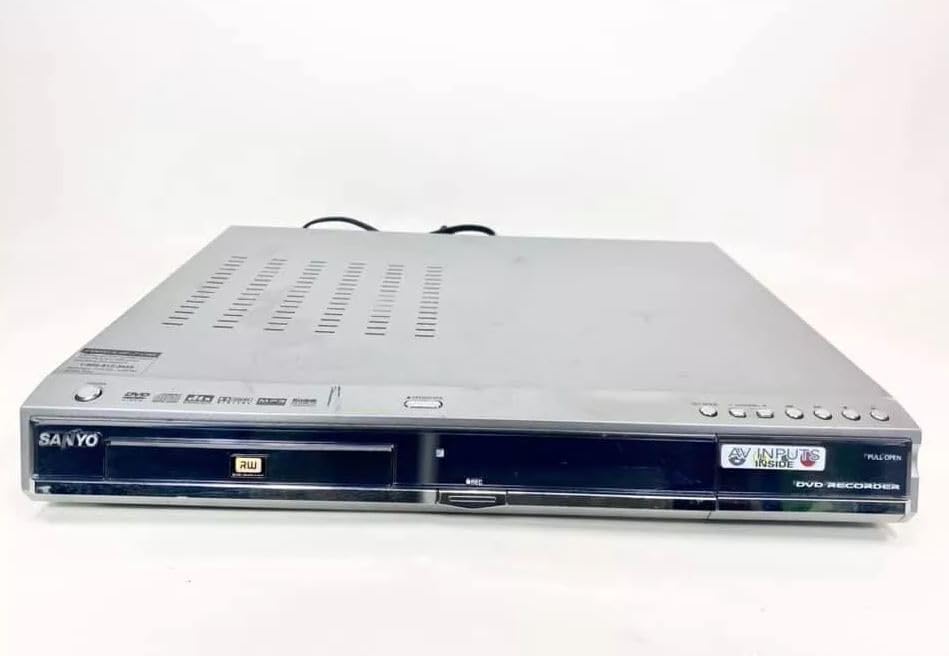
Sanyo DRW-500 DVD Recorder/Player Instruction Manual
Model: DRW-500
Sarrera
This manual provides comprehensive instructions for the safe and efficient operation of your Sanyo DRW-500 DVD Recorder/Player. Please read this manual thoroughly before using the device and retain it for future reference. The Sanyo DRW-500 allows you to record television programs and home videos onto DVD-R/RW discs, as well as play back DVD-Video and Audio CD discs.
Segurtasun informazio garrantzitsua
KONTUZ: SUTE EDO ELEKTRIZIO ARRISKUA MURRIZTEKO, EZ EZARRI APARATU HAU EURIRA EDO HEZETASUNERA.
Beti jarraitu oinarrizko segurtasun neurriak produktu hau erabiltzean, sute, deskarga elektriko eta pertsonen lesio arriskua murrizteko.
Ez blokeatu aireztapen-irekidurak. Instalatu fabrikatzailearen argibideen arabera.
Ez instalatu bero-iturri inongo ondoan, esate baterako, erradiadoreak, bero-erregistroak, sukaldeak edo beste aparatu batzuk (barne ampberoa sortzen duten argitzaileak).
Babestu korronte-kablea oinez ibiltzetik edo atxilotzetik, batez ere entxufeetan, erosotasun-harguneetan eta aparatutik irteten diren puntuetan.
Erabili soilik fabrikatzaileak zehaztutako eranskinak/osagarriak.
Bidali zerbitzu guztiak zerbitzu kualifikatuko langileengana. Aparatuak edozein modutan hondatu direnean mantenimendua egin behar da.
Paketearen edukia
Mesedez, egiaztatu elementu guztiak kutxan daudela:
Sanyo DRW-500 DVD Recorder/Player Unit
Urruneko Kontrola
RCA audio/bideo kablea
Elikatze kablea
Argibide eskuliburua (dokumentu hau)
Produktua amaituview
Familiarize yourself with the front and rear panels of your Sanyo DRW-500.
1. irudia: Front Panel of Sanyo DRW-500. Shows the disc tray, power button, play/pause, stop, record buttons, and the display screen.
Aurreko paneleko kontrolak:
POWER botoia: Unitatea pizten edo itzaltzen du.
IREKI/ITXI botoia: Diskoaren erretilua ireki eta ixten du.
JOLASTU botoia: Starts disc playback.
STOP botoia: Stops disc playback or recording.
RECORD botoia: Grabaketari ekiten dio.
DISPLAY: Uneko egoera, ordua eta pistaren informazioa erakusten ditu.
Atzeko panelaren konexioak:
AUDIO/VIDEO OUT (RCA): Connects to your TV's audio/video input.
S-VIDEO OUT: Provides higher quality video output to compatible TVs.
AUDIO/VIDEO IN (RCA): Connects to external devices like VCRs or camcorders for recording.
ALDIZKARIA: Elikatze-kablea konektatzen du.
Konfigurazioa
1. Telebistara konektatzea
There are two primary ways to connect your Sanyo DRW-500 to a television:
Option A: RCA (Composite Video) Connection
Connect one end of the RCA audio/video cable (red, white, yellow) to the AUDIO/VIDEO OUT jacks on the rear of the DRW-500.
Connect the other end of the RCA cable to the corresponding AUDIO/VIDEO IN jacks on your television. Ensure colors match (yellow to yellow for video, red to red for right audio, white to white for left audio).
Select the correct input channel on your TV (e.g., Video 1, AV1, Input 1).
Connect an S-Video cable (not included) from the S-BIDEOA IRTEERA jack on the DRW-500 to the S-Video input on your television.
Connect a separate RCA audio cable (red, white) from the AUDIOA jacks on the DRW-500 to the corresponding audio input jacks on your television. S-Video only carries video, not audio.
Select the correct input channel on your TV (e.g., S-Video, Input 2).
2. Energia-konexioa
Konektatu emandako elikatze-kablea ENERGIA port on the rear of the DRW-500.
Entxufatu kablearen beste muturra korronte alternoko hormako entxufe estandar batera.
3. Initial Setup and Clock Setting
Upon first power-on, the unit may prompt you to set the clock and other basic settings. Follow the on-screen instructions using the remote control.
Place a DVD or CD disc onto the tray with the label side facing up.
Sakatu IREKI/ITXI botoia berriro erretilua ixteko.
Erreprodukzioa automatikoki hasi beharko litzateke. Bestela, sakatu botoia JOLASTU botoia.
Use the remote control for functions like Pause, Stop, Fast Forward, Rewind, and Chapter Skip.
Recording to DVD-R/RW
The Sanyo DRW-500 can record from various external sources connected to its AUDIO/VIDEO IN kakak.
Recording from a TV/Cable Box:
Connect the audio/video output of your TV or cable box to the AUDIO/VIDEO IN jacks on the rear of the DRW-500.
Insert a blank recordable DVD (DVD-R or DVD-RW) into the disc tray.
Select the correct input source on the DRW-500 using the SARRERA HAUTATU button on the remote control (e.g., L1, L2).
Tune your TV/cable box to the desired program.
Sakatu GRABATU button on the DRW-500 or its remote control to start recording.
Sakatu GELDITU botoia grabazioa amaitzeko.
Recording from a VCR or Camcorder:
Connect the audio/video output of your VCR or camcorder to the AUDIO/VIDEO IN jacks on the rear of the DRW-500.
Insert a blank recordable DVD into the disc tray.
Select the correct input source on the DRW-500 using the SARRERA HAUTATU urrutiko aginteko botoia.
Start playback on your VCR or camcorder.
Sakatu GRABATU button on the DRW-500 or its remote control to start recording.
Sakatu GELDITU botoia grabazioa amaitzeko.
Disko bat amaitzea
For recorded DVD-R/RW discs to be playable on other DVD players, they must be "finalized."
Insert the recorded DVD-R/RW disc into the DRW-500.
Sartu MENUA urrutiko agintean.
Navigate to the "Disc Settings" or "Setup" menu.
Select the "Finalize Disc" option.
Confirm the action. The finalization process may take several minutes. Do not interrupt power during this process.
Note: DVD-RW discs can be unfinalized and re-recorded multiple times. DVD-R discs, once finalized, cannot be recorded on again.
Mantentzea
Unitatea garbitzea
Deskonektatu beti unitatea korronte-hartunetik garbitu aurretik.
Erabili zapi leun eta lehor bat unitatearen kanpoaldea garbitzeko.
Do not use liquid cleaners, aerosol cleaners, or strong chemical solvents, as these may damage the finish.
Diskoen Zainketa
Handle discs by their edges to avoid fingerprints on the recording surface.
Gorde diskoak beren zorroetan erabiltzen ez dituzunean, marradurak eta hautsa pilatzea saihesteko.
Clean dirty discs with a soft, lint-free cloth, wiping gently from the center outwards.
Arazoak konpontzea
Arazoa
Kausa posiblea
Irtenbidea
Botererik ez
Kable elektrikoa ez dago ondo konektatuta.
Egiaztatu kablearen konexioa unitatera eta hormako entxufera.
Ez dago irudi edo soinurik
Incorrect TV input selected. A/V cables not connected properly.
Select the correct input on your TV. Ensure A/V cables are securely connected to the correct input/output jacks.
Diskoa ez da erreproduzitzen
Disc is dirty or scratched. Disc is inserted incorrectly. Incompatible disc format.
Clean the disc. Insert the disc with the label side up. Ensure the disc is a compatible format (DVD-Video, Audio CD, recorded DVD-R/RW).
Ezin da grabatu
No blank recordable disc inserted. Disc is full or protected. Incorrect input source selected.
Insert a blank DVD-R or DVD-RW. Use a new disc or erase a DVD-RW. Select the correct input source (e.g., L1, L2).
Recorded disc won't play on other players
Diskoa ez da amaitu.
Finalize the disc using the "Finalize Disc" option in the unit's menu.
Zehaztapenak
Ezaugarri
Xehetasuna
Eredua
DRW-500
Fabrikatzailea
Sanyo
Compatible Disc Formats (Playback)
DVD-Video, CD-Audio, DVD-R, DVD-RW (finalized)
Recordable Disc Formats
DVD-R, DVD-RW
Bideo Irteera
Bideo konposatua (RCA), S-Bideoa
Audio Irteera
RCA estereo
Bideoaren sarrerako bateragarritasuna
NTSC
Konektibitate Teknologia
AUX (RCA)
Ezaugarri Berezia
Diseinu trinkoa
Elikatze Hornidura
AC 120V, 60Hz (typical for US models)
Bermea eta Laguntza
This product is covered by a limited manufacturer's warranty. Please refer to the warranty card included with your purchase for specific terms and conditions. For technical support or service inquiries, please contact Sanyo customer service through their official webgunea edo bermearen dokumentazioan emandako harremanetarako informazioa.
Please note that warranty terms may vary by region and retailer. Keep your proof of purchase for warranty claims.
SANYO FWBP505F Blu-ray Disc™ / DVD Player Owner's Manual This owner's manual provides comprehensive instructions for the SANYO FWBP505F Blu-ray Disc™ and DVD Player, covering setup, features, playback, connections, troubleshooting, and maintenance. Visit www.sanyo-av.com for more support.
SANYO MCD-Z120/MCD-Z120F CD irrati eramangarriaren kasete grabagailuaren zerbitzu eskuliburua Zerbitzu-eskuliburu oso honek zehaztapen tekniko zehatzak, doikuntza-prozedurak, leherketako informazioa eta viewSANYO MCD-Z120 eta MCD-Z120F CD irrati-kasete grabagailu eramangarrien piezen zerrendak eta piezen zerrendak. Ezinbestekoak teknikari eta konponketa-profesionalentzat.
SANYO DC-PT70 DVD Micro Component System Service Manual Comprehensive service manual for the SANYO DC-PT70 DVD Micro Component System. Covers laser safety, service mode operations, component replacement, tuner adjustments, parts lists, wiring diagrams, and detailed IC block diagrams and descriptions.
SANYO DC-F210 Mini Osagaien Sistemaren Argibide Eskuliburua SANYO DC-F210 Mini Osagaien Sistemaren argibideen eskuliburua, CD erreproduzitzailearen konfigurazioa, funtzionamendua eta sintonizatzailea azaltzen dituena. ampLikidatzailea eta kasete-erreproduzitzailea, grabazioa, bikoizketa, tenporizadorearen funtzioak, mantentze-lanak eta zehaztapen teknikoak. Segurtasun-neurri garrantzitsuak eta bermeari buruzko informazioa barne hartzen ditu.