Sarrera
The Razer BlackShark V3 X HyperSpeed is a wireless esports gaming headset designed for high-performance audio and clear communication across multiple platforms. This manual provides essential information for setting up, operating, maintaining, and troubleshooting your headset.
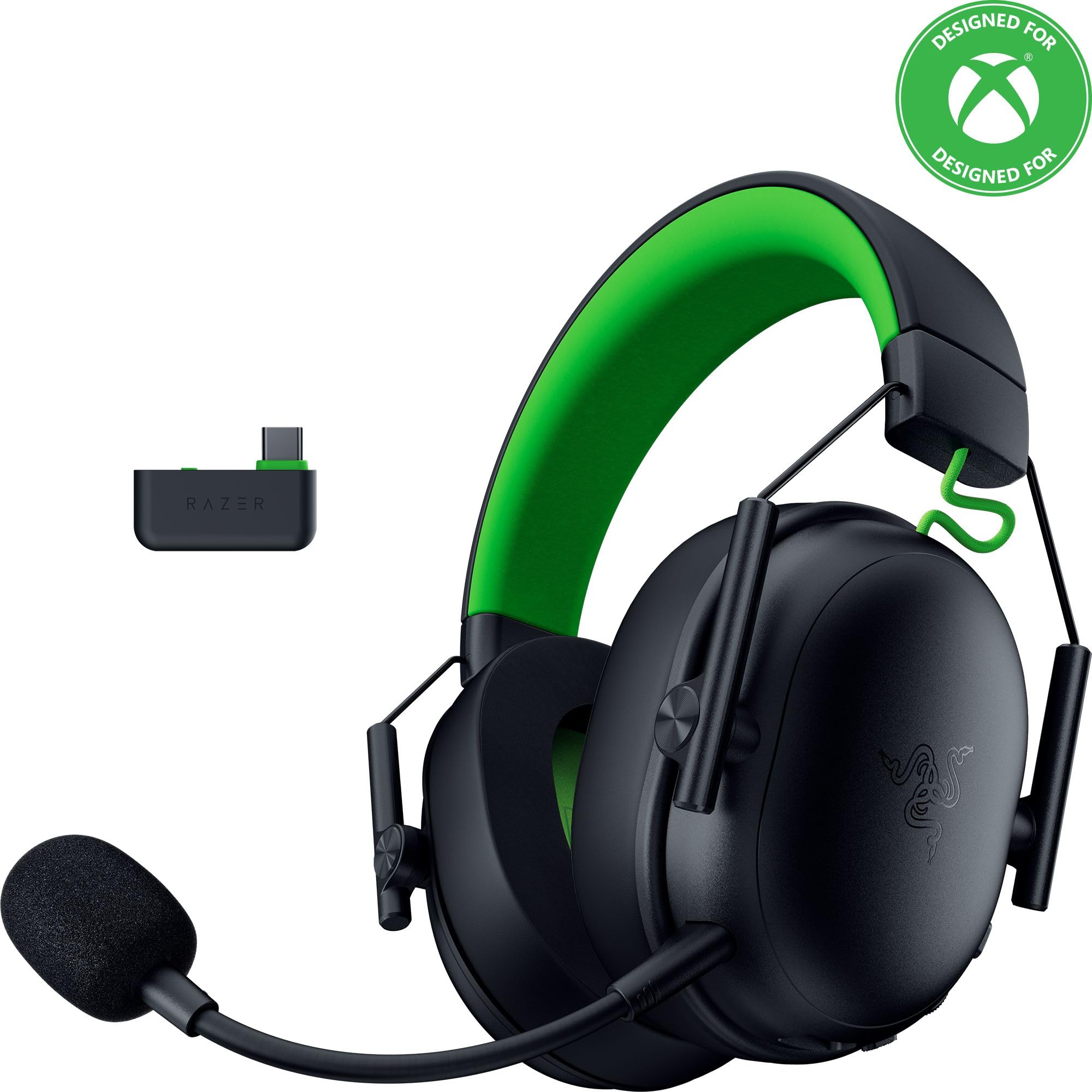
Image: The Razer BlackShark V3 X HyperSpeed Wireless Gaming Headset, showcasinbere diseinua eta mikrofono desmuntagarria esker.
Kutxan dagoena
Ziurtatu osagai hauek guztiak zure paketean daudela:
- Razer BlackShark V3 X HyperSpeed Wireless Gaming Headset
- USB Type C Razer HyperSpeed Wireless Dongle
- Detachable Razer HyperClear Cardioid 9.9mm Mic
- USB Type A to Type C Cable (for charging and wired connection)
- USB Type A to Type C Adapter Cable
- Erabiltzailearen eskuliburua (dokumentu hau)

Image: The Razer BlackShark V3 X HyperSpeed headset on a stand next to its retail packaging, illustrating the product and its box.
Konfigurazioa
1. Entzungailua kargatzea
Before initial use, fully charge your headset using the provided USB Type A to Type C cable. Connect the USB-C end to the headset's charging port and the USB-A end to a powered USB port.
2. Mikrofonoa konektatzea
Insert the detachable Razer HyperClear Cardioid 9.9mm Mic into the microphone port located on the left earcup. Ensure it is securely connected.

Image: Close-up of the Razer BlackShark V3 X HyperSpeed headset showing the detachable HyperClear Cardioid microphone attached.
3. Konektibitate-aukerak
The headset supports three modes of connectivity: 2.4 GHz HyperSpeed Wireless, Bluetooth, and wired USB-C.
- 2.4 GHz HyperSpeed Wireless (PC, Mac, PS5, Nintendo Switch, Xbox Series X|S, Xbox One):
Insert the USB Type C Razer HyperSpeed Wireless Dongle into an available USB-C port on your device. If your device only has USB-A ports, use the provided USB Type A to Type C Adapter Cable. Ensure the switch on the dongle is set to 'USB' for PC/Mac/PS5/Switch or 'XBOX' for Xbox consoles. The headset will automatically connect. - Bluetooth (Smartphones, Tablets, Handheld Gaming Devices):
With the headset powered on, press and hold the power button until the LED indicator blinks blue, indicating pairing mode. On your device, search for and select "Razer BlackShark V3 X HyperSpeed" from the list of available Bluetooth devices. - USB-C kableatua:
Connect the headset directly to your device using the USB Type A to Type C Cable. This mode provides audio and microphone functionality without relying on battery power.

Image: The Razer BlackShark V3 X HyperSpeed headset alongside its USB-C wireless dongle, illustrating the wireless connectivity component.

Image: A visual representation of the headset's three connectivity modes: 2.4 GHz Wireless, Bluetooth, and USB, highlighting its versatility.
Entzungailuaren funtzionamendua
1. Kontrolakview
Aurikularrek entzungailuetan kokatutako kontrol intuitiboak dituzte:
- Pizteko botoia: Press and hold to power on/off. Single press to switch between 2.4 GHz HyperSpeed Wireless and Bluetooth modes.
- Mikrofonoa isilarazteko botoia: Sakatu mikrofonoa isilarazteko edo aktibatzeko.
- Bolumen-gurpila: Audioaren bolumen orokorra doitzen du.
- Mikrofonoaren monitorizazio-gurpila: Adjusts the volume of your own voice heard through the headset (sidetone).

Irudia: Albokoa view of the Razer BlackShark V3 X HyperSpeed headset, highlighting the location of the power button, volume wheel, and mic mute button.
2. Audio Quality and Features
- Razer TriForce 50mm Drivers Gen-2: Experience powerful, clear audio with enhanced positional accuracy for competitive gaming.
- Razer HyperClear Cardioid 9.9mm Mic: The detachable microphone features a unidirectional pickup pattern to focus on your voice and minimize background noise.
- Ingurumen soinua: Enjoy immersive surround sound with Windows Sonic on Xbox and 7.1 Surround Sound on PC for precise audio cues.

Irudia: Leherketa bat view of the Razer TriForce 50mm Drivers Gen-2, illustrating their internal components for powerful and clear audio.

Image: The Razer BlackShark V3 X HyperSpeed headset surrounded by sound waves, representing its advanced surround sound capabilities for Xbox and PC.
3. Erosotasuna eta diseinua
Weighing just 270g, the headset is designed for extended gaming sessions with plush memory foam cushions and a fatigue-free design.

Image: The Razer BlackShark V3 X HyperSpeed headset with an icon representing its ultra-lightweight design, emphasizing comfort for long gaming sessions.
4. Produktuaren bideo ofiziala
Video: An official product video from Razer showcasing the BlackShark V3 headset line, highlighting its features and design for esports performance.
Mantentzea
1. Garbiketa
- Erabili zapi leun eta lehor bat entzungailuen gainazalak garbitzeko.
- For earcups, gently wipe with a damp beharrezkoa bada, zapi eta xaboi leun bat erabili, eta gero ondo lehortu. Saihestu gehiegizko hezetasuna.
- Ez erabili produktu kimiko gogorrak edo material urratzaileak.
2. Biltegiratzea
- Gorde entzungailuak leku fresko eta lehor batean, eguzki-argitik eta muturreko tenperaturetatik babestuta.
- When not in use, consider placing it on a headset stand to maintain its shape and prevent damage.
Arazoak konpontzea
Audiorik ez / Audio kalitate eskasa
- Egiaztatu bolumena: Ensure the volume wheel on the headset is turned up.
- Konektibitatea: Verify the headset is correctly connected via 2.4 GHz dongle, Bluetooth, or USB-C. For 2.4 GHz, ensure the dongle switch is set to the correct platform (USB/XBOX).
- Gailuaren ezarpenak: Confirm the headset is selected as the default audio output device in your computer's or console's sound settings.
- Parekatu berriro: For wireless connections, try re-pairing the headset with your device.
Mikrofonoa ez dabil
- Egiaztatu mutua: Ensure the mic mute button on the headset is not activated.
- Mic Connection: Verify the detachable microphone is securely inserted into the port.
- Gailuaren ezarpenak: Confirm the headset microphone is selected as the default input device in your computer's or console's sound settings.
- Mikrofonoaren jarraipena: Adjust the mic monitoring wheel to hear your own voice, confirming mic functionality.
Konektibitate arazoak
- Interferentzia: Aldendu interferentziak sor ditzaketen haririk gabeko beste gailuetatik.
- Tartea: Ensure you are within the effective range of the wireless dongle or Bluetooth connection.
- Dongle Switch: Double-check that the switch on the USB-C dongle is set to the correct position (USB for PC/Mac/PS5/Switch, XBOX for Xbox).
Battery Life Shorter Than Expected
- Kargatzen: Ziurtatu entzungailuak guztiz kargatuta daudela erabili aurretik.
- Erabilera: High volume levels or continuous use of certain features can reduce battery life.
Zehaztapenak
| Ereduaren izena | BlackShark V3 X HyperSpeed |
| Modelo zenbakia | RZ04-05420200-R3U1 |
| Konektibitate Teknologia | Bluetooth, USB, 2.4 GHz Wireless |
| Audio kontrolatzaile mota | Dynamic Driver (Razer TriForce 50mm Drivers Gen-2) |
| Maiztasun Erantzuna | 12 Hz - 28 KHz |
| Sentikortasuna | 106 dB |
| Mikrofonoa | Detachable Razer HyperClear Cardioid 9.9mm Mic |
| Zarata Kontrola | Soinu Isolamendua |
| Gailu bateragarriak | Xbox Series X|S, Xbox One, PS5, PS4, PC, Mac, Nintendo Switch, Smartphones, Tablets |
| Elementuaren pisua | 270 grams (without mic) |
| Pilak | 1 litio ioizko bateria (barne) |
| Bluetooth bertsioa | 5.3 |
Bermea eta Laguntza
Bermeari buruzko informazioa, laguntza teknikoa edo laguntza gehiago lortzeko, bisitatu Razerren laguntza ofiziala. webgunea. Gorde erosketaren egiaztagiria bermearen erreklamazioetarako.
Lineako laguntza: www.razer.com/laguntza


