1. Sarrera
This manual provides detailed instructions for the installation, operation, and maintenance of your Girafit GRF-T350SW 3K 5MP Indoor/Outdoor Pan/Tilt/Zoom Wi-Fi Security Camera. Please read this manual thoroughly before using the product to ensure proper functionality and safety. Keep this manual for future reference.
2. Produktua amaitu daview
Ezaugarri nagusiak
- 3K 5MP Resolution with 4X Digital Zoom: Bideo argi eta zehatza eskaintzen dutage.
- 360°-ko panoramika eta 180°-ko inklinazioa: Offers comprehensive coverage of your monitoring area.
- AI Person/Pet/Vehicle Detection: Advanced artificial intelligence for accurate identification of subjects, reducing false alerts.
- Mugimendu Automatikoaren Jarraipena: Automatically follows detected subjects within the camera's field of view.
- Starlight Color Night Vision: Enhanced low-light performance for vivid color images at night.
- Bi norabideko audioa: Mikrofono eta bozgorailu integratuak denbora errealeko komunikaziorako.
- Auto Alert Siren: Intrusoak alarma akustiko batekin uxatzen ditu.
- IP65 Eguraldiarekiko erresistentzia balorazioa: Suitable for outdoor use in various weather conditions.
- Biltegiratze aukera malguak: Supports encrypted US cloud storage and local Micro SD card storage (up to 256GB).
- 2.4GHz/5GHz Wi-Fi Connectivity: Dual-band Wi-Fi support for stable connection.
Kutxan dagoena
- Girafit GRF-T350SW Camera Body
- Elikatze-moldagailua
- Muntatzeko Torlojuak eta Aingurak
- Muntatzeko txantiloia
- Erabiltzailearen eskuliburua

Figure 2.1: Girafit GRF-T350SW camera showing its pan and tilt capabilities.

Figure 2.2: The Girafit GRF-T350SW camera operating reliably in both rainy and sunny conditions, highlighting its IP65 weatherproof design.
3. Konfigurazioa
3.1 Instalazio fisikoa
- Aukeratu kokapena: Select a suitable outdoor or indoor location that provides the desired viewing angle and is within range of your Wi-Fi network. Ensure the power outlet is accessible.
- Muntatu kamera: Use the provided mounting template to mark drill holes. Secure the mounting bracket to the wall or ceiling using the screws and anchors. Attach the camera to the bracket.
- Konektatu energia: Plug the power adapter into the camera and then into a power outlet. The camera will power on and initiate its startup sequence.
3.2 Aplikazioaren instalazioa eta kontuaren sorrera
- Download the Girafit App: Bilatu 'Girafit' in your smartphone's app store (iOS or Android) and download the official application.
- Sortu kontu bat: Open the app and follow the on-screen instructions to register a new account.
3.3 Sareko konexioa
- Gehitu gailua: In the Girafit app, tap the '+' icon to add a new device. Select your camera model.
- Jarraitu aplikazio barruko argibideei: The app will guide you through connecting the camera to your 2.4GHz or 5GHz Wi-Fi network. This typically involves scanning a QR code displayed on your phone with the camera lens.
- Osatzea: Once connected, the camera's status indicator will change, and you will see the live feed in the app.
4. Funtzionamendua
4.1 Panoramika, inklinazio eta zoomaren kontrola
Zuzenetik view in the Girafit app, use the on-screen controls to remotely adjust the camera's viewing angle. The camera supports 360° horizontal pan and 180° vertical tilt. You can also digitally zoom in up to 4X to view xehetasunak.

Figure 4.1: Visual comparison demonstrating the clarity of 3K 5MP resolution with 4X zoom compared to standard 3MP resolution.
4.2 Mugimenduaren detekzioa eta jarraipen automatikoa
The camera features advanced AI detection capabilities to identify humans, pets, and vehicles. When motion is detected, the camera can automatically track the subject, zoom in, record the event, and send push notifications to your smartphone.
- Gaitu detekzioa: Navigate to the camera settings in the app to enable AI Person/Pet/Vehicle Detection.
- Set Detection Zones: Definitu kameraren barruko eremu zehatzak view where you want motion detection to be active.
- Activate Auto Tracking: Enable auto tracking in the settings to allow the camera to follow detected subjects.
- Auto Alert Siren: Configure the camera to trigger an audible siren upon detection to deter unwanted visitors.

Figure 4.2: Illustration of the camera's automatic tracking feature, showing a person being followed with a 4X zoom.

Figure 4.3: The camera's AI accurately detecting a human, a pet, and a vehicle in a home environment.

Figure 4.4: The camera detecting activity in a defined hexagonal area and issuing an auto voice alert.
4.3 Gaueko ikusmena
The GRF-T350SW offers multiple night vision modes for clear surveillance in low-light conditions.
- Starlight Color Night Vision: Utilizes a Starlight Sensor and f/1.6 aperture to capture more light, providing full-color video even in very dim environments.
- Infragorri modua: LED infragorrien bidezko gaueko ikusmen zuri-beltza estandarra.
- Foku modua: Activates built-in spotlights to illuminate the area and capture color video when motion is detected at night.
You can switch between these modes or set them to automatic in the app settings.

Figure 4.5: Visual representation of the camera's Starlight Color Night Vision, Infrared Mode, and Spotlight Mode capabilities.
4.4 Bi norabideko audioa
The integrated microphone and speaker allow for two-way communication. You can speak through the camera to visitors or deter intruders directly from your smartphone via the Girafit app.
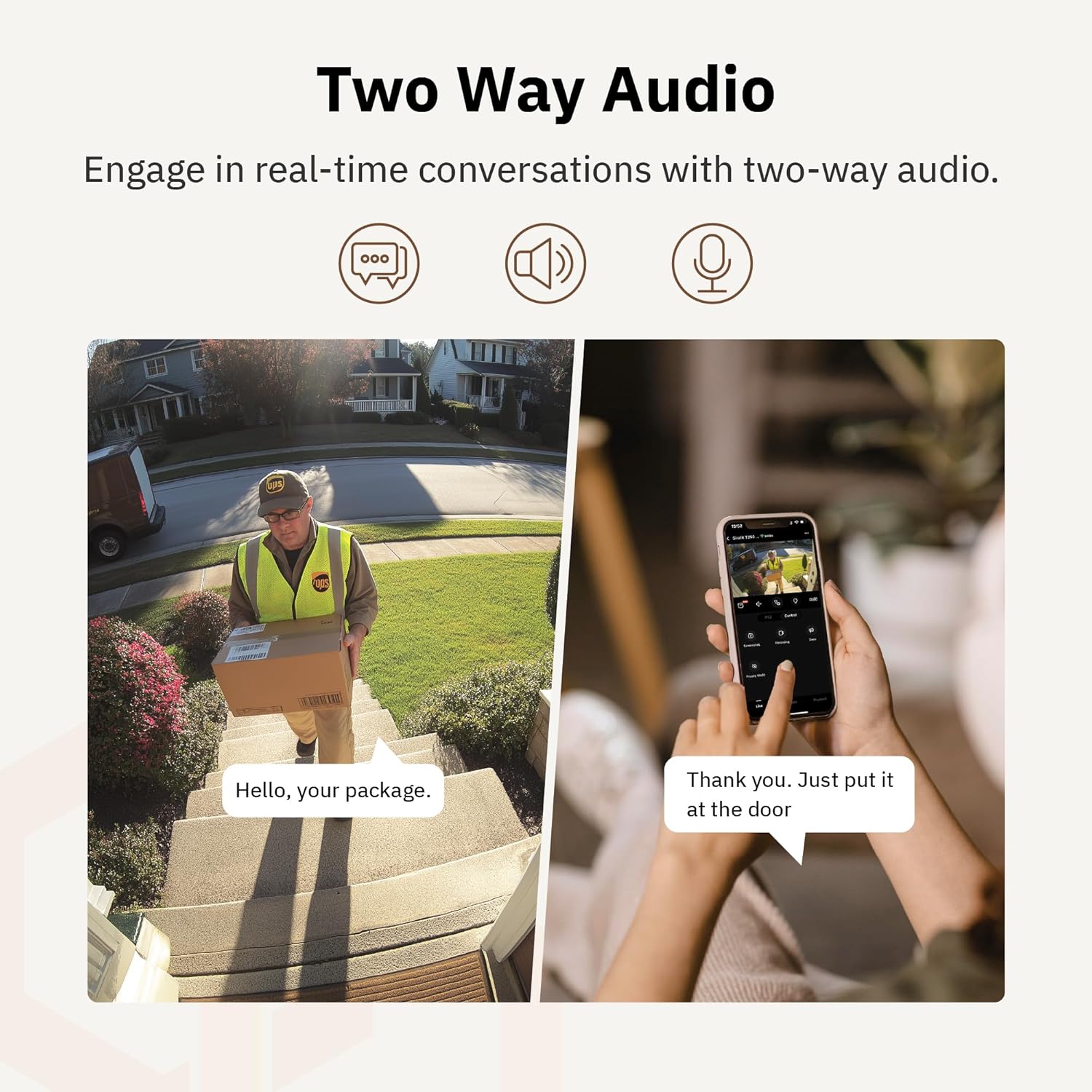
4.6. irudia: Adibample of using two-way audio to communicate with a delivery person at the door.
4.5 Pribatutasun modua
For enhanced privacy, the camera features a privacy mode. When activated, the camera lens physically tilts down by 180°, ensuring no live feed is captured or transmitted. This provides 100% privacy protection when needed.

Figure 4.7: The camera in privacy mode, with the lens tilted downwards to ensure no recording or live view.
4.6 Bideo biltegiratzea
The camera supports two primary methods for video storage:
- Mikro SD txartela: Insert a Micro SD card (up to 256GB, not included) into the designated slot on the camera for local storage of recordings.
- Hodeiko biltegiratzea: Girafit offers encrypted cloud storage services in the US. Refer to the app for subscription options and details.
5. Mantentzea
5.1 Garbiketa
To maintain optimal performance, periodically clean the camera lens and housing. Use a soft, damp zapi bat hautsa eta zikinkeria kentzeko. Saihestu lentea edo akabera kaltetu dezaketen produktu kimiko gogorrak edo material urratzaileak erabiltzea.
5.2 Firmware eguneraketak
Girafit regularly releases firmware updates to improve camera performance, add new features, and enhance security. Check the Girafit app periodically for available updates and follow the in-app instructions to install them. Ensure the camera has a stable power supply during updates.
6. Arazoak
- Kamera ez da wifira konektatzen:
- Ensure your Wi-Fi network is 2.4GHz or 5GHz and the password is correct.
- Hurbildu kamera zure Wi-Fi bideratzailera.
- Berrabiarazi zure bideratzailea eta kamera.
- Bideoaren kalitate eskasa:
- Egiaztatu zure Interneteko konexioaren abiadura.
- Garbitu kameraren lentea.
- Ziurtatu kamerak nahikoa potentzia jasotzen duela.
- Mugimendu-detekzioa ez dabil:
- Egiaztatu mugimenduaren detekzioa gaituta dagoela aplikazioaren ezarpenetan.
- Adjust detection sensitivity and detection zones.
- Ziurtatu kameraren ikuspegia blokeatzen duen oztoporik ez dagoela view.
- Bi norabideko audio-arazoak:
- Check microphone and speaker permissions for the Girafit app on your phone.
- Ziurtatu kameraren mikrofonoa eta bozgorailua ez daudela oztopoz.
For further assistance, please contact Girafit customer support.
7. Zehaztapenak
| Ezaugarri | Deskribapena |
|---|---|
| Ereduaren izena | GRF-T350SW |
| Bideo Harrapaketa Ebazpena | 3K (5MP) |
| Barruko/Kanpoko erabilera | Kanpoan |
| Konektibitate Teknologia | Wi-Fi (2.4GHz/5GHz), Wired |
| Energia iturria | Kable elektrikoa |
| Muntatze Mota | Hormako Muntaia |
| Ezaugarri Berezia | 2-Way Audio, AI Detection (Human/Pet/Vehicle), Auto Tracking, Color Night Vision, IP65 Weatherproof |
| Gailu bateragarriak | Desktop, Laptop, Smartphone (Android/iOS) |
| Elementuaren neurriak (L x W x H) | 2.63 x 2.63 x 4.76 hazbete |
| Elementuaren pisua | 14.7 ontza |
| Biltegiratze-aukerak | Mikro SD txartela (256 GB arte), hodeiko biltegiratzea |
| UPC | 764742517881 |
8. Bermea eta Laguntza
Girafit products are designed for reliability and performance. For warranty information, please refer to the warranty card included with your product or visit the official Girafit website. For technical support, troubleshooting assistance, or any inquiries regarding your Girafit GRF-T350SW camera, please contact Girafit customer service through the contact information provided on the official website or within the Girafit app.


