1. Sarrera
Thank you for choosing the Pamray S15 58-Inch Computer Desk. This desk is designed to provide a functional and organized workspace for various uses, including gaming, studying, and office tasks. It features integrated LED lighting, convenient power outlets, a monitor stand, and ample storage solutions. Please read this manual thoroughly before assembly and use to ensure proper setup and safe operation.
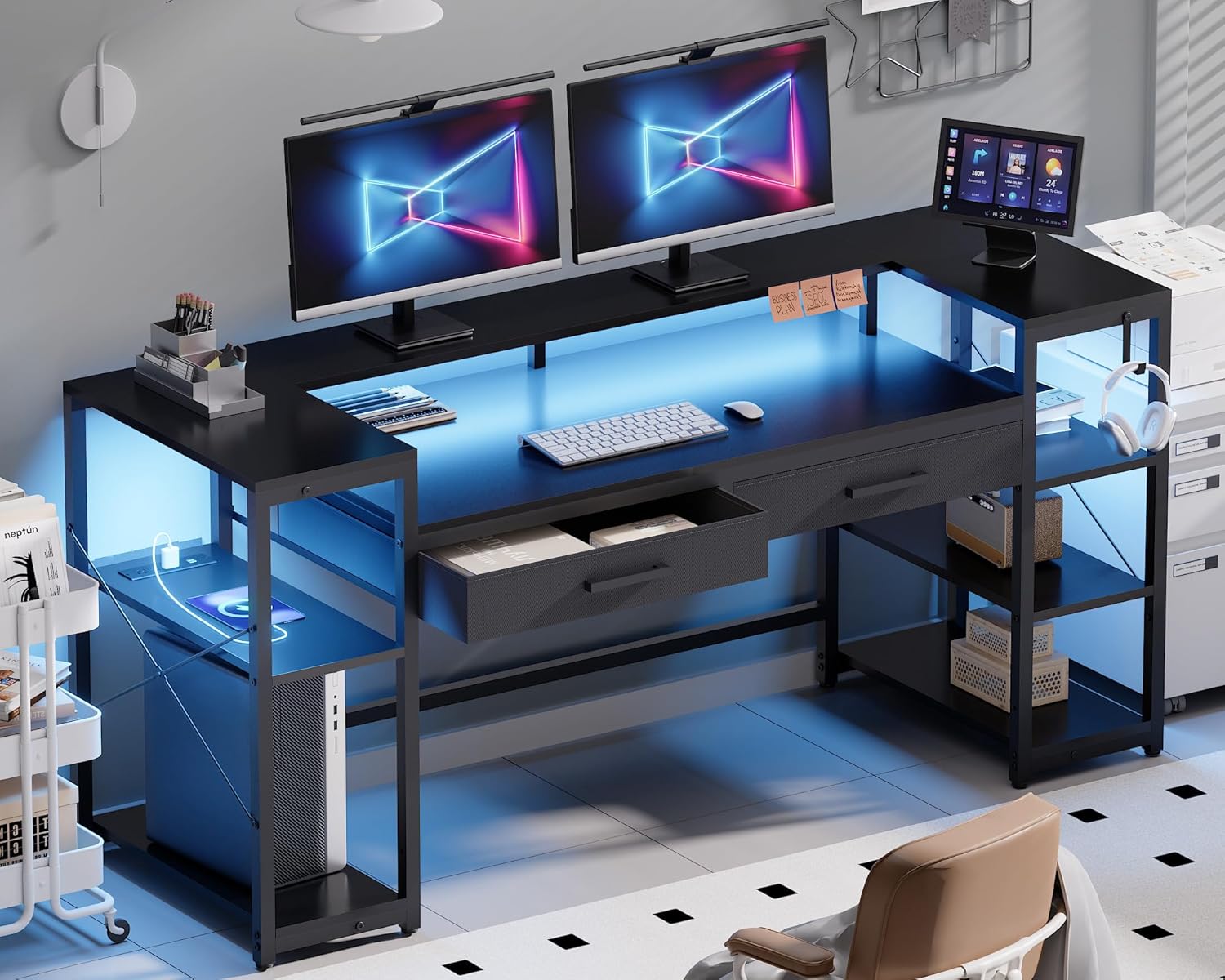
Image 1.1: The Pamray S15 58-Inch Computer Desk in a modern setup, showcasing its LED lighting, monitor stand, and storage.
2. Segurtasun informazioa
- Muntatu beti mahaia gainazal bigun eta garbi batean, marradurak saihesteko.
- Erabili aurretik, ziurtatu torloju eta lotura guztiak ondo estutu direla. Aldian-aldian egiaztatu eta berriro estutu behar izanez gero.
- Do not exceed the maximum weight capacity of 200 pounds for the tabletop and 10 pounds for each drawer.
- Mantendu pieza txikiak eta ontziratzeko materialak haurren eta animalien eskura urrun.
- Saihestu objektu beroak zuzenean mahaiaren gainazalean babesik gabe jartzea.
- Ez jarri zutik edo eseri mahaian.
- Ensure the power cord for the outlets and LED lights is not pinched or damaged.
3. Paketearen edukia
Muntaketa hasi aurretik, egiaztatu behean zerrendatutako osagai guztiak daudela eta kalterik gabe daudela. Piezarik falta edo kaltetuta badago, jarri harremanetan bezeroarentzako arreta-zerbitzuarekin.
- Desk Panels (Tabletop, Monitor Stand, Shelf Boards)
- Metal Frame Components (Legs, Support Bars, 'X'-shaped Braces)
- 2 Non-Woven Fabric Drawers
- LED argi-zerrenda kontrolagailuarekin
- Built-in Power Outlet Unit (3 AC outlets, 2 USB ports)
- Hankak erregulagarriak
- Muntaketa-osagaiak (torlojuak, Allen giltza, etab.)
- Argibide eskuliburua
4. Muntaketa argibideak (konfigurazioa)
Clear installation instructions and all necessary tools are included in the accessory box. For visual guidance, comprehensive installation videos are accessible by scanning the Transparency QR code on the packaging.
4.1. Batzar Nagusiaren Urratsak
- Piezak desontziratu eta identifikatu: Carefully remove all components from the packaging. Lay them out and compare them against the parts list in the included manual.
- Muntatu metalezko markoa: Begin by connecting the main metal frame components using the provided screws and Allen key. Ensure all connections are snug but do not overtighten until the frame is fully assembled.
- Erantsi mahaigaineko panelak: Secure the tabletop, monitor stand, and shelf boards to the assembled metal frame. Pay attention to the orientation of each panel.
- Tiraderak instalatu: Insert the two non-woven fabric drawers into their designated slots.
- LED argi-zerrenda instalatu: Adhere the LED light strip to the underside of the monitor stand or desired location. Connect it to the controller.
- Integratu entxufe unitatea: Place the power outlet unit into its designated cutout on the desk surface.
- Lotu hanka-babes erregulagarriak: Screw the adjustable leg pads into the bottom of the desk legs.
- Azken estutzea: Once all components are in place, go back and securely tighten all screws.

Image 4.1: An illustration detailing the assembly process for the desk frame and panel components.
4.2. Reversible Shelves
The side shelves are designed to be reversible, allowing you to configure them on either the left or right side of the desk to suit your space and preferences. Refer to the detailed assembly instructions for specific steps on how to achieve your desired configuration.

Image 4.2: The desk featuring open storage shelves and a dedicated PC space, illustrating the reversible shelf design.
5. Funtzionamendu-argibideak
5.1. LED Argien Funtzionamendua
The integrated LED light strip can be controlled via a remote control or a dedicated smartphone application. The lights offer 213 dynamic modes and over 10,000 color options. You can adjust brightness, color, and mode to create your desired ambiance.
- Piztu/Itzali: Use the remote or app to turn the LED lights on or off.
- Kolore aukeraketa: Aukeratu kolore sorta zabal batetik zure aldartearekin edo dekorazioarekin bat etortzeko.
- Modu aukeraketa: Select from various dynamic lighting effects.
- Distira doitzea: Argiaren intentsitatea handitu edo txikitu.
- Musika sinkronizazioa: The LED lights can synchronize with music, reacting to audio input.

Image 5.1: The RGB LED light strip in operation, demonstrating its various color options and app control capabilities.
5.2. Entxufeak eta USB atakak
The desk is equipped with a built-in power outlet unit for convenient charging and powering of your devices.
- AC irteerak: Features 3 standard AC outlets (125V/12A) for laptops, monitors, and other electronics.
- USB atakak: Bi USB ataka (5V/2A) ditu telefonoak, tabletak eta beste USB gailu batzuk kargatzeko.
- Elikatze kablea: The unit comes with a 4.92ft power cord.
- Potentzia nominala: The total rated power for the unit is 1500W.
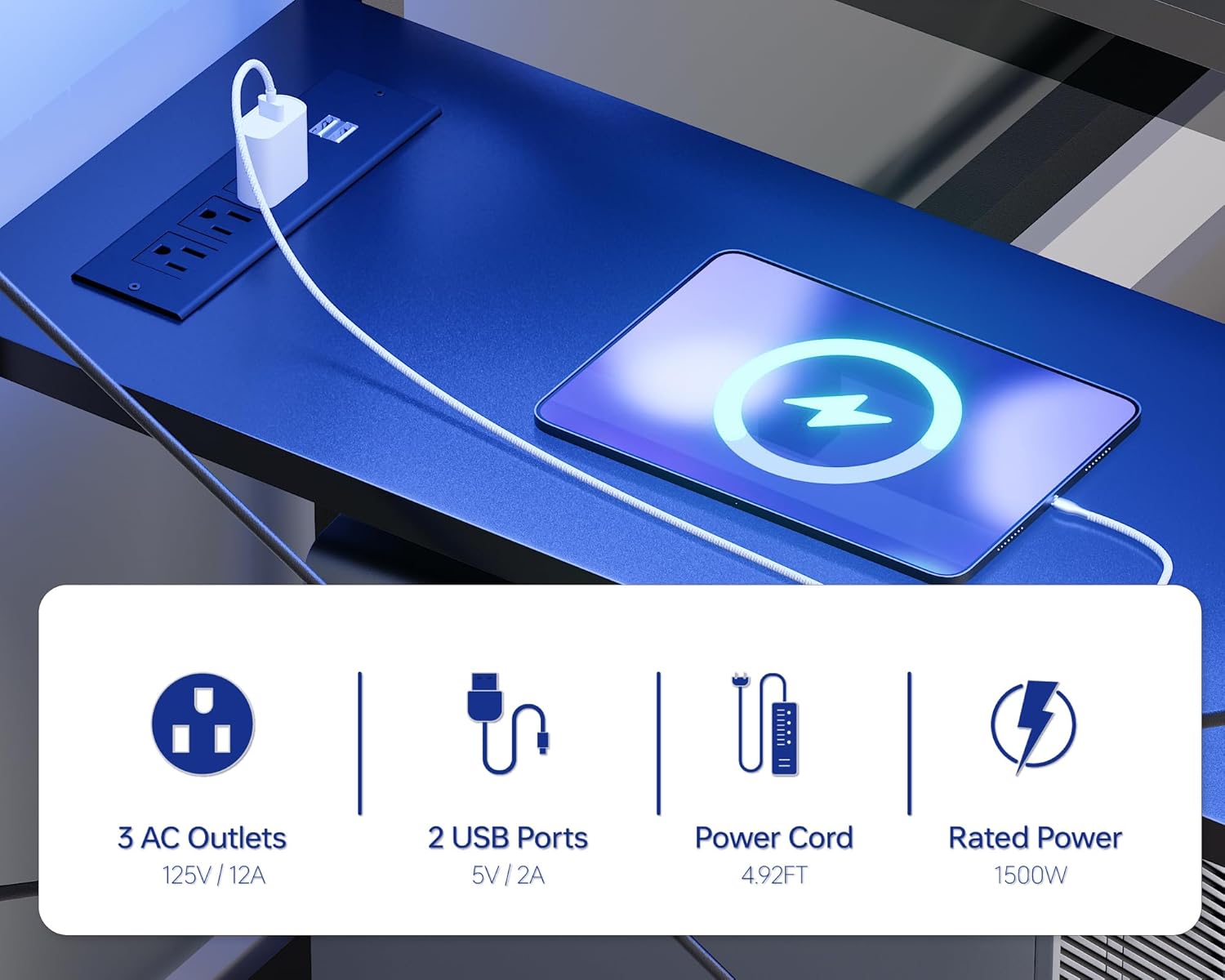
5.2. irudia: Xehetasun bat view of the integrated power outlet unit, showing the AC outlets and USB charging ports.
5.3. Storage and Monitor Stand
- Monitorearen euskarria: The sturdy U-shaped monitor stand can accommodate two monitors or laptops, elevating them to an ergonomic viewing height and freeing up desktop space.
- Tiraderak: Two non-woven fabric drawers provide concealed storage for office supplies, gaming accessories, or personal items.
- Apalategi irekiak: Two open side shelves offer additional storage and display space for books, decor, or a PC tower.

Image 5.3: The desk featuring its U-shaped monitor stand, designed to optimize screen height and desktop space.

Image 5.4: A close-up of one of the desk's non-woven fabric drawers, illustrating its capacity for storing various items.
6. Mantentzea
- Garbiketa: Garbitu mahaigaina leun batekin, damp oihal. Saihestu akabera kaltetu dezaketen produktu kimiko gogorrak edo garbitzaile urratzaileak.
- Isurketak: Immediately wipe up any spills to prevent water damage to the tabletop. The tabletop is designed to be water-resistant.
- Hardwarea: Aldian-aldian egiaztatu eta estutu torloju eta lotura guztiak egonkortasuna mantentzeko.
- LED argiak: Ensure the LED strip and controller are kept dry and free from dust.
- Korronte-hartuneak: Keep the power outlets clean and free from debris. Do not insert foreign objects into the outlets.
Image 6.1: Water droplets on the desk surface, illustrating its water-resistant properties.
7. Arazoak
- Mahaia ezegonkorra/dardaratsua da:
a. Ensure all assembly screws are fully tightened.
b. Adjust the leg pads on the bottom of the desk legs to level the desk on uneven floors. - LED argiak ez funtzionatzen:
a. Check if the power cord for the LED strip is securely plugged into a working outlet.
b. Ensure the LED controller is properly connected to the light strip.
c. Replace the remote control battery if applicable. - Entxufeak ez dute funtzionatzen:
a. Verify that the desk's main power cord is securely plugged into a working wall outlet.
b. Check if the power switch on the outlet unit (if present) is in the 'On' position.
c. Ensure the total power draw of connected devices does not exceed the 1500W rated power. - Tiraderak ez dira leunki irristatzen:
a. Ensure the drawer fabric is not caught or misaligned.
b. Check for any obstructions within the drawer slots.
7.1. irudia: Plano hurbila view of the adjustable leg pads, which help stabilize the desk on uneven surfaces.
8. Zehaztapenak
| Ezaugarri | Xehetasuna |
|---|---|
| Marka | Pamray |
| Modelo zenbakia | S15 |
| Produktuaren neurriak (L x W x H) | 18.9" x 58.27" x 36.38" (48 cm x 148 cm x 92.4 cm) |
| Kolorea | Beltza |
| Mahai gaineko materiala | FSC ziurtagiridun egurra |
| Oinarrizko materiala | Metala (hauts estaldura) |
| Mahai gaineko gehienezko pisu-ahalmena | 200 kilo |
| Drawer Weight Capacity (Each) | 10 kilo |
| Potentzia-saltokiak | 3 korronte alterno (125V/12A), 2 USB (5V/2A) |
| Elikatze-kablearen luzera | 4.92 oin |
| Potentzia nominala | 1500W |
| LED Argiak | RGB, 213 modes, 10,000+ colors, App/Remote Control, Music Sync |
| Ezaugarri bereziak | Monitor Stand, 2 Drawers, 2 Open Shelves, Reversible Shelves, Adjustable Leg Pads, 'X'-shaped Braces |
| Muntaia Beharrezkoa | Bai (Tresnak barne) |

Image 8.1: A diagram illustrating the detailed dimensions of the Pamray S15 Computer Desk.
9. Bermea eta Laguntza
For warranty information, product support, or to report missing/damaged parts, please refer to the contact information provided in your product packaging or visit the official Pamray webgunea. Gorde erosketa-agiria berme-erreklamazioetarako.


