1. Sarrera
This manual provides essential information for the installation, operation, and maintenance of your GIGABYTE GeForce RTX 5060 WINDFORCE MAX OC 8G Graphics Card. This high-performance graphics card is powered by the NVIDIA Blackwell architecture and DLSS 4, featuring 8GB of 128-bit GDDR7 memory and a PCIe 5.0 interface. It incorporates the WINDFORCE cooling system, a Hawk fan, server-grade thermal conductive gel, and a reinforced structure for optimal performance and durability. Please read this manual thoroughly before installation and use.
2. Segurtasun informazioa
- Deskonektatu beti ordenagailuko energia-iturria edozein hardware osagai instalatu edo kendu aurretik.
- Wear an anti-static wrist strap or frequently touch a grounded metal object to prevent electrostatic discharge (ESD) damage to the graphics card and other components.
- Txartel grafikoa ertzetik heldu osagai sentikorrak ez ukitzeko.
- Ziurtatu ordenagailuaren karkasa behar bezala aireztatuta dagoela gehiegi berotzea saihesteko.
- Do not attempt to repair the graphics card yourself. Refer to qualified service personnel for assistance.
3. Paketearen edukia
Egiaztatu elementu guztiak zure paketean daudela:
- GIGABYTE GeForce RTX 5060 WINDFORCE MAX OC 8G Graphics Card
- Argibide eskuliburua
Note: Additional accessories may vary by region or retailer.
4. Konfigurazioa (Instalazioa)
4.1 Hardwarearen instalazioa
Before proceeding, ensure your system meets the minimum requirements, including a 450W power supply and a compatible PCI Express graphics slot.
- Prestatu zure sistema: Turn off your computer and disconnect the power cable from the wall outlet. Open your computer case.
- Aurkitu PCI Express zirrikitua: Identifikatu zure plaka basean PCI Express 5.0 x8 zirrikitu libre bat.
- Kendu zirrikituen estalkiak: Remove the metal slot covers from the back of your computer case corresponding to the graphics card's size.
- Instalatu txartel grafikoa: Carefully align the graphics card with the PCI Express slot and press it firmly until it is securely seated. Ensure the retention clip on the motherboard clicks into place.
- Secure Graphics Card: Lotu txartel grafikoa ordenagailuaren kaxari torlojuekin.
- Konektatu energia: Connect the required 1x 8-pin PCIe power connector from your power supply to the graphics card.
- Itxi kasua: Itxi ordenagailuaren karkasa eta konektatu berriro elikatze-kablea.

1. irudia: Aurrealdea view of the GIGABYTE GeForce RTX 5060 WINDFORCE MAX OC 8G Graphics Card.

2. irudia: Aldea view of the GIGABYTE GeForce RTX 5060 WINDFORCE MAX OC 8G Graphics Card, showing the heatsink and power connector.
4.2 Gidariaren instalazioa
After hardware installation, you need to install the latest drivers for optimal performance.
- Piztu: Piztu ordenagailua.
- Deskargatu gidariak: Bisitatu GIGABYTE ofiziala webgunea (www.gigabyte.com) or NVIDIA webgunea (www.nvidia.com) zure GeForce RTX 5060 txartel grafikorako azken kontrolatzaileak deskargatzeko.
- Instalatu kontrolatzaileak: Jarraitu pantailan agertzen diren argibideei kontrolatzaileak instalatzeko. Berrabiarazi ordenagailua eskatzen bazaizu.
4.3 Ikusmen-gainjartzeaview eta Kutxatik ateratzea
Watch this official GIGABYTE video for a visual overview of the RTX 50 Series graphics cards and an unboxing experience.
Video 1: GIGABYTE GeForce RTX 50 Series - Official Trailer. This video provides a general overview of the RTX 50 series, highlighting key features and design elements.
Video 2: Gigabyte RTX 5060 8gb OC unboxing review by 'Remember This Tech'. This video demonstrates the unboxing process and initial impressions of the Gigabyte RTX 5060 graphics card, including its physical appearance and included accessories.
5. Funtzionamendua
5.1 Pantailak konektatzea
The GIGABYTE GeForce RTX 5060 graphics card supports multiple display outputs for a versatile setup.
- DisplayPort: Connect up to three DisplayPort 2.1 compatible monitors using DisplayPort cables.
- HDMI: Connect one HDMI 2.1 compatible monitor or TV using an HDMI cable.
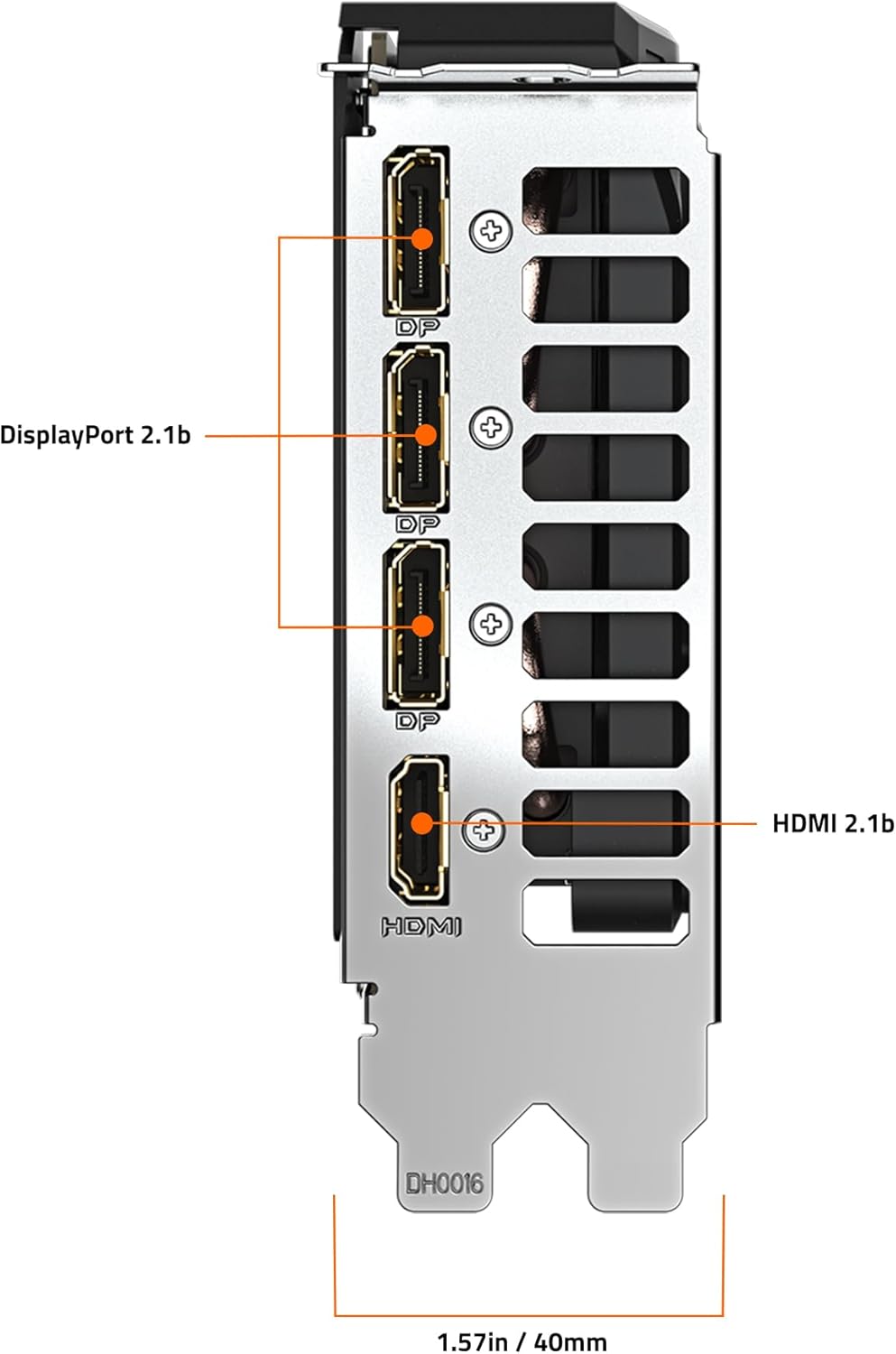
3. Irudia: Atzealdea view of the GIGABYTE GeForce RTX 5060 WINDFORCE MAX OC 8G Graphics Card, highlighting the DisplayPort and HDMI output connectors.
5.2 Software utilitateak
Utilize GIGABYTE and NVIDIA software for enhanced control and customization:
- GIGABYTE Kontrol Zentroa: Download from the GIGABYTE website to monitor GPU status, adjust fan speeds, and customize RGB lighting (if applicable).
- NVIDIA Kontrol Panela: Access advanced display settings, manage 3D settings, and configure features like DLSS and Ray Tracing.
6. Mantentzea
6.1 Garbiketa
Garbiketa erregularrak errendimendu optimoa mantentzen laguntzen du eta zure txartel grafikoaren bizitza luzatzen du.
- Itzali: Always power off your computer and disconnect it from the power source before cleaning.
- Hautsa kentzea: Use compressed air to gently blow dust from the fans, heatsink fins, and other components. Hold the fans in place to prevent over-spinning.
- Gainazalaren garbiketa: Erabili lipurrik gabeko zapi leun bat dampened with isopropyl alcohol to clean the exterior surfaces of the card. Avoid harsh chemicals.
6.2 Gidarien eguneraketak
Keep your graphics drivers updated to ensure compatibility with the latest games and applications, and to benefit from performance improvements and bug fixes.
- Periodically check the GIGABYTE or NVIDIA website for new driver releases.
- Follow the provided instructions for driver installation.
7. Arazoak
Zure txartel grafikoarekin arazoak badituzu, jo ezazu honako arazo eta irtenbide ohikoenei:
| Arazoa | Kausa posiblea | Irtenbidea |
|---|---|---|
| Ez dago pantailarik monitorean | Incorrect cable connection, loose card, power issue, driver problem. | Ensure display cables are securely connected. Re-seat the graphics card. Verify power connectors are attached. Reinstall or update drivers. |
| Low performance in games/applications | Outdated drivers, incorrect settings, insufficient power. | Update graphics drivers. Adjust in-game graphics settings. Ensure adequate power supply. Check for background applications consuming resources. |
| Overheating or loud fan noise | Dust accumulation, poor case airflow, high load. | Clean fans and heatsink. Improve case airflow. Monitor temperatures with GIGABYTE Control Center. Adjust fan curves if necessary. |
| System instability or crashes | Driver conflicts, overheating, faulty hardware. | Perform a clean driver installation. Monitor temperatures. Check other system components. |
8. Zehaztapenak
| Ezaugarri | Xehetasuna |
|---|---|
| Grafikoen Prozesatzeko Unitatea | NVIDIA GeForce RTX 5060 (Blackwell architecture) |
| Bideo Memoria | 8 GB GDDR7 |
| Memoria Interfazea | 128 bitekoa |
| Memoria Abiadura | 28000 MHz |
| GPU erlojuaren abiadura | 2512 MHz (Boost Clock) |
| PCI Express | PCIe 5.0 x8 |
| Hozte Sistema | WINDFORCE cooling system with Hawk fan |
| Bideo Irteerako Interfazea | 3x DisplayPort 2.1, 1x HDMI 2.1 |
| Gehienezko pantailaren bereizmena | 3840x2160 |
| Potentzia-konektorea | 1 x 8 pin |
| Gomendatutako PSU | 450W edo gehiago |
| Neurriak (LxWxH) | 7.83 x 4.57 x 1.57 hazbete (199 x 116 x 40 mm) |
| Elementuaren pisua | 1.1 kilo |
| Ezaugarri nagusiak | DLSS 4, AI Cores, 4th Gen Ray Tracing Cores, Reinforced structure, Server-grade Thermal conductive gel |
9. Bermea eta Laguntza
GIGABYTE products are covered by a limited warranty. For detailed warranty information, technical support, and service inquiries, please visit the official GIGABYTE support webgunea:
GIGABYTEren laguntza: https://www.gigabyte.com/Support
Mesedez, gorde zure erosketa-froga berme-erreklamazioetarako.


