1. Sarrera
This manual provides comprehensive instructions for the Nokia G310 5G TA-1573 smartphone. It covers essential information for setup, operation, maintenance, and troubleshooting to ensure optimal use of your device. The Nokia G310 5G TA-1573 features a 6.6-inch HD+ 90 Hz IPS LCD display, a Snapdragon 480+ octa-core processor, 4 GB of RAM, and 5G connectivity, running on Android 13.
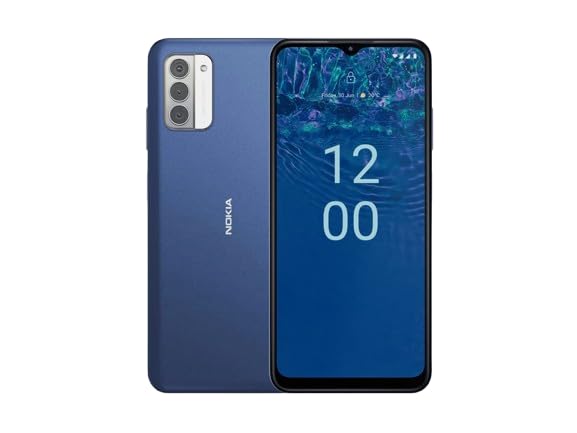
1.1. irudia: Nokia G310 5G TA-1573 Smartphone. This image displays the front view of the Nokia G310 5G smartphone, highlighting its display and general form factor.
2. Zer dago kutxan
Upon unboxing your Nokia G310 5G TA-1573, please verify that all the following items are included:
- Nokia G310 5G TA-1573 Smartphone
- USB-C kablea
- SIM kanporatzeko tresna
3. Konfigurazioa
3.1. Gailua kargatzea
Before initial use, fully charge your Nokia G310 5G. Connect the provided USB-C cable to the phone's USB-C port and the other end to a compatible power adapter (sold separately) or a computer's USB port. The battery indicator on the screen will show charging progress.
3.2. SIM txartela sartzea
- Bilatu SIM txartelaren erretilua telefonoaren alboan.
- Sartu SIM txartelaren kanporatzeko tresna erretiluko zulo txikian irekitzeko.
- Jarri Nano-SIM txartela erretiluan, urrezko kontaktuak behera begira dituela, ondo sartzen dela ziurtatuz.
- Kontu handiz sartu erretilua telefonoan berriro, bere lekuan klik egin arte.
3.3. Piztea eta hasierako konfigurazioa
- Press and hold the Power button (usually on the right side) until the Nokia logo appears.
- Jarraitu pantailan agertzen diren argibideei zure hizkuntza hautatzeko, Wi-Fi sare batera konektatzeko eta zure Google kontua konfiguratzeko.
- Osatu konfigurazio-morroia gailuaren ezarpenak pertsonalizatzeko.
4. Zure gailua funtzionatzea
4.1. Oinarrizko nabigazioa
- Ukipen-pantailaren keinuak: Sakatu hautatzeko, irristatu korritzeko, apurtu handitzeko.
- Hasierako pantaila: Sartu aplikazioetara, widgetetara eta jakinarazpenetara.
- Nabigazio-barra: Erabili pantailaren behealdean dauden Atzera, Hasiera eta Azken aplikazioak botoiak.
4.2. Deiak egitea eta mezuak bidaltzea
- Ireki Telefonoa aplikazioa zenbakiak markatzeko edo kontaktuak hautatzeko.
- Ireki Mezuak testu-mezuak idatzi eta bidaltzeko aplikazioa.
4.3. Sareetara konektatzea
- Wi-Fi: Joan zaitez Ezarpenak > Sarea eta Internet > Internet eskuragarri dauden Wi-Fi sareetara konektatzeko.
- Bluetootha: Joan zaitez Ezarpenak> Konektatutako gailuak> Konexio hobespenak> Bluetooth Bluetooth gailuekin parekatzeko.
- Datu mugikorrak: Ziurtatu datu mugikorrak gaituta daudela Ezarpenak > Sarea eta internet > SIM txartelak for internet access via your cellular network.
4.4. Kamera erabiliz
Ireki Kamera app to capture photos and videos. Tap the shutter button to take a picture or hold it to record a video. Explore different modes and settings within the app.
5. Mantentzea
5.1. Zure gailua garbitzea
Use a soft, lint-free cloth to clean the screen and body of your phone. Avoid using harsh chemicals or abrasive materials, which can damage the device's finish or screen coating.
5.2. Bateria zaintzea
- Saihestu telefonoa tenperatura altuetan jartzea.
- Ez utzi bateria guztiz agortzen aldizka.
- Erabili onartutako kargagailuak eta kableak soilik.
5.3. Software eguneraketak
Egiaztatu eta instalatu software eguneraketak aldizka, zure gailuak azken funtzioak, segurtasun adabakiak eta errendimendu hobekuntzak dituela ziurtatzeko. Joan honera Ezarpenak > Sistema > Sistemaren eguneraketa.
5.4. Biltegiratze kudeaketa
To optimize performance, regularly clear unnecessary filek, desinstalatu erabiltzen ez diren aplikazioak eta mugitu euskarri handiak files to cloud storage or an external device. Check storage usage in Ezarpenak > Biltegiratzea.
6. Arazoak
6.1. Gailua ez da pizten
Ensure the battery is charged. Connect the phone to a charger and wait a few minutes before attempting to power it on again. If it still doesn't turn on, try holding the Power button for 10-15 seconds.
6.2. Sarearen konexio arazoak
- Seinalerik ez: Check if your SIM card is properly inserted. Try restarting the phone.
- Wi-Fi ez da konektatzen: Ensure the Wi-Fi password is correct. Restart your router and phone.
- Bluetooth parekatzearen arazoak: Ziurtatu bi gailuak parekatze moduan daudela eta irismen-eremuan daudela.
6.3. Aplikazioak kraskatzen edo izozten dira
Try force-closing the app (Ezarpenak > Aplikazioak > Ikusi aplikazio guztiak > [Aplikazioaren izena] > Behartu gelditzea). Garbitu aplikazioaren cachea eta datuak (Ezarpenak > Aplikazioak > Ikusi aplikazio guztiak > [Aplikazioaren izena] > Biltegiratzea eta cachea > Garbitu cachea / Garbitu biltegiratzea). Arazoak jarraitzen badu, desinstalatu eta berriro instalatu aplikazioa.
6.4. Fabrika berrezarri
Azken aukera gisa, software arazoak jarraitzen badute, fabrika berrezarpena egin dezakezu. Abisua: Honek zure telefonoko datu guztiak ezabatuko ditu. Jarraitu aurretik, egin datu garrantzitsuen babeskopia. Joan honera Ezarpenak > Sistema > Berrezarri aukerak > Ezabatu datu guztiak (fabrika berrezarri).
7. Zehaztapenak
| Ezaugarri | Xehetasuna |
|---|---|
| Ereduaren izena | Nokia G310 5G TA-1573 |
| Sistema eragilea | Android 13.0 |
| Bistaratzeko tamaina | 6.6 hazbete |
| Ebazpena | 720 x 1560 pixel |
| Freskatze tasa | 90 Hz |
| CPU eredua | Qualcomm Snapdragon MSM8260A (Snapdragon 480+ equivalent) |
| CPU Abiadura | 2 GHz |
| RAM memoria instalatuaren tamaina | 4 GB |
| Memoria Biltegiratzeko Ahalmena | 128 GB (Barne) |
| Konektibitate Teknologiak | 5G |
| Bateriaren Potentzia Balorazioa | 3600 milioiamp Orduak (Litio Ioia) |
| Audio Jack | USB-C |
| Elementuaren pisua | 6.9 ontza |
| Kolorea | Urdina |
8. Bermea eta Laguntza
8.1. Bermearen informazioa
For specific warranty details regarding your Nokia G310 5G TA-1573, please refer to the documentation provided by the seller at the time of purchase. As this is a renewed product, warranty terms may differ from new devices. It is recommended to contact the seller directly for precise warranty coverage and duration.
8.2. Laguntza Teknikoa
If you encounter issues that cannot be resolved using the troubleshooting steps in this manual, please contact:
- The seller from whom you purchased the device.
- Nokia's official support channels for general product inquiries.
Please have your device model number (TA-1573) and proof of purchase ready when contacting support.


