Sarrera
This manual provides detailed instructions for the setup, operation, and maintenance of your HTC N15 Wireless Clip On Earbuds. Please read this manual thoroughly before using the product to ensure proper function and longevity.
Paketearen edukia
Egiaztatu elementu guztiak zure produktuaren paketean daudela:
- 1 Pair HTC N15 Clip On Earbuds
- 1 Kargatzeko maleta
- 1 USB-C kargatzeko kablea
- 1 Quick Start Guide (Basic Operations)
Produktua amaituview
The HTC N15 Wireless Clip On Earbuds feature an open-ear design for situational awareness and a lightweight, secure fit. They come with a compact charging case for extended use.
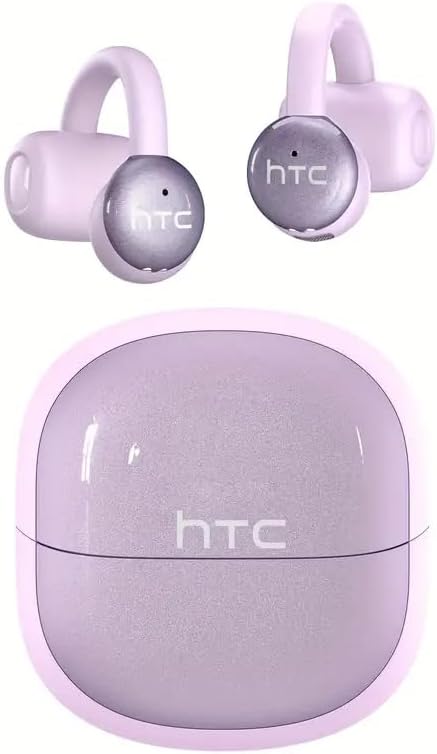
Image: HTC N15 Wireless Clip On Earbuds and Charging Case.

Image: The HTC N15 earbuds and charging case, highlighting battery life features such as 1.5 hours fast charging, 24 hours with the charge case, 8 hours on a single charge, and a Type-C charge port.
Entzungailuak eta kasua kargatzen
Before first use, fully charge the earbuds and charging case. The charging case provides additional power for on-the-go charging.
- Kasua kargatzea: Connect the provided USB-C cable to the charging port on the case and a power source. The indicator lights on the case will show the charging status.
- Entzungailuak kargatzea: Place the earbuds into the charging case. Ensure they are correctly seated. The earbuds will begin charging automatically.
A single charge provides approximately 8 hours of playback. The charging case extends total playtime to about 22 hours. Fast charging allows for quick power replenishment.

Image: Visual representation of the HTC N15 earbuds' battery life: 8 hours on a single charge, 24 hours with the charging case, and 1.5 hours for fast charging.
Konfigurazioa eta parekatzea
The HTC N15 earbuds utilize Bluetooth 6.0 technology for a stable and low-latency connection. They are compatible with iOS and Android devices.
- Piztu: Ireki kargatzeko zorroa. Aurikularrak automatikoki piztuko dira eta parekatze moduan sartuko dira.
- Aktibatu Bluetootha: Zure gailuan (telefono adimenduna, tableta, ordenagailu eramangarria), gaitu Bluetooth-a.
- Hautatu gailua: In your device's Bluetooth settings, search for 'HTC NE15' and select it to pair.
- Berrespena: Once paired, a voice prompt will confirm the connection.

Image: A diagram illustrating the 'Upgraded Bluetooth 6.0 Technology' with a comparison to Bluetooth 5.3 and 5.4, emphasizing low latency and fast connection.

Image: The HTC N15 earbuds and charging case shown with various compatible devices including notebooks, TVs, desktops, watches, phones, and iPads, demonstrating flexible connectivity. A phone screen displays 'HTC NE15 Connected'.
Operating Instructions (Touch Control)
The HTC N15 earbuds feature smart touch controls on both earbuds for easy management of calls and music playback.
- Deia erantzun/amaitu: Egin klik behin entzungailuetako edozeinetan.
- Deia baztertu: Eduki sakatuta aurikularretako bat 2 segundoz.
- Erreproduzitu/Pausatu musika: Egin klik bikoitza entzungailuetako edozeinetan.
- Aurreko abestia: Egin klik hirukoitz ezkerreko entzungailuan.
- Hurrengo abestia: Egin klik hirukoitz eskuineko entzungailuan.
- Bolumena igo: Click the right earbud once.
- Bolumena jaitsi: Click the left earbud once.
- Ahots laguntzailea: Eutsi ezkerreko aurikularra 2 segundoz.
- Joko modua: Eutsi eskuineko aurikularra 2 segundoz.

Image: A diagram illustrating the touch control functions for the HTC N15 earbuds, showing actions for answering/ending calls, rejecting calls, playing/pausing music, skipping tracks, adjusting volume, activating voice assistant, and enabling game mode.
Janzteko jarraibideak
The HTC N15 earbuds feature an ergonomic open-ear clip design for a secure and comfortable fit, allowing you to remain aware of your surroundings.
- Identify L/R: Confirm the left (L) and right (R) earbuds.
- Kokalekua: Confirm the direction of the earbud.
- Klipa jarri: Gently clip the earbud onto the thinnest part of your ear by sliding it down.
- Egokitu: Adjust the earbud tip to align with your ear canal for optimal sound and comfort.
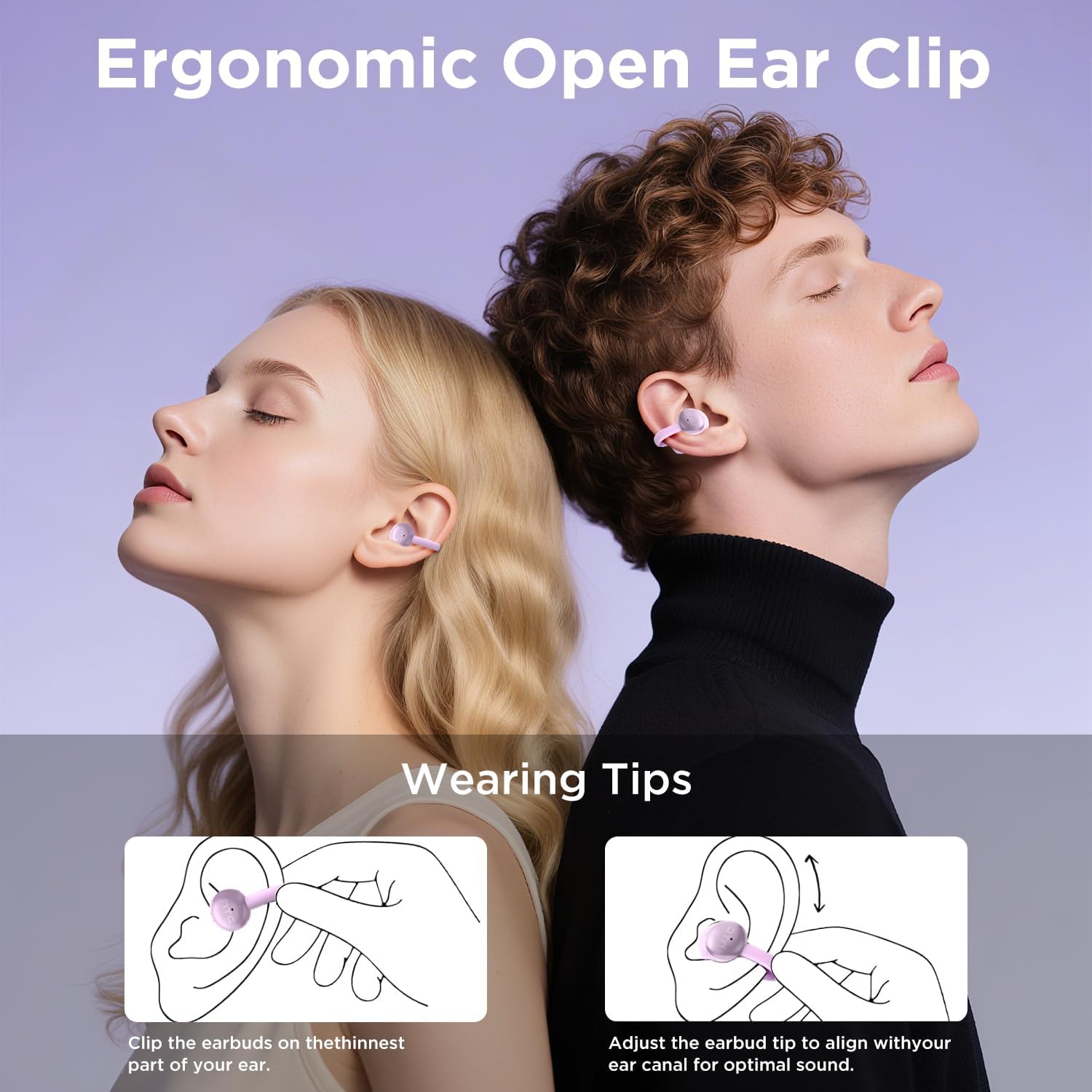
Image: A visual guide demonstrating the ergonomic open-ear clip design and wearing tips for the HTC N15 earbuds, showing how to clip them onto the ear and adjust for optimal sound.

Image: The HTC N15 earbuds emphasizing 'All-Day Comfort' with features like '4.7g Super Light' and a 'Flexible C-Bridge Design' for a secure fit.

Image: A four-step visual guide titled 'HOW TO WEAR?' showing how to correctly position and adjust the HTC N15 earbuds on the ear.
Mantentzea
To ensure the longevity and optimal performance of your HTC N15 earbuds, follow these maintenance guidelines:
- Garbiketa: Garbitu entzungailuak eta kargatzeko zorroa oihal leun eta lehor batekin aldizka. Saihestu produktu kimiko gogorrak edo material urratzaileak erabiltzea.
- Uraren erresistentzia: The earbuds are IPX4 sweatproof, meaning they are resistant to splashes and sweat. Do not submerge them in water or expose them to heavy rain.
- Biltegiratzea: Erabiltzen ez dituzunean, gorde entzungailuak kargatzeko zorroan hautsetik eta kalteetatik babesteko.
- Tenperatura: Saihestu entzungailuak denbora luzez tenperatura altuetan (beroan edo hotzean) edo eguzki-argitan zuzenean jartzea.
Arazoak konpontzea
If you encounter issues with your HTC N15 earbuds, refer to the following common solutions:
- Entzungailuak ez dira parekatzen: Ensure both earbuds are charged and in pairing mode. Turn off and on your device's Bluetooth, then try pairing again.
- Soinurik ez edo bolumen baxua: Check the volume levels on both your device and the earbuds. Ensure the earbuds are correctly positioned in your ears. Due to the open-ear design, you may need to increase the volume slightly in noisy environments.
- Entzungailuak erortzen: Ensure you are wearing the earbuds correctly as per the wearing instructions. Adjust the clip and earbud tip for a snug fit.
- Ukipen-kontrolak ez dute erantzuten: Ensure your fingers are clean and dry. Try restarting the earbuds by placing them back in the case and taking them out again.
- Kargatzeko arazoak: Verify the USB-C cable and power source are working. Ensure the earbuds are properly seated in the charging case.
Zehaztapenak
| Ezaugarri | Xehetasuna |
|---|---|
| Ereduaren izena | HTC NE15 |
| Konektibitate Teknologia | Haririk gabekoa (Bluetooth 6.0) |
| Entzungailuaren forma | Belarri irekia |
| Kontrol-metodoa | Ukitu |
| Bateriaren iraupena (entzungailuak) | 8 ordu (karga bakarra) |
| Jolas-denbora osoa (zorroarekin) | 22 ordu |
| Uraren Erresistentzia Maila | IPX4 (Izerdiarekiko erresistentea) |
| Materiala | Plastikoa, Silikona |
| Elementuaren pisua | 4.6 ontza |
| Gailu bateragarriak | Telefono mugikorrak, tabletak |
| UPC | 768649989703 |
Produktuen Bideoa
Bideoa: Kutxa ireki eta gehiagoview of the HTC Wireless Clip On Earbuds N15 Bluetooth 6.0. This video demonstrates the product packaging, contents, and the physical appearance of the earbuds and charging case.
Bermea eta Laguntza
HTC provides customer support for its products. For any questions or assistance, please refer to the contact information provided with your purchase or visit the official HTC support webgunea.
Bezeroarentzako laguntza: 7*24 Live Chat Support is available for assistance with your HTC N15 earbuds.
Mesedez, gorde zure erosketa-froga berme-erreklamazioetarako.


