Sarrera
This manual provides comprehensive instructions for the assembly, operation, and maintenance of your Jocoevol Farmhouse 57" Executive Desk. Please read this manual thoroughly before use to ensure safe and efficient operation. Keep this manual for future reference.
Segurtasun Informazioa
Always follow basic safety precautions when using this product to reduce the risk of injury or damage. Ensure all components are securely fastened before use. Do not overload the desk. Keep liquids away from the charging station and electrical outlets. Do not attempt to modify the desk or its electrical components.
Paketearen edukia eta osagaiak
Muntaketa hasi aurretik, egiaztatu behean zerrendatutako pieza guztiak daudela eta kalterik gabe daudela. Piezarik falta edo kaltetuta badago, jarri harremanetan bezeroarentzako arreta-zerbitzuarekin berehala.

1. Irudia: Lehertuta View and Key Components. This diagram illustrates the main components of the executive desk, including the large-capacity desktop, five spacious drawers, a central storage drawer, a file storage cabinet, a headphone hook, a charging station, and a charging cable organizer. Each part is clearly labeled to assist with identification during assembly and use.
Osagaien zerrenda:
- Desktop with integrated charging station (USB ports, Type-C port, AC outlets)
- Desk base panels (left, right, and center supports)
- 5 small drawers
- 1 large spacious center drawer
- 1 dedicated bottom file armairuko atea
- 1 file storage drawer (for letter/legal documents)
- Entzungailuen kakoa
- Muntatzeko beharrezko hardware guztia (torlojuak, takoak, kam blokeoak, etab.)
Konfigurazioa eta Muntaketa
Assembly is required for this executive desk. Follow the instructions carefully. It is recommended to have two people for assembly due to the size and weight of the components.
Muntatzeko urratsak:
- Deskonprimitu osagaiak: Kontu handiz atera pieza guztiak paketetik. Jarri gainazal garbi eta leun batean marradurak saihesteko.
- Hardwarea identifikatzea: Sort and identify all screws, dowels, and other hardware using the provided hardware list.
- Oinarrizko egitura muntatu: Follow the diagram to connect the main base panels. Ensure all connections are secure and aligned.
- Tiraderak instalatu: Assemble each drawer according to the instructions. Install drawer slides onto the desk frame and then insert the assembled drawers. Note: Some users have reported that drawer instructions may be inaccurate; if issues arise, try reversing the indicated direction for drawer installation or consulting the manufacturer's online resources.
- Erantsi mahaigaina: Carefully place the desktop onto the assembled base. Secure it using the provided fasteners, ensuring the charging station is positioned correctly.
- Konektatu kargatzeko estazioa: Ensure the charging station is properly seated and its power cord is accessible for connection to a wall outlet.
- Entzungailuen kakoa lotu: Secure the headphone hook to the designated location on the side of the desk using the provided screws.
- Azken egiaztapena: Verify that all screws are tightened and the desk is stable before placing items on it.
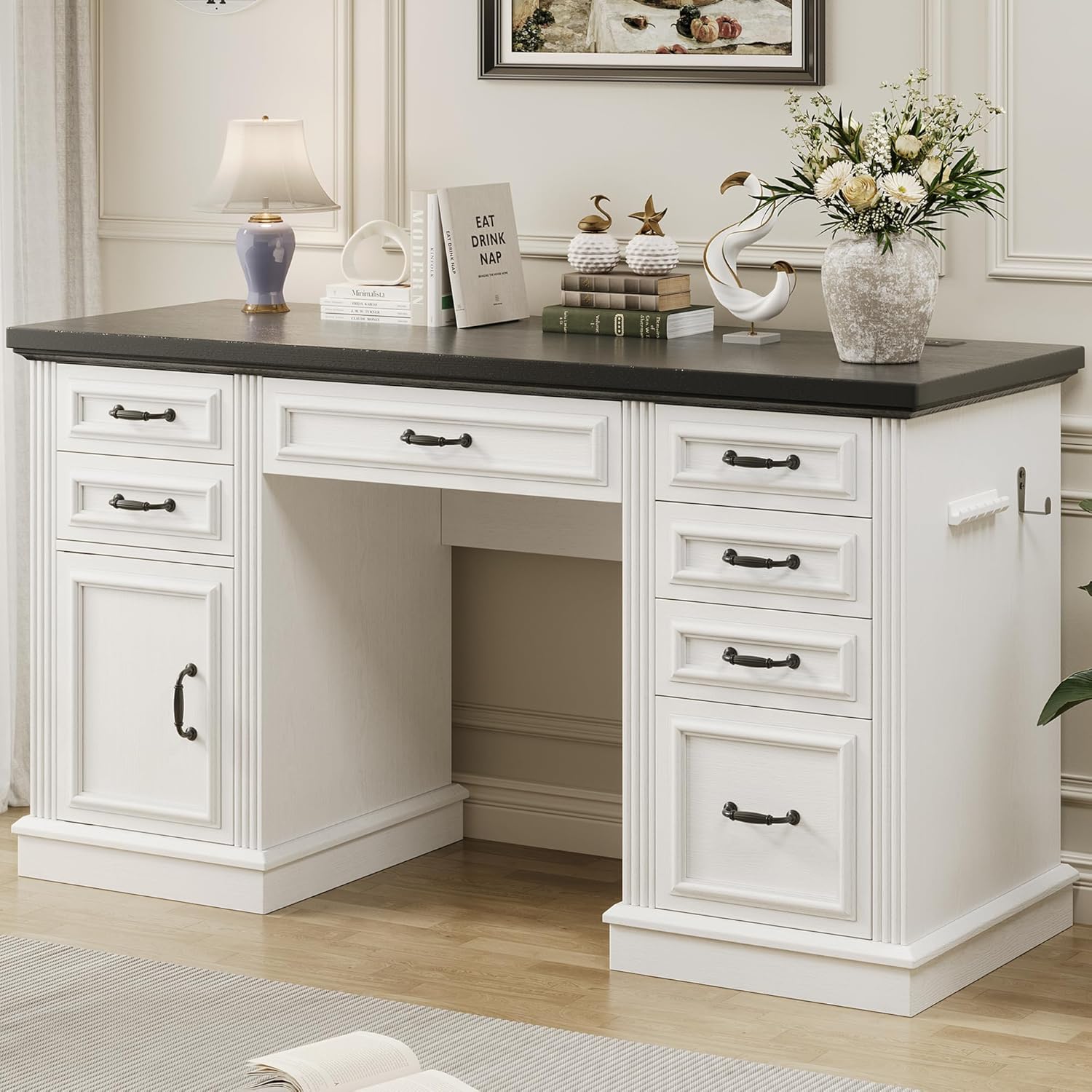
Figure 2: Fully Assembled Executive Desk. This image shows the complete desk with its antique white finish, black hardware, and dark top, ready for use in a home office setting. Note the integrated charging station and headphone hook on the right side.

3 irudia: Produktuaren neurriak. This diagram provides detailed measurements of the desk, including its overall length (56.7 inches), width (20.9 inches), and height (30.3 inches). Individual drawer dimensions are also shown, indicating their depth, width, and height for various storage needs.
Funtzionamendu-argibideak
Kargatzeko geltokia erabiltzea:
The desk features a built-in charging station for convenience. To use it:
- Plug the desk's power cord into a standard wall outlet.
- Connect your devices to the available USB ports, Type-C port, or AC outlets.
- The charging station is designed to power up to 4 devices simultaneously.

4. irudia: Kargatzeko estazio erosoa. This image highlights the integrated charging station on the desktop, featuring two standard AC outlets, USB ports, and a Type-C port. It allows for simultaneous charging of multiple electronic devices, reducing cable clutter on your workspace.
Biltegiratze Ezaugarriak Erabiltzea:
The desk offers extensive storage options to help keep your workspace organized:
- Small Drawers: Use the 5 small drawers for quick access to office supplies like pens, calculators, and notebooks.
- Center Drawer: The large center drawer is suitable for bulkier items, a keyboard, or a mouse.
- File Kabinete: The dedicated bottom file cabinet and file storage drawer are designed to accommodate letter and legal-sized documents, keeping your paperwork organized and secure.
- Aurikularren kakoa: Utilize the side hook to conveniently store headphones or other small accessories, keeping them within reach and off the desktop.

Figure 5: Comprehensive Storage Solutions. This composite image showcases the desk's diverse storage capabilities, including the quick-access desk dresser for small items, a large central drawer for bulkier office essentials, and a spacious file drawer designed for letter and legal documents. The cabinet provides additional hidden storage for items rarely used.
Mantentzea eta zaintzea
Zaintza egokiak zure mahaiaren bizitza eta itxura luzatuko ditu.
- Garbiketa: Garbitu mahaiaren gainazalak iragarkiekinamp oihal. Saihestu produktu kimiko gogorrak edo garbitzaile urratzaileak, akabera kaltetu baitezakete.
- Isurketak: Egurra zikindu edo kaltetu ez dadin, berehala garbitu isuritako edozein likido.
- Eguzkiaren argia: Saihestu eguzki-argiaren eraginpean denbora luzez egotea, akaberaren kolorea galtzea edo deskoloratzea eragin baitezake.
- Pisu-gaitasuna: Do not exceed the recommended weight capacity for the desktop or drawers to prevent structural damage.
- Tiradera diapositibak: Periodically check drawer slides for smooth operation. If they become stiff, a small amount of silicone lubricant can be applied to the tracks.
- Loturak: Periodically check and tighten all assembly fasteners to ensure the desk remains stable.
Arazoak konpontzea
| Arazoa | Kausa posiblea | Irtenbidea |
|---|---|---|
| Mahaia dardarka dago. | Lotura-elementu solteak; zorua irregularra. | Check and tighten all assembly screws. Use furniture levelers or shims if the floor is uneven. |
| Tiraderak ez dira leunki irristatzen. | Irristailuak gaizki lerrokatuta; hondakinak errailetan; torloju gehiegi estutu dira. | Ensure drawer slides are correctly aligned and free of obstructions. Loosen screws slightly if overtightened. Apply silicone lubricant to tracks if needed. |
| Kargatzeko estazioak ez du funtzionatzen. | Ez dago konektatuta; itzalita dagotage; gailu akastuna. | Verify the desk's power cord is securely plugged into a live wall outlet. Check household circuit breaker. Test with a different device to rule out device issue. |
| Muntaketa prozesuan falta diren edo kaltetutako piezak. | Ontziratze-errorea; bidalketa-kalteak. | Do not proceed with assembly. Contact Jocoevol customer support immediately with your purchase details and a list of affected parts. |
Zehaztapenak
- Marka: Jokoebol
- Modelo zenbakia: B11859
- Produktuaren neurriak (S x Z x A): 21" L x 57" W x 30.5" H
- Kolorea: Antzinako Zuria
- Estiloa: Baserria
- Oinarrizko materiala: Ingeniaritza Egurra
- Goiko material mota: Ingeniaritza Egurra
- Akabera mota: Amaitu gabe
- Ezaugarri bereziak: 6 drawers, Built-In USB Outlet, File Storage Drawer, Large Capacity Storage Cabinet, Large Desktop, Headphone Hook
- Elementuaren pisua: 55.4 kilo
- Beharrezkoa den muntaia: Bai
- Zaintzeko jarraibideak: Garbitu D-rekinamp Oihal
Bermea eta Laguntza
For warranty information, product support, or to order replacement parts, please contact Jocoevol customer service. Refer to your purchase receipt for specific warranty terms and conditions.
Bezeroarentzako laguntza: Laguntza behar baduzu, bisitatu Jocoevol Store on Amazon edo kontsultatu zure produktuaren ontzian emandako harremanetarako informazioa.


