1. Sarrera
This manual provides detailed instructions for the installation, operation, maintenance, and troubleshooting of your NKPU 56 Inch Ceiling Fan with Light, Model SY11. Please read this manual thoroughly before installation and use to ensure safe and efficient operation.
The NKPU 56 Inch Ceiling Fan is designed for both indoor and outdoor (covered patio) use, featuring a quiet reversible DC motor, dimmable LED light, and control via remote or mobile application.
2. Segurtasun informazioa
OHARRA: Sute, deskarga elektriko edo lesio pertsonalen arriskua murrizteko, jarraitu beti oinarrizko neurri hauek:
- Irakurri arretaz argibide guztiak instalatzen hasi aurretik.
- Ziurtatu zirkuitu-etengailuan korrontea itzalita dagoela instalazioa edo mantentze-lanak egin aurretik.
- Kableatu guztiak estatuko eta tokiko araudi elektrikoen arabera egin behar dira. Kableatuarekin ohituta ez bazaude, kontsultatu elektrizista kualifikatu bati.
- Haizagailua gutxienez 35 lb (15.9 kg) eusteko gai den sabaiko habe edo euskarri-egitura batean muntatu behar da.
- Ez erabili haizagailua palak edo karkasa hondatuta baditu.
- Saihestu objektuak haizagailuen pasatzen bidean jartzea.
- Haizagailu hau egokia da damp locations but should not be directly exposed to rain.
3. Paketearen edukia
Instalazioa hasi aurretik, egiaztatu osagai guztiak daudela.
- Sabaiko haizagailuaren motorren muntaia
- Fan Blades (6 double-sided: white/wood grain)
- LED Argiaren Kit
- Urruneko Kontrola
- Beheko hagak (6 hazbetekoak eta 10 hazbetekoak)
- Euskarria muntatzea
- Hardware paketea
- Erabiltzailearen eskuliburua (dokumentu hau)
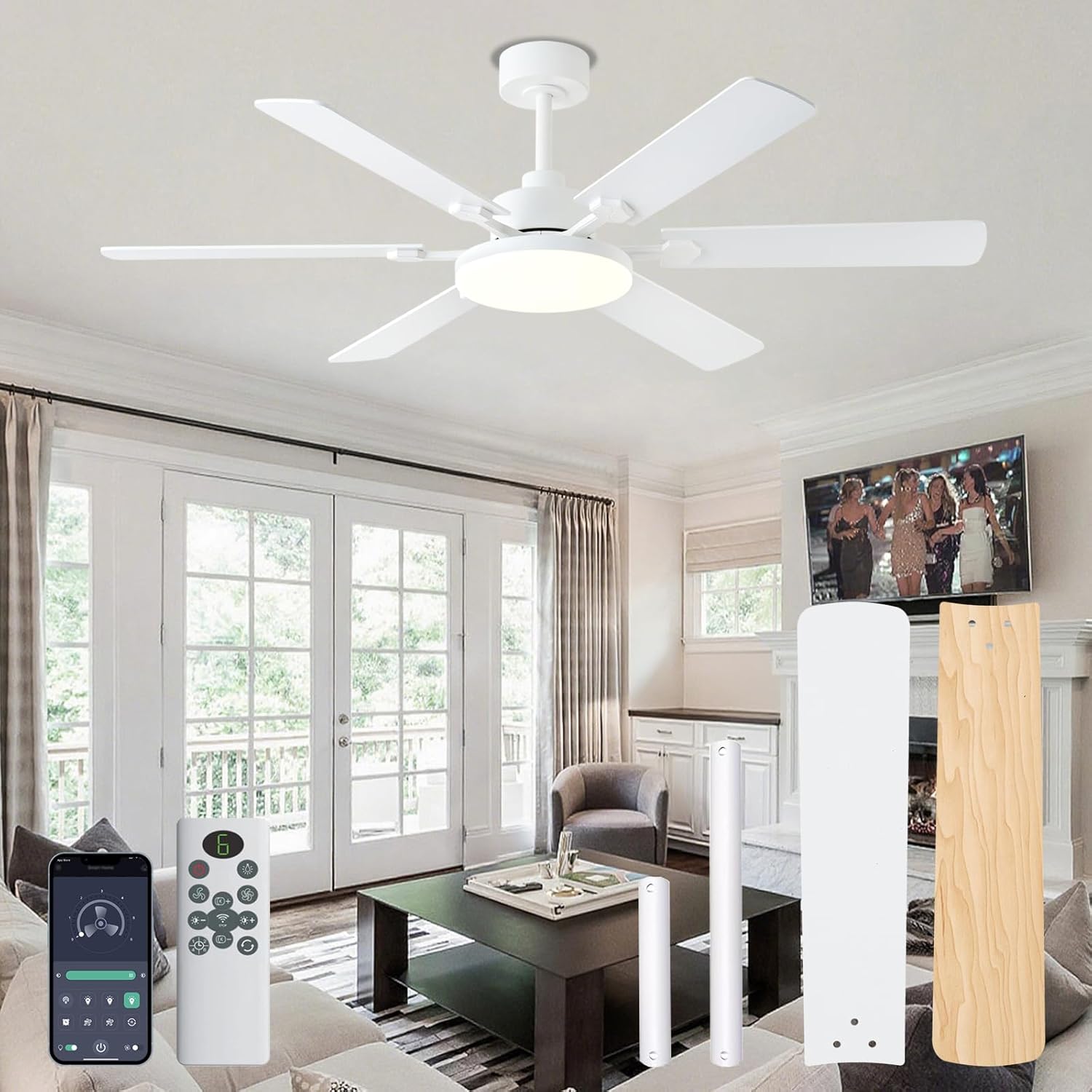
Irudia: Gainetikview of the NKPU 56 Inch Ceiling Fan, including the motor, blades, remote control, and mobile app interface.
4. Konfigurazioa eta instalazioa
Jarraitu urrats hauek zure sabaiko haizagailua behar bezala instalatzeko. Gomendagarria da bi pertsona egotea instalaziorako.
4.1 Muntatzeko aukerak
The fan includes 6-inch and 10-inch downrods to accommodate different ceiling heights. Choose the appropriate downrod for your room size and ceiling height. This fan is suitable for low and high ceilings but not for angled mounts.

Image: Diagram showing fan dimensions (56-inch diameter, 11.4-inch light panel, 13.8-inch/14.1-inch height with different downrods) and suitable mounting options (low ceiling, high ceiling, no angle mount).

Image: Illustration of the two included downrod sizes (6-inch and 10-inch) for varied installation scenarios.
4.2 Instalazio-urratsak
- Itzali energia: Before starting, ensure the power supply to the fan location is disconnected at the circuit breaker.
- Muntatzeko euskarriaren instalazioa: Secure the mounting bracket to the ceiling joist or a suitable support structure.
- Muntatu barra eta motorra: Attach the chosen downrod to the fan motor assembly. Route the electrical wires through the downrod.
- Zintzilikatzeko haizagailua: Kontu handiz altxatu haizagailuaren multzoa eta zintzilikatu muntaketa-euskarrian.
- Konexio elektrikoak: Connect the electrical wires according to the wiring diagram provided in the full manual (refer to included User Manual for detailed wiring instructions).
- Lotu palak: Securely attach the six double-sided blades to the motor housing. You can choose between the white or wood grain side facing down.
- Instalatu argi-kit: Connect and install the LED light kit to the bottom of the fan motor assembly.
- Azken egiaztapenak: Ensure all connections are secure and all screws are tightened.

Image: A person installing the fan blades, demonstrating the ease of installation.
For a visual guide, refer to the installation videos available on the product page or contact customer support.
5. Funtzionamendu-argibideak
Your NKPU ceiling fan can be controlled using the included remote control or the "Fan Lamp Pro" mobile application.
5.1 Urruneko kontrolaren funtzioak

Image: Detailed diagram of the remote control, indicating functions for each button such as fan on/off, speed adjustment, light color temperature, brightness, timer, and steering control.
- Haizagailua aktibatuta / desaktibatuta: Sakatu haizagailuaren botoia haizagailua piztu edo itzaltzeko.
- Fan abiaduraren doikuntza: Use the '+' and '-' buttons to increase or decrease fan speed (6 speeds available).
- Argia piztu/itzali: Sakatu argiaren botoia argia pizteko edo itzaltzeko.
- Kolore-tenperaturaren doikuntza: Adjust the light color temperature (3000K Warm, 4500K Natural, 6000K Cool White).
- Distira doitzea: Use the brightness '+' and '-' buttons to adjust light intensity (10%-100% dimmable).
- Tenporizadorearen ezarpenak: Konfiguratu haizagailua automatikoki itzaltzeko 1, 2, 4 edo 8 ordu igaro ondoren.
- Reversible Motor (Steering Control): Change the fan's rotation direction for summer (downward airflow) or winter (upward airflow for air circulation).
- Garbitu kodea: Short press the switch light button, then long press to clear the code for remote pairing.
Oharra: One remote control can simultaneously control multiple NKPU ceiling fans with lights if they are paired correctly.

Image: A remote control being used to operate two ceiling fans in a modern living space.
5.2 Mobile Application Control ("Fan Lamp Pro")
- Deskargatu aplikazioa: Scan the QR code provided in the manual or on the product page, or visit jasonghost.com/fanlamppro/ to download the "Fan Lamp "Pro" aplikazioa.
- Gehitu gailua: Open the app, click the "+" button to add a new device.
- Parekatzea: After the device is powered on, if the device flashes or beeps, it means the phone has successfully paired with the device.
- Kontrola: Use the app interface to adjust light brightness, color temperature, fan speed, set timers, and control the fan and light separately.

Image: Screenshots of the "Fan Lamp Pro" mobile application interface, showing the QR code for download, device pairing steps, and control options for the fan and light.

Image: Step-by-step guide for downloading and pairing the "Fan Lamp Pro" mobile application with the ceiling fan.
5.3 Fan Modes and Settings
- Motor itzulgarria: The DC motor allows for reversible airflow.
- Udako modua (beheranzko aire-fluxua): Creates a cooling effect.
- Neguko Modua (Gorantz doan Aire-fluxua): Sabaiaren ondoan harrapatuta dagoen aire beroa zirkulatzen du.
- 6 Abiadura ezarpenak: Adjust airflow from soft breeze to strong wind.
- 1-2 Speeds: Soft wind for comfortable sleep (8H timer).
- 3-4 Speeds: Natural wind for reading/work (2H/4H timer).
- 5-6 Speeds: Cool wind for exercise (1H timer).
- Dimmable LED argia: The 11.4-inch LED light offers 10%-100% brightness adjustment.
- 3 Kolore Tenperatura: Choose between 3000K (warm), 4500K (natural), and 6000K (cool white) to suit your preference.
- Denbora-funtzioa: Set the fan to turn off after 1, 2, 4, or 8 hours.

Image: Diagram illustrating the reversible motor function, showing downward airflow for cooling in summer and upward airflow for circulating warm air in winter.

Image: Visual representation of the dimmable LED light feature, showing 3 color temperatures (3000K, 4500K, 6000K) and brightness adjustment from 10% to 100%.

Image: Chart showing recommended fan speeds and timer settings for various activities like sleeping, reading/working, and exercising.
6. Mantentzea
Mantentze-lan erregularrak zure sabaiko haizagailuaren errendimendu optimoa eta iraupen luzea bermatzen ditu.
- Garbiketa: Aldian-aldian garbitu haizagailuaren palak eta motorraren karkasa oihal leun eta lehor batekinamp oihal. Ez erabili garbitzaile edo disolbatzaile urratzailerik.
- Palan ikuskatzea: Egiaztatu haizagailuaren palak pitzadurarik edo kalterik dagoen. Ordeztu kaltetutako palak berehala.
- estutu torlojuak: Over time, screws may loosen. Periodically check and tighten all screws on the fan assembly and mounting bracket.
- Ez da lubrifikaziorik behar: Korronte zuzeneko motorra betirako lubrifikatuta dago eta ez du olioztatze gehigarririk behar.
- LED argia: The LED light source is integrated and designed for long life. If the light fails, contact customer support for assistance.
KONTUZ: Itzali beti korrontea etengailu elektrikoan garbiketa edo mantentze-lanak egin aurretik.
7. Arazoak
Before contacting customer support, refer to the following common issues and solutions:
| Arazoa | Kausa posiblea | Irtenbidea |
|---|---|---|
| Fan ez da martxan jartzen | Ez dago haizagailurik; Kableen konexio solteak; Urrutiko agintearen bateria baxua edo parekatu gabea. | Check circuit breaker and wall switch; Verify all wire connections are secure; Replace remote battery or re-pair remote. |
| Argiak ez du funtzionatzen | Loose wire connection to light kit; LED driver issue; Light not turned on via remote/app. | Check light kit wiring; Ensure light is activated; Contact customer support if LED is faulty. |
| Fan dabil | Palak edo muntatzeko piezak solteak; Palak desorekatuak. | Ensure all blade screws and mounting screws are tight; Use a balancing kit (not included) if necessary. |
| Urruneko kontrola ez dabil | Bateria baxua; Haizagailuarekin parekatuta ez; Urrutiko agintearen eta hargailuaren arteko oztopoa. | Replace battery; Re-pair remote control (refer to section 5.1); Ensure clear line of sight. |
| Aplikazioen kontrola ez dabil | App not paired; Wi-Fi connectivity issues; Incorrect app settings. | Re-pair the app with the fan (refer to section 5.2); Check Wi-Fi connection; Ensure app permissions are granted. |
8. Zehaztapenak
| Ezaugarri | Xehetasuna |
|---|---|
| Eredua | SY11 |
| Marka | NKPU |
| Tamaina | 56 hazbeteko |
| Kolorea | White (Blades are double-sided: White / Wood Grain) |
| Motor Mota | DC Reversible Motor |
| Pala kopurua | 6 |
| Aire Fluxuaren Ahalmena | 8577 CFM |
| Zarata Maila | ≤35 dB |
| Argi Mota | Integrated Dimmable LED (11.4-inch, max 3800 lumens) |
| Kolore Tenperaturak | 3000K (Warm), 4500K (Natural), 6000K (Cool White) |
| Kontrol-metodoak | Remote Control, "Fan Lamp Pro" Mobile App |
| Tenporizadorearen ezarpenak | 1H, 2H, 4H, 8H |
| Beheko hagaxkaren luzerak | 6 hazbete, 10 hazbete |
| liburukiatage | 110 Volt |
| Wattage | 60 watt |
| Gomendatutako Gelaren Tamaina | 180-240 sq ft (e.g., 12x12 ft to 18x18 ft) |
| Barruko/Kanpoko erabilera | Indoor, Outdoor (covered patio, not directly exposed to rain) |
9. Bermea eta bezeroarentzako laguntza
NKPU offers a 2 urteko salmenta osteko zerbitzua for this product. In addition, a 30-day no-hassle return policy eskuragarri dago.
If you encounter any issues during installation or operation, or require replacement parts, please contact NKPU customer service. Our dedicated team is ready to assist you.
For support, please refer to the contact information provided with your purchase or visit the official NKPU store on Amazon: NKPU Store.


