1. Segurtasun informazio garrantzitsua
Please read all instructions carefully before installing and operating your air conditioner. Keep this manual for future reference. Your safety and the safety of others are very important. Follow all safety messages outlined in this manual.
Segurtasun Elektrikoa
- Aparailu honek behar bezala lurrarekin egon behar du.
- Ez erabili aire girotua kablea edo entxufea hondatuta badago.
- Do not use an extension cord or an adapter plug with this unit.
- Ziurtatu elikatze-iturria unitateko balorazio-etiketarekin bat datorrela.
Instalazioen Segurtasuna
- Install the unit securely according to the installation instructions to prevent it from falling.
- Ensure the window frame is strong enough to support the unit's weight.
- Do not block the air inlets or outlets of the unit.
2. Produktua amaitu daview
The Midea 5,000 BTU EasyCool Window Air Conditioner is designed to cool, dehumidify, and circulate air in spaces up to 150 sq. ft. This unit features intuitive controls and a reusable filter.
Unitatearen osagaiak

2.1. irudia: Aurrealdea view of the Midea EasyCool Window Air Conditioner, showing the control panel on the left and the air vents.
The front panel includes the main control interface with buttons for temperature adjustment, mode selection, fan speed, timer, filter reset, and power. The air outlet louvers are located at the top front of the unit.
Urruneko Kontrola
2.2. irudia: The remote control for the Midea EasyCool Window Air Conditioner, featuring buttons for power, mode, fan speed, temperature, timer, and special functions like Eco and Sleep.
The included remote control allows for convenient adjustment of settings from a distance. It features buttons for power, mode selection (Cool, Fan, Dry), fan speed (Auto, Low, Med, High), temperature adjustment, timer settings, and special functions such as EcoSave and SleepWell modes.
3. Instalatzeko jarraibideak
This section provides a general guide for installing your Midea EasyCool Window Air Conditioner. All mounting accessories are included. A screwdriver is required for installation (not included).
Osagarriak eta piezak barne

3.1. irudia: A visual representation of all included accessories and parts: side panels, top rail, reusable filter, remote control with batteries, various screws, and window sash seal foam.
Before beginning installation, ensure all parts listed in Image 3.1 are present. These typically include side panels, a top rail, a reusable filter, a remote control, mounting screws, and window sash seal foam.
Window Requirements and Unit Dimensions
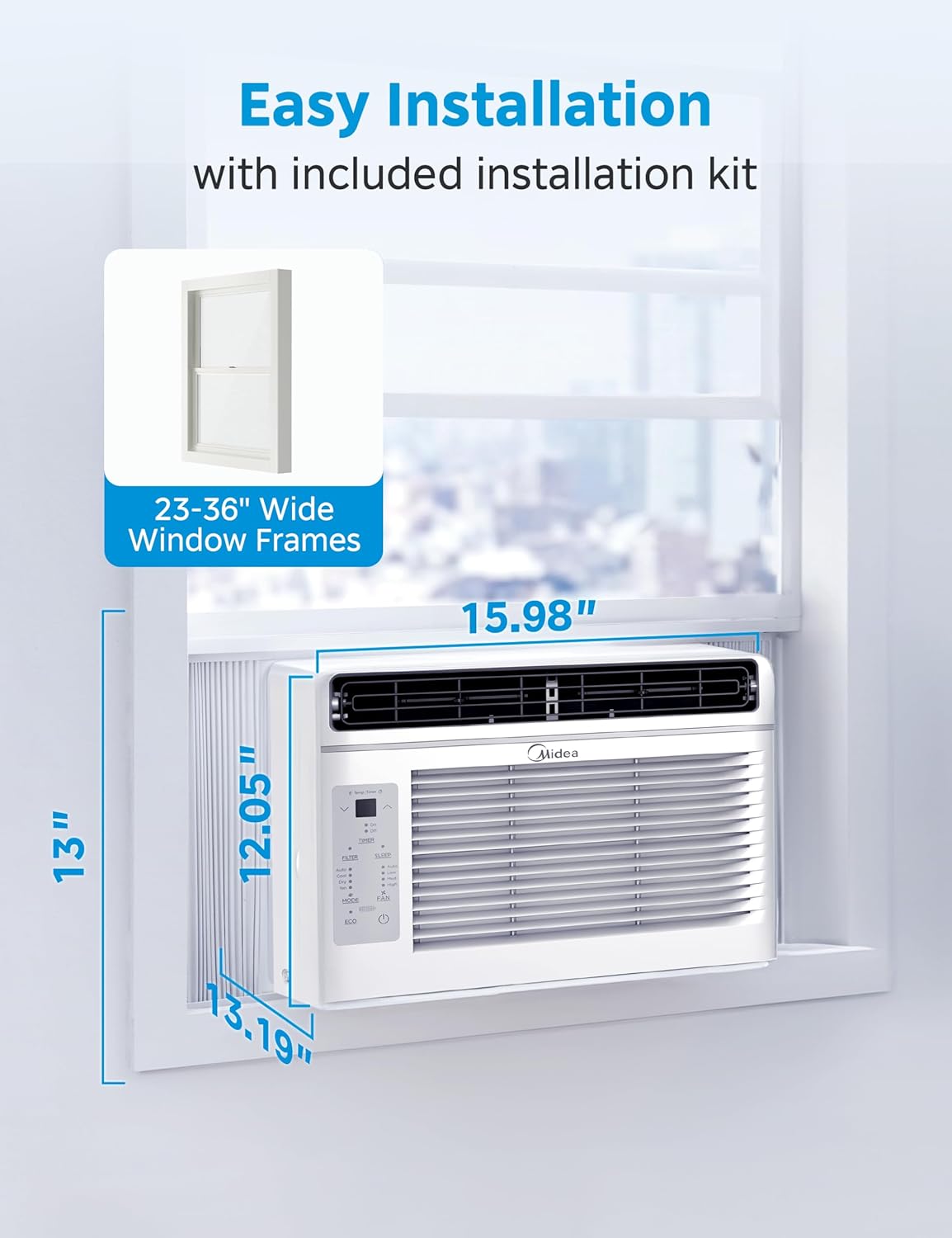
3.2. irudia: Diagram illustrating the air conditioner's dimensions (13.19"D x 15.98"W x 12.05"H) and indicating compatibility with window frames 23-36 inches wide.
The unit is designed for installation in standard double-hung windows with openings between 23 and 36 inches wide. Refer to Image 3.2 for detailed dimensions. Ensure your window can accommodate these measurements and support the unit's weight (approximately 35.5 pounds).
Urratsez urratseko instalazioa
- Prestatu leihoa: Clean the window sill and frame. For some window frames, pilot holes are recommended before installing screws.
- Alboko panelak erantsi: Slide the accordion side panels into the side channels of the air conditioner.
- Secure Top Rail: Attach the top rail to the top of the unit using the provided screws.
- Jarri unitatea leihoan: Carefully lift the unit and place it in the window opening, ensuring the bottom rail rests on the window sill.
- Alboko panelak luzatu: Extend the side panels to fill the window opening and secure them to the window frame with screws.
- Zigilu hutsuneak: Apply the window sash seal foam to seal any gaps between the window sashes and the unit to prevent air leakage.
- Proba funtzionamendua: Plug in the unit and test its basic functions to ensure proper installation.
4. Funtzionamendu-argibideak
Your Midea EasyCool Window Air Conditioner offers multiple modes and settings for optimal comfort. The unit can cool, dehumidify, and circulate air.

4.1. irudia: Visual representation of the three primary functions: cooling with snowflake icon, fan operation with fan icon, and dehumidification with water droplet icon, demonstrating the unit's versatility.
Kontrol-panela eta urrutiko agintearen funtzioak

4.2. irudia: A detailed diagram highlighting the electronic control panel buttons and their functions, including temperature increase/decrease, timer, filter reset, sleep mode, mode selection, fan speed adjustment, ECO mode, and power ON/OFF. It also shows the reusable filter being removed.
Refer to Image 4.2 for a detailed understanding of the electronic control panel and its functions. All these functions can also be accessed via the remote control.
Funtzionamendu moduak
- Cool modua: Provides cooling to the room. Adjust the temperature using the up/down arrows.
- Fan modua: Circulates air without cooling. Select from Low, Med, or High fan speeds.
- Modu lehorra (hezegailu): Reduces humidity in the room. The fan speed is automatically controlled in this mode.
- Modu automatikoa: The unit automatically selects the operating mode (Cool or Fan) and fan speed based on the set temperature and current room temperature.
Ezaugarri bereziak
- EcoSave modua: Energia-kontsumoa optimizatzen du konpresorea eta haizagailua ziklatuz ezarritako tenperatura eraginkortasunez mantentzeko.
- Lo egiteko modua: Gradually increases the set temperature over several hours to provide comfortable sleeping conditions while saving energy.
- ErrazTenporizadorea: Allows you to program the unit to turn on or off at a specific time within a 24-hour period.
- Berrabiarazte automatikoa: Potentzia bat gertatuz gerotage, the unit will automatically restart with the last used settings once power is restored.
5. Mantentzea
Regular maintenance ensures optimal performance and longevity of your air conditioner. The primary maintenance task is cleaning the air filter.
Cleaning the Reusable Air Filter
The air filter should be cleaned regularly, typically every two weeks, or when the 'Clean Filter' warning indicator illuminates on the control panel.
- Kendu iragazkia: Gently pull the front panel open and slide out the air filter. Refer to Image 4.2 for visual guidance on filter removal.
- Garbitu iragazkia: Wash the filter with warm, soapy water. Rinse thoroughly. For heavy dust accumulation, a vacuum cleaner can be used before washing.
- Lehortu iragazkia: Allow the filter to air dry completely before reinserting it. Do not expose it to direct sunlight or high heat.
- Berriro instalatu iragazkia: Irristatu iragazki lehorra berriro bere zirrikituan eta itxi aurrealdeko panela.
- Berrezarri iragazkien adierazlea: Press the 'FILTER' button on the control panel to reset the filter cleaning reminder.
Garbiketa orokorra
- Garbitu unitatearen kanpoaldea leun batekin, damp oihal. Ez erabili garbitzaile gogorrik edo urratzailerik.
- Ensure the air intake and exhaust vents are free from obstructions.
6. Arazoak
This section addresses common issues you might encounter with your air conditioner. If the problem persists after attempting these solutions, please contact customer support.
| Arazoa | Kausa posiblea | Irtenbidea |
|---|---|---|
| Unitatea ez da pizten | Argindarrik ez; etengailu magnetotermikoa jauzi egin du; kable elektrikoa hondatuta. | Egiaztatu konexioa; berrezarri etengailua; egiaztatu kablea kaltetuta dagoen. |
| Hozte nahikoa | Dirty air filter; blocked air vents; room too large; temperature setting too high. | Clean air filter; clear obstructions; ensure unit is appropriate for room size; lower temperature setting. |
| Gehiegizko zarata | Loose installation; foreign object in fan; unit not level. | Re-secure unit; check for obstructions; ensure unit is level. |
| Kanpoan tantaka ura | Funtzionamendu normala (kondentsazioa). | This is normal during cooling operation. Ensure proper drainage. |
| Urruneko kontrola ez dabil | Pila agortuak; urrutiko agintearen eta unitatearen arteko oztopoa. | Ordeztu bateriak; kendu oztopoak; ziurtatu urrutiko agintea unitatera zuzenduta dagoela. |
7. Zehaztapenak
Technical specifications for the Midea 5,000 BTU EasyCool Window Air Conditioner, Model MAW05R1JWT-B.
| Ezaugarri | Zehaztapena |
|---|---|
| Modelo zenbakia | MAW05R1JWT-B |
| Hozte Potentzia | 5,000 BTU |
| Estaldura Eremua | Gehienez 150 sq. |
| Produktuaren neurriak (L x W x H) | 13.19" x 15.98" x 12.05" |
| Elementuaren pisua | 35.5 kilo |
| liburukiatage | 115 Volt |
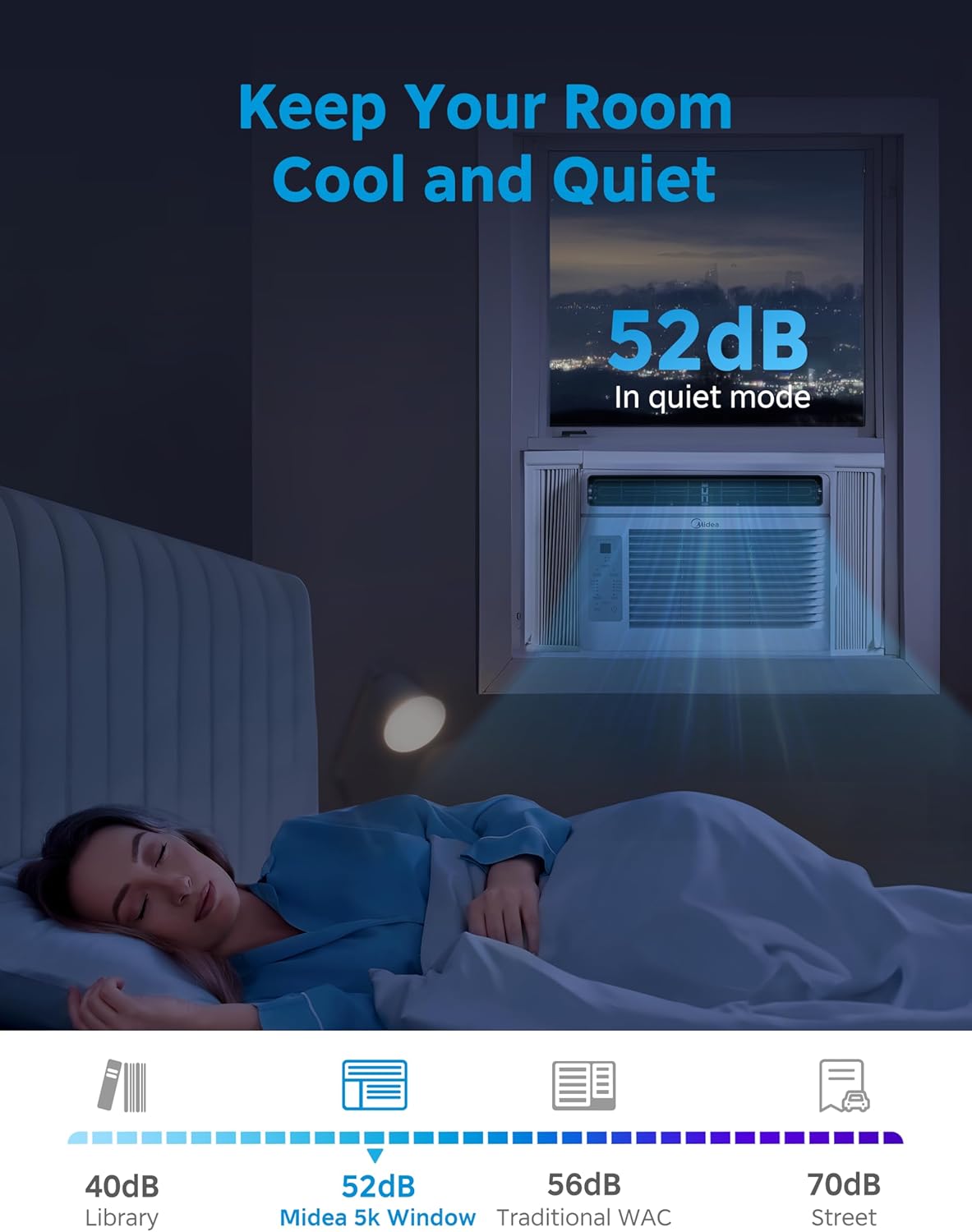
| Noise Level (Low Mode) | 52 dezibelio |
| Forma-faktorea | Leihoa |
| Ezaugarri bereziak | Dehumidifier, Dust Filter, Eco Mode, Fast Cooling, Remote Controlled |
| Dakarten osagaiak | Leiho euskarria |
| Beharrezko bateriak | Bai (urrutiko aginterako) |
8. Bermearen informazioa
This Midea product is backed by a Urtebeteko berme mugatua from the original purchase date. This warranty covers parts and labor for defects in materials or workmanship under normal use.
For specific warranty terms and conditions, please refer to the warranty card included with your product or contact Midea customer support.
9. Bezeroarentzako arreta
For technical assistance, troubleshooting beyond this manual, or warranty claims, please contact Midea customer support.
You can find more information and support resources by visiting the official Midea store:


