Sarrera
This manual provides detailed instructions for the installation, operation, and maintenance of your Alpine ILX-W670-S 7-inch Double-DIN Digital Multimedia Receiver with Backup Bullet Camera. Please read this manual thoroughly before using the product to ensure proper operation and to prevent damage.
Segurtasun Informazioa
Always observe the following safety precautions to prevent injury or damage to the unit and vehicle:
- Ez erabili unitatea gidatzeari arreta galarazten dizun moduan. Eman beti lehentasuna errepideko segurtasunari.
- Ensure all wiring is correctly connected to prevent short circuits or electrical hazards. Incorrect wiring can cause fire or damage.
- Instalaziorako, kontsultatu profesional bati urratsen bat zalantzan bazaude.
- Mantendu bolumena kanpoko soinuak entzuteko aukera ematen duen mailan, hala nola larrialdi-ibilgailuenak.
- Do not disassemble or modify the unit. This may cause damage and void the warranty.
Paketearen edukia
Egiaztatu elementu guztiak paketean daudela:
- Alpine ILX-W670-S Digital Multimedia Receiver
- BULCAMC-1 Backup Bullet Camera
- Kableatu-arnesak eta konektoreak
- Muntatzeko Hardwarea
- Erabiltzailearen eskuliburua (dokumentu hau)

1. irudia: Alpine ILX-W670-S Digital Multimedia Receiver with included Backup Bullet Camera. The image displays the 7-inch touchscreen receiver unit, the compact bullet-style backup camera, and a small key fob accessory.
Konfigurazioa
Hargailuaren instalazioa
The ILX-W670-S is designed for standard double-DIN vehicle openings. Its shallow-mount chassis is beneficial for vehicles with limited dash space. Professional installation is recommended for optimal performance and safety.
- Prestaketa: Deskonektatu ibilgailuaren bateriaren terminal negatiboa edozein lan elektriko hasi aurretik.
- Muntaketa: Secure the receiver into the double-DIN opening using the provided mounting hardware. Ensure it is firmly seated.
- Kableatu konexioak:
- Connect the main power harness (constant 12V, accessory 12V, ground).
- Connect speaker wires to the vehicle's speaker system.
- Connect the backup camera input cable.
- Connect the USB and AUX input cables as needed.
- For steering wheel control integration, connect the SWC adapter via the 3.5mm mini jack.
- Kanpokoa erabiliz gero amplifiers, connect the 4V pre-outs (front, rear, subwoofer).
- Probak: Reconnect the battery and perform a basic function test before fully reassembling the dashboard.
Backup Kameraren Instalazioa
The BULCAMC-1 bullet camera provides a wide-angle view for enhanced safety when reversing.

2. irudia: Gertutik view of the BULCAMC-1 Backup Bullet Camera. This image highlights the compact design and mounting bracket of the camera, which is designed for discreet installation.
- Muntatzeko kokapena: Choose a central location at the rear of the vehicle, typically near the license plate, that offers a clear, unobstructed view.
- Muntaketa segurua: Drill necessary holes (if required) and securely mount the camera using the provided hardware. Ensure the camera is aimed correctly.
- Kableatua:
- Connect the camera's power wire to the vehicle's reverse light circuit (12V) so it activates when the vehicle is in reverse.
- Run the video signal cable from the camera to the camera input on the ILX-W670-S receiver.
- Iragazgaitza: Ensure all connections are properly sealed, as the camera is IP67-68 waterproof rated.
Funtzionamendu-argibideak
Piztu/Itzali
The unit will power on automatically when the vehicle's ignition is turned to the accessory or on position. To turn off the unit, turn off the vehicle's ignition.
Ukipen-pantailaren interfazea
The ILX-W670-S features a responsive 6.75-inch touchscreen display with 800 x 480 resolution. The home screen is customizable, allowing you to arrange icons and even upload your own background image. The key illumination can be set to one of five colors (red, green, blue, amber, white).
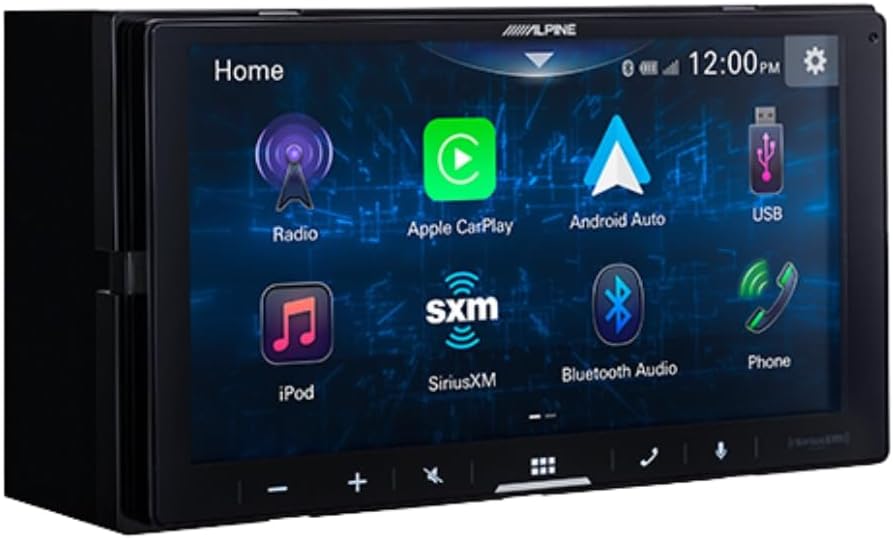
3. irudia: Alpine ILX-W670-S home screen displaying various application icons. This image shows the customizable interface with options for Radio, Apple CarPlay, Android Auto, USB, iPod, SiriusXM, Bluetooth Audio, and Phone.
Audio Ezaugarriak
- Equalizer: Utilize the 13-band graphic EQ to fine-tune audio frequencies to your preference.
- Denboraren zuzenketa: The 6-channel time correction feature allows for precise adjustment of sound delivery to each speaker, optimizing the sound stage.
- Gurutzaketak: Adjust front, rear, and subwoofer crossovers to manage frequency distribution to your speakers.
- Sound Boost Menu: Access dedicated controls for bass, mid-bass, and subwoofer output.
- Onartutako audio formatuak: The unit supports AAC, FLAC, MP3, and WMA audio playback.
Konektibitatea
- Apple CarPlay eta Android Auto: Connect your compatible smartphone via USB for wired access to navigation, music, messaging, and other apps directly on the receiver's screen.

4. irudia: Alpine ILX-W670-S display showing the Apple CarPlay interface. This image illustrates the integration of smartphone applications like Phone, Music, Maps, Messages, and Podcasts onto the receiver's screen.
- Bluetootha: Pair your smartphone for hands-free calling and wireless audio streaming.
- SiriusXM-Ready: The unit is compatible with SiriusXM satellite radio (requires a separate SiriusXM Connect Vehicle Tuner and subscription).
- AUX sarrera: Connect external audio devices using the 3.5mm auxiliary input.
- USB Sarrera: Use the USB port for media playback or smartphone connectivity.
- Bolantearen Kontrola (SWC): Integrate with your vehicle's factory steering wheel controls using a compatible adapter connected to the 3.5mm mini jack.
Bideo erreprodukzioa
The receiver supports various video formats including MP4, MKV, MOV, H.264, FLV, MPEG-4, and AVC. Video playback is typically restricted while the vehicle is in motion for safety reasons.
Atzeko kameraren funtzionamendua
When the vehicle is shifted into reverse, the display will automatically switch to the camera view, providing a 155-degree wide-angle perspective. The camera has a low light sensitivity of 0.5 lux, ensuring visibility in various lighting conditions.
Mantentzea
- Pantaila garbitzea: Erabili zapi leun eta lihorik gabeko bat ukipen-pantaila astiro-astiro garbitzeko. Orban egoskorrak izanez gero, garbitu apur batampGarbitu zapi bat urarekin edo pantaila-garbitzaile batekin. Saihestu material urratzaileak edo produktu kimiko gogorrak.
- Arreta orokorra: Keep the unit free from dust and debris. Ensure all connections remain secure.
- Kameraren garbiketa: Periodically clean the camera lens with a soft cloth to ensure a clear view.
Arazoak konpontzea
| Arazoa | Kausa posiblea | Irtenbidea |
|---|---|---|
| Unitateari ez dago energiarik | Fusible erreta; kableatu okerra; energia-konexio soltea. | Check vehicle fuses and the unit's fuse. Verify power and ground connections. Ensure the ignition is on. |
| Ez dago soinu irteerarik | Volume too low; mute activated; speaker wires disconnected; incorrect audio source selected. | Increase volume. Check if mute is active. Verify speaker wiring. Select the correct audio source. |
| Apple CarPlay/Android Auto not connecting | Faulty USB cable; phone not compatible; software issue; phone settings. | Use a high-quality, certified USB cable. Ensure your phone's OS is updated. Check phone settings for CarPlay/Android Auto permissions. Restart phone and receiver. |
| Atzeko kamera ez da bistaratzen | Camera power issue; video cable disconnected; vehicle not in reverse. | Ensure vehicle is in reverse. Check camera power connection (to reverse lights). Verify video cable connection to the receiver. |
| Ukipen-pantailak ez du erantzuten | Temporary software glitch; screen damage. | Restart the unit (turn vehicle off and on). If issue persists, contact support. |
Zehaztapenak
Alpine ILX-W670-S Digital Multimedia Receiver
- Pantaila: 6.75-inch capacitive touchscreen (800 x 480 resolution)
- Gako argiztapena: 5-color customizable (red, green, blue, amber, white)
- Ampbiziagoa: Built-in 16W RMS / 45W peak x 4 channels
- Audio prozesatzea: 13-band graphic EQ, 6-channel time correction, Sound Boost menu, Front/Rear/Subwoofer crossovers
- Aurre-irteerak: 3 pairs (Front, Rear, Subwoofer) at 4V
- Sarrerak: 1x AUX (3.5mm), 1x USB, 1x Camera, SWC adapter via 3.5mm mini jack
- Konektibitatea: Wired Apple CarPlay, Wired Android Auto, Bluetooth (hands-free calling & audio streaming), SiriusXM-ready
- Onartutako audio formatuak: AAC, FLAC, MP3, WMA
- Onartutako bideo formatuak: MP4, MKV, MOV, H.264, FLV, MPEG-4, AVC
- Neurriak: 8.75 x 6 x 7 hazbete (Produktua)
- Pisua: 3.4 kilo
BULCAMC-1 Backup Bullet Camera
- Sentsore: CMOS
- Ebazpena: 420 lerro
- Gutxieneko argiztapena: 0.5 lux
- View Angelua: 155 gradu
- Iragazgaitzaren balorazioa: IP67-68
- Funtzionamendu-tenperatura: -30 eta 70 ℃ artean (-22 eta 158 ℉ artean)
Bermearen informazioa
Alpine products are manufactured to high-quality standards. For specific warranty terms and conditions, please refer to the warranty card included with your product or visit the official Alpine webgunea. Gorde erosketaren egiaztagiria bermearen erreklamazioetarako.
Laguntza
For further assistance, technical support, or to download the latest firmware updates, please visit the official Alpine webgunean www.alpine-usa.com. You may also contact Alpine customer service directly for personalized support.


