1. Sarrera
This manual provides essential information for the assembly, operation, maintenance, and troubleshooting of your Jocoevol Farmhouse L Shaped Executive Desk, Model B11861. Please read these instructions carefully before assembly and use to ensure proper function and longevity of your product. Keep this manual for future reference.
2. Produktua amaitu daview
The Jocoevol Farmhouse L Shaped Executive Desk is designed to provide a spacious and organized workspace. It features a robust construction with a farmhouse aesthetic, multiple storage options, and an integrated charging station for convenience.

Ezaugarri nagusiak:
- L formako diseinua: Offers an expansive work surface for multi-monitor setups and various tasks.
- Kargatzeko estazio integratua: Equipped with USB ports, Type-C ports, and AC outlets for convenient device charging.
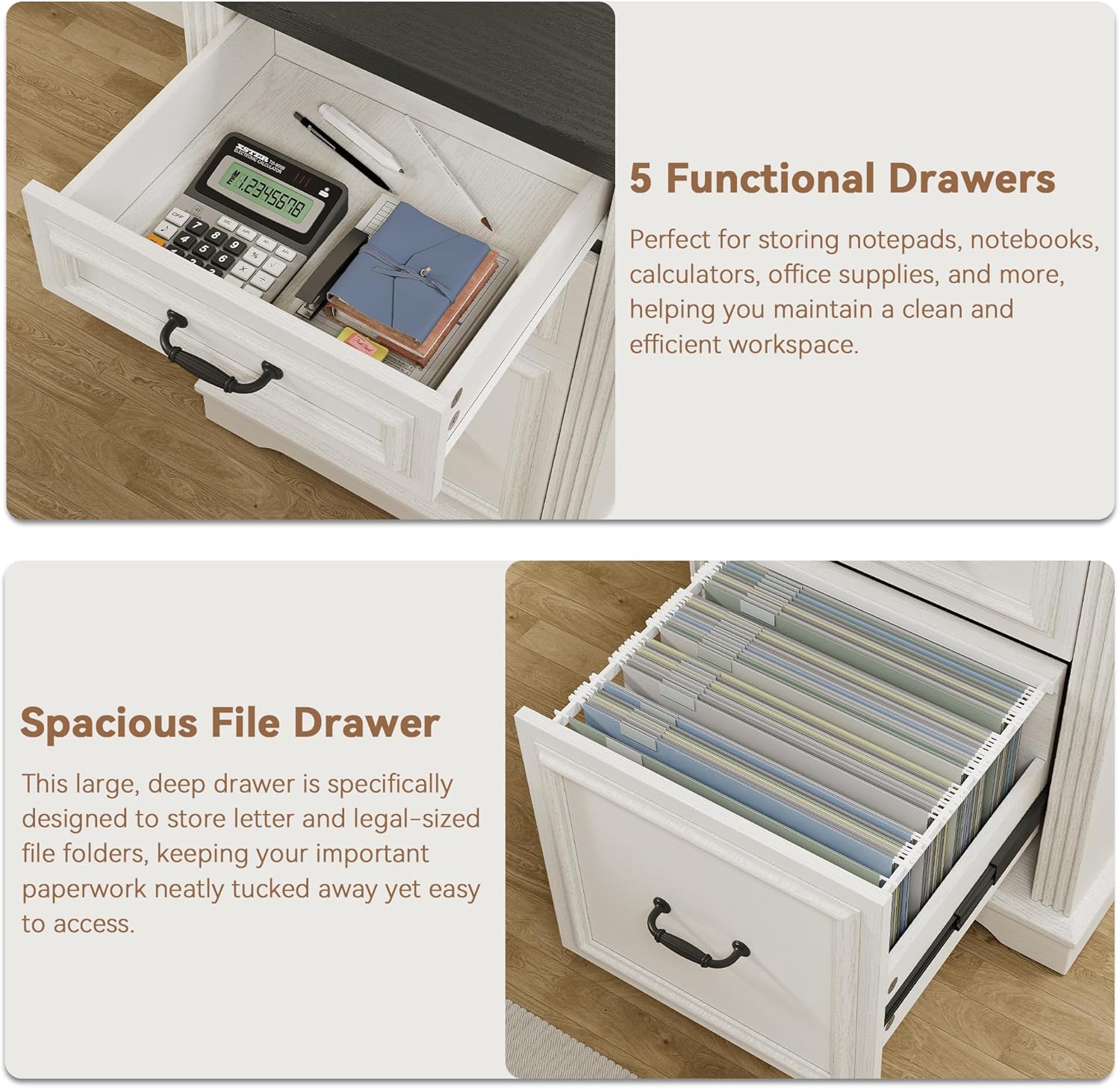
- AmpBiltegiratzea: Includes multiple drawers, a file cabinet for letter/legal documents, and a hidden under-desk storage shelf.
- Eraikuntza iraunkorra: Features a thickened solid wood base and desktop for stability and longevity.
- Baserri estetika: Classic beadboard detailing and vintage-style pulls contribute to a warm and inviting appearance.
3. Zehaztapenak
| Ezaugarri | Xehetasuna |
|---|---|
| Marka | Jokoebol |
| Modelo zenbakia | B11861 |
| Produktuaren neurriak (L x W x H) | 21" L x 59" W x 30" H |
| Kolorea | Antzinako Zuria |
| Estiloa | Baserria |
| Oinarrizko materiala | Ingeniaritza Egurra |
| Goiko material mota | Ingeniaritza Egurra |
| Akabera mota | Amaitu gabe |
| Elementuaren pisua | 137 kilo |
| Beharrezko muntaia | Bai |
| Ezaugarri bereziak | 4 drawers, Built-In USB Outlet, Executive L Shaped Desk with Drawers, File Storage Drawer, Large Desktop |

4. Segurtasun informazioa
Please adhere to the following safety guidelines during assembly and use:
- Irakurri argibide guztiak muntatzen hasi aurretik.
- Ziurtatu pieza guztiak daudela eta kalterik gabe muntatu aurretik. Ez erabili piezaren bat falta bada edo hautsita badago.
- Assemble the desk on a soft, clean surface (e.g., carpet) to prevent scratches.
- Ez estutu torlojuak gehiegi, materiala kaltetu baitezake.
- Mantendu pieza txikiak haurrengandik urrun muntatzean.
- Ez jarri zutik edo eseri mahaian.
- Distribute weight evenly on the desktop and shelves to prevent tipping.
- Ensure the charging station is properly connected to a grounded outlet and avoid liquid spills near electrical components.
5. Paketearen edukia
Verify that all components are included in your package. While specific part lists vary, a typical package for this desk includes:
- Desktop panels (L-shaped sections)
- Side cabinets with drawers and doors
- Support panels and legs
- Tiraderen irristailuak eta hardwarea
- Kargatzeko estazio unitatea
- Muntaketa-osagarriak (torlojuak, espiga, kama-blokeoak, etab.)
- Entzungailuen kakoa
- Muntatzeko argibideen eskuliburua
6. Muntatzeko jarraibideak
Assembly of the Jocoevol Farmhouse L Shaped Executive Desk requires careful attention to detail. It is recommended to have two people for assembly. Please refer to the separate, detailed assembly guide included in your package for step-by-step visual instructions. The general process involves:
- Deskonprimitu eta identifikatu: Carefully unpack all components and hardware. Lay them out and identify each part using the provided parts list.
- Oinarrizko unitateak muntatu: Construct the two main cabinet base units, including drawer frames and cabinet structures.
- Tiraderak eta ateak instalatzea: Attach drawer slides, assemble drawers, and install them into the cabinet units. Mount cabinet doors.
- Connect Desktop Sections: Secure the L-shaped desktop panels to the assembled base units and central support.
- Kargatzeko estazioa instalatu: Integrate the charging station into the designated desktop cutout and connect necessary wiring.
- Azken ukituak: Attach any remaining accessories like the headphone hook and ensure all connections are secure.


7. Funtzionamendu-argibideak
7.1 Kargatzeko estazioaren erabilera
The integrated charging station provides convenient power access for your electronic devices. To use:
- Ensure the desk's power cord is securely plugged into a functional, grounded wall outlet.
- Connect your devices to the available USB ports, Type-C ports, or AC outlets.
- Use the cable organizer to manage cords and reduce clutter.

7.2 Utilizing Storage Drawers and Cabinets
The desk offers various storage solutions to keep your workspace organized:
- Functional Drawers: Use the smaller drawers for office supplies such as pens, notebooks, and calculators.
- Zabala File Tiradera: The bottom drawer is designed to accommodate letter and legal-sized hanging file folders for important documents.
- Hidden Under-Desk Storage Shelf: This shelf provides discreet storage for items you want to keep within reach but out of sight.
- Large Storage Cabinet: The cabinet offers adjustable shelving for bulkier items or binders.

8. Mantentzea
Proper care will help maintain the appearance and functionality of your desk:
- Garbiketa: Garbitu mahaiaren gainazalak iragarkiekinamp oihal. Saihestu akabera kaltetu dezaketen produktu kimiko gogorrak edo garbitzaile urratzaileak.
- Isurketak: Garbitu isuriak berehala egurra zikindu edo kaltetu ez dadin.
- Beroa eta hezetasuna: Avoid placing hot items directly on the desktop. Use coasters for drinks to prevent water rings.
- Hardwarearen egiaztapena: Aldian-aldian egiaztatu eta estutu torloju eta lotura guztiak egonkortasuna bermatzeko.
- Eguzkiaren argiaren esposizioa: Saihestu eguzki-argiaren eraginpean denbora luzez, akabera koloreztatzea edo deskoloratzea saihesteko.
9. Arazoak
Zure mahaiarekin arazoak badituzu, jo ezazu honako arazo eta irtenbide ohikoenei:
| Arazoa | Kausa posiblea | Irtenbidea |
|---|---|---|
| Mahaia dardarka dago. | Lotura solteak; zorua irregularra | Tighten all assembly screws. Ensure the desk is on a level surface; use shims if necessary. |
| Tiraderak ez dira leunki irristatzen | Improperly installed slides; obstruction | Check that drawer slides are correctly aligned and installed. Remove any obstructions. |
| Kargatzeko geltokia ez dabil | Power cord not plugged in; faulty outlet; device issue | Ensure the desk's power cord is fully plugged into a working wall outlet. Test the outlet with another device. Check device's charging cable. |
| Iritsieran falta diren edo hondatutako piezak | Bidalketa-kalteak; ontziratze-errorea | Do not proceed with assembly. Contact Jocoevol customer support immediately for replacement parts. |
10. Bermea eta Laguntza
For information regarding product warranty, please refer to the warranty card included with your purchase or visit the official Jocoevol website. If you require assistance with assembly, have questions about product functionality, or need to report missing/damaged parts, please contact Jocoevol customer support. Contact details can typically be found on the product packaging or the brand's official webgunea.


