1. Sarrera
Welcome to the user manual for the MARSTEK 63A 110V Automatic/Manual Transfer Switch. This device is engineered to provide seamless power management by automatically or manually switching between primary (L1) and backup (L2) power sources. It features an LED display for real-time monitoring and incorporates comprehensive protection features to ensure the safety and reliability of your electrical system.
This manual provides essential information for the safe and efficient installation, operation, and maintenance of your transfer switch. Please read it thoroughly before installation and use.
2. Segurtasun informazio garrantzitsua
Always follow basic safety precautions when installing, operating, and maintaining this product to reduce the risk of fire, electric shock, and injury to persons.
- Instalazioa elektrizista kualifikatu batek egin behar du, tokiko eta estatuko arau elektriko guztien arabera.
- Disconnect all power sources before performing any installation, wiring, or maintenance.
- Ez erabili etengailua hondatuta dagoela dirudienean.
- Ziurtatu lurra egokia deskarga elektrikoa saihesteko.
- This device is designed for indoor use in a dry environment.
- Mantendu haurrak tresna elektrikoetatik urrun.
3. Paketearen edukia
- 1 x MARSTEK 63A 110V Automatic/Manual Transfer Switch
- 1 x DIN Rail
- 1 x Erabiltzailearen eskuliburua (dokumentu hau)
4. Produktua amaitu daview
The MARSTEK 63A 110V Automatic/Manual Transfer Switch is a compact device designed for reliable power source switching. It features an LED display for real-time voltage and operational status, and offers both automatic and manual control options.
Ezaugarri nagusiak
- Automatic or Manual Switching: Seamless transfer between primary (L1) and backup (L2) power sources.
- Babes integrala: Overboltage, azpiantage, eta gainkorrontearen babesa.
- Denbora errealeko jarraipena: High-definition LED display shows voltage eta egoera.
- Instalazio erraza: DIN rail mountable design.
- Aplikazio zabala: Suitable for commercial, industrial, and residential backup power systems.
Produktuen Diagrama

This image displays the main unit of the transfer switch, highlighting its compact design and the integrated LED display. The DIN rail is also shown, indicating its mounting method.
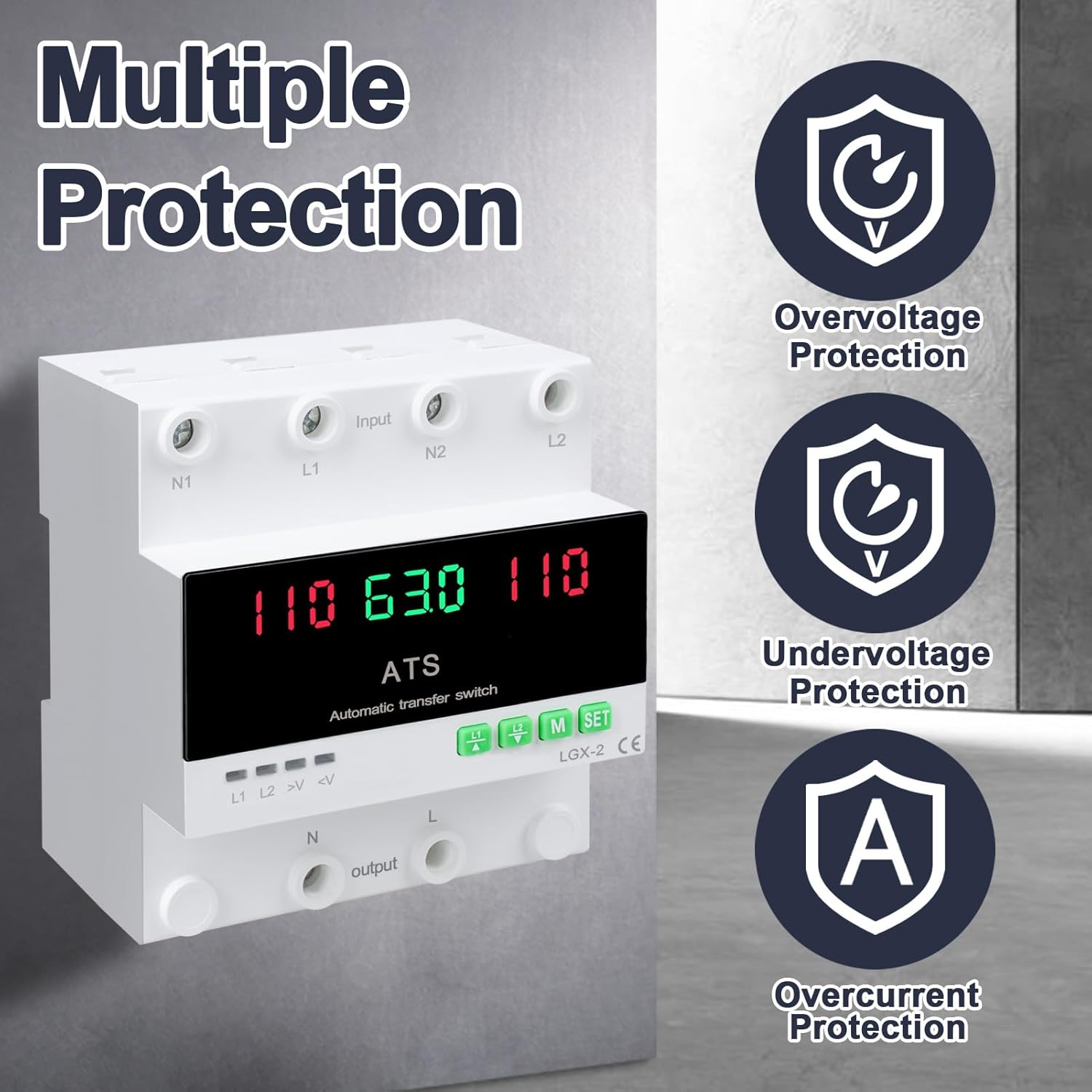
This image illustrates the built-in safety mechanisms of the transfer switch, emphasizing its capability to protect connected devices from electrical instability through overvoltage, azpiantage, and overcurrent safeguards.
5. Zehaztapenak
| Parametroa | Balioa |
|---|---|
| Eredua | Dual Power 63A |
| Egungo balorazioa | 63 Amps |
| Bolumen eragileatage | 120 Volt |
| Eragiketa modua | ON-AUTO-MANUAL |
| Produktuaren neurriak (L x W x H) | 4.3 x 3.5 x 3.3 hazbete |
| Pisua | 13.12 ontza |
| Kontaktu mota | Normalean Itxita |
| Konektore mota | Entxufatu |
| Terminala | Torlojua |
| Zirkuitu Mota | norabide bakarrekoa |
| Harremanetarako materiala | Kobrea |
| Maiztasun baloratua | 50/60Hz |
| Overboltage Babes-atalasea | AC140V |
| Azpikontrolatage Babes-atalasea | AC90V |
6. Konfigurazioa eta instalazioa
Proper installation is crucial for the safe and reliable operation of the transfer switch. This device is designed for DIN rail mounting.
Instalatu aurretik
- Ensure all power sources are disconnected at the main breaker before beginning installation.
- Egiaztatu voltage and current ratings of the transfer switch match your electrical system requirements.
- Prepare the installation location, ensuring it is dry, well-ventilated, and easily accessible.
Kableatu-diagrama

This diagram illustrates the correct wiring connections for the transfer switch. It shows the input terminals for primary power (N1, L1) and backup power (N2, L2), and the output terminals (N, L) to the load. The diagram also labels the LED indicators for L1 output, L2 output, overvoltage, eta undervoltage, as well as the menu/reset and manual ON/OFF buttons.
Instalazio urratsak
- Mount the DIN rail securely in your electrical panel or enclosure.
- Attach the transfer switch onto the DIN rail.
- Connect the primary power source (N1, L1) to the designated input terminals.
- Connect the backup power source (N2, L2) to the designated input terminals.
- Connect the load (N, L) to the output terminals.
- Egiaztatu birritan konexio guztiak estutasuna eta zuzentasuna.
- Once all wiring is complete and verified, restore power to the system.
7. Funtzionamendua
The MARSTEK transfer switch offers both automatic and manual operation modes.
Modu automatikoa

In automatic mode, the switch prioritizes the primary power source (L1). If L1 fails or experiences voltage fluctuations (undervoltage edo overvoltage), the switch will automatically transfer the load to the backup power source (L2). When L1 is restored and stable, the switch will automatically transfer the load back to L1.
Eskuzko modua

The transfer switch can be manually operated using the buttons on the front panel.
- To close L1: Press the button labeled "L1" (often indicated by an up arrow or similar icon). Press again to open L1.
- To close L2: Press the button labeled "L2" (often indicated by a down arrow or similar icon). Press again to open L2.
In manual mode, the automatic transfer function is overridden. Ensure you understand the implications of manual switching before use.
LED Display and Indicators
The LED display provides real-time information about the system status.
- The main display shows voltage readings for the active power source.
- L1: Indicates L1 output is active.
- L2: Indicates L2 output is active.
- >V: Overboltage argi adierazlea.
- <V: Azpikontrolatage argi adierazlea.
- M: Menu selection/Reset button.
- SET: Manual ON/OFF button.
8. Mantentzea
The MARSTEK transfer switch requires minimal maintenance.
- Periodically inspect the wiring connections to ensure they are secure and free from corrosion.
- Keep the device clean and free from dust and debris. Use a dry, soft cloth for cleaning.
- Ez erabili garbitzaile edo disolbatzaile urratzailerik.
- Ziurtatu unitatearen inguruan aireztapen egokia dagoela gehiegi berotzea saihesteko.
Warning: Always disconnect all power sources before performing any maintenance.
9. Arazoak
Atal honek aurki ditzakezun arazo ohikoenei irtenbideak eskaintzen ditu.
| Arazoa | Kausa posiblea | Irtenbidea |
|---|---|---|
| Gailua ez da pizten. | No input power; incorrect wiring; internal fault. | Check main breakers and power sources. Verify all wiring connections. If the problem persists, contact support. |
| No automatic transfer. | Device in manual mode; power source within acceptable limits; fault in L1 or L2 detection. | Ensure the device is set to automatic mode. Check voltage levels of both L1 and L2. Contact support if automatic transfer fails despite correct settings. |
| Overboltage (>V) or Undervoltage (<V) indicator lit. | Sarrerako bolumenatage outside specified range. | Egiaztatu liburukiatage of the active power source. The device will automatically switch if the voltage is outside the set parameters (AC140V overvoltage, AC90V undervoltage). Address the power source issue. |
| Overcurrent protection triggered. | Load exceeds the 63A current rating. | Reduce the connected load. Ensure total current draw does not exceed 63 Amps. |
10. Bermea eta Laguntza
For warranty information and technical support, please refer to the MARSTEK official webwebgunearekin edo jarri harremanetan zure saltzailearekin. Gorde erosketa-agiria erosketaren frogagiri gisa.
Manufacturer: JUXIANG
Marka: MARSTEK


