1. Sarrera
Thank you for choosing the WOLFANG WDV01 Portable DVD Player. This manual provides essential information for setting up, operating, and maintaining your device. Please read it carefully before use to ensure optimal performance and longevity of your product.
The WOLFANG WDV01 is designed for portable entertainment, featuring a 9.5-inch unit with a 7.5-inch HD swivel screen, stereo speakers, and a long-lasting battery. It supports various disc and file formats, making it versatile for different media content.
2. Paketearen edukia
Egiaztatu elementu guztiak paketean daudela:
- WOLFANG WDV01 Portable DVD Player
- Urruneko Kontrola
- Erabiltzailearen eskuliburua
- AC kargagailua
- Kotxe kargagailua
- 3-en-1 AV kablea

Image: Contents of the WOLFANG WDV01 package, showing the DVD player, remote control, user manual, AC charger, car charger, and AV cable.
3. Produktua amaitu daview
3.1 Ezaugarri nagusiak
- Pantaila: 9.5-inch unit with 7.5-inch HD eye-protection screen.
- Pantailaren biraketa: 270° horizontal rotation and 180° vertical flip for flexible viewangeluak.
- Audioa: Bozgorailu estereo integratuak.
- Bateriaren iraupena: Up to 6 hours of playback on a full charge.
- Potentzia aukerak: AC power adapter and car charger included.
- Memoria Funtzioa: Breakpoint memory resumes playback from the last stopped point.
- Komunikabideen bateragarritasuna: Supports DVD, SVCD, VCD, CD-R/RW discs.
- File Formatu euskarria: JPEG, WMA, MPG, MP3, DIVX, VOB, AVI.
- Kanpoko konexioa: USB port, SD card slot (max 32GB), AV input, AV output, 3.5mm headphone jack.
3.2 Gailuaren diseinua
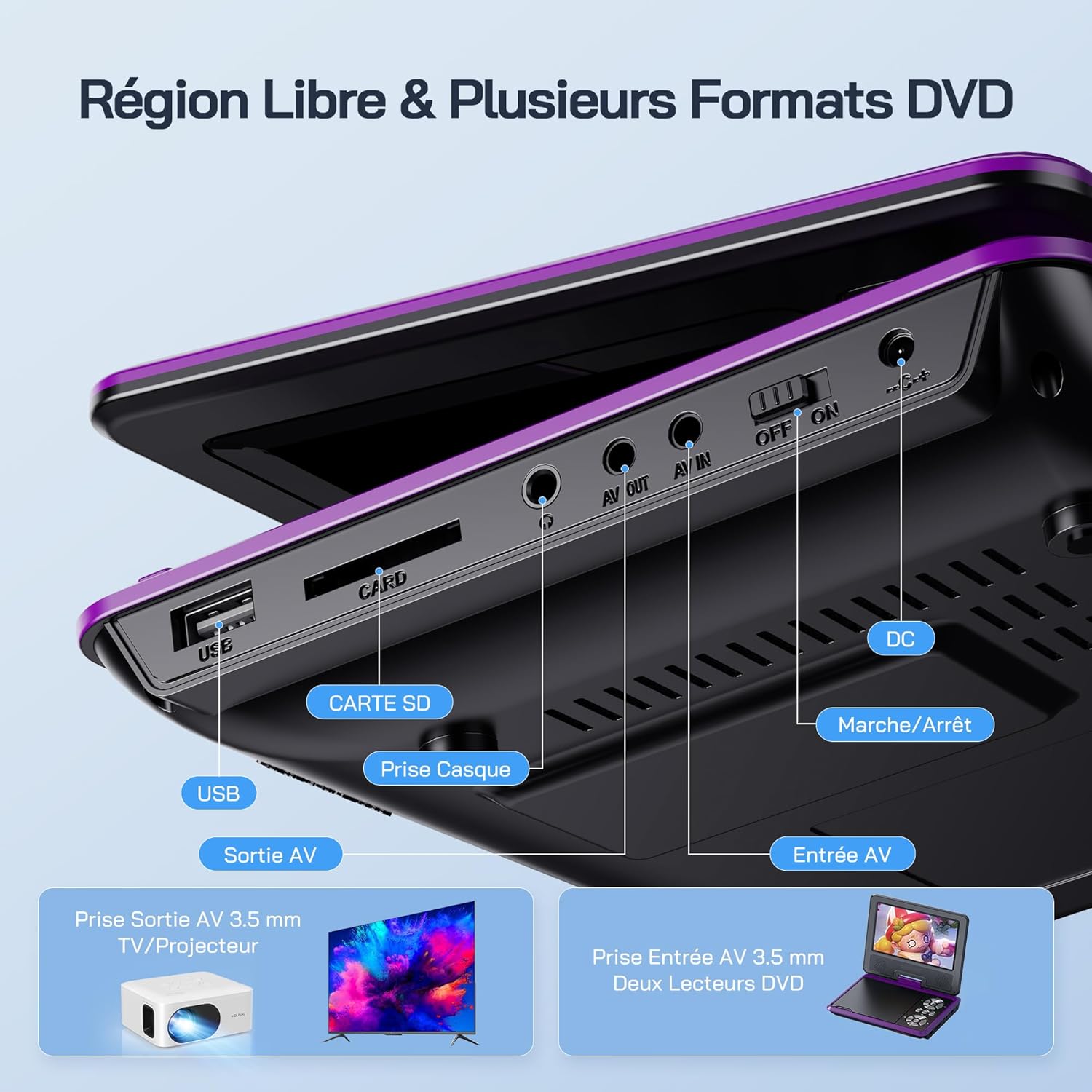
Irudia: Xehetasun handikoa view of the side panel of the WOLFANG WDV01, highlighting the USB port, SD card slot, headphone jack, AV OUT, AV IN, DC power input, and ON/OFF switch.
- USB ataka: USB flash unitateak konektatzeko.
- SD txartelaren zirrikitua: For inserting SD/MMC cards.
- Aurikularrak Jack: 3.5mm audio output for headphones.
- AV IRTEERA: Audio/Video output for connecting to a TV or projector.
- AV IN: Audio/Video input for connecting external devices or another DVD player.
- DC IN: Korronte-egokitzailerako edo autoko kargagailurako elikatze-sarrera.
- ON / OFF etengailua: Gailuaren potentzia kontrola.
4. Konfigurazioa
4.1 Hasierako karga
Before first use, fully charge the device. Connect the AC charger to the DC IN port on the player and plug it into a wall outlet. The charging indicator light will illuminate. Once fully charged, the light may change color or turn off, depending on the model.
4.2 Piztu/Itzaltzea
To power on the device, slide the ON/OFF switch to the "ON" position. To power off, slide it to the "OFF" position.
4.3 Pantailaren doikuntza
The screen can be rotated 270 degrees horizontally and flipped 180 degrees vertically. Adjust the screen to your preferred viewing angle. This feature is particularly useful for mounting in a car or for shared viewing.

Image: Illustration demonstrating the 270-degree rotation and 180-degree flip capabilities of the WOLFANG WDV01 screen.
5. Funtzionamendu-argibideak
5.1 Playing a DVD/CD
- Ireki diskoaren estalkia astiro-astiro.
- Place a compatible DVD or CD onto the spindle, label side up.
- Itxi diskoaren estalkia.
- The player will automatically detect and begin playback. If not, select "Disc" from the main menu.
Oharra: This device supports DVD, SVCD, VCD, CD-R/RW discs. It is not compatible with 1080p, 4K, or Blu-ray discs.
5.2 Playing from USB/SD Card
- Sartu USB flash unitate bat USB atakan edo SD txartel bat SD txartelaren zirrikituan.
- From the main menu, select "USB" or "SD" depending on your media source.
- Nabigatu karpetetan zehar eta files using the control buttons or remote control.
- Aukeratu nahi duzuna file (JPEG, WMA, MPG, MP3, DIVX, VOB, AVI) to begin playback.
Oharra: Maximum supported Micro SD card capacity is 32GB. Video files should have a resolution up to 720x480. Image files should have a resolution up to 2650x1440.
5.3 Breakpoint Memory Function
The player automatically remembers the last playback position. When you power on the device again or re-insert the same disc/media, it will prompt you to resume playback from where you left off. This function may need to be activated in the system settings.

Image: Visual representation of the breakpoint memory feature, illustrating how the player can pause and resume video playback from the exact point of interruption.
5.4 Connecting to an External Display (TV/Projector)
Use the provided 3-in-1 AV cable to connect the player to a TV or projector.
- Connect one end of the AV cable to the AV OUT port on the DVD player.
- Connect the other end of the AV cable to the corresponding AV input ports (Yellow for Video, Red for Right Audio, White for Left Audio) on your TV or projector.
- Select the correct AV input source on your TV or projector.
- Jokalariaren pantailaren edukia kanpoko pantailan bistaratuko da orain.

Image: A WOLFANG WDV01 Portable DVD Player connected to a large television screen, displaying content for a family watching together, demonstrating the TV sync feature.
5.5 Connecting to Another DVD Player (AV IN)
The AV IN port allows you to connect another compatible device, such as a second DVD player, to display its content on the WOLFANG WDV01 screen.
- Connect one end of an AV cable to the AV OUT port of the external device.
- Connect the other end of the AV cable to the AV IN port on the WOLFANG WDV01.
- Switch the WOLFANG WDV01 to AV input mode (refer to the on-screen menu or remote control for this option).
6. Mantentzea
6.1 Gailua garbitzea
- Garbitu aurretik, ziurtatu gailua itzalita eta deskonektatuta dagoela.
- Use a soft, dry cloth to wipe the exterior of the player.
- Pantailarentzat, erabili gailu elektronikoen pantailetarako bereziki diseinatutako zapi leun eta lint-gabea. Ez erabili garbitzaile edo disolbatzaile urratzailerik.
- To clean the disc lens, use a specialized DVD lens cleaning disc. Do not attempt to clean the lens manually.
6.2 Bateria zaintzea
- Saihestu gailua muturreko tenperaturetan (beroan edo hotzean) jartzea.
- If storing the device for an extended period, charge the battery to approximately 50% to prolong its lifespan.
- Ez saiatu barneko bateria zuk zeuk ordezkatzen. Jarri harremanetan bezeroarentzako arreta-zerbitzuarekin bateriarekin arazoak izanez gero.
6.3 Biltegiratzea
Store the player in a cool, dry place away from direct sunlight and moisture. Keep it in its original packaging or a protective case when not in use to prevent damage.
7. Arazoak
| Arazoa | Kausa posiblea | Irtenbidea |
|---|---|---|
| Botererik ez | Battery drained, power adapter not connected, power switch off. | Charge the battery, ensure power adapter is securely connected, slide power switch to ON. |
| Diskoa ez da erreproduzitzen | Incompatible disc format, disc dirty/scratched, disc inserted incorrectly. | Check disc compatibility (no Blu-ray/4K), clean disc, insert disc label side up. |
| Soinurik ez | Volume too low, headphones connected, audio settings incorrect. | Increase volume, disconnect headphones, check audio output settings. |
| Ez dago irudirik telebistan | AV cable loose, incorrect TV input selected. | Ensure AV cable is securely connected, select correct AV input on TV. |
| USB/SD txartela ez da ezagutzen | Incompatible format, card/drive damaged, incorrect file sistema. | Ensure media is formatted to FAT32, check for damage, try another USB/SD card. Max 32GB SD card. |
If the problem persists after trying these solutions, please contact WOLFANG customer support.
8. Zehaztapenak
| Ezaugarri | Xehetasuna |
|---|---|
| Marka | OTSOA |
| Eredua | WDV01 |
| Pantailaren tamaina | 7.5 hazbetekoa |
| Unitatearen Tamaina | 9.5 hazbete (diagonala) |
| Pantailaren bereizmena | Gehienez 800 x 480 pixel |
| Diskoen bateragarritasuna | DVD, SVCD, VCD, CD-R/RW |
| File Formatu euskarria | Video: AVI, MPG, MP3, DIVX, VOB; Audio: WMA, MP3; Image: JPEG |
| USB/SD txartelaren euskarria | Max 32GB (Micro SD) |
| Video Resolution (USB/SD) | Gehienez 720 x 480 pixel |
| Image Resolution (USB/SD) | Gehienez 2650 x 1440 pixel |
| Bateriaren iraupena | 4-6 ordu |
| Elementuaren pisua | 1100 gramo |
| UPC | 850067892205 |
9. Bermea eta Laguntza
9.1 Fabrikatzailearen bermea
The WOLFANG WDV01 Portable DVD Player comes with a 24 hilabeteko fabrikatzailearen bermea erosketa-datatik aurrera. Berme honek materialen eta fabrikazioaren akatsak estaltzen ditu erabilera normalaren pean. Ez ditu estaltzen erabilera okerrak, istripuek, baimenik gabeko aldaketek edo higadura normalak eragindako kalteak.
Mesedez, gorde zure erosketa-froga berme-erreklamazioetarako.
9.2 Bezeroarentzako laguntza
For any questions, technical assistance, or warranty claims, please contact WOLFANG customer support. Our team is available to assist you and aims to respond within 24 hours.
Contact information can typically be found on the official WOLFANG webgunea edo zure erosketa plataformaren bidez.


